
Salesforce LWC学习(三十二)实现上传 Excel解析其内容
本篇参考:salesforce lightning零基础学习(十七) 实现上传 Excel解析其内容
上一篇我们写了aura方式上传excel解析其内容。lwc作为salesforce的新宠儿,逐渐的在去aura化,这种功能怎么能lwc不搞一份,所以本篇来了,直接上代码。
excelImportForLwc.html
<template>

    <lightning-input type="file" label="上传" onchange={excelFileToJson} disabled={disableButton} accept="xlsx" multiple="false"></lightning-input>

    <lightning-button label="打印结果" onclick={printResult} disabled={disableButton}></lightning-button>

</template>
excelImportForLwc.js:因为 loadScript是一个 Promise操作,不是瞬间同步的操作,所以初始化先给按钮disable掉,加载完js资源以后启用。
import { LightningElement,track } from 'lwc';

import sheetJS from '@salesforce/resourceUrl/sheetJS';

import {loadScript } from 'lightning/platformResourceLoader';

import { ShowToastEvent } from 'lightning/platformShowToastEvent';

export default class ExcelImportForLwc extends LightningElement {

    @track dataList = [];

    @track disableButton = true;

    connectedCallback() {

        loadScript(this, sheetJS).then(() => {

             console.log('加载 sheet JS完成');

             this.disableButton = false;

        });

    }

    excelFileToJson(event) {

        event.preventDefault();

        let files = event.target.files;

        const analysisExcel = (file) =>

        new Promise((resolve, reject) => {

            const reader = new FileReader();

            reader.readAsBinaryString(file);

            reader.onload = () => resolve(reader.result);

            reader.onerror = (error) => reject(error);

        });

        analysisExcel(files[0])

        .then((result) => {

            let datas = []; // 存储获取到的数据

            let XLSX = window.XLSX;

            let workbook = XLSX.read(result, {

                type: 'binary'

            });

            for (let sheet in workbook.Sheets) {

                if (workbook.Sheets.hasOwnProperty(sheet)) {

                    datas = datas.concat(XLSX.utils.sheet_to_json(workbook.Sheets[sheet]));

                }

            }

            this.dataList = datas;

            const toastEvent = new ShowToastEvent({

                variant: "success",

                message: '文件已经上传解析成功',

            });

            this.dispatchEvent(toastEvent);

        });

    }

    printResult() {

        console.log(JSON.stringify(this.dataList));

    }

}
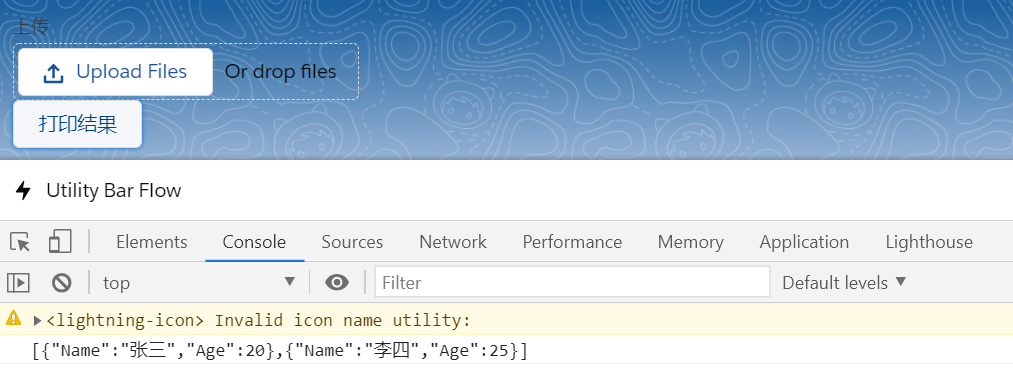
效果展示:
1. 上传按钮点击上传成功以后展示 toast

2. 点击打印结果按钮console出来excel内容
总结:lwc调用区别就是声明一个 Promise,在Promise里面通过 FileReader的onload去进行处理。处理方式和aura相同,只是部分写法区别。篇中仍然有很多没有优化,包括文件大小限制,error场景处理等等。感兴趣的自行完善。篇中有错误地方欢迎指出,有不懂欢迎留言。
Salesforce LWC学习(三十二)实现上传 Excel解析其内容的更多相关文章
- Salesforce LWC学习(三十九) lwc下quick action的recordId的问题和解决方案
本篇参考: https://developer.salesforce.com/docs/component-library/bundle/force:hasRecordId/documentation ...
- Salesforce LWC学习(三十) lwc superbadge项目实现
本篇参考:https://trailhead.salesforce.com/content/learn/superbadges/superbadge_lwc_specialist 我们做lwc的学习时 ...
- salesforce lightning零基础学习(十七) 实现上传 Excel解析其内容
本篇参考: https://developer.mozilla.org/zh-CN/docs/Web/API/FileReader https://github.com/SheetJS/sheetjs ...
- Salesforce LWC学习(三十四) 如何更改标准组件的相关属性信息
本篇参考: https://www.cnblogs.com/zero-zyq/p/14548676.html https://www.lightningdesignsystem.com/platfor ...
- Salesforce LWC学习(三十六) Quick Action 支持选择 LWC了
本篇参考: https://developer.salesforce.com/docs/component-library/documentation/en/lwc/lwc.use_quick_act ...
- Salesforce LWC学习(三十五) 使用 REST API实现不写Apex的批量创建/更新数据
本篇参考: https://developer.salesforce.com/docs/atlas.en-us.224.0.api_rest.meta/api_rest/resources_compo ...
- Salesforce LWC学习(三十八) lwc下如何更新超过1万的数据
背景: 今天项目组小伙伴问了一个问题,如果更新数据超过1万条的情况下,有什么好的方式来实现呢?我们都知道一个transaction只能做10000条DML数据操作,那客户的操作的数据就是超过10000 ...
- Salesforce LWC学习(四十) dynamic interaction 浅入浅出
本篇参考: Configure a Component for Dynamic Interactions in the Lightning App Builder - Salesforce Light ...
- springMVC3学习(十二)--文件上传优化CommonsMultipartResolver
基于上一篇文件上传发现效率很慢,我们应该对它进行优化 使用springMVC对文件上传的解析器 来处理文件上传的时候需要在spring的applicationContext里面加上springMVC ...
随机推荐
- 考研最路径dijkstra和floyd
先来讲个段子:为什么 Dijkstra 不能提出 floyd 算法?因为他的名字是 ijk 而不是 kij. get不到点没有关系.我们今天的任务是看懂这个笑话. dijkstra 的效率是n^2.处 ...
- BZOJ 3676 回文串(回文树)题解
题意: 一个回文的价值为长度 * 出现次数,问一个串中的子串的最大回文价值 思路: 回文树模板题,跑PAM,然后计算所有节点出现次数. 参考: 回文串问题的克星--Palindrome Tree(回文 ...
- npm ip
npm ip webpack $ ip address var ip = require('ip'); ip.address() // my ip address ip.isEqual('::1', ...
- macOS & Catalina vs Big Sur
macOS & Catalina vs Big Sur 乍一看,macOS的色彩更加丰富,最大的变化就是明亮,略带卡通风格的iOS形状的图标. 一切都变得更加圆润,感觉一切都变得更大了. 这可 ...
- js currying All In One
js currying All In One 柯里化 refs https://juejin.im/post/6844903603266650125 xgqfrms 2012-2020 www.cnb ...
- code to markdown auto converter
code to markdown auto converter code => markdown how to import a js file to a markdown file? // a ...
- py 时间处理
字符串解析 如果你使用的不是isoformat string那么解析字符串就会失败,需要用strptime转换一下 import datetime datetime.datetime.strptime ...
- Flutter 创建透明的路由页面
原文 import 'package:flutter/material.dart'; void main() => runApp(MyApp()); class MyApp extends St ...
- 转换时间戳,兼容webkit和IE
var date="2018-6-6"; var test=Date.parse(date.replace(/-/g,"/"));console.log(tes ...
- 新手如何通过SPC算力生态获得多重收益?
DeFi市场在去年的一波又一波热潮之后,在今年余温有些褪去.而资本市场也将目光从DeFi市场中转移开来,他们将目光对准了新的市场,即算力市场.算力,其实从区块链技术在大范围普及以来,就是一个常见的话题 ...