
小白5分钟创建WPF
创建WPF应用程序
基于生产这里选择.Net Framework进行开发

添加控件
由于不熟悉 高效点 我们这里直接拖拽控件
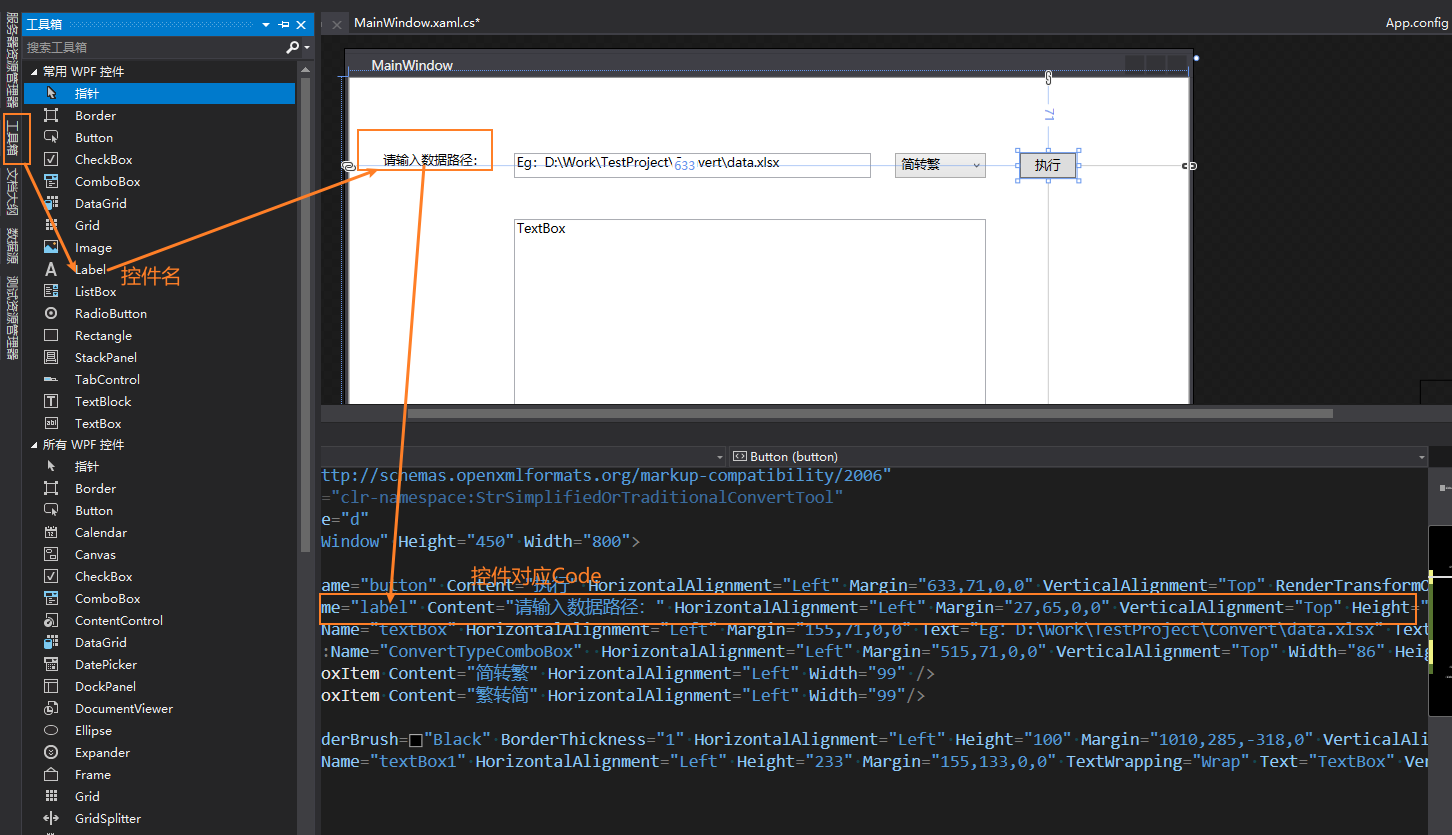
- 如果你有一点前端基础 你可以在控件对应Code 根据属性 对控件进行设置 包括颜色 大小 填充内容等
- 如果你对属性不是很熟悉 简单点 直接点控件双击本文--修改控件展示文本 双击控件--为控件添加双击事件
创建ViewModel【VM】
- 你的VM需要与前端控件绑定 并在有变更时 通知前端 所以你要实现 INotifyPropertyChanged接口
- 同时 将控件双击执行的事件 通过Command来绑定
所以这里我们直接封装一个ViewModelBase【拷贝直接可用 具体代码你可以选择不看】 你只需要让你的VM集成这个base 上诉两个功能点就可以直接调用了
public abstract class ViewModelBase : INotifyPropertyChanged
{
public event PropertyChangedEventHandler PropertyChanged;
#region Methods
protected void RasePropertyChanged(string propertyName)
{
var handler = PropertyChanged;
handler?.Invoke(this, new PropertyChangedEventArgs(propertyName));
}
protected bool SetProperty<T>(ref T storage, T value, [CallerMemberName] string propertyName = null)
{
if (Equals(storage, value))
return false;
storage = value;
OnPropertyChanged(propertyName);
return true;
}
protected virtual void OnPropertyChanged([CallerMemberName] string propertyName = null)
{
PropertyChanged?.Invoke(this, new PropertyChangedEventArgs(propertyName));
}
#endregion Methods
#region Constructor
protected ViewModelBase()
{
}
#endregion Constructor
}
#region RelayCommand
public class RelayCommand : ICommand
{
private readonly WeakAction _execute;
private readonly WeakFunc<bool> _canExecute;
public event EventHandler CanExecuteChanged;
public RelayCommand(Action execute, bool keepTargetAlive = false)
: this(execute, null, keepTargetAlive)
{
}
public RelayCommand(Action execute, Func<bool> canExecute, bool keepTargetAlive = false)
{
if (execute == null)
{
throw new ArgumentNullException("execute");
}
_execute = new WeakAction(execute, keepTargetAlive);
if (canExecute != null)
{
_canExecute = new WeakFunc<bool>(canExecute, keepTargetAlive);
}
}
public void RaiseCanExecuteChanged()
{
this.CanExecuteChanged?.Invoke(this, EventArgs.Empty);
}
public bool CanExecute(object parameter)
{
if (_canExecute != null)
{
if (_canExecute.IsStatic || _canExecute.IsAlive)
{
return _canExecute.Execute();
}
return false;
}
return true;
}
public virtual void Execute(object parameter)
{
if (CanExecute(parameter) && _execute != null && (_execute.IsStatic || _execute.IsAlive))
{
_execute.Execute();
}
}
}
public class RelayCommand<T> : ICommand
{
private readonly WeakAction<T> _execute;
private readonly WeakFunc<T, bool> _canExecute;
public event EventHandler CanExecuteChanged;
public RelayCommand(Action<T> execute, bool keepTargetAlive = false)
: this(execute, (Func<T, bool>)null, keepTargetAlive)
{
}
public RelayCommand(Action<T> execute, Func<T, bool> canExecute, bool keepTargetAlive = false)
{
if (execute == null)
{
throw new ArgumentNullException("execute");
}
_execute = new WeakAction<T>(execute, keepTargetAlive);
if (canExecute != null)
{
_canExecute = new WeakFunc<T, bool>(canExecute, keepTargetAlive);
}
}
public void RaiseCanExecuteChanged()
{
this.CanExecuteChanged?.Invoke(this, EventArgs.Empty);
}
public bool CanExecute(object parameter)
{
if (_canExecute == null)
{
return true;
}
if (_canExecute.IsStatic || _canExecute.IsAlive)
{
if (parameter == null && typeof(T).GetTypeInfo().IsValueType)
{
return _canExecute.Execute(default(T));
}
if (parameter == null || parameter is T)
{
return _canExecute.Execute((T)parameter);
}
}
return false;
}
public virtual void Execute(object parameter)
{
if (!CanExecute(parameter) || _execute == null || (!_execute.IsStatic && !_execute.IsAlive))
{
return;
}
if (parameter == null)
{
if (typeof(T).GetTypeInfo().IsValueType)
{
_execute.Execute(default(T));
}
else
{
_execute.Execute((T)parameter);
}
}
else
{
_execute.Execute((T)parameter);
}
}
}
public class WeakFunc<TResult>
{
private Func<TResult> _staticFunc;
protected MethodInfo Method
{
get;
set;
}
public bool IsStatic => _staticFunc != null;
public virtual string MethodName
{
get
{
if (_staticFunc != null)
{
return _staticFunc.GetMethodInfo().Name;
}
return Method.Name;
}
}
protected WeakReference FuncReference
{
get;
set;
}
protected object LiveReference
{
get;
set;
}
protected WeakReference Reference
{
get;
set;
}
public virtual bool IsAlive
{
get
{
if (_staticFunc == null && Reference == null && LiveReference == null)
{
return false;
}
if (_staticFunc != null)
{
if (Reference != null)
{
return Reference.IsAlive;
}
return true;
}
if (LiveReference != null)
{
return true;
}
if (Reference != null)
{
return Reference.IsAlive;
}
return false;
}
}
public object Target
{
get
{
if (Reference == null)
{
return null;
}
return Reference.Target;
}
}
protected object FuncTarget
{
get
{
if (LiveReference != null)
{
return LiveReference;
}
if (FuncReference == null)
{
return null;
}
return FuncReference.Target;
}
}
protected WeakFunc()
{
}
public WeakFunc(Func<TResult> func, bool keepTargetAlive = false)
: this(func?.Target, func, keepTargetAlive)
{
}
public WeakFunc(object target, Func<TResult> func, bool keepTargetAlive = false)
{
if (func.GetMethodInfo().IsStatic)
{
_staticFunc = func;
if (target != null)
{
Reference = new WeakReference(target);
}
}
else
{
Method = func.GetMethodInfo();
FuncReference = new WeakReference(func.Target);
LiveReference = (keepTargetAlive ? func.Target : null);
Reference = new WeakReference(target);
}
}
public TResult Execute()
{
if (_staticFunc != null)
{
return _staticFunc();
}
object funcTarget = FuncTarget;
if (IsAlive && (object)Method != null && (LiveReference != null || FuncReference != null) && funcTarget != null)
{
return (TResult)Method.Invoke(funcTarget, null);
}
return default(TResult);
}
public void MarkForDeletion()
{
Reference = null;
FuncReference = null;
LiveReference = null;
Method = null;
_staticFunc = null;
}
}
public class WeakFunc<T, TResult> : WeakFunc<TResult>, IExecuteWithObjectAndResult
{
private Func<T, TResult> _staticFunc;
public override string MethodName
{
get
{
if (_staticFunc != null)
{
return _staticFunc.GetMethodInfo().Name;
}
return base.Method.Name;
}
}
public override bool IsAlive
{
get
{
if (_staticFunc == null && base.Reference == null)
{
return false;
}
if (_staticFunc != null)
{
if (base.Reference != null)
{
return base.Reference.IsAlive;
}
return true;
}
return base.Reference.IsAlive;
}
}
public WeakFunc(Func<T, TResult> func, bool keepTargetAlive = false)
: this(func?.Target, func, keepTargetAlive)
{
}
public WeakFunc(object target, Func<T, TResult> func, bool keepTargetAlive = false)
{
if (func.GetMethodInfo().IsStatic)
{
_staticFunc = func;
if (target != null)
{
base.Reference = new WeakReference(target);
}
}
else
{
base.Method = func.GetMethodInfo();
base.FuncReference = new WeakReference(func.Target);
base.LiveReference = (keepTargetAlive ? func.Target : null);
base.Reference = new WeakReference(target);
}
}
public new TResult Execute()
{
return Execute(default(T));
}
public TResult Execute(T parameter)
{
if (_staticFunc != null)
{
return _staticFunc(parameter);
}
object funcTarget = base.FuncTarget;
if (IsAlive && (object)base.Method != null && (base.LiveReference != null || base.FuncReference != null) && funcTarget != null)
{
return (TResult)base.Method.Invoke(funcTarget, new object[1]
{
parameter
});
}
return default(TResult);
}
public object ExecuteWithObject(object parameter)
{
T parameter2 = (T)parameter;
return Execute(parameter2);
}
public new void MarkForDeletion()
{
_staticFunc = null;
base.MarkForDeletion();
}
}
public interface IExecuteWithObjectAndResult
{
object ExecuteWithObject(object parameter);
}
#endregion RelayCommand
#region WeakAction
public class WeakAction
{
private Action _staticAction;
protected MethodInfo Method
{
get;
set;
}
public virtual string MethodName
{
get
{
if (_staticAction != null)
{
return _staticAction.GetMethodInfo().Name;
}
return Method.Name;
}
}
protected WeakReference ActionReference
{
get;
set;
}
protected object LiveReference
{
get;
set;
}
protected WeakReference Reference
{
get;
set;
}
public bool IsStatic => _staticAction != null;
public virtual bool IsAlive
{
get
{
if (_staticAction == null && Reference == null && LiveReference == null)
{
return false;
}
if (_staticAction != null)
{
if (Reference != null)
{
return Reference.IsAlive;
}
return true;
}
if (LiveReference != null)
{
return true;
}
if (Reference != null)
{
return Reference.IsAlive;
}
return false;
}
}
public object Target
{
get
{
if (Reference == null)
{
return null;
}
return Reference.Target;
}
}
protected object ActionTarget
{
get
{
if (LiveReference != null)
{
return LiveReference;
}
if (ActionReference == null)
{
return null;
}
return ActionReference.Target;
}
}
protected WeakAction()
{
}
public WeakAction(Action action, bool keepTargetAlive = false)
: this(action?.Target, action, keepTargetAlive)
{
}
public WeakAction(object target, Action action, bool keepTargetAlive = false)
{
if (action.GetMethodInfo().IsStatic)
{
_staticAction = action;
if (target != null)
{
Reference = new WeakReference(target);
}
}
else
{
Method = action.GetMethodInfo();
ActionReference = new WeakReference(action.Target);
LiveReference = (keepTargetAlive ? action.Target : null);
Reference = new WeakReference(target);
}
}
public void Execute()
{
if (_staticAction != null)
{
_staticAction();
return;
}
object actionTarget = ActionTarget;
if (IsAlive && (object)Method != null && (LiveReference != null || ActionReference != null) && actionTarget != null)
{
Method.Invoke(actionTarget, null);
}
}
public void MarkForDeletion()
{
Reference = null;
ActionReference = null;
LiveReference = null;
Method = null;
_staticAction = null;
}
}
public class WeakAction<T> : WeakAction, IExecuteWithObject
{
private Action<T> _staticAction;
public override string MethodName
{
get
{
if (_staticAction != null)
{
return _staticAction.GetMethodInfo().Name;
}
return base.Method.Name;
}
}
public override bool IsAlive
{
get
{
if (_staticAction == null && base.Reference == null)
{
return false;
}
if (_staticAction != null)
{
if (base.Reference != null)
{
return base.Reference.IsAlive;
}
return true;
}
return base.Reference.IsAlive;
}
}
public WeakAction(Action<T> action, bool keepTargetAlive = false)
: this(action?.Target, action, keepTargetAlive)
{
}
public WeakAction(object target, Action<T> action, bool keepTargetAlive = false)
{
if (action.GetMethodInfo().IsStatic)
{
_staticAction = action;
if (target != null)
{
base.Reference = new WeakReference(target);
}
}
else
{
base.Method = action.GetMethodInfo();
base.ActionReference = new WeakReference(action.Target);
base.LiveReference = (keepTargetAlive ? action.Target : null);
base.Reference = new WeakReference(target);
}
}
public new void Execute()
{
Execute(default(T));
}
public void Execute(T parameter)
{
if (_staticAction != null)
{
_staticAction(parameter);
return;
}
object actionTarget = base.ActionTarget;
if (IsAlive && (object)base.Method != null && (base.LiveReference != null || base.ActionReference != null) && actionTarget != null)
{
base.Method.Invoke(actionTarget, new object[1]
{
parameter
});
}
}
public void ExecuteWithObject(object parameter)
{
T parameter2 = (T)parameter;
Execute(parameter2);
}
public new void MarkForDeletion()
{
_staticAction = null;
base.MarkForDeletion();
}
}
public interface IExecuteWithObject
{
object Target
{
get;
}
void ExecuteWithObject(object parameter);
void MarkForDeletion();
}
#endregion WeakAction
VM继承Base后
首先属性变更通知
 private string _inputPath = string.Empty;

        public string InputPath

        {

            get { return _inputPath; }

            set

            {

                if (!string.IsNullOrWhiteSpace(_inputPath) && _inputPath.Equals(value)) return;

                _inputPath = value;

                RasePropertyChanged("InputPath");//这里就是直接调用Base

            }

        }
其次Command事件
  public ICommand ExcutedClicked => new RelayCommand(ExcuteConvert);//调Base

        #endregion Event

        public void ExcuteConvert()

        {

           //Do some thing

        }
开始绑定ViewModel
- 这里仅画一个页面 且整个界面都是Grid画的 绑定整个页面数据源为ViewModel 并将其绑定至grid
//页面源绑定

    <Window.Resources>

        <local:ViewModelName x:Key="d" />

    </Window.Resources>

//grid 源绑定

 <Grid ShowGridLines="True" DataContext="{StaticResource d}"> //ShowGridLines="True" 可以显示布局虚线 使得页面布局更简单
然后你前端控件就可以直接绑定VM的属性 或是事件了
- 属性绑定 直接Binding VM的属性名就可以了
<TextBox Grid.Column="1" x:Name="InputPathText" Text="{Binding InputPath}" TextWrapping="Wrap" VerticalAlignment="Center" Height="24" />
- 事件绑定 Command="{Binding ExcutedClicked} 同理直接绑定VM 事件名
<Button Grid.Column="3" x:Name="ExcuteBtn" Content="执行" HorizontalAlignment="Center" VerticalAlignment="Center" Height="24" Width="60" Command="{Binding ExcutedClicked}" />
搞定 WPF就建好了
小白5分钟创建WPF的更多相关文章
- ASP.NET MVC 5– 使用Wijmo MVC 5模板1分钟创建应用
开始使用 使用ComponentOne Studio for ASP.NET Wijmo制作MVC5应用程序,首先要做的是安装Studio for ASP.NET Wijmo . 测试环境 VS201 ...
- 创建 WPF 工具箱控件
创建 WPF 工具箱控件 WPF (Windows Presentation Framework) 工具箱控件模板允许您创建 WPF 控件,会自动添加到 工具箱 安装扩展的安装. 本主题演示如何使用模 ...
- WPF笔记1 用VS2015创建WPF程序
使用WPF创建第一个应用程序.实现功能如下: 单击"Red"按钮,文本显示红色:单击"Black"按钮,文本显示黑色:单击"Back"按钮, ...
- [转]ASP.NET MVC 5– 使用Wijmo MVC 5模板1分钟创建应用
开始使用 使用ComponentOne Studio for ASP.NET Wijmo制作MVC5应用程序,首先要做的是安装Studio for ASP.NET Wijmo . 测试环境 VS201 ...
- C++/CLI 创建WPF程序
本文简单演示下用C++/CLI创建WPF程序,IDE为VS2015 首先创建CLR项目,选择CLR空项目: 然后,右键源文件,选择新建class,选择CLR->Component Class 接 ...
- 用Visual C++创建WPF项目的三种主要方法
用Visual C++创建WPF项目的三种主要方法 The problem with using XAML from C++ Because C++ doesn't support partial c ...
- 流程自动化RPA,Power Automate Desktop系列 - 创建WPF程序安装包及升级包
一.背景 之前写过的几个WPF小工具,每次发布都需要给它打安装包和升级包,涉及到一些系列繁琐的手工操作,有了Power Automate Desktop,于是便寻思着能不能做成一个自动化的流来使用. ...
- .NET6: 三分钟搭建WPF三维应用
要运行本文中的示例,请先安装Vistual Studio 2022,社区版就可以了. 1 创建项目 选择创建WPF应用 给程序起一个酷酷的名字,选一个酷酷的位置: 选一下.NET6 2 配置项目 从n ...
- 创建WPF用户控件
wpf用户自定义控件和winform创建方法类似,这里先纠正一个误区,就是有很多人也是添加,然后新建,然后是新建用户控件库,但是为什么编译好生成后Debug目录下还是只有exe文件而没有dll文件呢? ...
随机推荐
- [004] .NET 的现状和未来
我们总是能听到一些人说,.NET 不行.学 .NET 没发展前途之类的言论,有的童鞋听多了便也开始怀疑自己选择的 .NET 方向是不是错了. 不得不承认,在 .NET 没有实现跨平台之前,市场行情确实 ...
- js检测客户端是否安装
前言 需求背景:一个web下载页面,需要检测pc是否安装了客户端软件(windows软件).网页上有一个打开客户端按钮.若安装了客户端软件,则直接打开,否则下载软件.支持web下载页面在iframe下 ...
- Leetcode春季打卡活动 第二题:206. 反转链表
Leetcode春季打卡活动 第二题:206. 反转链表 206. 反转链表 Talk is cheap . Show me the code . /** * Definition for singl ...
- .net 5+ 知新:【1】 .Net 5 基本概念和开发环境搭建
最近一两年搞了很多其它事情,.net web方面的基本没做,之前做过几个小的项目零星的学习了些,从.net core 发布后其实都没正真的系统学习过. 就是上手做项目,平时也有关注和看些资料,所以项目 ...
- Java实战:教你如何进行数据库分库分表
摘要:本文通过实际案例,说明如何按日期来对订单数据进行水平分库和分表,实现数据的分布式查询和操作. 本文分享自华为云社区<数据库分库分表Java实战经验总结 丨[绽放吧!数据库]>,作者: ...
- POJ3264线段树求最值
刚开始还觉得有点怪怪的.因为想着如果每个树只是单纯地记录它所在的区间的话会不会有不在区间内的数据给更新了,但是我好像是傻掉了因为如果有这种情况出现的话在父亲节点就会分成l,mid和mid+1,r两个区 ...
- pip批量安装库
将需要安装的库名和版本号都写在一个txt文档中,每个库名占一行,例如requests==2.24.0. 然后在用pip install -r命令去找到这个txt文档批量安装里面填写的库,如果嫌速度太慢 ...
- []*T *[]T *[]*T 傻傻分不清楚
前言 作为一个 Go 语言新手,看到一切"诡异"的代码都会感到好奇:比如我最近看到的几个方法:伪代码如下: func FindA() ([]*T,error) { } func F ...
- SQL SERVER 雨量计累计雨量(小时)的统计思路
PLC中定时读取5分钟雨量值,如何将该值统计为小时雨量作为累计?在sql server group by聚合函数,轻松实现该目的. 1.编写思路 数据库中字段依据datetime每五分钟插入一条语句, ...
- ts踩坑笔记
1.react中 this.el 报错 Property 'el' does not exist on type,添加el: any; 2.使用window.xx编译总是报错,用下面方法解决 let ...