
【SpringMVC】@RequestMapping注解
@RequestMapping注解的源码
@Target({ElementType.TYPE, ElementType.METHOD})

@Retention(RetentionPolicy.RUNTIME)

@Documented

@Mapping

public @interface RequestMapping {

    String name() default "";

    @AliasFor("path")

    String[] value() default {};

    @AliasFor("value")

    String[] path() default {};

    RequestMethod[] method() default {};

    String[] params() default {};

    String[] headers() default {};

    String[] consumes() default {};

    String[] produces() default {};

}
@RequestMapping注解的功能
@RequestMapping注解的作用就是将请求和处理请求的控制器方法关联起来,建立映射关系。
SpringMVC 接收到指定的请求,就会来找到在映射关系中对应的控制器方法来处理这个请求。
该注解可以标识在类和方法上。
@RequestMapping注解的位置
@RequestMapping标识一个类:设置映射请求的请求路径的初始信息
@RequestMapping标识一个方法:设置映射请求请求路径的具体信息
如果有请求路径的初始信息,则先设置请求路径的初始信息才能设置请求路径的具体信息。
比如,想从index的超链接跳转到welcome页面:
index.html
<!DOCTYPE html>

<html lang="en" xmlns:th="http://www.thymeleaf.org">

<head>

    <meta charset="UTF-8">

    <title>首页</title>

</head>

<body>

    <h1>首页</h1>

    <a th:href="@{/testRequestMapping}">访问welcome页面 </a>

</body>

</html>
index的超链接跳转的路径是/testRequestMapping
welcome.html
<!DOCTYPE html>

<html lang="en">

<head>

    <meta charset="UTF-8">

    <title>welcome</title>

</head>

<body>

<h1>Welcome to My Blog</h1>

</body>

</html>
在welcome的控制器的类和方法上都加上RequestMapping注解
@Controller

@RequestMapping("/hello")

public class RequestMappingController {

    @RequestMapping("/testRequestMapping")

    public String welcome(){

        return "welcome";

    }

}
结果就是跳转失败
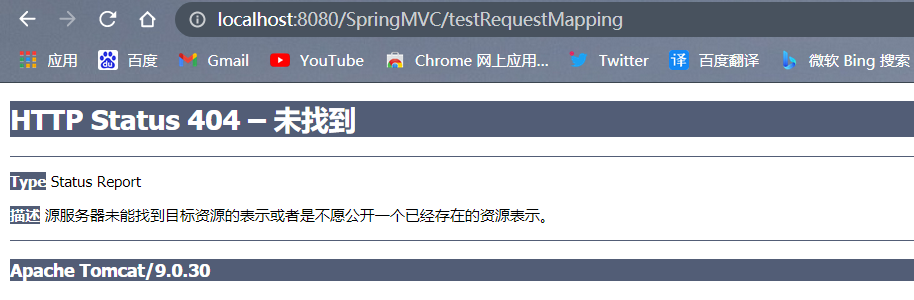
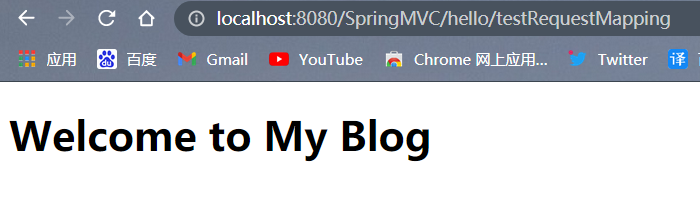
如果修改跳转路径为/hello/testRequestMapping,即可成功
<a th:href="@{/hello/testRequestMapping}">访问welcome页面 </a>
@RequestMapping注解的value属性
@RequestMapping注解的value属性通过请求的请求地址匹配请求映射
@RequestMapping注解的value属性是一个字符串类型的数组,表示该请求映射能够匹配多个请求地址所对应的请求
@RequestMapping注解的value属性必须设置,至少通过请求地址匹配请求映射
index.html
<!DOCTYPE html>

<html lang="en" xmlns:th="http://www.thymeleaf.org">

<head>

    <meta charset="UTF-8">

    <title>首页</title>

</head>

<body>

    <h1>首页</h1>

    <a th:href="@{/testRequestMapping}">通过/testRequestMapping访问welcome页面 </a>

    <br>

    <a th:href="@{/test}">通过/test访问welcome页面 </a>

</body>

</html>
@Controller

public class RequestMappingController {

    @RequestMapping(value = {"/testRequestMapping","/test"})

    public String welcome(){

        return "welcome";

    }

}
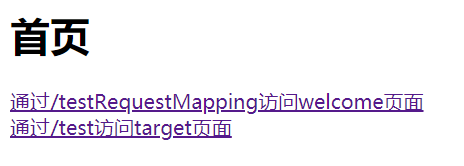
两个超连接都可访问成功
@RequestMapping注解的method属性
@RequestMapping注解的method属性通过请求的请求方式(get或post)匹配请求映射
@RequestMapping注解的method属性是一个RequestMethod类型的数组,表示该请求映射能够匹配多种请求方式的请求
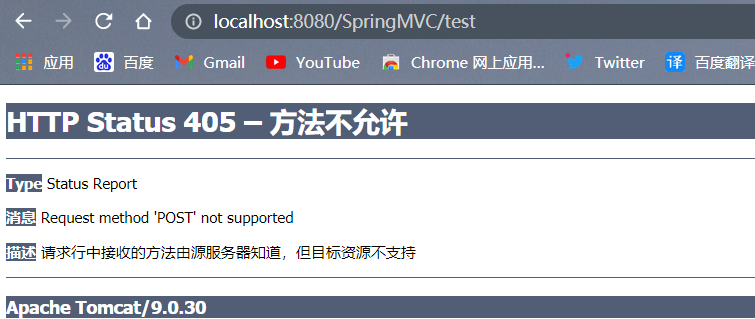
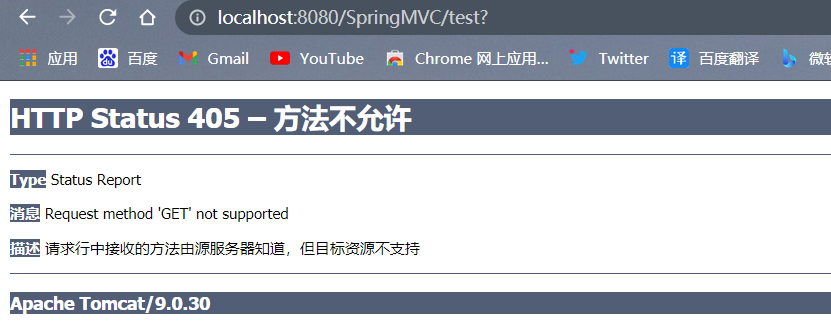
若当前请求的请求地址满足请求映射的value属性,但是请求方式不满足method属性,则浏览器报错405:Request method 'POST' not supported
index.html
<!DOCTYPE html>

<html lang="en" xmlns:th="http://www.thymeleaf.org">

<head>

    <meta charset="UTF-8">

    <title>首页</title>

</head>

<body>

    <form th:action="@{/test}" method="post">

        <input type="submit" value="以post方式提交">

    </form>

    <br>

    <form th:action="@{/test}" method="get">

        <input type="submit" value="以get方式提交">

    </form>

</body>

</html>
welcome.html的控制器
    @RequestMapping(value = "/test",

    method = {RequestMethod.GET})

    public String welcome(){

        return "welcome";

    }
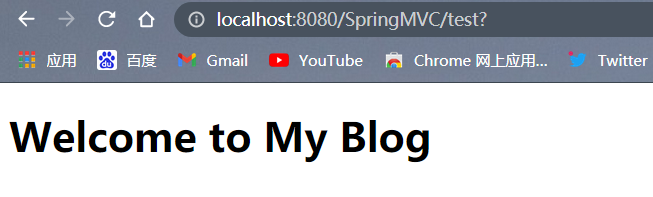
如果不设置控制器的method,则index的post和get两种方式都可以访问welcome.html
如果设置控制器的method为RequestMethod.GET,则只能用get方式访问
以post方式访问:
以get方式访问:
对于处理指定请求方式的控制器方法,SpringMVC中提供了@RequestMapping的派生注解
处理get请求的映射-->@GetMapping
处理post请求的映射-->@PostMapping
处理put请求的映射-->@PutMapping
处理delete请求的映射-->@DeleteMapping
免去了设置method的麻烦,只写映射路径即可
    @GetMapping("/test")

    public String welcome(){

        return "welcome";

    }
常用的请求方式有get,post,put,delete
但是目前浏览器只支持get和post,若在form表单提交时,为method设置了其他请求方式的字符串(put或delete),则按照默认的请求方式get处理
index.html
<!DOCTYPE html>

<html lang="en" xmlns:th="http://www.thymeleaf.org">

<head>

    <meta charset="UTF-8">

    <title>首页</title>

</head>

<body>

    <form th:action="@{/test}" method="put">

        <input type="submit" value="以put方式提交">

    </form>

    <br>

</body>

</html>
    @PostMapping("/test")

    public String welcome(){

        return "welcome";

    }
@RequestMapping注解的params属性
@RequestMapping注解的params属性通过请求的请求参数匹配请求映射
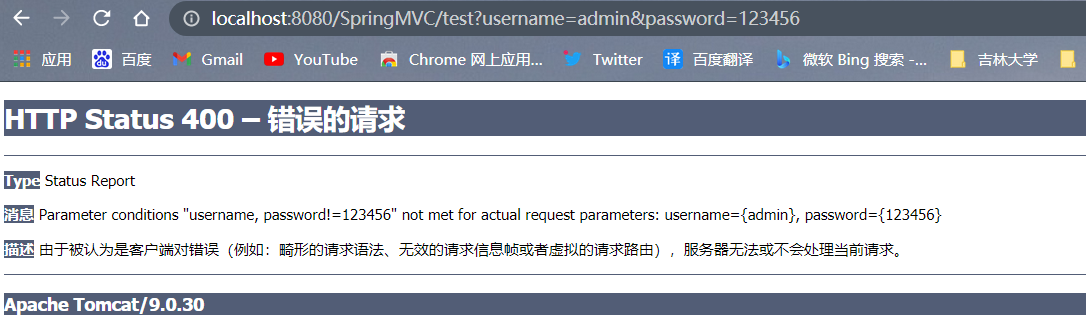
@RequestMapping注解的params属性是一个字符串类型的数组,可以通过四种表达式设置请求参数和请求映射的匹配关系
"param":要求请求映射所匹配的请求必须携带param请求参数
"!param":要求请求映射所匹配的请求必须不能携带param请求参数
"param=value":要求请求映射所匹配的请求必须携带param请求参数且param=value
"param!=value":要求请求映射所匹配的请求必须携带param请求参数但是param!=value
<a th:href="@{/test(username='admin',password=123456)}">测试@RequestMapping的params属性-->/test</a><br>
@RequestMapping(

        value = {"/testRequestMapping", "/test"}

        ,method = {RequestMethod.GET, RequestMethod.POST}

        ,params = {"username","password!=123456"}

)

public String testRequestMapping(){

    return "welcome";

}
@RequestMapping注解的headers属性
@RequestMapping注解的headers属性通过请求的请求头信息匹配请求映射
@RequestMapping注解的headers属性是一个字符串类型的数组,可以通过四种表达式设置请求头信息和请求映射的匹配关系
"header":要求请求映射所匹配的请求必须携带header请求头信息
"!header":要求请求映射所匹配的请求必须不能携带header请求头信息
"header=value":要求请求映射所匹配的请求必须携带header请求头信息且header=value
"header!=value":要求请求映射所匹配的请求必须携带header请求头信息且header!=value
若当前请求满足@RequestMapping注解的value和method属性,但是不满足headers属性,此时页面显示404错误,即资源未找到
SpringMVC路径的模糊匹配
?:表示任意的单个字符
    @RequestMapping(value = "/a?a/test")

    public String welcome(){

        return "welcome";

    }
*:表示任意的0个或多个字符
    @RequestMapping(value = "/a*a/test")

    public String welcome(){

        return "welcome";

    }
/**:表示任意的一层或多层目录
    @RequestMapping(value = "/**/test")

    public String welcome(){

        return "welcome";

    }
- 注意:
在使用
/**时,只能使用/**/xxx的方式?和*不可以用。/?来占位
SpringMVC支持路径中的占位符(重点)
原始方式:/deleteUser?id=1
rest方式:/deleteUser/1
SpringMVC路径中的占位符常用于RESTful风格中,当请求路径中将某些数据通过路径的方式传输到服务器中,就可以在相应的@RequestMapping注解的value属性中通过占位符{xxx}表示传输的数据,在通过@PathVariable注解,将占位符所表示的数据赋值给控制器方法的形参
<a th:href="@{/testRest/1/admin}">测试路径中的占位符-->/testRest</a><br>
@RequestMapping("/testRest/{id}/{username}")

public String testRest(@PathVariable("id") String id, @PathVariable("username") String username){

    System.out.println("id:"+id+",username:"+username);

    return "success";

}

//最终输出的内容为-->id:1,username:admin
【SpringMVC】@RequestMapping注解的更多相关文章
- SpringMVC RequestMapping注解
1.@RequestMapping 除了修饰方法,还可以修饰类 2.类定义处:提供初步的请求映射信息.相对于WEB应用的根目录 方法处:提供进一步细分映射信息 相对于类定义处的URL.若类定义处未 ...
- SpringMVC @RequestMapping注解详解
@RequestMapping 参数说明 value:定义处理方法的请求的 URL 地址.(重点) method:定义处理方法的 http method 类型,如 GET.POST 等.(重点) pa ...
- 超详细 SpringMVC @RequestMapping 注解使用技巧
@RequestMapping 是 Spring Web 应用程序中最常被用到的注解之一.这个注解会将 HTTP 请求映射到 MVC 和 REST 控制器的处理方法上. 在这篇文章中,你将会看到 @R ...
- SpringMVC源码解读 - RequestMapping注解实现解读 - RequestMappingInfo
使用@RequestMapping注解时,配置的信息最后都设置到了RequestMappingInfo中. RequestMappingInfo封装了PatternsRequestCondition, ...
- SpringMVC源码解读 - RequestMapping注解实现解读 - RequestCondition体系
一般我们开发时,使用最多的还是@RequestMapping注解方式. @RequestMapping(value = "/", param = "role=guest& ...
- SpringMVC使用注解@RequestMapping映射请求
pringMVC通过使用@RequestMapping注解,实现指定控制器可以处理哪些URL请求. 控制器的类定义及方法定义处都可以标注@RequestMapping: 类定义处:提供初步的请求映射信 ...
- (转)SpringMVC学习(六)——SpringMVC高级参数绑定与@RequestMapping注解
http://blog.csdn.net/yerenyuan_pku/article/details/72511749 高级参数绑定 现在进入SpringMVC高级参数绑定的学习,本文所有案例代码的编 ...
- SpringMVC详解一、@RequestMapping注解与Controller接收参数
SpringMVC详解一.@RequestMapping注解与Controller接收参数 https://blog.csdn.net/mxcsdn/article/details/80719258 ...
- SpringMVC源码解读 - RequestMapping注解实现解读
SpringMVC源码解读 - RequestMapping注解实现解读 - RequestCondition体系 https://www.cnblogs.com/leftthen/p/520840 ...
随机推荐
- 一文读懂 .NET 中的高性能队列 Channel
介绍 System.Threading.Channels 是.NET Core 3.0 后推出的新的集合类型, 具有异步API,高性能,线程安全等特点,它可以用来做消息队列,进行数据的生产和消费, 公 ...
- 【网络IO系列】 预备知识 操作系统之内核程序和用户程序
一.概念 首先我们先来复习一下操作系统的概念和作用 操作系统是用户和硬件之间的一层媒介程序,为上提供编程接口,为下调用资源,管理驱动,以使用硬件. 从以上的表述我们可以看出OS的两点作用,第一个是对下 ...
- python 爬取网络小说 清洗 并下载至txt文件
什么是爬虫 网络爬虫,也叫网络蜘蛛(spider),是一种用来自动浏览万维网的网络机器人.其目的一般为编纂网络索引. 网络搜索引擎等站点通过爬虫软件更新自身的网站内容或其对其他网站的索引.网络爬虫可以 ...
- react应用(基于react脚手架)
使用create-react-app创建react应用 react脚手架 1) xxx脚手架: 用来帮助程序员快速创建一个基于xxx库的模板项目 a. 包含了所有需要的配置 b. 指定好了所有的依赖 ...
- 测试龙芯 LoongArch .NET之 使用 FastTunnel 做内网穿透远程计算机
龙芯3A5000 已经上市,与龙芯3A5000配套的三大编译器GCC.LLVM.GoLang和三大虚拟机Java.JavaScript..NET均已完成开发,从老伙计哪里搞来一台3A5000 机器,安 ...
- windows使用nvm管理node不同版本
最近项目需要升级,新技术需要的node版本较高,而新node不兼容旧版本node,而原项目仍需要继续维护,所以就需要在本地有多个版本的node,基本原理是在环境配置中修改系统变量node的版本文件夹路 ...
- BZOJ2457 双端队列 题解
本题直接求解十分困难,因为在不知道整个序列的数字规律时当前所作决策都无法保证最优性. 考虑正难则反,题目转化为将一个非降序列分成尽量少的几段,让每段对应原问题的双端队列. 先将原数组排序,由于原数组下 ...
- 前端基础div(六)
实例 文档中的一个部分会显示为绿色: <div style="color:#00FF00"> <h3>This is a header</h3> ...
- 第八篇 -- 用U盘制作启动盘装Win10系统
下载装机吧:http://www.zhuangjiba.com 装Win10参考文章:http://www.zhuangjiba.com/bios/13249.html U盘启动盘制作 1.首先将U盘 ...
- 【算法学习笔记】动态规划与数据结构的结合,在树上做DP
前置芝士:Here 本文是基于 OI wiki 上的文章加以修改完成,感谢社区的转载支持和其他方面的支持 树形 DP,即在树上进行的 DP.由于树固有的递归性质,树形 DP 一般都是递归进行的. 基础 ...