
简单的通用TreeView(WPF)
工作中要为很多类创建TreeView, 很多时候仅仅是因为要显示字段不同, 就得Ctrl+C、Ctrl+V复制一份几乎相同的代码, 这难免让人生厌, 于是希望像泛型集合的扩展方法那样, 可以在使用的时候灵活指定要显示哪个字段.
下面的TreeView要实现这样的逻辑: 父项目 被勾选 或者 取消勾选, 那么它的所有子项目全部改成 被勾选 或者 取消勾选; 只有所有的子项目都被勾选时, 父项目才自发的改成被勾选
- 创建基本的CommonTreeViewItemModel
/// <summary>
/// 通用的TreeViewItem模型, 仅包含最基础CheckBox(如果你觉得不好看, 在CommonTreeView.xaml中修改样式), 还包含一个 Tag(包含的对象)
/// 业务逻辑: 父项目 被勾选 或者 取消勾选, 那么它的所有子项目全部改成 被勾选 或者 取消勾选; 只有所有的子项目都被勾选时, 父项目才自发的改成被勾选
/// 所有的字段都改为protected, 方便继承修改
/// </summary>
public class CommonTreeViewItemModel : INotifyPropertyChanged
{ #region 属性 public event PropertyChangedEventHandler PropertyChanged; protected object id;
/// <summary>
/// 唯一性Id
/// </summary>
public object Id
{
get { return id; }
set { id = value; }
} protected string caption;
/// <summary>
/// 标题
/// </summary>
public string Caption
{
get { return caption; }
set { caption = value; if (PropertyChanged != null) PropertyChanged.Invoke(this, new PropertyChangedEventArgs("Caption")); }
} protected bool isChecked;
/// <summary>
/// 是否被勾选
/// </summary>
public bool IsChecked
{
get { return isChecked; }
set
{
isChecked = value;
if (PropertyChanged != null) PropertyChanged.Invoke(this, new PropertyChangedEventArgs("IsChecked"));
SetIsCheckedByParent(value);
if (Parent != null) Parent.SetIsCheckedByChild(value);
}
} protected bool isExpanded;
/// <summary>
/// 是否被展开
/// </summary>
public bool IsExpanded
{
get { return isExpanded; }
set { isExpanded = value; if (PropertyChanged != null) PropertyChanged.Invoke(this, new PropertyChangedEventArgs("IsExpanded")); }
} protected CommonTreeViewItemModel parent;
/// <summary>
/// 父项目
/// </summary>
public CommonTreeViewItemModel Parent
{
get { return parent; }
set { parent = value; }
} protected List<CommonTreeViewItemModel> children = new List<CommonTreeViewItemModel>();
/// <summary>
/// 含有的子项目
/// </summary>
public List<CommonTreeViewItemModel> Children
{
get { return children; }
set { children = value; }
} /// <summary>
/// 包含的对象
/// </summary>
public object Tag { get; set; } /// <summary>
/// 包含对象的类型
/// </summary>
public Type TagType { get; set; }
#endregion #region 业务逻辑, 如果你需要改成其他逻辑, 要修改的也就是这两行 /// <summary>
/// 子项目的isChecked改变了, 通知 是否要跟着改变 isChecked
/// </summary>
/// <param name="value"></param>
public virtual void SetIsCheckedByChild(bool value)
{
if (this.isChecked == value)
{
return;
} bool isAllChildrenChecked = this.Children.All(c => c.IsChecked == true);
this.isChecked = isAllChildrenChecked;
if (PropertyChanged != null) PropertyChanged.Invoke(this, new PropertyChangedEventArgs("IsChecked"));
if (Parent != null) Parent.SetIsCheckedByChild(value);
} /// <summary>
/// 自己的isChecked改变了, 所有子项目都要跟着改变
/// </summary>
/// <param name="value"></param>
public virtual void SetIsCheckedByParent(bool value)
{
this.isChecked = value;
if (PropertyChanged != null) PropertyChanged.Invoke(this, new PropertyChangedEventArgs("IsChecked"));
foreach (var child in Children)
{
child.SetIsCheckedByParent(value);
}
}
#endregion } - 创建通用的 CommonTreeView, 这其中最关键的就是泛型方法SetItemsSourceData<TSource, TId>
    public partial class CommonTreeView : UserControl

    {

        public IList<CommonTreeViewItemModel> ItemsSourceData

        {

            get { return (IList<CommonTreeViewItemModel>)innerTree.ItemsSource; }

        }

        public CommonTreeView()

        {

            InitializeComponent();

        }

        /// <summary>

        /// 设置数据源, 以及各个字段

        /// </summary>

        /// <typeparam name="TSource">数据源类型</typeparam>

        /// <typeparam name="TId">主键类型</typeparam>

        /// <param name="itemsArray">数据源列表</param>

        /// <param name="captionSelector">指定显示为Caption的属性</param>

        /// <param name="idSelector">指定主键属性</param>

        /// <param name="parentIdSelector">指定父项目主键属性</param>

        public void SetItemsSourceData<TSource, TId>(IEnumerable<TSource> itemsArray, Func<TSource, string> captionSelector, Func<TSource, TId> idSelector, Func<TSource, TId> parentIdSelector)

                where TId : IEquatable<TId>

        {

            var list = new List<CommonTreeViewItemModel>();

            foreach (var item in itemsArray.Where(a => object.Equals(default(TId), parentIdSelector(a))))

            {

                var tvi = new CommonTreeViewItemModel();

                tvi.Caption = captionSelector(item).ToString();

                tvi.Id = idSelector(item);

                tvi.Tag = item;

                tvi.TagType = item.GetType();

                list.Add(tvi);

                RecursiveAddChildren(tvi, itemsArray, captionSelector, idSelector, parentIdSelector);

            }

            innerTree.ItemsSource = list;

            return;

        }

        /// <summary>

        /// 递归加载children

        /// </summary>

        /// <typeparam name="TSource"></typeparam>

        /// <typeparam name="TId"></typeparam>

        /// <param name="parent"></param>

        /// <param name="itemsArray"></param>

        /// <param name="captionSelector"></param>

        /// <param name="idSelector"></param>

        /// <param name="parentIdSelector"></param>

        /// <returns></returns>

        private CommonTreeViewItemModel RecursiveAddChildren<TSource, TId>(CommonTreeViewItemModel parent, IEnumerable<TSource> itemsArray, Func<TSource, string> captionSelector, Func<TSource, TId> idSelector, Func<TSource, TId> parentIdSelector)

        {

            foreach (var item in itemsArray.Where(a => parent.Id.Equals(parentIdSelector(a))))

            {

                var tvi = new CommonTreeViewItemModel();

                tvi.Caption = captionSelector(item);

                tvi.Id = idSelector(item);

                tvi.Tag = item;

                tvi.TagType = item.GetType();

                tvi.Parent = parent;

                parent.Children.Add(tvi);

                RecursiveAddChildren(tvi, itemsArray, captionSelector, idSelector, parentIdSelector);

            }

            return parent;

} - CommonTreeView 对应的xaml
<UserControl x:Class="WPFCommonTreeView.CommonTreeView"

             xmlns="http://schemas.microsoft.com/winfx/2006/xaml/presentation"

             xmlns:x="http://schemas.microsoft.com/winfx/2006/xaml"

             xmlns:mc="http://schemas.openxmlformats.org/markup-compatibility/2006"

             xmlns:d="http://schemas.microsoft.com/expression/blend/2008"

             xmlns:local="clr-namespace:WPFCommonTreeView"

             mc:Ignorable="d"

             d:DesignHeight="300" d:DesignWidth="300">

    <Grid>

        <TreeView Name="innerTree">

            <TreeView.ItemContainerStyle>

                <Style TargetType="TreeViewItem">

                    <Setter Property="IsExpanded" Value="{Binding IsExpanded, Mode=TwoWay}"></Setter>

                </Style>

            </TreeView.ItemContainerStyle>

            <TreeView.ItemTemplate>

                <HierarchicalDataTemplate DataType="{x:Type local:CommonTreeViewItemModel}"  ItemsSource="{Binding Children}">

                    <CheckBox   FontSize="14" FontFamily="微软雅黑" Tag="{Binding Children}" IsChecked="{Binding IsChecked, Mode=TwoWay}" Content="{Binding Caption}" />

                </HierarchicalDataTemplate>

            </TreeView.ItemTemplate>

        </TreeView>

    </Grid>

</UserControl> - 演示效果
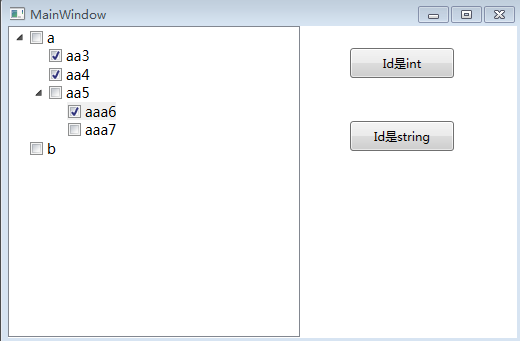
后记: 说实在的, 这个通用TreeView其实一点也不通用, 简单倒是真的, 主要原因是实际业务中TreeView的层次和逻辑千差万别, 就当自己的一点尝试吧.
转载请注明出处: http://www.cnblogs.com/zhouandke/p/6201064.html
简单的通用TreeView(WPF)的更多相关文章
- [译]聊聊C#中的泛型的使用(新手勿入) Seaching TreeVIew WPF 可编辑树Ztree的使用(包括对后台数据库的增删改查) 字段和属性的区别 C# 遍历Dictionary并修改其中的Value 学习笔记——异步 程序员常说的「哈希表」是个什么鬼?
[译]聊聊C#中的泛型的使用(新手勿入) 写在前面 今天忙里偷闲在浏览外文的时候看到一篇讲C#中泛型的使用的文章,因此加上本人的理解以及四级没过的英语水平斗胆给大伙进行了翻译,当然在翻译的过程中发 ...
- 一个简单的通用Makefile实现
一个简单的通用Makefile实现 Makefile是Linux下程序开发的自动化编译工具,一个好的Makefile应该准确的识别编译目标与源文件的依赖关系,并且有着高效的编译效率,即每次重新ma ...
- wpf中,一个简单的自定义treeview
首先创建一个自定义控件,在里面定义好treeview的样式,将本来的三角形的图标变为加号的图标,并且添加节点之间的连线. <UserControl x:Class="TreeViewE ...
- 微信小程序实现简单的树形图treeview
H5有很多树形图(树状图)的组件,echarts也有.比如像bootstrap的treeview,定制性很强.不过这些都无法方便地为小程序所用,除非整个页面用H5搭建再用webview框进去,有点粗暴 ...
- Seaching TreeVIew WPF
项目中有一个树形结构的资源,需要支持搜索功能,搜索出来的结果还是需要按照树形结构展示,下面是简单实现的demo. 1.首先创建TreeViewItem的ViewModel,一般情况下,树形结构都包含D ...
- C#简单的通用分页
通用分页技术分析 需要返回不同的类型的数据--采用泛型实现该操作 需要提供不同的方法 上一页 上一页 第一页 最后一页 跳转到指定页 Demo 代码 using System; using Syste ...
- Task(TPL)简单的实现Winform(WPF)异步
很多时候,我们要实现Winform异步操作,你可以用传统的方法,但个人感觉代码不好理解,而且使用真有点不舒服.也可以用Task来实现,Task(.net4.0新添加的对象)其实就是对线程池线程的一个封 ...
- flowable笔记 - 简单的通用流程
简介 通用流程可以用于一些基本的申请,例如请假.加班. 大致过程是: 1. 创建申请 2. 分配给审批人(需要审批人列表,当前审批人) -> 有下一个审批人 -> 3 -> 无 -& ...
- 简单的介绍下WPF中的MVVM框架
最近在研究学习Swift,苹果希望它迅速取代复杂的Objective-C开发,引发了一大堆热潮去学它,放眼望去各个培训机构都已打着Swift开发0基础快速上手的招牌了.不过我觉得,等同于无C++基础上 ...
随机推荐
- 《从零开始做一个MEAN全栈项目》(4)
欢迎关注本人的微信公众号"前端小填填",专注前端技术的基础和项目开发的学习. 在上一篇中,我们讲了如何去构建第一个Express项目,总结起来就是使用两个核心工具,express和 ...
- artTemplate 自动化编译之tmod
一.背景 前端小白的成长历程,一般都会经历html模板的一些问题,jquery template/artTemplate/yayaTemplate等常见的模板使用,这里就不作介绍了. 先谈谈我们为什么 ...
- Xenko基础API笔记2-Enum Keys按键
Name Description A The 'a' key. Add The 'add' key. Apps The 'apps' key. Attn The 'attn' key. B The ...
- php-fpm 在centos 7下的安装配置
安装php: sudo yum install php php-fpm php-mysql php-mbstring php-mcrypt php-sockets php-curl php-commo ...
- jq封装的tab切换
function tab(a,b,c){ $(a).on(c,function(){ $(this).addClass('active').siblings().removeClass('active ...
- 在Ubuntu上安装Mysql For Python
安装: 首先安装pip,并且把pip更新到最小版本 apt-get install python-pip pip install -U pip 安装mysql开发包 apt-get install p ...
- Foundation ----->NSNumber
/*--------------------NSNumber--------------------*/ //包装基本数据类型 //1.创建number对象 //12 ...
- Mysql Explain 详解(转)
原文:http://www.cnitblog.com/aliyiyi08/archive/2008/09/09/48878.html 一.语法 explain < table_name > ...
- 关于Comparable与Comparator
首先说明一下这两个都是用来排序的, 只是应用起来有点差别而已. 有以下情景: 对于 List<String> list = new ArrayList<String>(); 我 ...
- 带隙基准(Bandgap,BG)
Bandgap voltage reference,常常有人简单地称它为Bandgap.最经典的带隙基准是利用一个与温度成正比的电压与一个与温度成反比的电压之和,二者温度系数相互抵消,实现与温度无关的 ...