
Fast Token Replacement in C#
http://www.codeproject.com/Articles/298519/Fast-Token-Replacement-in-Csharp
Fast Token Replacement in C#
Introduction
FastReplacer is good for executing many Replace operations on a large string when performance is important.
The main idea is to avoid modifying existing text or allocating new memory every time a string is replaced.
We have designed FastReplacer to help us on a project where we had to generate a large text with a large number of append and replace operations. The first version of the application took 20 seconds to generate the text usingStringBuilder. The second improved version that used the String class took 10 seconds. Then we implementedFastReplacer and the duration dropped to 0.1 seconds.
Using the code
Use of FastReplacer should come intuitively to developers that have used StringBuilder before.
Add classes FastReplacer and FastReplacerSnippet to your C# console application and copy the following code in Program.cs:
 Collapse | Copy Code
using System;
using Omega.Alpha.Common; namespace ConsoleApplication1
{
class Program
{
static void Main(string[] args)
{
// Tokens will be delimited with { and }.
FastReplacer fr = new FastReplacer("{", "}");
fr.Append("{OPTION} OR {ANOTHER}.");
fr.Replace("{ANOTHER}", "NOT {OPTION}");
// The text is now "{OPTION} OR NOT {OPTION}."
fr.Replace("{OPTION}", "TO BE");
// The text is now "TO BE OR NOT TO BE."
Console.WriteLine(fr.ToString());
}
}
}
Note that only properly formatted tokens can be replaced using FastReplacer. This constraint is set to ensure good performance since tokens can be extracted from text in one pass.
Case-insensitive
For a case-insensitive replace operation, set the additional constructor parameter caseSensitive to false (default istrue).
Collapse | Copy CodeFastReplacer fr = new FastReplacer("{", "}", false); // Case-insensitive
fr.Append("{Token}, {token} and {TOKEN}.");
fr.Replace("{tOkEn}", "x"); // Text is "x, x and x."
Console.WriteLine(fr.ToString());
What is in the package
The algorithm is implemented in two C# classes on .NET Framework 4.0:
FastReplacer– Class for generating strings with a fastReplacefunction.FastReplacerSnippet– Internal class that is used fromFastReplacer. No need to use it directly.
The attached solution contains three projects for Visual Studio 2010:
Omega.Alpha.Common– A class library with theFastReplacerclass and theFastReplacerSnippetclass.FastReplacerDemo– Demonstration console application. Contains samples and performance tests used in this article.FastReplacerTest– Unit tests forFastReplacer. All cool features can be seen in these tests.
Performance
Speed
Using String or StringBuilder to replace tokens in large text takes more time because every time a Replacefunction is called, a new string is generated.
These tests were performed with FastReplacerDemo.exe (attached project) on a computer with Windows Experience Index: Processor 5.5, Memory 5.5.
| ReplaceCount | TextLength | FastReplacer | String | StringBuilder |
| 100 | 907 | 0.0008 sec | 0.0006 sec | 0.0014 sec |
| 300 | 2707 | 0.0023 sec | 0.0044 sec | 0.0192 sec |
| 1000 | 10008 | 0.0081 sec | 0.0536 sec | 1.2130 sec |
| 3000 | 30008 | 0.0246 sec | 0.4515 sec | 43.5499 sec |
| 10000 | 110009 | 0.0894 sec | 5.9623 sec | 1677.5883 sec |
| 30000 | 330009 | 0.3649 sec | 60.9739 sec | Skipped |
| 100000 | 1200010 | 1.5461 sec | 652.8718 sec | Skipped |
Memory usage
Memory usage while working with FastReplacer is usually 3 times the memory size of the resulting text. This includes:
- Original strings sent to
FastReplaceras an argument forAppend,Replace,InsertBefore, andInsertAfterfunctions. - Temporary memory used while generating final text in the
FastReplacer.ToStringfunction. - The final generated string.
The algorithm
Using the conventional string.Replace function or StringBuilder.Replace function to generate large text takes O(n*m) time, where n is the number of replace operations that is executed and m is the text length, because a new string is generated every time the function is executed.
This chapter explains that FastReplacer will take O(n*log(n) + m) time for the same task.
Tokens
Tokens are recognized in text every time a new text is added (by the Append, Replace, InsertBefore, andInsertAfter functions). Positions of tokens are kept in a Dictionary for fast retrieval. That way searching for a text to be replaced takes O(n*log(n) + m) time instead of O(n*m). That is good, but the following part of the algorithm has more impact.
Snippets
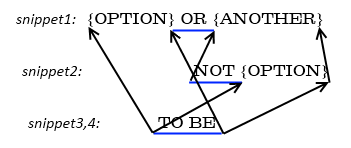
When the Replace function is called to replace a token with a new string, FastReplacer does not modify existing text. Instead, it keeps track of the position in the original text where the token should be cut out and the new string inserted. Next time the Replace function is called, it will do the same on the original text and in the new strings that were previously inserted. That creates a directed acyclic graph where every node (called FastReplacerSnippet) represents a string with information where it should be inserted in its parent text, and with an array of child nodes that should be inserted in that string.
Every replace operation takes O(log n) time to find the matching token (covered in the previous chapter) and O(1) to insert a new node in the data structure.
Generating the final string takes O(m) time because there is only one pass through the data structure to recursively collect all the parts that need to be concatenated.
Sample 1
For example, in the string “My {pet} likes {food}.”, if token “{pet}” is replaced with “tortoise”, the following data structure will be created:
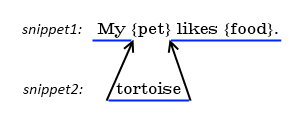
The final text will be composed by concatenating the text parts “My ”, “tortoise”, and “ likes {food}.”.
Sample 2
A more complex example is the text “{OPTION} OR {ANOTHER}”. If the token “{ANOTHER}” is replaced with “NOT {OPTION}”, then the token “{OPTION}” replaced with “TO BE”, we will get the following structure:
Constraints
When snippets of text are inserted, tokens are searched in every snippet separately. Tokens in every snippet must be properly formatted. A token cannot start in one snippet then end in another.
For example, you cannot insert a text that contains only the beginning of a token (e.g., “Hello {”) then append a text with the end of the token (e.g., “USERNAME}.”). Each of these function calls would fail because the token in each text is not properly formatted.
To ensure maximal consistency, FastReplacer will throw an exception if the inserted text contains an improperly formatted token.
Fast Token Replacement in C#的更多相关文章
- Cheatsheet: 2013 09.01 ~ 09.09
.NET Multi Threaded WebScraping in CSharpDotNetTech .NET Asynchronous Patterns An Overview of Projec ...
- 一)如何开始 ehcache ?
官网地址 http://www.ehcache.org/ 从哪开始 第一步优先下载 http://www.ehcache.org/downloads/ 下载 Ehcache 2.10.0 .tar.g ...
- 如何使用VS在SharePont 2013中插入ashx文件
http://www.lifeonplanetgroove.com/adding-and-deploying-generic-handlers-ashx-to-a-sharepoint-2010-vi ...
- ExtJS笔记 Form
A Form Panel is nothing more than a basic Panel with form handling abilities added. Form Panels can ...
- 教你如何用AST语法树对代码“动手脚”
个推安卓工程师,负责公司移动端项目的架构和开发,主导移动端日志管理平台系统架构和开发工作,熟悉前后端的技术线,参与个推SDK主要业务研发工作,善于解决项目中遇到的痛点问题. 作为程序猿,每天都在写代码 ...
- sql改写优化:简单规则重组实现
我们知道sql执行是一个复杂的过程,从sql到逻辑计划,到物理计划,规则重组,优化,执行引擎,都是很复杂的.尤其是优化一节,更是内容繁多.那么,是否我们本篇要来讨论这个问题呢?答案是否定的,我们只特定 ...
- NuGet在创建pack时提示”The replacement token 'author' has no value“问题解决
在创建pack时出现了“The replacement token 'author' has no value”的错误提示. 解决方法: 1.可能程序没生成过,在解决方案上重新生成解决方案,注意Deb ...
- Android学习笔记之Fast Json的使用
PS:最近这两天发现了Fast Json 感觉实在是强大.. 学习内容: 1.什么是Fast Json 2.如何使用Fast Json 3.Fast Json的相关原理 4.Fast Json的优势, ...
- JSON Web Token
What is JSON Web Token? JSON Web Token (JWT) is an open standard (RFC 7519) that defines a compact a ...
随机推荐
- STL 源代码分析 算法 stl_algo.h -- binary_search
本文为senlie原创.转载请保留此地址:http://blog.csdn.net/zhengsenlie binary_search -------------------------------- ...
- 用python 爬取网页图片
import re import string import sys import os import urllib url="http://tieba.baidu.com/p/252129 ...
- datatables表格
datatables表格 并不是所有的后台开发都有美工和前端工程师来配合做页面,为了显示数据并有一定的美感,jQuery的DataTables插件对于像我这样的前端菜鸟来说真是雪中送炭,当然对于专业的 ...
- PE文件结构(五岁以下儿童)基地搬迁
PE文件结构(五岁以下儿童) 參考 书:<加密与解密> 视频:小甲鱼 解密系列 视频 基址重定位 链接器生成一个PE文件时,它会如果程序被装入时使用的默认ImageBase基地址(VC默认 ...
- Java 多线程之内存一致性错误
当不同的线程针对相同的数据却读到了不同的值时就发生了内存一致性错误.内存一致性错误的原因是非常复杂的.幸运的是我们程序员不需要详细的理解这些原因,我们需要做的事情就是使用策略来规避这些. 避免内存一致 ...
- Java中“==”和equals()方法
这是在Thinking in Java中看到的. 第一个程序 public class Exponents { public static void main(String []args){ Inte ...
- [译]内存中的Java数组是怎么样的
(文章翻译自What does a Java array look like in memory?) Java中的数组存储了两个中的一个类型:原始类型的类或则是引用类型(比如指针) 当一个对象通过Ne ...
- Extjs中GridPanel的各个属性与方法
1.Ext.grid.GridPanel 主要配置项: store:表格的数据集 columns:表格列模式的配置数组,可自动创建ColumnModel列模式 autoExpandColumn:自动充 ...
- 几乎没用到过的css 样式
1. :focus 选择器用于选取获得焦点的元素. 案例:http://www.w3school.com.cn/tiy/t.asp?f=css_sel_focus 2. clearfix清除浮动闭合 ...
- 手机新闻网站,掌上移动新闻,手机报client,jQuery Mobile手机新闻网站,手机新闻网站demo,新闻阅读器开发
我们坐在地铁,经常来查看新浪手机新闻,腾讯新闻.或者刷微信看新闻更多功能.你有没有想过如何实现这些目标.移动互联网,更活泼. 因为HTML5到,jQuery Moblie到.今天我用jqm为了给你一个 ...