
View Controller Transition:京东加购物车效果
冬天已经过去了,阳光越来越暖洋洋的了。还记得上学的时候,老师总说“春天是播种的季节”,而我还没在朋友圈许下什么愿望。一年了,不敢想象回首还能看到点什么,所以勇往直前。当被俗世所扰,你是否也丢失了自己,忘却了理想。
欲做精金美玉的人品,定从烈火中煅来;思立掀天揭地的事功,须向薄冰上履过。
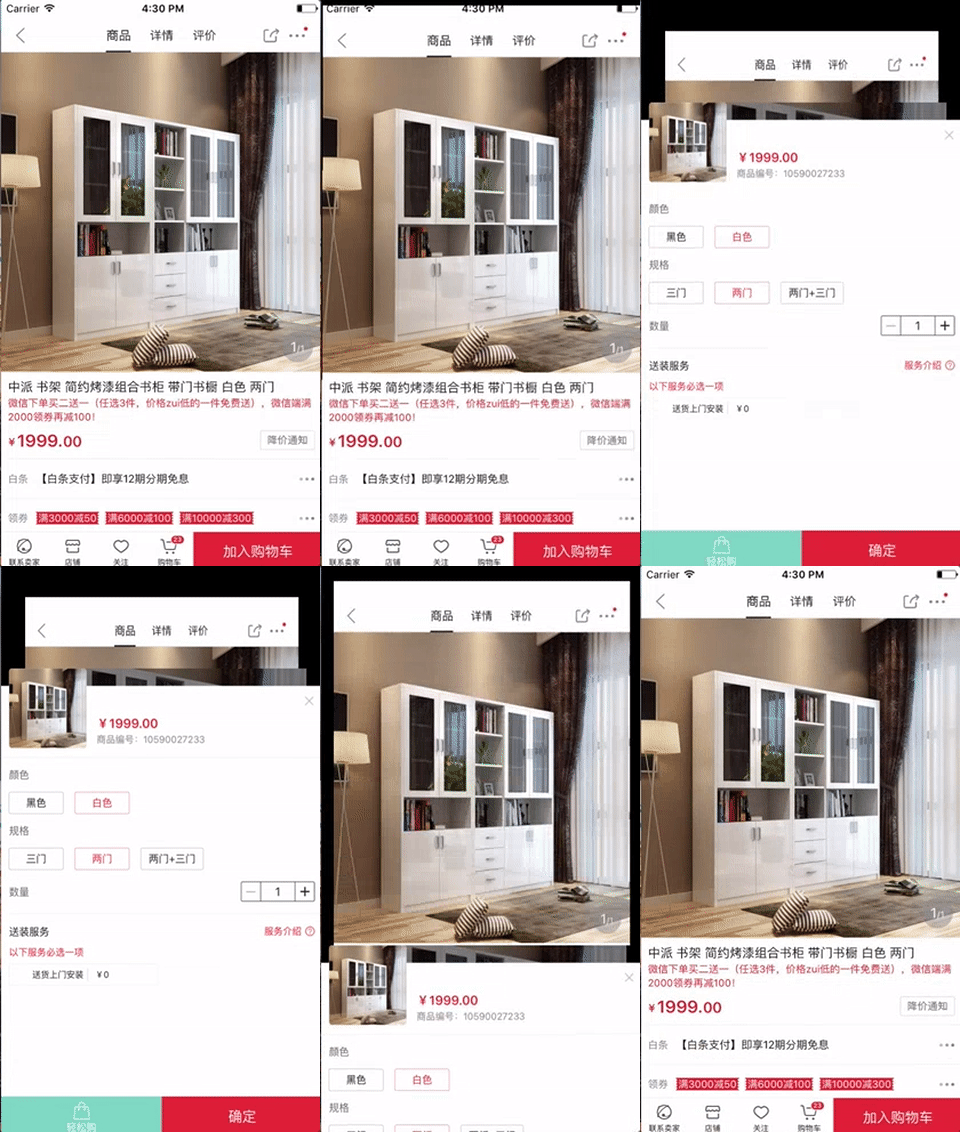
这篇博客中,我们主要来叙述一下上述动画效果的实现方案。主要涉及 View Controller 转场动画的知识。
<a href="http://www.iddev.cn">我搭建了个人站点,那里有更多内容,请多多指教。点我哦!!!</a>
Presenting a View Controller
显示一个 View Controller 主要有一下几种方式:
- 使用 segues 自动显示 View Controller;
- 使用 showViewController:sender: 和 showDetailViewController:sender: 方法显示 View Controller;
- 调用 presentViewController:animated:completion: 方法依模态形式显示 View Controller
通过上述方式,我们可以将一个 View Controller 显示出来,而对于显示地形式,我们可以使用 UIKit 中预定义的形式,也可以自定义(即自定义转场动画)。
Customizing the Transition Animations
自定义转场动画中,主要包含以下几个组件:
- Presenting View Controller(正在显示的 View Controller)
- Animator(动画管理者)
- Presented View Controller(要显示的 View Controller)
- Transitioning Delegate Object(转场代理,用来提供 Animator 对象)
实现自定义转场动画,通常按照以下几个步骤来完成
- 创建 Presented View Controller;
- 创建 Animator;
- 设置 Presented View Controller 的 transitioningDelegate 属性,并实现 UIViewControllerTransitioningDelegate 提供 Animator 对象;
- 在 Presenting View Controller 中调用 presentViewController:animated:completion: 显示 Presented View Controller;
Presented View Controller
这里,我们将 Presented View Controller 本身作为其转场代理,你也可以使用单独的代理对象。
class PresentedViewController: UIViewController {

    let imageView = UIImageView(image: UIImage(named: "jd_add.jpg"))

    override func viewDidLoad() {

        super.viewDidLoad()

        // 1.设置 transitioningDelegate(转场代理)

        transitioningDelegate = self

        modalPresentationStyle = .custom

        view.addSubview(imageView)

    }

    override func viewDidLayoutSubviews() {

        super.viewDidLayoutSubviews()

        imageView.frame = CGRect(x: 0, y: 120, width: UIScreen.main.bounds.width, height: UIScreen.main.bounds.height - 120)

    }

    override func touchesBegan(_ touches: Set, with event: UIEvent?) {

        self.dismiss(animated: true, completion: nil)

    }

}
Animator
Animator 作为转场动画的管理者,主要负责 Presenting 和 Dismissing 动画效果。
动画时长
/// 转场动画时长

func transitionDuration(using transitionContext: UIViewControllerContextTransitioning?) -> TimeInterval {

    return TimeInterval(0.5)

}
执行动画
/// 执行转场动画

func animateTransition(using transitionContext: UIViewControllerContextTransitioning) {

    switch type {

    case .Present:

        present(transitionContext: transitionContext)

    case .Dismiss:

        dismiss(transitionContext: transitionContext)

    }

}
Presenting 动画
/// Presenting 动画

func present(transitionContext: UIViewControllerContextTransitioning) {

    /** 1.从转场上下文中取出 Presenting/Pressented View Controller 及容器视图 */

    guard let presentingVC = transitionContext.viewController(forKey: .from) as? ViewController else {

        return

    }

    guard let presentedVC = transitionContext.viewController(forKey: .to) as? PresentedViewController else {

        return

    }

    let containerView = transitionContext.containerView

    /** 2.设置 Presenting View Controller 所显示内容的属性 */

    // 对 presentingVC 的视图内容截屏,用于 presentedVC 显示出来时的背景

    guard let presentingVCViewSnapshot = presentingVC.view.snapshotView(afterScreenUpdates: false) else {

        return

    }

    // 隐藏 presentingVC 的 view,并将其截屏添加到 containerView 中

    presentingVC.view.isHidden = true

    containerView.addSubview(presentingVCViewSnapshot)

    // 改变 presentingVCViewSnapshot 的焦点

    presentingVCViewSnapshot.layer.anchorPoint = CGPoint(x: 0.5, y: 1)

    // 更新 presentingVCViewSnapshot 的 frame

    presentingVCViewSnapshot.frame = presentingVC.view.frame

    /** 3.设置 Presented View Controller 所显示内容的属性 */

    presentedVC.view.frame = CGRect(x: 0, y: containerView.bounds.height, width: containerView.bounds.width, height: containerView.bounds.height)

    containerView.addSubview(presentedVC.view)

    /** 4.设置 Presenting 转场动画 */

    UIView.animate(withDuration: transitionDuration(using: transitionContext), animations: {

        // 改变 presentingVCViewSnapshot 的 layer 的 transform,使其绕 X轴 旋转,并改变大小

        presentingVCViewSnapshot.layer.transform.m34 = -1 / 100.0

        presentingVCViewSnapshot.layer.transform = presentingVCViewSnapshot.layer.transform = CATransform3DConcat(CATransform3DMakeRotation(CGFloat(0.1), 1, 0, 0), CATransform3DMakeScale(0.85, 0.95, 1))

        // 改变 presentedVC 的 view 的 transform

        presentedVC.view.transform = CGAffineTransform(translationX: 0, y: -containerView.bounds.height)

    }) { (finished) in

        // 告知 UIKit Presenting 转场动画结束(很重要)

        transitionContext.completeTransition(true)

    }

}
Dismissing 动画
/// Dismissing 动画

func dismiss(transitionContext: UIViewControllerContextTransitioning) {

    /** 1.从转场上下文中取出容器视图、Presenting/Pressented View Controller 及其 view 的截屏 */

    let containerView = transitionContext.containerView

    guard let presentingVC = transitionContext.viewController(forKey: .from) as? PresentedViewController else {

        return

    }

    guard let presentedVC = transitionContext.viewController(forKey: .to) as? ViewController else {

        return

    }

    let subviewsCount = containerView.subviews.count

    let presentedVCViewSnapshot = containerView.subviews[subviewsCount - 2]

    /** 2.设置 Dismissing 转场动画 */

    UIView.animate(withDuration: transitionDuration(using: transitionContext), animations: {

        // 将 presentedVCViewSnapshot 的 transform 恢复到初始值

        presentedVCViewSnapshot.layer.transform = CATransform3DIdentity

        // 将 presentedVC 的 view 的 transform 恢复到初始值

        presentingVC.view.transform = CGAffineTransform.identity

    }) { (finished) in

        // 使 presentedVC 的 view 显示出来,并隐藏其截屏

        presentedVC.view.isHidden = false

        presentedVCViewSnapshot.removeFromSuperview()

        // 告知 UIKit Dismissing 转场动画结束(很重要)

        transitionContext.completeTransition(true)

    }

}
Transitioning Delegate
// MARK: - 2.实现 UIViewControllerTransitioningDelegate 提供 Animator

extension PresentedViewController: UIViewControllerTransitioningDelegate {

    /// Present

    func animationController(forPresented presented: UIViewController, presenting: UIViewController, source: UIViewController) -> UIViewControllerAnimatedTransitioning? {

        return MyAnimator(type: .Present)

    }

    /// Dismiss

    func animationController(forDismissed dismissed: UIViewController) -> UIViewControllerAnimatedTransitioning? {

        return MyAnimator(type: .Dismiss)

    }

}
Present
@IBAction func present() {

    let presentedVC = PresentedViewController()

    present(presentedVC, animated: true, completion: nil)

}
关于 View Controller Transition 就介绍到这里,你应该熟悉了其使用方法,至于博客中的动画效果,我想就没办法深究了,这是一个花费时间苦差事。
<a href="http://www.iddev.cn">我搭建了个人站点,那里有更多内容,请多多指教。点我哦!!!</a>
View Controller Transition:京东加购物车效果的更多相关文章
- iOS7之定制View Controller切换效果
在iOS5和iOS6前,View Controller的切换主要有4种: 1. Push/Pop,NavigationViewController常干的事儿 2. Tab,TabViewControl ...
- UIStoryboard类介绍(如何从Storyboard中加载View Controller)
如何从Storyboard中加载View Controller? 1. 首先了解下UIStoryboard类: @class UIViewController; @interface UIStoryb ...
- js实现仿购物车加减效果
代码如下: <!DOCTYPE html> <html> <head> <meta charset="UTF-8"> <tit ...
- 【IOS笔记】View Controller Basics
View Controller Basics 视图控制器基础 Apps running on iOS–based devices have a limited amount of screen s ...
- 自己定义View Controller转换动画
原文链接 : Introduction to Custom View Controller Transitions and Animations 原文作者 : joyce echessa 译文出自 : ...
- Android -- 贝塞尔二阶实现饿了么加入购物车效果
1,上周我们实现了简单的三阶贝塞尔曲线效果实例,今天是使用二阶贝塞尔曲线加动画实现的加入购物车效果,在码代码过程中出现了些问题,过一下和大家来探讨探讨,先看一下效果图 2,从上面的效果来看我们基本上可 ...
- Swift:超炫的View Controller切换动画
匿名社交应用Secret的开发者开发了一款叫做Ping的应用,用户可以他们感兴趣的话题的推送. Ping有一个很炫的东西,就是主界面和之间切换的动画做的非常的好.每次看到一个非常炫的动画,都不由得会想 ...
- presenting view controller
Present ViewController详解 Present ViewController Modally 一.主要用途 弹出模态ViewController是IOS变成中很有用的一个技术,UIK ...
- View Controller Programming Guide for iOS---(四)---Creating Custom Content View Controllers
Creating Custom Content View Controllers 创建自定义内容视图控制器 Custom content view controllers are the heart ...
随机推荐
- 安卓 listview与arrayadapter
今天有感于群里讨论的一个问题,很简单,但是问题还真是需要仔细看一下 问题:定义了一个最简单的arrayadapter,和listview结合使用,灭个item就显示个最简单的textView,一共6个 ...
- ashx文件中使用session提示“未将对象引用设置到对象的实例”
using System;using System.Collections.Generic;using System.Linq;using System.Web;using System.Data;u ...
- UVa 10226 - Hardwood Species
题目大意:给出n棵树(有重复),统计每种树出现的频率.使用STL的map. #include <cstdio> #include <iostream> #include < ...
- jsp分页的不同实现方法
一.代码实现分页 定义四个分页变量 pageNow 表示第几页 该变量是由用户来决定的,因此是变化的 pageCount 表示总共有多少页,该变量是计算出来的, ---考虑算法 pag ...
- Python3基础 使用clear() 清空一个字典
镇场诗: 诚听如来语,顿舍世间名与利.愿做地藏徒,广演是经阎浮提. 愿尽吾所学,成就一良心博客.愿诸后来人,重现智慧清净体.-------------------------------------- ...
- 【USB-HID在STM32上的实现】-00-开始
前一段时间参照网上的例程搞了一阵STM32F103的HID程序,改了改例子实现了一个摇杆的外设控制功能.1通道开关量输入,2通道模拟量输入. 之后有空了总结一下,防止忘记.
- WGCNA算法研究笔记
转自:http://www.gogoqq.com/ASPX/8390905/JournalContent/1303140588.aspx 研究了近半年的算法,记录下来给自己一个交代,也应该是考G前地最 ...
- 九 Android基本知识介绍
1.Package Package,中文翻译过来是包的意思.安卓系统的程序是以apk作为扩展名的,.apk就是android package的简写,package也就是这个app的唯一标识,其实这里的 ...
- sae中thinkphp使用smarty
因为最近在学thinkphp跟着做一个小商城. 没有使用thinkphp自带的think引擎,使用的是smarty引擎. 在sea中使用的时候出现了问题.已经是前几天的事了,问题图片没保存下来. 在网 ...
- iOS 错误 之 Potential leak of an object stored into 'cs'
存储到 “cs”的对象存在潜在的泄露