
c#之GDI简单实现代码及其实例
作业:文档形式
3到5页理解
1.理解
2.源代码解释(1到2页)
3.实现效果
项目地址: https://github.com/zhiyishou/polyer
Demo:https://zhiyishou.github.io/Polyer
[图形学]Delaunay三角剖分算法附C++实现
https://blog.csdn.net/qq_31804159/article/details/81709423
算法丨带内外边界的三角剖分算法(Delaunay)
https://blog.csdn.net/npu2017302288/article/details/80460552
三角剖分算法(delaunay)
https://www.cnblogs.com/zhiyishou/p/4430017.html
GDI
https://www.cnblogs.com/stg609/archive/2008/03/16/1108333.html
1.pen类创建画笔对象:
1) 新建一个Windows应用程序,适当加宽窗体宽度。然后切换到代码方式,添加名称空间引用:
using System.Drawing.Drawing2D;
2) 添加Form1_Paint事件代码
3)在Form1_Load中手动添加paint事件:
this.Paint += new PaintEventHandler(Form1_Paint);
 using System;

 using System.Collections.Generic;

 using System.ComponentModel;

 using System.Data;

 using System.Drawing;

 using System.Drawing.Drawing2D;

 using System.Linq;

 using System.Text;

 using System.Threading.Tasks;

 using System.Windows.Forms;

 namespace drawpicture

 {

     public partial class Form1 : Form

     {

         public Form1()

         {

             InitializeComponent();

         }

         public void Form1_Paint(object sender, PaintEventArgs e)

         {

             Graphics g = e.Graphics; //创建画板,这里的画板是由Form提供的.

             Pen pen = new Pen(Color.Blue, 10.5f);

             g.DrawString("蓝色,宽度为10.5", this.Font,

                                new SolidBrush(Color.Black), , );

             g.DrawLine(pen, new Point(, ), new Point(, ));

             pen.Width = ;

             pen.Color = Color.Red;

             g.DrawString("红色,宽度为2", this.Font,

                                new SolidBrush(Color.Black), , );

             g.DrawLine(pen, new Point(, ), new Point(, ));

             pen.StartCap = LineCap.Flat;

             pen.EndCap = LineCap.ArrowAnchor;

             pen.Width = ;

             g.DrawString("红色箭头线", this.Font,

                                                        new SolidBrush(Color.Black), , );

             g.DrawLine(pen, new Point(, ), new Point(, ));

             pen.DashStyle = DashStyle.Custom;

             pen.DashPattern = new float[] { ,  };

             pen.Width = ;

             pen.EndCap = LineCap.NoAnchor;

             g.DrawString("自定义虚线", this.Font,

                                                         new SolidBrush(Color.Black), , );

             g.DrawLine(pen, new Point(, ), new Point(, ));

             pen.DashStyle = DashStyle.Dot;

             g.DrawString("点划线", this.Font, new SolidBrush(Color.Black), , );

             g.DrawLine(pen, new Point(, ), new Point(, ));

         }

         private void contextMenuStrip1_Opening(object sender, CancelEventArgs e)

         {

         }

         private void Form1_Load(object sender, EventArgs e)

         {

             this.Paint += new PaintEventHandler(Form1_Paint);

         }

         private void button1_Click(object sender, EventArgs e)

         {

         }

     }

 }
整个源码
运行情况:
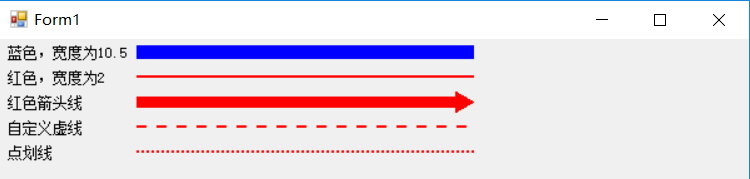
2.画刷
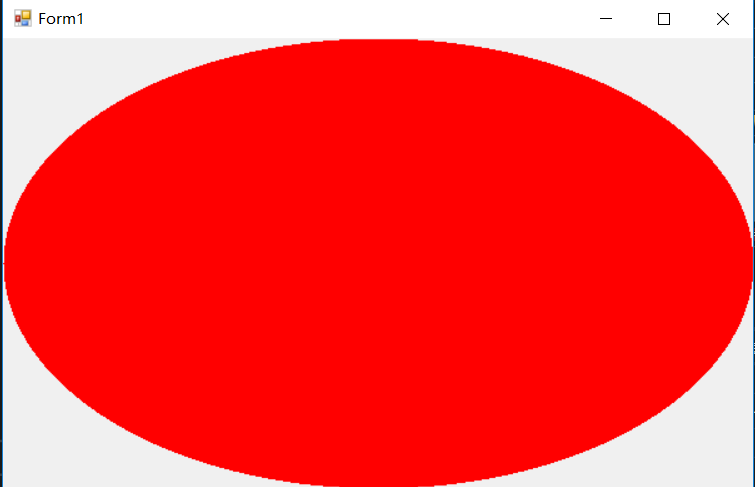
public void Form1_Paint(object sender, PaintEventArgs e)
{
Graphics g = e.Graphics;
SolidBrush myBrush = new SolidBrush(Color.Red);
g.FillEllipse(myBrush, this.ClientRectangle);
}
c#之GDI简单实现代码及其实例的更多相关文章
- 一个简单的Android小实例
原文:一个简单的Android小实例 一.配置环境 1.下载intellij idea15 2.安装Android SDK,通过Android SDK管理器安装或卸载Android平台 3.安装J ...
- C/C++代码检视实例
相关文章链接如下: 微软过桥问题与测试人员素养 等价类分法 新解 测试用例设计中的NP难题 90%程序员写不出无BUG的二分查找程序? C/C++代码检视要点 4.1 代码检视 ...
- Linux下简单的socket通信实例
Linux下简单的socket通信实例 If you spend too much time thinking about a thing, you’ll never get it done. —Br ...
- PureMVC和Unity3D的UGUI制作一个简单的员工管理系统实例
前言: 1.关于PureMVC: MVC框架在很多项目当中拥有广泛的应用,很多时候做项目前人开坑开了一半就消失了,后人为了填补各种的坑就遭殃的不得了.嘛,程序猿大家都不喜欢像文案策划一样组织文字写东西 ...
- Hibernate入门2.简单的项目开发实例
Hibernate入门2.简单的项目开发实例 这一节通过一个简单的项目学习Hibernate项目的配置 代码下载 : 链接: http://pan.baidu.com/s/1zlgjl 密码: p34 ...
- html简单标签代码
html简单标签代码demo <!DOCTYPE html PUBLIC "-//W3C//DTD XHTML 1.0 Transitional//EN" "ht ...
- Lucene.net站内搜索—3、最简单搜索引擎代码
目录 Lucene.net站内搜索—1.SEO优化 Lucene.net站内搜索—2.Lucene.Net简介和分词Lucene.net站内搜索—3.最简单搜索引擎代码Lucene.net站内搜索—4 ...
- JS Map 和 List 的简单实现代码
javascript中是没有map和list 结构的. 本篇文章是对在JS中Map和List的简单实现代码进行了详细的分析介绍,需要的朋友参考下 代码如下: /* * MAP对象,实现MAP功能 * ...
- python网页请求urllib2模块简单封装代码
这篇文章主要分享一个python网页请求模块urllib2模块的简单封装代码. 原文转自:http://www.jbxue.com/article/16585.html 对python网页请求模块ur ...
随机推荐
- conda 添加bioconda源,创建/删除/重命名环境
1.conda安装 在https://repo.continuum.io/miniconda/选择conda版本 wget "https://repo.continuum.io/archiv ...
- ZROI2018提高day5t3
传送门 分析我们可以根据性质将这个序列构造成一个环:0,a[1~n],0,a[n~1] 这中间的0是为了起间隔作用的. 我们又知道b[i]=a[i-1]^a[i+1] c[i]=b[i-1]^b[i+ ...
- java 中一个char包含几个字节
背景 char包含几个字节可能记得在上学的时候书上写的是2个字节,一直没有深究,今天我们来探究一下到底一个char多少个字节? Char char在设计之初的时候被用来存储字符,可是世界上有那 ...
- Loading Large Bitmaps Efficiently
有效地加载大位图文件-Loading Large Bitmaps Efficiently 图像有各种不同的形状和大小.在许多情况下,他们往往比一个典型应用程序的用户界面(UI)所需要的资源更大.例如, ...
- Cookies的两种存取方式
我们在使用webview开发时,少不了和cookie打交道,在网页端我这使用的是asp.net开发的,安卓下的cookie和windows平台下还是有些不同的,后来看了看,原来有两种cookie的存取 ...
- passing parameter to an event handler [stackoverflow]
Q: i want to pass my List<string> as parameter using my event public event EventHandler _newFi ...
- git常用命令(转)
git常用命令: git init //初始化本地git环境 git clone XXX//克隆一份代码到本地仓库 git pull //把远程库的代码更新到工作台 git pull --rebase ...
- sqlite3使用备忘
执行sqlite3进入sqlite3环境: $ sqlite3 SQLite version -- :: Enter ".help" for usage hints. Connec ...
- Ubuntu 如何为 XMind 添加快速启动方式和图标
目录 Ubuntu 如何为 XMind 添加快速启动方式和图标 Ubuntu 如何为 XMind 添加快速启动方式和图标 按照教程Ubuntu16.04LTS安装XMind8并创建运行图标进行Xmin ...
- Python函数的冒泡排序、递归以及装饰器
函数的冒泡排序: 本质是,让元素换位置,逐个比较最终排序. 例1:实现a1,a2值互换: a1 = 123 a2 = 456 temp = a1 a1 = a2 a2 = temp print(a1) ...