
ubuntu 16.04 jenkins pipline的实现 最终docker启动服务
准备工作:两台虚拟机A:192.168.1.60 B:192.168.1.61 C:一个存放代码的代码库(github)
A:jenkins git docker openssh-server(ssh)
B:docker openssh-server(ssh)
A主机jenkins用户的公钥放到github上,A主机jenkins用户可以免密码登陆B的普通用户
************************************************************************************************************
先说思路,自己写的太乱了,有点看不下去了:
建四个job,建一个pipline把四个job连起来。
test1是通过python基础镜像打成里边包含服务的镜像并上传docker hub。
test2是通过ssh进入目标服务器,把test1上传的镜像拉去下来。根据镜像生成容器,容器启动同时启动服务。
test3,test4没用。
*************************************************************************************************************
jenkins首先要下载pipline的plugin,在系统管理-->管理插件-->可选插件 搜索Build Pipeline Plugin
在jenkins上建一条pipline:
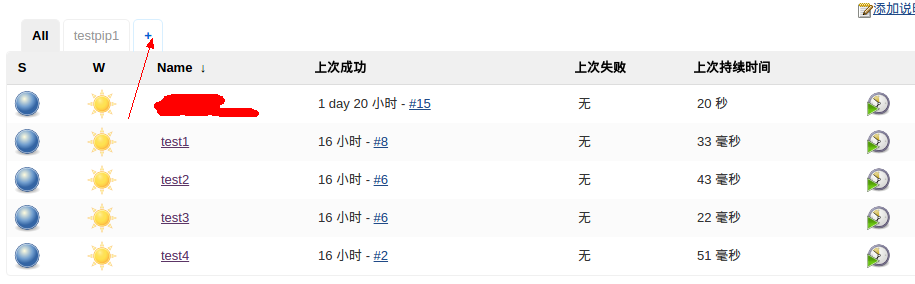
先创建4个job:主界面-->新建-->然后选第一个(构建一个自由风格的软件项目)。重复四次,分别命名test1,test2,test3,test4
在新建一个pipline:pipline插件下载完成后点击下图中的加号会出现 Build PipLine View这个选项,名字随便(testpipline1)创建。
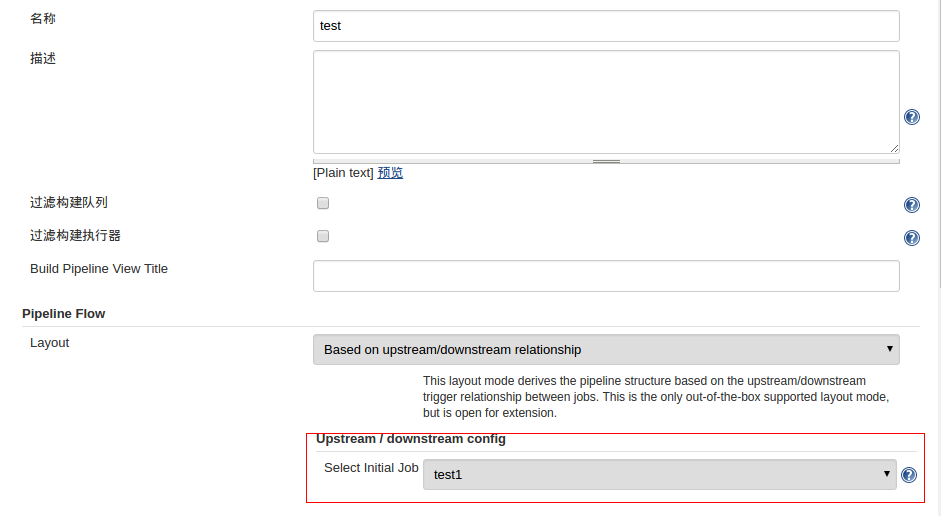
创建完成后会出现配置的页面:最重要的就是把Select Initial Job这个选项设置好,设成test1。其他的设置也能看懂随便设置。
现在开始配置job。
打开test1:点击test1-->点击配置(Configure)
github插件安装完成后,在General中会有GitHub project,这个配置只是在外边的时候能直接连到github地址。对于配置没什么大用,但是还是设置上。https://github.com/badboyf/PyService
源码管理的部分:选git,url如果配置错误下面会有红字。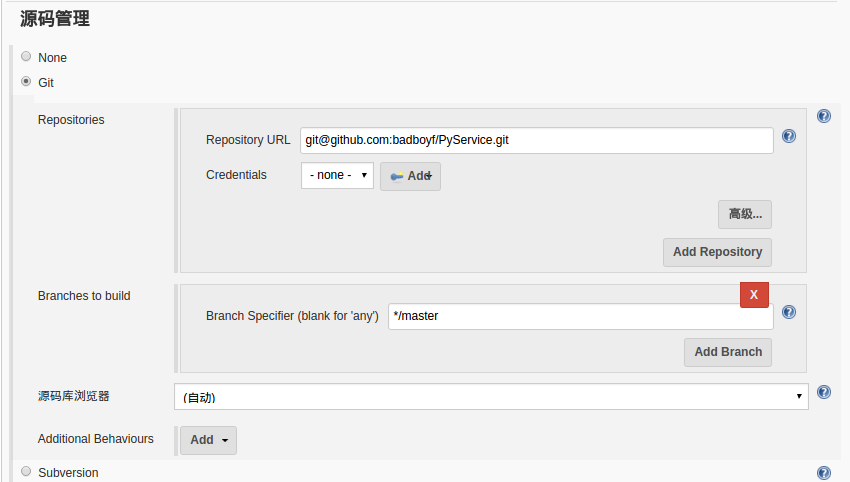
构建触发器:选择github上什么条件触发构建,因为自己的这个是内网,如果到时候换成服务器ip,当push的时候就会触发这个构建了。
构建:
在构建下选择excecute shell,这里执行的shell是服务器上的脚本,可以写绝对路径,如果是相对路径,现在的路径在jenkins的家目录,也就是/var/lib/jenkins
构建后操作:这个意思是当test1构建完成后下一个job是test2。

但是现在并不能触发。需要在test2的。需要在test2的<触发构建器> --> Build after other projects are built 填上test1。test2,test3,test4配置类似。功能很多,慢慢研究。
现在开始看看脚本。
与docker有关的在jenkins家目录建了一个docker目录。下面是docker目录里的东西。
我写的是一个python项目(自己瞎看没多长时间,代码写的还特别糟)。首先用打了一个docker的python的flask的基础镜像。这步是手动完成的,需要自己先打出来。
#Dockerfile
FROM ubuntu:16.04

ADD sources.list /etc/apt/sources.list

RUN mkdir /workspace

RUN mkdir ~/.pip

ADD pip.conf ~/.pip/

RUN apt-get update

RUN apt-get install python-pip libmysqlclient-dev libmysqld-dev python-dev python-setuptools -y

RUN pip install MySQL-python

RUN pip install --upgrade pip

RUN pip install SQLAlchemy

RUN pip install Flask
Dockerfile中包含的两个文件:
sources.list用了阿里的源:
# deb cdrom:[Ubuntu 16.04 LTS _Xenial Xerus_ - Release amd64 (20160420.1)]/ xenial main restricted

deb-src http://archive.ubuntu.com/ubuntu xenial main restricted #Added by software-properties

deb http://mirrors.aliyun.com/ubuntu/ xenial main restricted

deb-src http://mirrors.aliyun.com/ubuntu/ xenial main restricted multiverse universe #Added by software-properties

deb http://mirrors.aliyun.com/ubuntu/ xenial-updates main restricted

deb-src http://mirrors.aliyun.com/ubuntu/ xenial-updates main restricted multiverse universe #Added by software-properties

deb http://mirrors.aliyun.com/ubuntu/ xenial universe

deb http://mirrors.aliyun.com/ubuntu/ xenial-updates universe

deb http://mirrors.aliyun.com/ubuntu/ xenial multiverse

deb http://mirrors.aliyun.com/ubuntu/ xenial-updates multiverse

deb http://mirrors.aliyun.com/ubuntu/ xenial-backports main restricted universe multiverse

deb-src http://mirrors.aliyun.com/ubuntu/ xenial-backports main restricted universe multiverse #Added by software-properties

deb http://archive.canonical.com/ubuntu xenial partner

deb-src http://archive.canonical.com/ubuntu xenial partner

deb http://mirrors.aliyun.com/ubuntu/ xenial-security main restricted

deb-src http://mirrors.aliyun.com/ubuntu/ xenial-security main restricted multiverse universe #Added by software-properties

deb http://mirrors.aliyun.com/ubuntu/ xenial-security universe

deb http://mirrors.aliyun.com/ubuntu/ xenial-security multiverse
pip.conf 从国内下载
[global]

index-url = https://pypi.tuna.tsinghua.edu.cn/simple

[install]

trusted-host=mirrors.aliyun.com
这里遇到的问题就是我命名已经安装了virtualenv,但是放到上面就是启动不起来,只能在容器中重新下载一边全局的模块。
在Dockerfile的目录执行
$ docker build -t badboyf/python-flask . #打出一个名为badboyf/python-flask的镜像
这个镜像可以放在Docker hub上,基镜像吗,以后每次升级可定需要在这个基础上打镜像的。
基础镜像有了,开始打项目的镜像
#Dockerfile
FROM badboyf/python-flask

ADD PyService /workspace/PyService

EXPOSE
jenkins上配置的执行的脚本放在了execute目录下。
test1执行的脚本:build_image.sh
#!/bin/bash

cd ~/docker

cp ~/workspace/PyService/ ./ -R

docker build -t badboyf/py .

docker login -u <username> -p <password>

docker push badboyf/py

docker rmi badboyf/py
docker logout
test2执行的脚本:run_docker.sh
#!/bin/bash

ssh fzk@192.168.1.61

docker pull badboyf/py

docker run -d -p : badboyf/py python/workspace/PyService/src/py_service/serv.py
这里test3,test4没用,建了这两个只是为了测试一下pipline怎么用。
还有,jenkins的主配置文件在家目录的config.xml。
<au.com.centrumsystems.hudson.plugin.buildpipeline.BuildPipelineView plugin="build-pipeline-plugin@1.5.6">
..........
</au.com.centrumsystems.hudson.plugin.buildpipeline.BuildPipelineView plugin="build-pipeline-plugin@1.5.6">
这两个标签就是一个pipline。可以手动修改这个文件,重启一下jenkins,就会看到了自己手动写的。前提是得写对。自己建的job在jobs目录里。可以手动复制jobs里的一个项目,重命名为其他的。通过修改这几个文件,可以实现完全自动化的pipline流程,从什么也没有到自动生成job、pipline。想想就刺激。
ubuntu 16.04 jenkins pipline的实现 最终docker启动服务的更多相关文章
- Ubuntu 16.04下配置 Nginx 与 Node.js 以及服务的部署
第一步:安装nginx sudo apt-get update sudo apt-get install nginx 如果遇到依赖问题,尝试执行sudo apt-get -f install命令 第二 ...
- Ubuntu 16.04 LTS 64位系统 安装Docker
本文开发环境为Ubuntu 16.04 LTS 64位系统,通过apt的docker官方源安装最新的Docker CE(Community Edition),即Docker社区版,是开发人员和小型团队 ...
- 菜鸟在ubuntu 16.04下制作am335x的SD卡启动盘反思
以前只在消费电子平台android和rtos上做软件,每次都是公司的环境现成的,根本不用去想启动加载那部分 的事情,最近在做一个工控机的项目时,接触到了TI的arm335x系列的平台,才发现在嵌入式的 ...
- 解决Ubuntu 16.04 上Android Studio2.3上面运行APP时提示DELETE_FAILED_INTERNAL_ERROR Error while Installing APKs的问题
本人工作环境:Ubuntu 16.04 LTS + Android Studio 2.3 AVD启动之后,运行APP,报错提示: DELETE_FAILED_INTERNAL_ERROR Error ...
- Ubuntu 16.04安装docker(2018年最新)
参考https://blog.csdn.net/bingzhongdehuoyan/article/details/79411479 http://www.cnblogs.com/lighten/p/ ...
- ubuntu 16.04 LTS安装jenkins服务器
官方网站:https://jenkins.io/ 这里我们的系统是Ubuntu 16.04,所以选择Ubuntu的版本,另外,为什么选择2.60.3,而不是新的2.77?因为2.60.3是LTS版本, ...
- ubuntu 16.04安装Jenkins
快速安装: sudo wget -q -O - http://pkg.jenkins.io/debian-stable/jenkins.io.key | sudo apt-key add - sudo ...
- 将Ubuntu 15.10升级到Ubuntu 16.04
Ubuntu 16.04 LTS 代号为 Xenial Xerus,其最终版将于 2016 年 4 月 21 日正式发布,Ubuntu16.04 将是非常受欢迎的开源操作系统 Ubuntu 的第 6 ...
- Ubuntu 16.04配置OpenCV 3.1.0 for Java
我们都知道,OpenCV是基于C++的开源计算机视觉库,但是从2.4.4版本开始提供了Java绑定,也就是说,我们也可以使用Java来开发基于OpenCV的计算机视觉应用.目前,最新的版本是3.1.0 ...
随机推荐
- Spark on Intellij IDEA
添加scala插件 如果网络有问题,可以手动下载插件安装包(http://plugins.jetbrains.com/plugin/?id=1347),在上面选择“Install plugin fro ...
- MongoDB启动及用户名密码设置
1.服务启动 下载后的安装步骤,请参见mongoDB安装详细教程 启动服务NET START MongoDB 关闭服务NET STOP MongoDB 启动客户端mongo MongoDB shell ...
- MQTT--入门
一.简述 MQTT(Message Queuing Telemetry Transport,消息队列遥测传输协议),是一种基于发布/订阅(publish/subscribe)模式的“轻量级”通讯协议 ...
- 二维树状数组的区间加减及查询 tyvj 1716 上帝造题的七分钟
详细解释见小结.http://blog.csdn.net/zmx354/article/details/31740985 #include <algorithm> #include < ...
- oracle中can not set解决方法
原因:set autotrace on和set trimspool on在pl\sql中使用不了 解决方法:在window环境中,使用cmd命令,sqlplus user_name/password@ ...
- 调用http接口耗时过长。
利用CRUL命令简单分析请求细节所占用的时间吧 curl -o /dev/null -s -w %{http_code}:%{time_namelookup}:%{time_redirect}:%{t ...
- Unable to VNC onto Centos server remotely
用的好好的vncserver 突然遇到这个错误: [vnc@localhost ~]$ sudo systemctl status vncserver@:1.service -l● vncserver ...
- 从动态获取div高度的问题展开来看
ps 可能篇幅比较长,请大家耐心看看 今天有人在群里问我 动态获取高度怎么获取 我就说jq中的outerHeight. height .innerHeight 原生的height clientH ...
- WPF 员工卡条形码
大家都知道条形码(Barcode)是一种可以由机器识别的特殊编码,在生产.生活中也常常会见到并使用它.条形码的类型和种类很多感兴趣的朋友可以详细了解一下.其中Code 39 可以说是一种最为常见并广泛 ...
- 批处理--执行sql(mysql数据库)
@echo off rem test.sql文件 for %%i in (test.sql) do ( echo excute %%i mysql -u用户名 -p密码 -D数据库名 < %%i ...