
.NET RESTful Web Services入门
很早之前看到过RESTful Web Services,并未在意,也没找相关资料进行学习。今天偶尔有一机会,就找了点资料进行研究,发现RESTful真是“简约而不简单”。下面用示例来说明:
1 项目结构
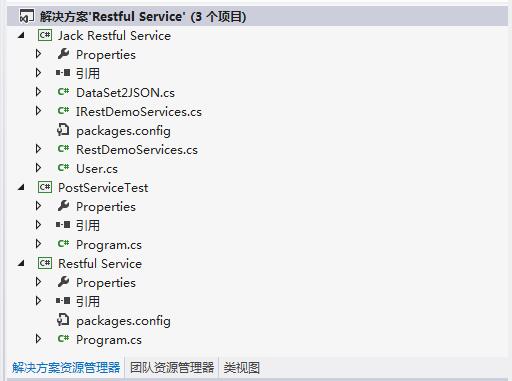
2 REST 服务接口定义
 using System;

 using System.Collections.Generic;

 using System.Linq;

 using System.Text;

 using System.ServiceModel;

 using System.ServiceModel.Web;

 namespace Jack_Restful_Service

 {

     [ServiceContract(Name = "RestfulService",Namespace="http://www.cnblogs.com/isaboy")]

     public interface IRestDemoServices

     {

         [OperationContract]

         [WebGet(UriTemplate = Routing.GetClientRoute, BodyStyle = WebMessageBodyStyle.Bare)]

         string GetClientNameById(string Id);

         [OperationContract]

         [WebGet(UriTemplate = Routing.AddClientRoute, BodyStyle = WebMessageBodyStyle.Bare)]

         string Add(string a, string b);

         //error

         //string Add(int a, int b);

         [OperationContract]

         [WebGet(UriTemplate = Routing.LoginClientRoute, BodyStyle = WebMessageBodyStyle.Bare)]

         string Login(string uname, string upwd);

         //post

         [OperationContract]

         [WebInvoke(RequestFormat = WebMessageFormat.Json,

         ResponseFormat = WebMessageFormat.Json,

         BodyStyle = WebMessageBodyStyle.Bare,

         Method = "POST", UriTemplate = "/Client/UpdateUser/{uname}")]

         User UpdateUser(string uname, User newUser);

     }

     //URI路由

     public static class Routing

     {

         public const string GetClientRoute = "/Client/{id}";

         public const string AddClientRoute = "/Client/{a},{b}";

         //{uname}里面的参数名称要和string Login(string uname, string upwd);一致

         public const string LoginClientRoute = "/Client/{uname}__{upwd}";

     }

 }
3 REST服务接口实现
 using System;

 using System.Collections.Generic;

 using System.Linq;

 using System.Text;

 using System.ServiceModel;

 using System.ServiceModel.Activation;

 namespace Jack_Restful_Service

 {

     [ServiceBehavior(InstanceContextMode = InstanceContextMode.Single,

         ConcurrencyMode = ConcurrencyMode.Single,

         IncludeExceptionDetailInFaults = true,

         Namespace = "http://www.cnblogs.com/isaboy")]

     [AspNetCompatibilityRequirements(RequirementsMode = AspNetCompatibilityRequirementsMode.Allowed)]

     public class RestDemoServices : IRestDemoServices

     {

         //GET

         public string GetClientNameById(string Id)

         {

             string ReturnString = "Your id is: " + Id;

             return ReturnString;

         }

         public string Add(string a, string b)

         {

             int sum = int.Parse(a) + int.Parse(b);

             return sum.ToString();

         }

         public string Login(string uname, string upwd)

         {

             if (uname == "admin" && upwd == "admin")

             {

                 return "success";

             }

             else

             {

                 return "false";

             }

         }

         //POST

         public User UpdateUser(string uname, User newUser)

         {

             return newUser;

         }

     }

 }
4 将服务HOST
  Console.WriteLine("----------Restful Service Start--------------");

  RestDemoServices demoServices = new RestDemoServices();

  WebServiceHost _serviceHost = new WebServiceHost(demoServices, new Uri("http://localhost:8000/RestfulService"));

   _serviceHost.Open();

   Console.WriteLine("----------Restful Service Opened--------------");

   Console.WriteLine("http://localhost:8000/RestfulService/Client/8");

   Console.WriteLine("http://localhost:8000/RestfulService/Client/2,5");

   Console.WriteLine("http://localhost:8000/RestfulService/Client/admin__admin");
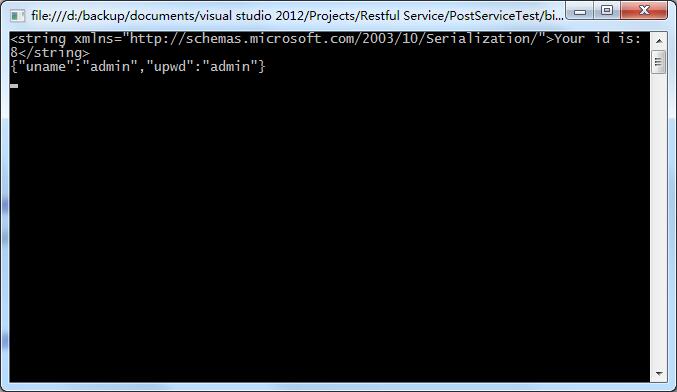
5 打开浏览器,即可进行资源访问

另外,我们可以用代码进行测试
 using System;

 using System.Collections.Generic;

 using System.Linq;

 using System.Text;

 using System.Web;

 using System.Net;

 using System.IO;

 namespace PostServiceTest

 {

     class Program

     {

         static void Main(string[] args)

         {

             //get

             HttpWebRequest request = (HttpWebRequest)WebRequest.Create("http://localhost:8000/RestfulService/Client/8");

             WebResponse response = request.GetResponse();

             string result = new StreamReader(response.GetResponseStream()).ReadToEnd();

             Console.WriteLine(result);

             //post

             string requestData = "{\"uname\":\"admin\",\"upwd\":\"admin\"}";

             byte[] data = Encoding.UTF8.GetBytes(requestData);

             request = (HttpWebRequest)WebRequest.Create("http://localhost:8000/RestfulService/Client/UpdateUser/admin");

             request.Method = "POST";

             request.ContentType = "application/json";

             Stream dataStream = request.GetRequestStream();

             dataStream.Write(data, , data.Length);

             dataStream.Close();

             response = request.GetResponse();

             result = new StreamReader(response.GetResponseStream()).ReadToEnd();

             Console.WriteLine(result);

             Console.ReadKey();

         }

     }

 }
.NET RESTful Web Services入门的更多相关文章
- RESTful Web Services初探
RESTful Web Services初探 作者:杜刚 近几年,RESTful Web Services渐渐开始流行,大量用于解决异构系统间的通信问题.很多网站和应用提供的API,都是基于RESTf ...
- Jersey the RESTful Web Services in Java
Jersey 是一个JAX-RS的实现, JAX-RS即Java API for RESTful Web Services, 支持按照表述性状态转移(REST)架构风格创建Web服务. REST 中最 ...
- 使用 Spring 3 来创建 RESTful Web Services
来源于:https://www.ibm.com/developerworks/cn/web/wa-spring3webserv/ 在 Java™ 中,您可以使用以下几种方法来创建 RESTful We ...
- 就是这么简单!使用Rest-assured 测试Restful Web Services
使用 Rest-assured 测试 Restful Web Services 转载注明出处: http://www.cnblogs.com/wade-xu/p/4298819.html 这里向大家介 ...
- cxf开发Restful Web Services
一.restful web services rest全称是Representation State Transfer(表述性状态转移).它是一种软件架构风格,只是提供了一组设计原则和约束条件.在re ...
- RESTful Web Services测试工具推荐
命令行控的最爱:cURL cURL是一个很强大的支持各种协议的文件传输工具,用它来进行RESTful Web Services的测试简直是小菜一碟.这个工具基本上类Unix操作系统(各种Linux.M ...
- 【转】RESTful Web Services初探
近几年,RESTful Web Services渐渐开始流行,大量用于解决异构系统间的通信问题.很多网站和应用提供的API,都是基于RESTful风格的Web Services,比较著名的包括Twit ...
- 使用 Spring 3 来创建 RESTful Web Services(转)
使用 Spring 3 来创建 RESTful Web Services 在 Java™ 中,您可以使用以下几种方法来创建 RESTful Web Service:使用 JSR 311(311)及其参 ...
- 基于Spring设计并实现RESTful Web Services(转)
基于Spring设计并实现RESTful Web Services 在本教程中,你将会使用Spring来创建一个具有生产力的RESTful网络服务. 为什么用RESTful网络服务? 从和Amazon ...
随机推荐
- iOS之应用版本号的设置规则
版本号的格式:v<主版本号>.<副版本号>.<发布号> 版本号的初始值:v1.0.0 管理规则: 主版本号(Major version) 1. 产品的主体构件进 ...
- Android 调用百度地图API
一.到 百度地图开发平台下载SDK http://lbsyun.baidu.com/index.php?title=androidsdk/sdkandev-download 1.点击自定义下载 2.下 ...
- 算是休息了这么长时间吧!准备学习下python文本处理了,哪位大大有好书推荐的说下!
算是休息了这么长时间吧!准备学习下python文本处理了,哪位大大有好书推荐的说下!
- .NET程序的性能要领和优化建议
前几天在老赵的博客上看到,Bill Chiles (Roslyn 编译器的Program Manager)写了一篇文章叫做<Essential Performance Facts and .NE ...
- 深入理解Java 8 Lambda(语言篇——lambda,方法引用,目标类型和默认方法)
作者:Lucida 微博:@peng_gong 豆瓣:@figure9 原文链接:http://zh.lucida.me/blog/java-8-lambdas-insideout-language- ...
- Integer.parseInt 引发的血案
Integer.parseInt 处理一个空字符串, 结果出错了, 程序没有注意到,搞了很久, 引发了血案啊!! 最后,终于 观察到了, 最后的部分: Caused by: java.lang.NoC ...
- 网站使用https协议
了解https HTTPS 是以安全为目标的 HTTP 通道,即 HTTP 下加入 SSL 加密层.HTTPS 不同于 HTTP 的端口,HTTP默认端口为80,HTTPS默认端口为443. SSL ...
- Android-环境问题
大家都知道 Android Studio 是 Goole 的亲儿子,但,亲儿子毕竟也是刚出生2年不到,身上大毛病没有,小毛病大一堆,这篇博文就来总结一下常见的Android Studio 的设置,使用 ...
- WCF学习之旅—WCF寄宿前的准备(八)
一.WCF服务应用程序与WCF服务库 我们在平时开发的过程中常用的项目类型有“WCF 服务应用程序”和“WCF服务库”. WCF服务应用程序,是一个可以执行的程序,它有独立的进程,WCF服务类协定的定 ...
- 网站就必须用响应式布局吗?MVC视图展现模式之移动布局
本文先引入给读者一个自己研究的机会,下次深入说明一下: 废话不多说,直接上图 新建一个mvc的项目 在视图里面添加一个移动端视图 正常访问一下 Bootstrap自带的响应式的方式(页面代码并没有改变 ...