
oracle Can't connect to X11 window server using ':0.0' /Checking monitor: must be configured to display at least 256 colors解决方法
Can't connect to X11 window server using ':0.0' 解决方法
1. 以oracle 用户登陆X window
或者
2. root 身份执行
# xhost +
=======================
[oracle@rusky-oracle11g database]$ ./runInstaller  //安装报错

Starting Oracle Universal Installer...

Checking Temp space: must be greater than  MB.   Actual  MB    Passed

Checking swap space: must be greater than  MB.   Actual  MB    Passed

Checking monitor: must be configured to display at least  colors

    >>> Could not execute auto check for display colors using command /usr/bin/xdpyinfo. Check if the DISPLAY variable is set.    Failed <<<<

Some requirement checks failed. You must fulfill these requirements before

continuing with the installation,

Continue? (y/n) [n] y

>>> Ignoring required pre-requisite failures. Continuing...

Preparing to launch Oracle Universal Installer from /tmp/OraInstall2015--02_07--20AM. Please wait ...[oracle@rusky-oracle11g database]$ Xlib: connection to ":0.0" refused by server

Xlib: No protocol specified

Exception in thread "main" java.lang.NoClassDefFoundError

        at java.lang.Class.forName0(Native Method)

        at java.lang.Class.forName(Class.java:)

        at java.awt.Toolkit$.run(Toolkit.java:)

        at java.security.AccessController.doPrivileged(Native Method)

        at java.awt.Toolkit.getDefaultToolkit(Toolkit.java:)

        at com.jgoodies.looks.LookUtils.isLowResolution(Unknown Source)

        at com.jgoodies.looks.LookUtils.<clinit>(Unknown Source)

        at com.jgoodies.looks.plastic.PlasticLookAndFeel.<clinit>(PlasticLookAndFeel.java:)

        at java.lang.Class.forName0(Native Method)

        at java.lang.Class.forName(Class.java:)

        at javax.swing.SwingUtilities.loadSystemClass(SwingUtilities.java:)

        at javax.swing.UIManager.setLookAndFeel(UIManager.java:)

        at oracle.install.commons.util.Application.startup(Application.java:)

        at oracle.install.commons.flow.FlowApplication.startup(FlowApplication.java:)

        at oracle.install.commons.flow.FlowApplication.startup(FlowApplication.java:)

        at oracle.install.commons.base.driver.common.Installer.startup(Installer.java:)

        at oracle.install.ivw.db.driver.DBInstaller.startup(DBInstaller.java:)

        at oracle.install.ivw.db.driver.DBInstaller.main(DBInstaller.java:)

--------------------
-------------------

[oracle@rusky-oracle11g database]$ xhost +    -----必须以root用户执行

Xlib: connection to ":0.0" refused by server

Xlib: No protocol specified

xhost:  unable to open display ":0.0"

[oracle@rusky-oracle11g database]$

DISPLAY=rusky-oracle11g.com:0.0; export DISPLAY

DISPLAY=rusky-oracle11g.com:0.0; export DISPLAY

[oracle@rusky-oracle11g database]$ ./runInstaller

Starting Oracle Universal Installer...

Checking Temp space: must be greater than  MB.   Actual  MB    Passed

Checking swap space: must be greater than  MB.   Actual  MB    Passed

Checking monitor: must be configured to display at least  colors

    >>> Could not execute auto check for display colors using command /usr/bin/xdpyinfo. Check if the DISPLAY variable is set.    Failed <<<<

Some requirement checks failed. You must fulfill these requirements before

continuing with the installation,

-----------------------按文档要求以root用户执行以下命令还是不行

[root@rusky-oracle11g ~]# xhost rusky-oracle11g.com

xhost:  unable to open display "rusky-oracle11g.com:0.0"

[root@rusky-oracle11g ~]# xhost +

xhost:  unable to open display "rusky-oracle11g.com:0.0"

[root@rusky-oracle11g ~]#

[oracle@rusky-oracle11g ~]# $DISPLAY=192.168.1.203:0.0;export DISPLAY  //以oracle用户执行
最终解决办法:logout,以oracle用户登录图形界面,测试执行xclock弹出图形界面时钟。执行./runinstaller安装oracle正常。
To verify that X applications display is set properly, run a X11 based program that comes with the operating system such as xclock:
$ xclock //正常情况下,切换到oracle用户执行xclock命令会弹出一个图形界面的时钟。
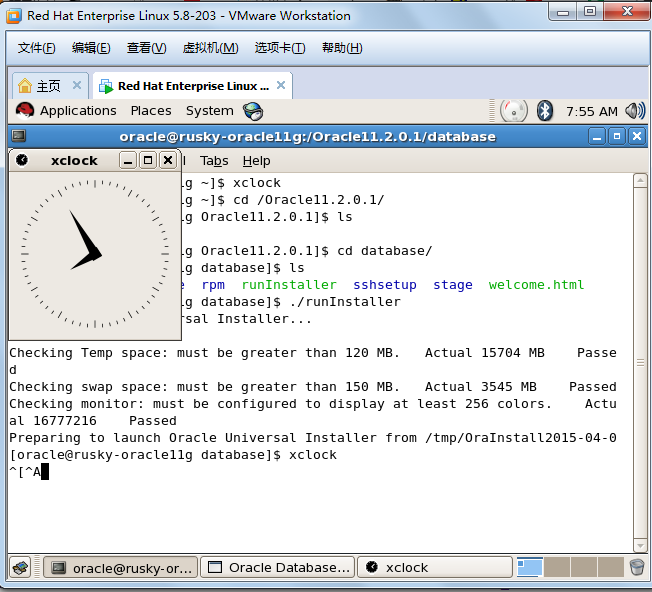
[oracle@rusky-oracle11g database]$ ./runInstaller

Starting Oracle Universal Installer...

Checking Temp space: must be greater than  MB.   Actual  MB    Passed

Checking swap space: must be greater than  MB.   Actual  MB    Passed

Checking monitor: must be configured to display at least  colors.    Actual     Passed

Preparing to launch Oracle Universal Installer from /tmp/OraInstall2015--[oracle@rusky-oracle11g database]$
参考资料:http://blog.itpub.net/12801008/viewspace-1023688/ 官方文档:http://docs.oracle.com/cd/E11882_01/install.112/e24326/toc.htm#CEGEGDBA
oracle Can't connect to X11 window server using ':0.0' /Checking monitor: must be configured to display at least 256 colors解决方法的更多相关文章
- Can't connect to X11 window server using ':1.0' as the value of the DISPLAY variable.
安装oracle数据时需要用到图形界面安装,当我们用root用户登录后切换到oracle用户时运行./runInstaller提示报错: Can't connect to X11 window ser ...
- Can't connect to X11 window server using 'localhost:0.0' 的解决
Can't connect to X11 window server using 'localhost:0.0' 的解决 http://lufei-99999.blog.163.com/blog/st ...
- 23. Can't connect to X11 window server using '127.0.0.1:0.0' as the value of the DISPLAY variable.解决办法
在终端里 以root用户执行 #xhost + 然后su - oracle 执行#export DISPLAY=:0 运行runinstaller
- Linux上 Can't connect to X11 window server using XX as the value of the DISPLAY 错误解决方法
在Linux上运行需要图形界面的程序时出现如下错误提示: No protocol specified Exception in thread "main" java.awt.AWT ...
- Java在Linux下 不能处理图形的解决办法 Can't connect to X11 window server
java在图形处理时调用了本地的图形处理库.在利用Java作图形处理(比如:图片缩放,图片签名,生成报表)时,如果运行在windows上不会出问题.如果将程序移植到Linux/Unix上的时候有可能出 ...
- Can't connect to X11 window server using 'localhost:10.0' as the value of the DISPLAY variable.
刚刚在一台Linux服务器上安装了jdk和Tomcat,然后部署了一个web项目,在项目中有个添加图片的功能,保存图片时报错 org.springframework.web.util.NestedSe ...
- Linux启动应用(比如jmeter)报An error occurred: Can't connect to X11 window server using ':0.0' as the value of the DISPLAY variable.
Linux启动应用(比如jmeter)报An error occurred: Can't connect to X11 window server using ':0.0' as the value ...
- 【java异常】org.springframework.web.util.NestedServletException: Handler processing failed;Can't connect to X11 window server using 'localhost:10.0' as the value of th
tomcat工程中创建二维码失败.抛出异常Can't connect to X11 window server using 'localhost:10.0' as the value of th 因为 ...
- Linux 下centos7启动 Tomcat 抛出Can't connect to X11 window server 问题的解决方法
1 问题 今天启动 Tomcat 后,登录页验证码不见了.在 localhost.xxx.log 发现以下错误: org.apache.catalina.core.StandardWrapperVal ...
随机推荐
- iOS 8 Metal Swift教程(一) :开始学习
在本篇教程中,你将应用到3D图形中的一系列矩阵变换,并会学习到如下内容: 如何使用模型(model),视图(view)以及投影变换(projection transformations). 如何使用矩 ...
- 关于 linux ssh 的配置.
一.禁止root用户远程登录: # cd /etc/ssh # vi sshd_config 将 permitRootLogin 后面的值改成 no 如下图: 然后再重启sshd服务即可,如下: # ...
- javascript 之 this 用法
参考视频:http://www.imooc.com/video/6430 JavaScript中的this比较灵活,也是让很多初学者摸不到头脑,那么根据在不同的环境下,在同一个函数,不同的调用方式下, ...
- Day_8.《无懈可击的web设计》-巧妙地浮动效果
> 本章内容略显陈旧,主要描述如何用浮动替代表格布局,并没有什么出彩的地方.不过其间提到了清楚浮动的几种方法,那么今天就总结一下如何清楚浮动吧. #### 为什么要清除浮动?虽说是清除浮动,其实 ...
- java中的io系统详解(转)
Java 流在处理上分为字符流和字节流.字符流处理的单元为 2 个字节的 Unicode 字符,分别操作字符.字符数组或字符串,而字节流处理单元为 1 个字节,操作字节和字节数组. Java 内用 U ...
- React react-ui-tree的使用
公司需要做一个IDE,要做IDE当然少不了文件列表了.下面我就来展示一下刚刚研究的一个库. 下面是链接:https://react.rocks/example/react-ui-tree 至于如何导入 ...
- (转) 学习C++ -> 指针初步
学习C++ -> 指针初步 一.指针 1. 什么是指针? 我们知道, 计算机的内存是由一个个独立的存储单元组成, 并且系统会对每一个存储单元分配一个唯一的号码, 称为这个存储 ...
- CDZSC_2015寒假新人(1)——基础 g
Description Ignatius likes to write words in reverse way. Given a single line of text which is writt ...
- 利用反射动态构成sql语句
class Program { static void Main(string[] args) { People p = new Peo ...
- php代码查询apache模块
<?php print_r(apache_get_modules()); ?> 注:此函数仅适用于CGI模式.