
React react-ui-tree的使用
公司需要做一个IDE,要做IDE当然少不了文件列表了。下面我就来展示一下刚刚研究的一个库。
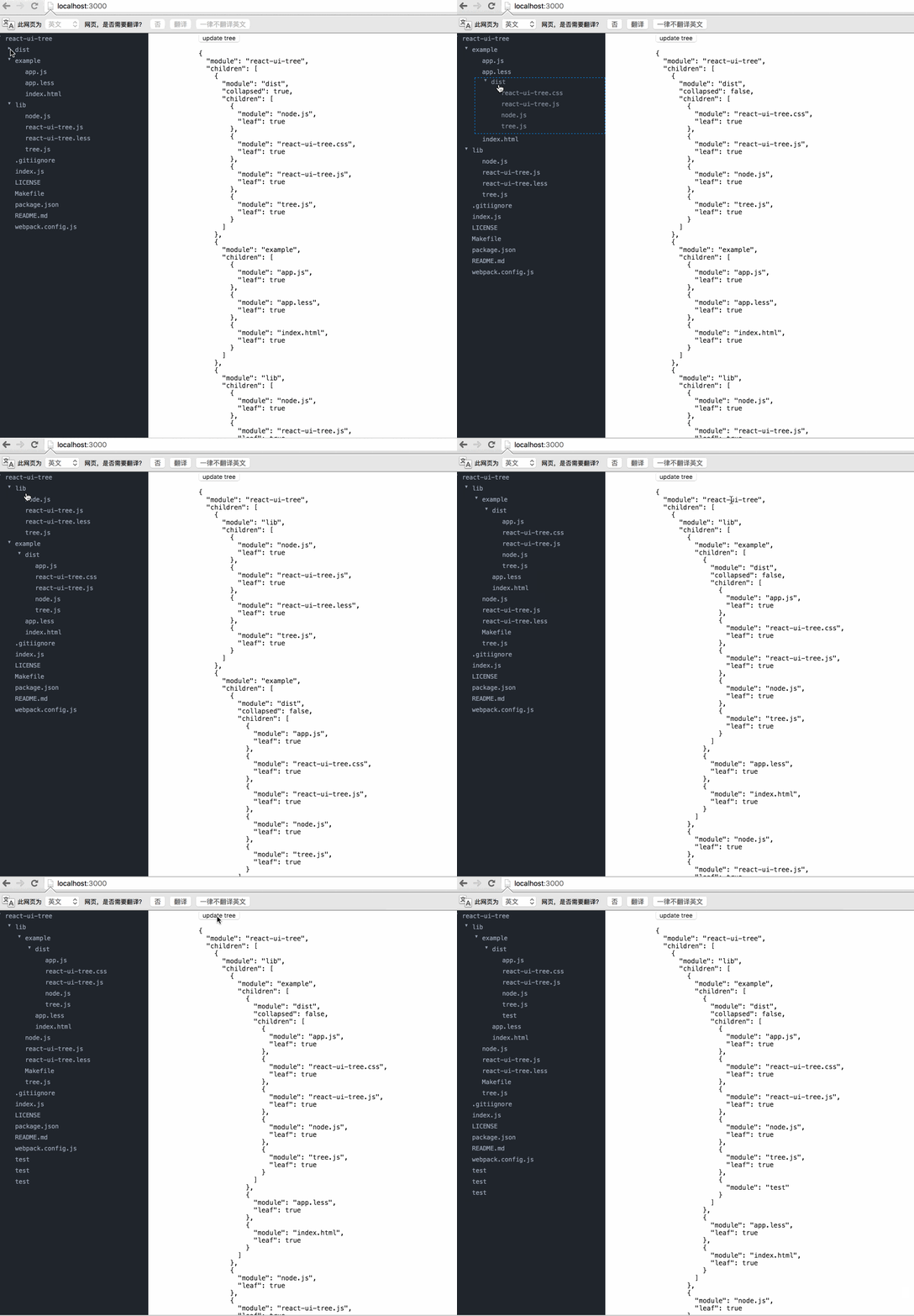
下面是链接:https://react.rocks/example/react-ui-tree
至于如何导入module,官方文档都写的很清楚我就不再贴出。
这里由于给的介绍太过简单。我就将我的代码贴出:
第一个文件就是我们组件文件:
var cx = require('classnames');

var React = require('react');

var ReactDOM = require('react-dom');

var Tree = require('react-ui-tree');

var tree = require('./tree');

require('react-ui-tree/dist/react-ui-tree.css')

require('./css.css')

var UiTree = React.createClass({

  getInitialState() {

    return {

      active: null,

      tree: tree

    };

  },

  renderNode(node) {

    return (

      <span className={cx('node', {

        'is-active': node === this.state.active

        })} onClick={this.onClickNode.bind(null, node)}>

        {node.module}

      </span>

    );

  },

  onClickNode(node) {

    this.setState({

      active: node

    });

  },

  render() {

    return (

      <div className="app">

        <div className="tree">

          <Tree

            paddingLeft={20}

            tree={this.state.tree}

            onChange={this.handleChange}

            isNodeCollapsed={this.isNodeCollapsed}

            renderNode={this.renderNode}

          />

        </div>

        <div className="inspector">

          <button onClick={this.updateTree}>update tree</button>

          <pre>

          {JSON.stringify(this.state.tree, null, '  ')}

          </pre>

        </div>

      </div>

    );

  },

  handleChange(tree) {

    this.setState({

      tree: tree

    });

  },

  updateTree() {

    var tree = this.state.tree;

    tree.children.push({module: 'test'});

    this.setState({

      tree: tree

    });

  }

});

module.exports = UiTree;
下面是数据:
module.exports = {

  module: 'react-ui-tree',

  children: [{

    module: 'dist',

    collapsed: true,

    children: [{

      module: 'node.js',

      leaf: true

    }, {

      module: 'react-ui-tree.css',

      leaf: true

    }, {

      module: 'react-ui-tree.js',

      leaf: true

    }, {

      module: 'tree.js',

      leaf: true

    }]

  }, {

    module: 'example',

    children: [{

      module: 'app.js',

      leaf: true

    }, {

      module: 'app.less',

      leaf: true

    }, {

      module: 'index.html',

      leaf: true

    }]

  }, {

    module: 'lib',

    children: [{

      module: 'node.js',

      leaf: true

    }, {

      module: 'react-ui-tree.js',

      leaf: true

    }, {

      module: 'react-ui-tree.less',

      leaf: true

    }, {

      module: 'tree.js',

      leaf: true

    }]

  }, {

    module: '.gitiignore',

    leaf: true

  }, {

    module: 'index.js',

    leaf: true

  }, {

    module: 'LICENSE',

    leaf: true

  }, {

    module: 'Makefile',

    leaf: true

  }, {

    module: 'package.json',

    leaf: true

  }, {

    module: 'README.md',

    leaf: true

  }, {

    module: 'webpack.config.js',

    leaf: true

  }]

}
这里有个坑,就是当我们将程序运行起来的时候发现样式是不对的,查阅它的源码才知道他是将样式放入了“.less”的文件之中,所以我们需要将文件先转化成css文件,然后添加文件手动导入:
.tree {

  position: fixed;

  top:;

  left:;

  bottom:;

  width: 300px;

  overflow-x: hidden;

  overflow-y: auto;

  background-color: #21252B;

}

.m-node.placeholder {

  border: 1px dashed #1385e5;

}

.m-node .inner {

  color: #9DA5B4;

  font-size: 12px;

  font-family: Menlo;

}

.m-node .node {

  display: inline-block;

  width: 100%;

  padding: 4px 5px;

}

.m-node .node.is-active {

  background-color: #31363F;

}

.m-node .children {

  transition: 1s;

}

*,

*:before,

*:after {

  -webkit-box-sizing: border-box;

  -moz-box-sizing: border-box;

  box-sizing: border-box;

}

body {

  margin:;

  padding:;

  font-size: 100%;

}

.inspector {

  margin-left: 400px;

}

.inspector pre {

  font-family: Menlo;

  font-size: 13px;

}
最后还有一个坑就是他跟bootstrap是有冲突的,所以如果你使用了bootstrap再使用它,可能样式会有所改变。
demo可以从我的github上看到:
https://github.com/weifengzz/react-ui-tree-demo
React react-ui-tree的使用的更多相关文章
- [React] react+redux+router+webpack+antd环境搭建一版
好久之前搭建的一个react执行环境,受历史影响是webpack3.10.0和webpack-dev-server2.7.1的环境,新项目准备用webpack4重新弄弄了,旧的记录就合并发布了(在没有 ...
- React/React Native 的ES5 ES6写法对照表
//es6与es5的区别很多React/React Native的初学者都被ES6的问题迷惑:各路大神都建议我们直接学习ES6的语法(class Foo extends React.Component ...
- React/React Native 的ES5 ES6写法对照表-b
很多React/React Native的初学者都被ES6的问题迷惑:各路大神都建议我们直接学习ES6的语法(class Foo extends React.Component),然而网上搜到的很多教 ...
- [React] React Fundamentals: Integrating Components with D3 and AngularJS
Since React is only interested in the V (view) of MVC, it plays well with other toolkits and framewo ...
- Element ui tree树形控件获取当前节点id和父节点id
低版本Element ui tree树形控件获取当前节点id和父节点id的方法:点击查看 最新版本Element ui tree树形控件获取当前节点id和父节点id教程: 1.找到node_modul ...
- React: React组件的生命周期
一.简介 在前面的第二篇博文中对组件的生命周期虽然做了一个大略介绍,但总感觉说的过于简单,毕竟生命周期是React组件的核心部分.在我们熟练使用React挂载和合成组件来创建应用表现层的过程中,针对数 ...
- React: React的属性验证机制
一.简介 在开发中,属性变量类型的验证,几乎是任何语言都必须关注的问题,因为如果传入的数据类型不对,轻者程序运行仅仅是给出警告⚠️,严重的会直接导致程序中断,APP闪退或者web页面挂掉,这是很严重的 ...
- React/react相关小结
React React组件由React元素组成,React组件使用React.Component或React.PureComponent来生成:React元素使用JSX的语法来编写或使用React.c ...
- 使用CRA开发的基于React的UI组件发布到内网NPM上去
前言:构建的ES组件使用CNPM发布内网上过程 1. 使用Create-React-APP开的组件 如果直接上传到NPM,你引用的时候会报: You may need an appropriate l ...
- [React] Optimistic UI update in React using setState()
In this lesson we will refactor an existing UI update from a typical loading approach to an optimist ...
随机推荐
- ios开发必备第三方库
引言 作为iOS开发人员,在开发App的过程中怎么会不使用第三方库呢?相信没有App是不使用第三方库的! 网络库 网络库,这是开发必备,除非你的App玩单机.现在特别火也特别好用的网络库就数AFNet ...
- python代码风格规范
类注释模板: :: class AnotherClass: """ 类注释 """ def method(self, arg1, arg2, ...
- memcached的安装
最近在研究怎么让Discuz!去应用Memcache去做一些事情,记录下Memcache安装的过程. Linux下Memcache服务器端的安装 服务器端主要是安装memcache服务器端,目前的最新 ...
- 解决Windows 7/win8 使用VMware虚拟机的NAT 不能上网
最近在学习linux系统,在使用debian6更新源的时候,发现Nat模式上网就是配置不了.而内外网可以ping通.所以很苦恼.最后终于解决了. 以下操作在VMware10下进行 1.首先要设置一下 ...
- Oracle trunc函数
--Oracle trunc()函数的用法/**************日期********************/1.select trunc(sysdate) from dual --2011 ...
- Android使用xml中定义的动画效果
Animation animation = AnimationUtils.loadAnimation(getActivity(), R.anim.zqrl_out); animation.setFil ...
- vs 自动生成core dump文件
一直以来觉着core dump这个东西很神奇,在初步学习的时候也没有个大方向,最近项目需要记录程序崩溃时的日志信息,因此在网上寻找相关的信息,此时core dump也成为了我重点关注的东西. 说说我的 ...
- 深入浅出Node.js (4) - 异步编程
4.1 函数式编程 4.1.1 高阶函数 4.1.2 偏函数用法 4.2 异步编程的优势与难点 4.2.1 优势 4.2.2 难点 4.3 异步编程解决方案 4.3.1 事件发布/订阅模式 4.3.2 ...
- wikioi1369 xth 砍树
题目描述 Description 在一个凉爽的夏夜,xth 和 rabbit 来到花园里砍树.为啥米要砍树呢?是这样滴, 小菜儿的儿子窄森要出生了.Xth这个做伯伯的自然要做点什么.于是他决定带着 r ...
- mongodb----pymongo的用法
pymongo是python的一个模块,可能通过sudo pip install pymongo来安装. 导入pymongo import pymongo 创建连接 conn = pymongo.Co ...