
Think Python - Chapter 15 - Classes and objects
15.1 User-defined types
We have used many of Python’s built-in types; now we are going to define a new type. As an example, we will create a type called Point that represents a point in two-dimensional space.
In mathematical notation, points are often written in parentheses with a comma separating the coordinates. For example, (0, 0) represents the origin, and (x, y) represents the point x units to the right and y units up from the origin.
There are several ways we might represent points in Python:
- We could store the coordinates separately in two variables, x and y.
- We could store the coordinates as elements in a list or tuple.
- We could create a new type to represent points as objects.
Creating a new type is (a little) more complicated than the other options, but it has advantages that will be apparent soon.
A user-defined type is also called a class. A class definition looks like this(如何定义一个类?):
class Point(object):

    """Represents a point in 2-D space."""
This header indicates that the new class is a Point, which is a kind of object, which is a built-in type.
The body is a docstring that explains what the class is for. You can define variables and functions inside a class definition, but we will get back to that later.
Defining a class named Point creates a class object.
>>> print Point

<class '__main__.Point'>
Because Point is defined at the top level, its "full name" is __main__.Point.
The class object is like a factory for creating objects. To create a Point, you call Point as if it were a function.
>>> blank = Point()

>>> print blank

<__main__.Point instance at 0xb7e9d3ac>
The return value is a reference to a Point object, which we assign to blank. Creating a new object is called instantiation, and the object is an instance of the class(对象是类的实现).
When you print an instance, Python tells you what class it belongs to and where it is stored in memory (the prefix 0x means that the following number is in hexadecimal).
15.2 Attributes
You can assign values to an instance using dot notation:
>>> blank.x = 3.0

>>> blank.y = 4.0
This syntax is similar to the syntax for selecting a variable from a module, such as math.pi or string.whitespace. In this case, though, we are assigning values to named elements of an object. These elements are called attributes.
As a noun, “AT-trib-ute” is pronounced with emphasis on the first syllable, as opposed to "a-TRIB-ute," which is a verb.
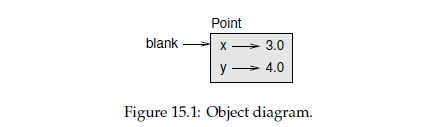
The following diagram shows the result of these assignments. A state diagram that shows an object and its attributes is called an object diagram; see Figure 15.1.
The variable blank refers to a Point object, which contains two attributes. Each attribute refers to a floating-point number.
You can read the value of an attribute using the same syntax:
>>> print blank.y

4.0

>>> x = blank.x

>>> print x

3.0
The expression blank.x means, "Go to the object blank refers to and get the value of x."
In this case, we assign that value to a variable named x. There is no conflict between the variable x and the attribute x.
You can use dot notation as part of any expression. For example:
>>> print '(%g, %g)' % (blank.x, blank.y)

(3.0, 4.0)

>>> distance = math.sqrt(blank.x**2 + blank.y**2)

>>> print distance

5.0
You can pass an instance as an argument in the usual way. For example:
def print_point(p):

    print '(%g, %g)' % (p.x, p.y)
print_point takes a point as an argument and displays it in mathematical notation. To invoke it, you can pass blank as an argument:
>>> print_point(blank)

(3.0, 4.0)
Inside the function, p is an alias for blank, so if the function modifies p, blank changes(这个函数中,p是blank的一个别名,如果函数内改变p,则blank也被改变).
Exercise 15.1. Write a function called distance_between_points that takes two Points as arguments and returns the distance between them.
15.3 Rectangles
Sometimes it is obvious what the attributes of an object should be, but other times you have to make decisions. For example, imagine you are designing a class to represent rectangles.
What attributes would you use to specify the location and size of a rectangle? You can ignore angle; to keep things simple, assume that the rectangle is either vertical or horizontal.
There are at least two possibilities:
- You could specify one corner of the rectangle (or the center), the width, and the height.
- You could specify two opposing corners.
At this point it is hard to say whether either is better than the other, so we’ll implement the first one, just as an example.
Here is the class definition:
class Rectangle(object):

    """Represents a rectangle.

    attributes: width, height, corner.

    """
The docstring lists the attributes: width and height are numbers; corner is a Point object that specifies the lower-left corner.
To represent a rectangle, you have to instantiate a Rectangle object and assign values to the attributes:
box = Rectangle()

box.width = 100.0

box.height = 200.0

box.corner = Point()

box.corner.x = 0.0

box.corner.y = 0.0
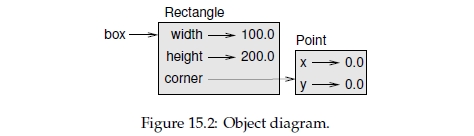
The expression box.corner.x means, "Go to the object box refers to and select the attribute named corner; then go to that object and select the attribute named x."
Figure 15.2 shows the state of this object. An object that is an attribute of another object is embedded.
15.4 Instances as return values
Functions can return instances(函数可以返回一个实例). For example, find_center takes a Rectangle as an argument and returns a Point that contains the coordinates of the center of the Rectangle:
def find_center(rect):

    p = Point()

    p.x = rect.corner.x + rect.width/2.0

    p.y = rect.corner.y + rect.height/2.0

    return p
Here is an example that passes box as an argument and assigns the resulting Point to center:
>>> center = find_center(box)

>>> print_point(center)

(50.0, 100.0)
15.5 Objects are mutable(对象是可变的)
You can change the state of an object by making an assignment to one of its attributes. For example, to change the size of a rectangle without changing its position, you can modify the values of width and height:
box.width = box.width + 50

box.height = box.width + 100
You can also write functions that modify objects. For example, grow_rectangle takes a Rectangle object and two numbers, dwidth and dheight, and adds the numbers to the width and height of the rectangle:
def grow_rectangle(rect, dwidth, dheight):

    rect.width += dwidth

    rect.height += dheight
Here is an example that demonstrates the effect:
>>> print box.width

100.0

>>> print box.height

200.0

>>> grow_rectangle(box, 50, 100)

>>> print box.width

150.0

>>> print box.height

300.0
Inside the function, rect is an alias for box, so if the function modifies rect, box changes.
Exercise 15.2. Write a function named move_rectangle that takes a Rectangle and two numbers named dx and dy. It should change the location of the rectangle by adding dx to the x coordinate of corner and adding dy to the y coordinate of corner.
15.6 Copying
Aliasing can make a program difficult to read because changes in one place might have unexpected effects in another place(别名使用起来容易出错). It is hard to keep track of all the variables that might refer to a given object.
Copying an object is often an alternative to aliasing. The copy module contains a function called copy that can duplicate any object(copy模块中有些函数用于对象的复制):
>>> p1 = Point()

>>> p1.x = 3.0

>>> p1.y = 4.0

>>> import copy

>>> p2 = copy.copy(p1)
p1 and p2 contain the same data, but they are not the same Point.
>>> print_point(p1)

(3.0, 4.0)

>>> print_point(p2)

(3.0, 4.0)

>>> p1 is p2

False

>>> p1 == p2

False
The is operator indicates that p1 and p2 are not the same object, which is what we expected. But you might have expected == to yield True because these points contain the same data. In that case, you will be disappointed to learn that for instances, the default behavior of the
== operator is the same as the is operator; it checks object identity, not object equivalence.
This behavior can be changed—we'll see how later.
If you use copy.copy to duplicate a Rectangle, you will find that it copies the Rectangle object but not the embedded Point.
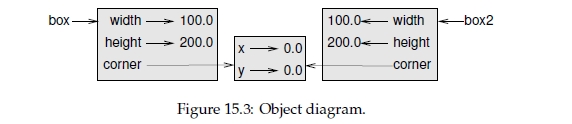
>>> box2 = copy.copy(box)

>>> box2 is box

False

>>> box2.corner is box.corner

True
Figure 15.3 shows what the object diagram looks like. This operation is called a shallow copy(浅拷贝) because it copies the object and any references it contains, but not the embedded objects.
For most applications, this is not what you want. In this example, invoking grow_rectangle on one of the Rectangles would not affect the other, but invoking move_rectangle on either would affect both! This behavior is confusing and error-prone.
Fortunately, the copy module contains a method named deepcopy that copies not only the object but also the objects it refers to, and the objects they refer to, and so on. You will not be surprised to learn that this operation is called a deep copy(深拷贝).
>>> box3 = copy.deepcopy(box)

>>> box3 is box

False

>>> box3.corner is box.corner

False
box3 and box are completely separate objects.
Exercise 15.3. Write a version of move_rectangle that creates and returns a new Rectangle instead of modifying the old one.
15.7 Debugging
When you start working with objects, you are likely to encounter some new exceptions. If you try to access an attribute that doesn't exist, you get an AttributeError:
>>> p = Point()

>>> print p.z

AttributeError: Point instance has no attribute 'z'
If you are not sure what type an object is, you can ask:
>>> type(p)

<type '__main__.Point'>
If you are not sure whether an object has a particular attribute, you can use the built-in function hasattr:
>>> hasattr(p, 'x')

True

>>> hasattr(p, 'z')

False
The first argument can be any object; the second argument is a string that contains the name of the attribute.
Think Python - Chapter 15 - Classes and objects的更多相关文章
- Think Python - Chapter 17 - Classes and methods
17.1 Object-oriented featuresPython is an object-oriented programming language, which means that it ...
- Think Python - Chapter 16 - Classes and functions
16.1 TimeAs another example of a user-defined type, we’ll define a class called Time that records th ...
- 十五. Python基础(15)--内置函数-1
十五. Python基础(15)--内置函数-1 1 ● eval(), exec(), compile() 执行字符串数据类型的python代码 检测#import os 'import' in c ...
- Reloading Java Classes 101: Objects, Classes and ClassLoaders Translation
The original link: http://zeroturnaround.com/rebellabs/reloading-objects-classes-classloaders/ A Bir ...
- Classes as objects
Before understanding metaclasses, you need to master classes in Python. And Python has a very peculi ...
- <Web Scraping with Python>:Chapter 1 & 2
<Web Scraping with Python> Chapter 1 & 2: Your First Web Scraper & Advanced HTML Parsi ...
- 零元学Expression Blend 4 - Chapter 15 用实例了解互动控制项「Button」I
原文:零元学Expression Blend 4 - Chapter 15 用实例了解互动控制项「Button」I 本章将教大家如何更改Button的预设Template,以及如何在Button内设置 ...
- python day 15: IO多路复用,socketserver源码培析,
目录 python day 15 1. IO多路复用 2. socketserver源码分析 python day 15 2019/10/20 学习资料来自老男孩教育 1. IO多路复用 ''' I/ ...
- 尚学python课程---15、python进阶语法
尚学python课程---15.python进阶语法 一.总结 一句话总结: python使用东西要引入库,比如 json 1.python如何创建类? class ClassName: :以冒号结尾 ...
随机推荐
- 使用Parallel
Parallel是.net framework为我们封装的用于并行的静态类,它使用起来简单灵活.它为我们提供了三个方法,分别是Invoke,For和ForEach.下面来进行分别演示. Paralle ...
- [转载]java NIO详解
Java NIO(New IO)是从Java 1.4版本开始引入的一个新的IO API,可以替代标准的Java IO API.下面的文章写的很详细,还配有插图,有助于深入学习和理解java NIO 文 ...
- HDU 4050 wolf5x 概率dp 难度:1
http://acm.hdu.edu.cn/showproblem.php?pid=4050 题意: 现在主角站在0处,需要到达大于n的位置 主角要进入的格子有三种状态: 0. 不能进入 1. 能进入 ...
- HDU 1394 Minimum Inversion Number
//============================================================================ // Name : B.cpp // Au ...
- android启动模式2
Android中的启动模式(下) 在这篇文章中,我会继续跟大家分享有关于Android中启动模式的相关知识.当然,如果对这个启动模式还不完全了解或者没有听过的话,可以先看看我之前写的有关于这个知识点的 ...
- sql 语句中使用条件判断case then else end
sql 语句中使用条件判断case then else end范例: SELECT les.[nLessonNo] FROM BS_Lesson AS les WHERE les.[sClassCod ...
- 苹果 Mac OS X Yosemite 10.10 新功能特性总结 - 扁平化、主打跨设备的无缝连通性
苹果在2014.06.03凌晨的 WWDC 2014 大会上正式发布了最新的 OS X Yosemite 桌面操作系统和 iOS 8 移动系统.虽然整场发布会的重心都在软件上,并没有硬件亮相,但软件上 ...
- SharePoint开发 - 自定义导航菜单(二)母版页的菜单应用
博客地址 http://blog.csdn.net/foxdave 接上篇点击打开链接 本篇叙述在母版页中应用之前的配置信息生成菜单,主要涉及到母版页的自定义,并应用了第三方控件库DevExpress ...
- GoldenGate中使用strcat和strext进行数据转换
在OGG中可以对源字段的内容进行合并或拆分,从而实现类似于“ETL”的功能.strcat(s1,s2,s3,,,):用于合并字串:strext(str, start, end):用于获取指定位置的字串 ...
- Ubuntu 14.10 下安装Synergy,不同电脑之间公用一套键盘鼠标
因为工作时候有多台电脑放在一起,如果每个用一套键盘鼠标很是不方便,所以希望能够不用电脑之间公用一套键盘鼠标. Synergy可以实现不同电脑之间公用一套键盘鼠标,并且支持简单的复制粘贴.很好用. 它还 ...