
jqueryMobile
  <!DOCTYPE html>

  <html lang="zh-CN">

  <head>

      <meta charset="UTF-8">

      <link rel="stylesheet" href="http://code.jquery.com/mobile/1.3.2/jquery.mobile-1.3.2.min.css">

      <script src="http://code.jquery.com/jquery-1.8.3.min.js"></script>

      <script src="http://code.jquery.com/mobile/1.3.2/jquery.mobile-1.3.2.min.js"></script>

      <title>jqueryMoblie</title>

  </head>

  <body>

 <div data-role="page" id="pageone">

   <div data-role="header">

   <h1>图标</h1>

   </div>

   <div data-role="content">

     <p>定位图标:</p>

     <a href="#link" data-role="button" data-icon="search" data-iconpos="top">顶部</a>

     <a href="#link" data-role="button" data-icon="search" data-iconpos="right">右侧</a>

     <a href="#link" data-role="button" data-icon="search" data-iconpos="bottom">底部</a>

     <a href="#link" data-role="button" data-icon="search" data-iconpos="left">左侧</a>

   </div>

   <div data-role="footer">

   <h1>底部文本</h1>

   </div>

 </div>

  </body>

  </html>
 <!DOCTYPE html>

 <html>

 <head>

 <link rel="stylesheet" href="http://code.jquery.com/mobile/1.3.2/jquery.mobile-1.3.2.min.css">

         <script src="http://code.jquery.com/jquery-1.8.3.min.js"></script>

         <script src="http://code.jquery.com/mobile/1.3.2/jquery.mobile-1.3.2.min.js"></script>

 </head>

 <body>

 <div data-role="page" id="pageone">

   <div data-role="header">

     <h1>可折叠块</h1>

   </div>

   <div data-role="content">

     <div data-role="collapsible">

       <h1>点击我 - 我可以折叠!</h1>

       <p>我是可折叠的内容。</p>

     </div>

   </div>

   <div data-role="footer">

     <h1>页脚文本</h1>

   </div>

 </div>

 </body>

 </html>
 <!DOCTYPE html>

 <html lang="zh_CN">

 <head>

 <meta charset="utf-8">

 <!-- <link rel="stylesheet" href="http://apps.bdimg.com/libs/jquerymobile/1.4.2/jquery.mobile.min.css">

 <script src="http://apps.bdimg.com/libs/jquery/1.10.2/jquery.min.js"></script>

 <script src="http://apps.bdimg.com/libs/jquerymobile/1.4.2/jquery.mobile.min.js"></script> -->

 <link rel="stylesheet" href="http://code.jquery.com/mobile/1.3.2/jquery.mobile-1.3.2.min.css">

     <script src="http://code.jquery.com/jquery-1.8.3.min.js"></script>

     <script src="http://code.jquery.com/mobile/1.3.2/jquery.mobile-1.3.2.min.js"></script>

 </head>

 <body>

 <div data-role="page" id="pageone">

   <div data-role="header">

     <h1>可折叠集合</h1>

   </div>

   <div data-role="content">

     <div data-role="collapsible-set">

       <div data-role="collapsible">

         <h3>点击我 - 我可以折叠!</h3>

           <p>我是可折叠的内容。</p>

       </div>

       <div data-role="collapsible">

         <h3>点击我 - 我可以折叠!</h3>

         <p>我是可折叠的内容。</p>

       </div>

       <div data-role="collapsible">

         <h3>点击我 - 我可以折叠!</h3>

         <p>我是可折叠的内容。</p>

       </div>

       <div data-role="collapsible">

         <h3>点击我 - 我可以折叠!</h3>

         <p>我是可折叠的内容。</p>

       </div>

     </div>

   </div>

   <div data-role="footer">

     <h1>在此插入底部文本</h1>

   </div>

 </div>

 </body>

 </html>
 <html lang="zh_CN">

 <head>

 <meta charset="utf-8">

 <link rel="stylesheet" href="http://apps.bdimg.com/libs/jquerymobile/1.4.2/jquery.mobile.min.css">

 <script src="http://apps.bdimg.com/libs/jquery/1.10.2/jquery.min.js"></script>

 <script src="http://apps.bdimg.com/libs/jquerymobile/1.4.2/jquery.mobile.min.js"></script>

 <style>

 .ui-block-a,

 .ui-block-b,

 .ui-block-c

 {

 background-color: lightgray;

 border: 1px solid black;

 height: 100px;

 font-weight: bold;

 text-align: center;

 padding: 30px;

 }

 </style>

 </head>

 <body>

 <div data-role="page" id="pageone">

   <div data-role="header">

   <h1>自定义的列</h1>

   </div>

   <div data-role="content">

    <p>三列样式布局:</p>

    <div class="ui-grid-b">

      <div class="ui-block-a"><span>第一个列</span></div>

      <div class="ui-block-b"><span>第二个列</span></div>

      <div class="ui-block-c"><span>第三个列</span></div>

    </div>

   </div>

 </div>

 </body>

 </html>
 <!DOCTYPE html>

 <html lang="zh-CN">

 <head>

 <meta charset="utf-8">

 <link rel="stylesheet" href="http://apps.bdimg.com/libs/jquerymobile/1.4.2/jquery.mobile.min.css">

 <script src="http://apps.bdimg.com/libs/jquery/1.10.2/jquery.min.js"></script>

 <script src="http://apps.bdimg.com/libs/jquerymobile/1.4.2/jquery.mobile.min.js"></script>

 </head>

 <body>

 <div data-role="page" id="pageone">

   <div data-role="content">

     <h2>有序列表:</h2>

     <ol data-role="listview">

       <li><a href="#">列表项</a></li>

       <li><a href="#">列表项</a></li>

       <li><a href="#">列表项</a></li>

     </ol>

     <h2>无序列表:</h2>

     <ul data-role="listview">

       <li><a href="#">列表项</a></li>

       <li><a href="#">列表项</a></li>

       <li><a href="#">列表项</a></li>

     </ul>

   </div>

 </div>

 </body>

 </html>
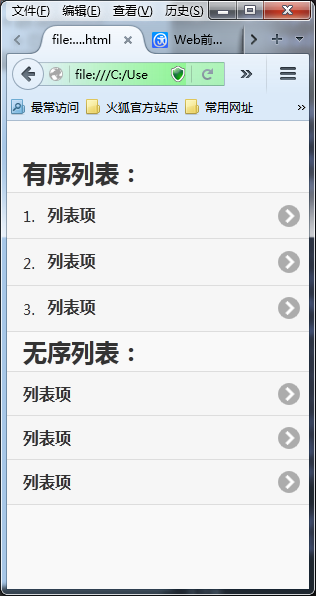
 <!DOCTYPE html>

 <html lang="zh-CN">

 <head>

 <meta charset="utf-8">

 <link rel="stylesheet" href="http://apps.bdimg.com/libs/jquerymobile/1.4.2/jquery.mobile.min.css">

 <script src="http://apps.bdimg.com/libs/jquery/1.10.2/jquery.min.js"></script>

 <script src="http://apps.bdimg.com/libs/jquerymobile/1.4.2/jquery.mobile.min.js"></script>

 </head>

 <body>

 <div data-role="page" id="pageone">

   <div data-role="content">

     <h2>列表分隔符</h2>

     <ul data-role="listview">

       <li data-role="list-divider">欧洲</li>

       <li><a href="#">德国</a></li>

       <li><a href="#">英国</a></li>

       <li data-role="list-divider">亚洲</li>

       <li><a href="#">中国</a></li>

       <li><a href="#">印度</a></li>

       <li data-role="list-divider">非洲</li>

       <li><a href="#">埃及</a></li>

       <li><a href="#">南非</a></li>

     </ul>

   </div>

 </div>

 </body>

 </html>

 <!DOCTYPE html>

 <html lang="zh-CN">

 <head>

 <meta charset="utf-8">

 <link rel="stylesheet" href="http://apps.bdimg.com/libs/jquerymobile/1.4.2/jquery.mobile.min.css">

 <script src="http://apps.bdimg.com/libs/jquery/1.10.2/jquery.min.js"></script>

 <script src="http://apps.bdimg.com/libs/jquerymobile/1.4.2/jquery.mobile.min.js"></script>

 </head>

 <body>

 <div data-role="page" id="pageone">

   <div data-role="header">

     <a href="#" data-role="button" data-icon="home" data-theme="b">首页</a>

     <h1>欢迎来到我的主页</h1>

     <a href="#" data-role="button" data-icon="search" data-theme="e">搜索</a>

   </div>

   <div data-role="content">

    <p>此处是内容...</p>

   </div>

   <div data-role="footer">

     <a href="#" data-role="button" data-theme="b" data-icon="plus">在Facebook上关注我</a>

     <a href="#" data-role="button" data-theme="c" data-icon="plus">在Twitter上关注我</a>

     <a href="#" data-role="button" data-theme="e" data-icon="plus">在Instagram上关注我</a>

   </div>

 </div>

 </body>

 </html>

jqueryMobile的更多相关文章
- html5+jqueryMobile编写App推广注册页
html5+jqueryMobile的组合可以直接开发web版的app,所以用到我当前app中的推广注册页的编写是很恰当的,其实只要你熟悉html4+jquery的组合开发,那么html5+jquer ...
- [deviceone开发]-do_Webview加载JQueryMobile的示例
一.简介 JQueryMobile是JQuery的移动版,不过它并没有像JQuery那么成功.我们只是使用JQueryMobile来展示do_Webview加载第三方js框架.适合所有开发者.二.效果 ...
- jQueryMobile示例页面代码
这是一个jQueryMobile示例页面 示例效果:http://hovertree.com/texiao/jquerymobile/ 可以在手机或者触屏浏览器查看效果. 以下是HTML代码: < ...
- jQueryMobile 网页在UC等游览器上无法正常显示或者是无法自适应设备大小,但在QQ游览器上能正常显示的解决方法
造成jQueryMobile网页在QQ游览器上能正常显示,在UC等游览器上无法正常显示或者是无法自适应设备大小的解决方法: 在<head>标签间添加<meta name=" ...
- jQueryMobile引入文件后样式无法正常显示
jQueryMobile引入文件后样式无法正常显示解决方法: jQuery文件必须放在jQueryMobile文件之前 eg:
- jquerymobile仿微信 - 01
jquerymobile仿微信 - 01 jquerymobile的组件感觉不咋地哇 本地调试最好是开一个web server,不然数据访问会有问题 <div data-role="p ...
- Jquerymobile 简单安装
需要导入三个文件jquery,jquerymobile,css(jquerymobile地址:http://jquerymobile.com/) <script src="js/jqu ...
- jquerymobile页面跳转和参数传递
http://blog.csdn.net/chen052210123/article/details/7481578 页面跳转: 页面跳转时pagebeforechange事件会被触发两次,通过$(d ...
- jquery-mobile之loading加载自定义
用jquery-mobile的时候,我们发现文档中loading是直接通过标签属性进行渲染,封装的函数必须通过点击按钮才能执行.而实际运用中,我们的加载开始和结束可能不需要点击,而是通过某个函数调用直 ...
- JqueryMobile入门基础附源码下载
最近要做一个手机版的网站,所以就了解了一点JqueryMObile,下面是我整理的笔记,现在分享给大家,希望朋友们喜欢,先给个首页看看吧!!! 一.JqueryMobile基本页面结构 <!DO ...
随机推荐
- 可视化MNIST之降维探索Visualizing MNIST: An Exploration of Dimensionality Reduction
At some fundamental level, no one understands machine learning. It isn’t a matter of things being to ...
- CNN卷积神经网络在自然语言处理的应用
摘要:CNN作为当今绝大多数计算机视觉系统的核心技术,在图像分类领域做出了巨大贡献.本文从计算机视觉的用例开始,介绍CNN及其在自然语言处理中的优势和发挥的作用. 当我们听到卷积神经网络(Convol ...
- USACO Section 4.2: Drainage Ditches
最大流的模板题 /* ID: yingzho1 LANG: C++ TASK: ditch */ #include <iostream> #include <fstream> ...
- delphi常用函数
直接引用了 http://www.cnblogs.com/doit8791/archive/2012/05/17/2507073.html.
- Open Explorer Plugin for Eclipse (eclipse 插件 在eclipse里面打开文件目录)
就是在eclipse里面直接打开文件所在的目录地址 只要将下面的jar 文件放到你的 “$ECLIPSE_HOME/plugins” 下面,重启eclipse就ok了 要想卸载的话 停止eclip ...
- linux下使用svn
安装:apt-get install subversion CHECKOUT 将文件checkout到本地目录 svn checkout path(path是服务器上的目录)例如:svn checko ...
- 51nod1421 最大MOD值
O(n2)tle.O(nlognlogn) #include<cstdio> #include<cstring> #include<cctype> #include ...
- 使用MFC中的AfxBeginThread创建多线程
创建一个基于对话框的工程,工程名为CreateThreadRect 在CreateThreadRect.cpp中增加一个ThreadProc函数,代码如下 工作者线程的函数必须是全局函数或静态 ...
- acdream 1412 2-3Trees (组合+DP)
题意:2-3树的每个结点(除了叶子外)有2或3个孩子(分支),假设是一个满2-3树,那么给出叶子的数量,求这样的树有多少棵.(注:有2个孩子的结点视为相同,有3个孩子的结点视为相同,比如倒数第2层有4 ...
- SPY++的使用
百度百科Spy++ 使用的是VS2010.net自带的功能,可以从开始菜单中打开.