
WPF: 读取XPS文件或将word、txt文件转化为XPS文件
读取XPS格式文件或将doc,txt文件转化为XPS文件,效果图如下:
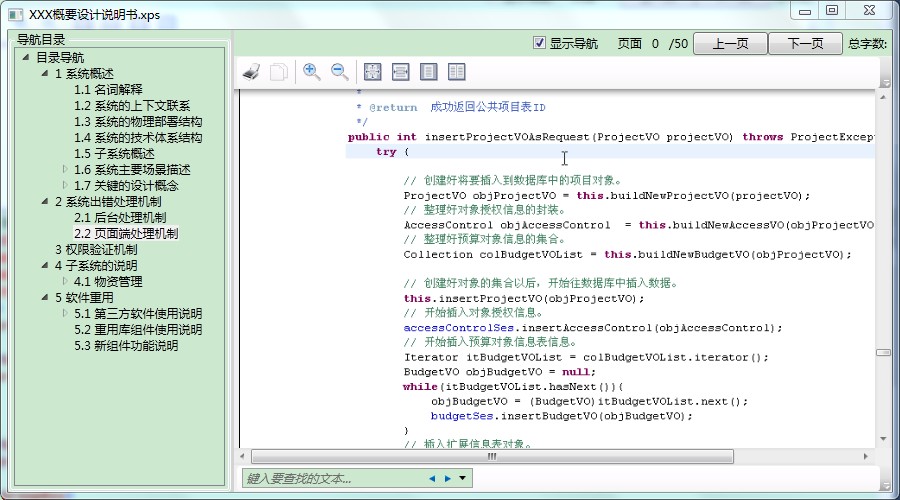
1.XAML页面代码:
<Window x:Class="WpfWord.MainWindow"

        xmlns="http://schemas.microsoft.com/winfx/2006/xaml/presentation"

        xmlns:x="http://schemas.microsoft.com/winfx/2006/xaml"

        Title="WordReader" Height="" Width="">

    <Grid>

        <Grid.RowDefinitions>

            <RowDefinition/>

        </Grid.RowDefinitions>

        <Grid.ColumnDefinitions>

            <ColumnDefinition Width="" Name="cdTree"/>

            <ColumnDefinition Width="auto"/>

            <ColumnDefinition Width="3*"/>

        </Grid.ColumnDefinitions>

        <GroupBox Header="导航目录">

            <TreeView Name="tvTree" SelectedItemChanged="tvTree_SelectedItemChanged"/>

        </GroupBox>

        <GridSplitter Width="" ResizeBehavior="PreviousAndNext" Grid.Column="" Background="LightGray"/>

        <Grid Grid.Column="">

            <Grid.RowDefinitions>

                <RowDefinition Height="auto"/>

                <RowDefinition Height="*"/>

            </Grid.RowDefinitions>

            <DocumentViewer Name="dvShow" Grid.Row=""/>

            <StackPanel Grid.Row="" Orientation="Horizontal" HorizontalAlignment="Right">

                <CheckBox Content="显示导航" Height="" Margin="" Name="cbNav" Width="" Click="cbNav_Click" />

                <Label Content="页面"/>

                <Label Name="lblCurPage" Margin=""/>

                <Label Name="lblPage"/>

                <Button Content="上一页" Height="" Name="btnPrev" Width="" Click="btnPrev_Click" />

                <Button Content="下一页" Height="" Name="btnNext" Width="" Click="btnNext_Click" />

                <Label Content="总字数:" Name="lblWordCount"/>

            </StackPanel>

        </Grid>

    </Grid>

</Window>
2.后台CS文件代码:
首先引用Microsoft.Office.Interop.Word.dll;

//具体代码如下↓

using System;

using System.IO;

using System.Linq;

using System.Windows;

using System.Windows.Controls;

using System.Windows.Xps.Packaging;

using System.Xml;

using Microsoft.Office.Interop.Word;

namespace WpfWord

{

    /// <summary>

    /// MainWindow.xaml 的交互逻辑

    /// </summary>

    public partial class MainWindow : System.Windows.Window

    {

        #region 全局变量

        /// <summary>

        /// 用于存放目录文档各节点OutlineLevel值,并转化为int型

        /// </summary>

        int[] array = null;

        /// <summary>

        /// 用于存放目录文档各节点OutlineLevel值

        /// </summary>

        string[] array1 = null;

        /// <summary>

        /// 用于存放目录文档各节点Description值,章节信息

        /// </summary>

        string[] arrayName = null;

        /// <summary>

        /// 用于存放目录文档各节点OutlineTarget值,页码信息

        /// </summary>

        string[] pages = null;

        #endregion

        public MainWindow()

        {

            InitializeComponent();

            OpenFile(null);

        }

        /// <summary>

        /// 构造函数

        /// </summary>

        /// <param name="strFilePath">文件路径</param>

        public MainWindow(string strFilePath)

            : this()

        {

        }

        #region 方法

        /// <summary>

        /// 读取导航目录

        /// </summary>

        private void ReadDoc(XpsDocument xpsDoc)

        {

            IXpsFixedDocumentSequenceReader docSeq = xpsDoc.FixedDocumentSequenceReader;

            IXpsFixedDocumentReader docReader = docSeq.FixedDocuments[];

            XpsStructure xpsStructure = docReader.DocumentStructure;

            Stream stream = xpsStructure.GetStream();

            XmlDocument doc = new XmlDocument();

            doc.Load(stream);

            //获取节点列表

            XmlNodeList nodeList = doc.ChildNodes.Item().FirstChild.FirstChild.ChildNodes;

            if (nodeList.Count <= )//判断是否存在目录节点

            {

                //tvTree.Visibility = System.Windows.Visibility.Hidden;

                tvTree.Items.Add(new TreeViewItem { Header = "没有导航目录" });

                return;

            }

            tvTree.Visibility = System.Windows.Visibility.Visible;

            array = new int[nodeList.Count];

            array1 = new string[nodeList.Count];

            arrayName = new string[nodeList.Count];

            pages = new string[nodeList.Count];

            for (int i = ; i < nodeList.Count; i++)

            {

                array[i] = Convert.ToInt32(nodeList[i].Attributes["OutlineLevel"].Value);

                array1[i] = nodeList[i].Attributes["OutlineLevel"].Value.ToString();

                arrayName[i] = nodeList[i].Attributes["Description"].Value.ToString();

                pages[i] = nodeList[i].Attributes["OutlineTarget"].Value.ToString();

            }

            for (int i = ; i < array.Length - ; i++)

            {

                //对array进行转换组装成可读的树形结构,通过ASCII值进行增加、转换

                array1[] = "A";

                if (array[i + ] - array[i] == )

                {

                    array1[i + ] = array1[i] + 'A';

                }

                if (array[i + ] == array[i])

                {

                    char s = Convert.ToChar(array1[i].Substring((array1[i].Length - ), ));

                    array1[i + ] = array1[i].Substring(, array1[i].Length - ) + (char)(s + );

                }

                if (array[i + ] < array[i])

                {

                    int m = array[i + ];

                    char s = Convert.ToChar(array1[i].Substring(, m).Substring(m - , ));

                    array1[i + ] = array1[i].Substring(, m - ) + (char)(s + );

                }

            }

            //添加一个节点作为根节点

            TreeViewItem parent = new TreeViewItem();

            TreeViewItem parent1 = null;

            parent.Header = "目录导航";

            Boolean flag = false;

            for (int i = ; i < array.Length; i++)

            {

                if (array[i] == )

                {

                    flag = true;

                }

                if (flag) //如果找到实际根节点,加载树

                {

                    parent1 = new TreeViewItem();

                    parent1.Header = arrayName[i];

                    parent1.Tag = array1[i];

                    parent.Items.Add(parent1);

                    parent.IsExpanded = true;

                    parent1.IsExpanded = true;

                    FillTree(parent1, array1, arrayName);

                    flag = false;

                }

            }

            tvTree.Items.Clear();

            tvTree.Items.Add(parent);

        }

        /// <summary>

        /// 填充树的方法

        /// </summary>

        /// <param name="parentItem"></param>

        /// <param name="str1"></param>

        /// <param name="str2"></param>

        public void FillTree(TreeViewItem parentItem, string[] str1, string[] str2)

        {

            string parentID = parentItem.Tag as string;

            for (int i = ; i < str1.Length; i++)

            {

                if (str1[i].IndexOf(parentID) ==  && str1[i].Length == (parentID.Length + ) && str1[i].ElementAt().Equals(parentID.ElementAt()))

                {

                    TreeViewItem childItem = new TreeViewItem();

                    childItem.Header = str2[i];

                    childItem.Tag = str1[i];

                    parentItem.Items.Add(childItem);

                    FillTree(childItem, str1, str2);

                }

            }

        }

        /// <summary>

        /// 打开文件-如果传入路径为空则在此打开选择文件对话框

        /// </summary>

        /// <param name="strFilepath">传入文件全路径</param>

        private void OpenFile(string strFilepath)

        {

            if (string.IsNullOrEmpty(strFilepath))

            {

                Microsoft.Win32.OpenFileDialog openFileDialog = new Microsoft.Win32.OpenFileDialog();

                openFileDialog.DefaultExt = ".doc|.txt|.xps";

                openFileDialog.Filter = "*(.xps)|*.xps|Word documents (.doc)|*.doc|Word(2007-2010)(.docx)|*.docx|*(.txt)|*.txt";

                Nullable<bool> result = openFileDialog.ShowDialog();

                strFilepath = openFileDialog.FileName;

                if (result != true)

                {

                    return;

                }

            }

            this.Title = strFilepath.Substring(strFilepath.LastIndexOf("\\")+);

            if (strFilepath.Length > )

            {

                XpsDocument xpsDoc = null;

                //如果是xps文件直接打开,否则需转换格式

                if (!strFilepath.EndsWith(".xps"))

                {

                    string newXPSdocName = String.Concat(System.IO.Path.GetDirectoryName(strFilepath), "\\", System.IO.Path.GetFileNameWithoutExtension(strFilepath), ".xps");

                    xpsDoc = ConvertWordToXPS(strFilepath, newXPSdocName);

                }

                else

                {

                    xpsDoc = new XpsDocument(strFilepath, System.IO.FileAccess.Read);

                }

                if (xpsDoc != null)

                {

                    dvShow.Document = xpsDoc.GetFixedDocumentSequence();

                    //读取文档目录

                    ReadDoc(xpsDoc);

                    xpsDoc.Close();

                }

                this.lblCurPage.Content = ;

                this.lblPage.Content = "/" + dvShow.PageCount;

            }

        }

        /// <summary>

        /// 将word文档转换为xps文档

        /// </summary>

        /// <param name="wordDocName">word文档全路径</param>

        /// <param name="xpsDocName">xps文档全路径</param>

        /// <returns></returns>

        private XpsDocument ConvertWordToXPS(string wordDocName, string xpsDocName)

        {

            XpsDocument result = null;

            //创建一个word文档,并将要转换的文档添加到新创建的对象

            Microsoft.Office.Interop.Word.Application wordApplication = new Microsoft.Office.Interop.Word.Application();

            try

            {

                wordApplication.Documents.Add(wordDocName);

                Document doc = wordApplication.ActiveDocument;

                doc.ExportAsFixedFormat(xpsDocName, WdExportFormat.wdExportFormatXPS, false, WdExportOptimizeFor.wdExportOptimizeForPrint, WdExportRange.wdExportAllDocument, , , WdExportItem.wdExportDocumentContent, true, true, WdExportCreateBookmarks.wdExportCreateHeadingBookmarks, true, true, false, Type.Missing);

                result = new XpsDocument(xpsDocName, System.IO.FileAccess.ReadWrite);

            }

            catch (Exception ex)

            {

                string error = ex.Message;

                wordApplication.Quit(WdSaveOptions.wdDoNotSaveChanges);

            }

            wordApplication.Quit(WdSaveOptions.wdDoNotSaveChanges);

            return result;

        }

        #endregion

        /// <summary>

        /// 导航树跳转事件

        /// </summary>

        /// <param name="sender"></param>

        /// <param name="e"></param>

        private void tvTree_SelectedItemChanged(object sender, RoutedPropertyChangedEventArgs<object> e)

        {

            int x = ;

            TreeViewItem selectTV = this.tvTree.SelectedItem as TreeViewItem;

            if (null == selectTV)

                return;

            if (null == selectTV.Tag)

                return;

            string page = selectTV.Tag.ToString();

            for (int i = ; i < array1.Length; i++)

            {

                if (array1[i].Equals(page))

                {

                    x = i;

                }

            }

            string[] strPages = pages[x].Split('_');

            dvShow.GoToPage(Int32.Parse(strPages[]));

        }

        private void cbNav_Click(object sender, RoutedEventArgs e)

        {

            this.cdTree.Width = this.cbNav.IsChecked == true ? new GridLength() : new GridLength();

        }

        private void btnPrev_Click(object sender, RoutedEventArgs e)

        {

            this.dvShow.PreviousPage();

        }

        private void btnNext_Click(object sender, RoutedEventArgs e)

        {

            this.dvShow.NextPage();

        }

    }

}
转自:http://www.cnblogs.com/_ymw/p/3324892.html
WPF: 读取XPS文件或将word、txt文件转化为XPS文件的更多相关文章
- 【文件】使用word的xml模板生成.doc文件
一.编辑模板 替换地方以变量标记如“案件编号”可写成{caseNo} template.xml 二.准备数据 以HashMap封装数据,原理是替换模板中的变量 三.替换操作 选择输出位置:writeP ...
- 怎样将word文件转化为Latex文件:word-to-latex-2.56具体解释
首先推荐大家读一读这篇博文:http://blog.csdn.net/ibingow/article/details/8613556 --------------------------------- ...
- WFP: 读取XPS文件或将word、txt文件转化为XPS文件
读取XPS格式文件或将doc,txt文件转化为XPS文件,效果图如下: 1.XAML页面代码: <Window x:Class="WpfWord.MainWindow" ...
- WPF读取和显示word
引言 在项目开发中,word的读取和显示会经常出现在客户的需求中.特别是一些有关法律规章制度.通知.红头文件等,都是用word发布的. 在WPF中,对显示WORD没有特定的控件,这对开发显示WORD的 ...
- c#上传文件并将word pdf转化成txt存储并将内容写入数据库
c#上传文件并将word pdf转化成txt存储并将内容写入数据库 using System; using System.Data; using System.Configuration; using ...
- Python:读取 .doc、.docx 两种 Word 文件简述及“Word 未能引发事件”错误
概述 Python 中可以读取 word 文件的库有 python-docx 和 pywin32. 下表比较了各自的优缺点. 优点 缺点 python-docx 跨平台 只能处理 .docx 格式 ...
- python操作txt文件中数据教程[3]-python读取文件夹中所有txt文件并将数据转为csv文件
python操作txt文件中数据教程[3]-python读取文件夹中所有txt文件并将数据转为csv文件 觉得有用的话,欢迎一起讨论相互学习~Follow Me 参考文献 python操作txt文件中 ...
- c# 读取 excel文件内容,写入txt文档
1 winform 读取excel文档 1)点击button按钮,弹出上传excel窗口 private void button_headcompany_Click(object sender, Ev ...
- 逐行创建、读取并写入txt(matlab) && 生成文件夹里文件名的.bat文件
fidin=fopen('C:\Users\byte\Desktop\新建文件夹 (4)\tr4.txt','r'); fidout=fopen('C:\Users\byte\Desktop\新建文件 ...
随机推荐
- .NET单元测试
原文链接:http://www.cnblogs.com/edisonchou/p/5467573.html
- struts (七) 域模型
1.域模型获取参数 domain Model 2. vo value object 值对象 do data object 数据对象 dto data transfer object 数据传输对 ...
- [ActionScript 3.0] Away3D 灯光的使用
package { import away3d.containers.View3D; import away3d.entities.Mesh; import away3d.events.MouseEv ...
- C++primer练习14.44
编写一个简单的桌面计算器使其处理二元运算 // 14_44.cpp : 定义控制台应用程序的入口点. // #include "stdafx.h" #include<iost ...
- iBeacons 资源汇总
从淘宝上购买了iBeacons的开发模块,便开始要熟悉这个技术了. 先来说一下什么是iBeacons iBeacons是苹果在2013年WWDC上推出一项基于蓝牙4.0(Bluetooth LE | ...
- 《Code Complete》ch.22 开发者测试
WHAT? 单元测试(Unit Testing):是将一个程序员或一个开发团队所编写的,一个完整的类.子程序或者小程序,从完整的系统中隔离出来进行测试 组件测试(Component Testing): ...
- com学习(四)——用 ATL 写第一个组件
建立 ATL 工程 步骤2.1:建立一个工作区(WorkSpace). 步骤2.2:在工作区中,建立一个 ATL 工程(Project).示例程序叫 Simple1,并选择DLL方式,见图一. 图一. ...
- centos 7 安装mariadb
卸载mysql # rpm -qa|grep mysql mysql-community-common-5.6.30-2.el7.x86_64 mysql-community-libs-5.6.30- ...
- 学习练习 java 小题
Scanner a = new Scanner(System.in); System.out.println("请输入您的分数"); int fen = a.nextInt(); ...
- centos6.5没有eth0, 只有eth1, eth1无法上网
1. cat /etc/udev/rules.d/70-persistent-net/rules 2.将ATTR(address)=XXXXXXXX的内容 替换 文件/etc/sysconfig/ ...