
超实用的SpringAOP实战之日志记录
本文主要以日志记录作为切入点,来讲解Spring AOP在实际项目开发中怎样更好的使项目业务代码更加简洁、开发更加高效。
日志处理只是AOP其中一种应用场景,当你掌握了这一种场景,对于其它应用场景也可以游刃有余的应对。
AOP常见的应用场景有:日志记录、异常处理、性能监控、事务管理、安全控制、自定义验证、缓存处理等等。文末会简单列举一下。
在看完本文(日志记录场景)后,可以练习其它场景如何实现。应用场景万般种,万变不离其中,掌握其本质最为重要。
使用场景的本质是:在一个方法的执行前、执行后、执行异常和执行完成状态下,都可以做一些统一的操作。AOP 的核心优势在于将这些横切功能从核心业务逻辑中提取出来,从而实现代码的解耦和复用,提升系统的可维护性和扩展性。
案例一:简单日志记录
本案例主要目的是为了理解整个AOP代码是怎样编写的。
引入依赖
<dependency>

    <groupId>org.springframework.boot</groupId>

    <artifactId>spring-boot-starter-aop</artifactId>

</dependency>
自定义一个注解类
import java.lang.annotation.ElementType;

import java.lang.annotation.Retention;

import java.lang.annotation.RetentionPolicy;

import java.lang.annotation.Target;

// 日志记录注解:作用于方法

@Target(ElementType.METHOD)

@Retention(RetentionPolicy.RUNTIME)

public @interface RecordLog {

    String value() default "";

}
编写一个切面类Aspect
AOP切面有多种通知方式:@Before、@AfterReturning、@AfterThrowing、@After、@Around。因为@Around包含前面四种情况,本文案例都只使用@Around,其它可自行了解。
import org.aspectj.lang.ProceedingJoinPoint;

import org.aspectj.lang.annotation.Around;

import org.aspectj.lang.annotation.Aspect;

import org.springframework.stereotype.Component;

@Aspect

@Component

public class RecordLogAspect {

    // 指定自定义注解为切入点

    @Around("@annotation(org.example.annotations.RecordLog)")

    public void around(ProceedingJoinPoint proceedingJoinPoint){

        try {

            System.out.println("日志记录--执行前");

            proceedingJoinPoint.proceed();

            System.out.println("日志记录--执行后");

        } catch (Throwable e) {

//            e.printStackTrace();

            System.out.println("日志记录--执行异常");

        }

        System.out.println("日志记录--执行完成");

    }

}
编写一个Demo方法
import org.example.annotations.RecordLog;

import org.springframework.stereotype.Component;

@Component

public class RecordLogDemo {

    @RecordLog

    public void simpleRecordLog(){

        System.out.println("执行当前方法:"+Thread.currentThread().getStackTrace()[1].getMethodName());

        // 测试异常情况

//        int a  = 1/0;

    }

}
进行单元测试
import org.example.demo.RecordLogDemo;

import org.junit.jupiter.api.Test;

import org.springframework.beans.factory.annotation.Autowired;

import org.springframework.boot.test.context.SpringBootTest;

@SpringBootTest

class SpringDemoAOPApplicationTests {

    @Autowired

    private RecordLogDemo recordLogDemo;

    @Test

    void contextLoads() {

        System.out.println("Test...");

        recordLogDemo.simpleRecordLog();

    }

}
测试结果:

这是最简单的日志记录,主要目的是理解整个代码是怎样的。
案例二:交易日志记录
本案例完成切面类根据外部传进来的参数实现动态日志的记录。
切面获取外部信息的一些方法:
获取目标方法(连接点)的参数:
JoinPoint类下的getArgs()方法,或ProceedingJoinPoint类下的getArgs()方法获取自定义注解中的参数:自定义注解可以定义多个参数、必填参数、默认参数等
通过抛出异常来传递业务处理情况,切面通过捕获异常来记录异常信息
也可以根据方法参数的名称去校验是否是你想要的参数 String[] paramNames = ((MethodSignature) joinPoint.getSignature()).getParameterNames();
切面获取内部信息:比如获取执行前后的时间。
调整后的代码如下
新增了枚举类
public enum TransType {

    // 转账交易类型

    TRANSFER,

    // 查询交易类型

    QUERYING;

}
自定义注解类
注解多了必填的交易类型和选填的交易说明
import org.example.enums.TransType;

import java.lang.annotation.ElementType;

import java.lang.annotation.Retention;

import java.lang.annotation.RetentionPolicy;

import java.lang.annotation.Target;

// 日志记录注解:作用于方法

@Target(ElementType.METHOD)

@Retention(RetentionPolicy.RUNTIME)

public @interface RecordLog {

    // 必填的交易类型

    TransType transType() ;

    // 选填的交易说明

    String description() default "";

}
切面类
新增了开头所说的三种获取外部信息的代码
import org.aspectj.lang.ProceedingJoinPoint;

import org.aspectj.lang.annotation.*;

import org.aspectj.lang.reflect.MethodSignature;

import org.example.annotations.RecordLog;

import org.example.enums.TransType;

import org.springframework.stereotype.Component;

import java.lang.reflect.Method;

@Aspect

@Component

public class RecordLogAspect {

    // 指定自定义注解为切入点

    @Around("@annotation(org.example.annotations.RecordLog)")

    public Object around(ProceedingJoinPoint proceedingJoinPoint){

        // 1.获取目标方法(连接点)的参数信息

        Object[] args = proceedingJoinPoint.getArgs();

        // 获取特定类型的参数:根据具体情况而定

        for (Object arg : args) {

            if (arg instanceof String) {

                System.out.println("日志记录--执行前:方法请求参数信息记录: " + arg);

            }

        }

        // 2.获取自定义注解中的参数

        MethodSignature methodSignature = (MethodSignature)proceedingJoinPoint.getSignature();

        Method method = methodSignature.getMethod();

        RecordLog annotation = method.getAnnotation(RecordLog.class);

        // 交易类型

        TransType transType = annotation.transType();

        // 交易描述信息

        String description = annotation.description();

        try {

            System.out.println("日志记录--执行前:注解参数信息记录:"+transType+"|"+description+"|");

            Object proceed = proceedingJoinPoint.proceed();

            System.out.println("日志记录--执行后:"+proceed.toString());

            // 只要没异常,那就是执行成功

            System.out.println("日志记录--执行成功:200");

            return proceed;

        } catch (Throwable e) {

//            e.printStackTrace();

            // 3.捕获异常来记录异常信息

            String errorMessage = e.getMessage();

            System.out.println("日志记录--执行异常: "+errorMessage);

            throw new Exception("日志记录--执行异常: ").initCause(e);

        } finally {

            System.out.println("日志记录--执行完成");

        };

    }

}
新增了业务相关类
public class TransInfoBean {

    private String transStatusCode;

    private String transResultInfo;

    private String account;

    private BigDecimal transAmt;

    public String getTransStatusCode() {

        return transStatusCode;

    }

    public void setTransStatusCode(String transStatusCode) {

        this.transStatusCode = transStatusCode;

    }

    public String getTransResultInfo() {

        return transResultInfo;

    }

    public void setTransResultInfo(String transResultInfo) {

        this.transResultInfo = transResultInfo;

    }

    public String getAccount() {

        return account;

    }

    public void setAccount(String account) {

        this.account = account;

    }

    public BigDecimal getTransAmt() {

        return transAmt;

    }

    public void setTransAmt(BigDecimal transAmt) {

        this.transAmt = transAmt;

    }

}
业务Demo类
加入了外部参数注解、方法参数和异常,只要交易失败都要抛出异常。
import org.example.annotations.RecordLog;

import org.example.enums.TransType;

import org.springframework.stereotype.Component;

import java.math.BigDecimal;

@Component

public class RecordLogDemo {

    @RecordLog(transType = TransType.QUERYING,description = "查询账户剩余多少金额")

    public BigDecimal queryRecordLog(String account) throws Exception {

        System.out.println("--执行当前方法:"+Thread.currentThread().getStackTrace()[1].getMethodName());

        try{

            // 执行查询操作:这里只是模拟

            TransInfoBean transInfoBean = this.queryAccountAmt(account);

            BigDecimal accountAmt = transInfoBean.getTransAmt();

            System.out.println("--查询到的账户余额为:"+accountAmt);

            return accountAmt;

        }catch (Exception e){

            throw new Exception("查询账户余额异常:"+e.getMessage());

        }

    }

    /**

     * 调用查询交易

     * @param account

     * @return TransInfoBean

     */

    private TransInfoBean queryAccountAmt(String account) throws Exception {

        TransInfoBean transInfoBean = new TransInfoBean();

        transInfoBean.setAccount(account);

        try{

            // 调用查询交易

//            int n = 1/0;

            transInfoBean.setTransAmt(new BigDecimal("1.25"));

            //交易成功:模拟交易接口返回来的状态

            transInfoBean.setTransStatusCode("200");

            transInfoBean.setTransResultInfo("成功");

        }catch (Exception e){

            //交易成功:模拟交易接口返回来的状态

            transInfoBean.setTransStatusCode("500");

            transInfoBean.setTransResultInfo("失败");

            throw new Exception(transInfoBean.getTransStatusCode()+"|"+transInfoBean.getTransResultInfo());

        }

        return transInfoBean;

    }

}
单元测试
@SpringBootTest

class SpringDemoAOPApplicationTests {

    @Autowired

    private RecordLogDemo recordLogDemo;

    @Test

    void contextLoads() throws Exception {

        System.out.println("Test...");

        recordLogDemo.queryRecordLog("123567890");

    }

}
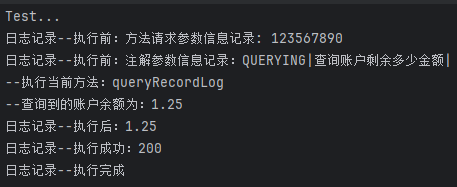
测试结果
成功的情况
失败的情况

总结
使用AOP后,交易处理的日志就不需要和业务代码交织在一起,起到解耦作用,提高代码可读性和可维护性。
其次是代码的扩展性问题,比如后面要开发转账交易,后面只管写业务代码,打上日志记录注解即可完成日志相关代码@RecordLog(transType = TransType.TRANSFER,description = "转账交易")。如果一个项目几十个交易接口需要编写,那这日志记录就少写了几十次,大大的提高了开发效率。
这个案例只是讲解了日志记录,如果将输出的日志信息存到一个对象,并保存到数据库,那就可以记录所有交易的处理情况了。把日志记录处理换成你所需要做的操作即可。
常用场景简述
事务管理
Spring AOP 提供了 @Transactional 注解来简化事务管理,底层是通过 AOP 实现的。通过声明式事务管理,可以根据方法的执行情况自动提交或回滚事务。
例如:在方法执行之前开启事务,执行后提交事务,出现异常时回滚事务。
@Transactional

public void transferMoney(String fromAccount, String toAccount, double amount) {

    accountService.debit(fromAccount, amount);

    accountService.credit(toAccount, amount);

}
可以自定义事务管理切面,也可以同时兼容@Transactional事务管理注解。执行目标方法前开启事务,执行异常时回滚事务,执行正常时可以不用处理。
@Aspect

@Component

public class TransactionAspect {

    @Before("execution(* com.example.service.*.*(..)) && @annotation(org.springframework.transaction.annotation.Transactional)")

    public void beforeTransaction(JoinPoint joinPoint) {

        System.out.println("Starting transaction for method: " + joinPoint.getSignature().getName());

    }

    @AfterThrowing(pointcut = "execution(* com.example.service.*.*(..)) && @annotation(org.springframework.transaction.annotation.Transactional)", throwing = "exception")

    public void transactionFailure(Exception exception) {

        System.out.println("Transaction failed: " + exception.getMessage());

    }

}
性能监控
AOP 可以用来监控方法的执行性能(如执行时间、频率等),特别适合用于系统的性能分析和优化。
示例:
- 计算方法执行时间,并记录日志。
- 监控方法的调用频率。
@Aspect

@Component

public class PerformanceMonitorAspect {

    @Around("execution(* com.example.service.*.*(..))")

    public Object monitorPerformance(ProceedingJoinPoint joinPoint) throws Throwable {

        long start = System.currentTimeMillis();

        // 执行目标方法

        Object result = joinPoint.proceed();

        long elapsedTime = System.currentTimeMillis() - start;

        System.out.println("Method " + joinPoint.getSignature().getName() + " executed in " + elapsedTime + " ms");

        return result;

    }

}
安全控制
AOP 适用于实现方法级别的安全控制。例如,你可以在方法调用之前检查用户的权限,决定是否允许访问。
示例:
- 校验用户是否具有某个操作的权限。
- 使用注解
@Secured或自定义注解,基于角色或权限进行安全验证。
@Aspect

@Component

public class SecurityAspect {

    @Before("@annotation(com.example.security.Secured)")

    public void checkSecurity(Secured secured) {

        // 获取当前用户的权限

        String currentUserRole = getCurrentUserRole();

        if (!Arrays.asList(secured.roles()).contains(currentUserRole)) {

            throw new SecurityException("Insufficient permissions");

        }

    }

}
缓存管理
AOP 可以用于方法结果的缓存。对于一些耗时较长的方法,可以使用 AOP 来在第一次调用时执行计算,后续的调用则直接从缓存中获取结果,从而提高性能。
示例:使用 AOP 实现方法结果缓存,避免重复计算。
@Aspect

@Component

public class CachingAspect {

    private Map<String, Object> cache = new HashMap<>();

    @Around("execution(* com.example.service.*.get*(..))")

    public Object cacheResult(ProceedingJoinPoint joinPoint) throws Throwable {

        String key = joinPoint.getSignature().toShortString();

        if (cache.containsKey(key)) {

            return cache.get(key); // 从缓存中获取

        }

        // 执行目标方法并缓存结果

        Object result = joinPoint.proceed();

        cache.put(key, result);

        return result;

    }

}
异常处理
AOP 可以统一处理方法中的异常,比如记录日志、发送警报或执行其他处理。可以通过 @AfterThrowing 或 @Around 注解来实现异常的捕获和处理。
示例:统一捕获异常并记录日志或发送通知。
@Aspect

@Component

public class ExceptionHandlingAspect {

    @AfterThrowing(pointcut = "execution(* com.example.service.*.*(..))", throwing = "exception")

    public void handleException(Exception exception) {

        System.out.println("Exception caught: " + exception.getMessage());

        // 发送邮件或日志记录

    }

}
自定义验证
AOP 可以用于方法参数的验证,尤其在输入数据的校验上。在方法调用之前进行参数验证,避免无效数据的传入。
示例:校验方法参数是否为空或符合特定规则,比如密码格式校验
@Aspect

@Component

public class ValidationAspect {

    // 正则表达式

    private static final String PASSWORD_PATTERN =

            "^(?=.*[A-Z])(?=.*[a-z])(?=.*\\d)(?=.*[!@#$%^&*(),.?:{}|<>_]).{8,16}$";

    @Before("execution(* org.example.demo.UserService.createUser(..))")

    public void validateUserInput(JoinPoint joinPoint) {

        Object[] args = joinPoint.getArgs();

        for(Object arg : args){

            // 类型检查

            if(arg instanceof UserService){

                UserService userService = (UserService) arg;

                // 然后再校验对象属性的值:是否为空、是否不符合格式要求等等,

                // 比如密码校验

                if(!validatePassword(userService.getPassword())){

                    // 不符合就抛出异常即可

                    throw new IllegalArgumentException("Invalid user input");

                }

            }

        }

    }

    /**

     * 密码校验:8~16为,要有大小学字母+数字+特殊字符

     * @param password String

     * @return boolean

     */

    public static boolean validatePassword(String password) {

        if(password == null)

            return false;

        return Pattern.matches(PASSWORD_PATTERN, password);

    }

}
总结
应用场景万般种,万变不离其中,掌握其本质最为重要。
使用场景的本质是:在一个方法的执行前、执行后、执行异常和执行完成状态下,都可以做一些统一的操作。AOP 的核心优势在于将这些横切功能从核心业务逻辑中提取出来,从而实现代码的解耦和复用,提升系统的可维护性和扩展性。

超实用的SpringAOP实战之日志记录的更多相关文章
- SpringAop切面实现日志记录
SpringAop切面实现日志记录代码实现:https://www.cnblogs.com/wenjunwei/p/9639909.html 问题记录 1.signature.getMethod(). ...
- springAOP实现操作日志记录,并记录请求参数与编辑前后字段的具体改变
本文为博主原创,未经允许不得转载: 在项目开发已经完成多半的情况下,需要开发进行操作日志功能的开发,由于操作的重要性,需要记录下操作前的参数和请求时的参数, 在网上找了很多,没找到可行的方法.由于操作 ...
- Asp.Net Core 2.0 项目实战(9) 日志记录,基于Nlog或Microsoft.Extensions.Logging的实现及调用实例
本文目录 1. Net下日志记录 2. NLog的使用 2.1 添加nuget引用NLog.Web.AspNetCore 2.2 配置文件设置 2.3 依赖配置及调用 ...
- 在SpringBoot中用SpringAOP实现日志记录功能
背景: 我需要在一个SpringBoot的项目中的每个controller加入一个日志记录,记录关于请求的一些信息. 代码类似于: logger.info(request.getRequestUrl( ...
- 9.Spring Boot实战之配置使用Logback进行日志记录
转自:https://blog.csdn.net/meiliangdeng1990/article/details/54300227 Spring Boot实战之配置使用Logback进行日志记录 在 ...
- 一文带你学会基于SpringAop实现操作日志的记录
前言 大家好,这里是经典鸡翅,今天给大家带来一篇基于SpringAop实现的操作日志记录的解决的方案.大家可能会说,切,操作日志记录这么简单的东西,老生常谈了.不! 网上的操作日志一般就是记录操作人, ...
- 记一次基于springboot+aop实现日志记录实战
1. 为什么要记录日志 好处: a. 可以对一些重要功能进行记录,方便以后跟踪是谁操作此功能的. b. 在操作某些功能时可能会发生异常,但每次出现异常我们想定位日志都要去服务器查看我们的日志.有了日志 ...
- 来一手 AOP 注解方式进行日志记录
系统日志对于定位/排查问题的重要性不言而喻,相信许多开发和运维都深有体会. 通过日志追踪代码运行状况,模拟系统执行情况,并迅速定位代码/部署环境问题. 系统日志同样也是数据统计/建模的重要依据,通过分 ...
- Spring Boot AOP 扫盲,实现接口访问的统一日志记录
AOP 是 Spring 体系中非常重要的两个概念之一(另外一个是 IoC),今天这篇文章就来带大家通过实战的方式,在编程猫 SpringBoot 项目中使用 AOP 技术为 controller 层 ...
- 前端学HTTP之日志记录
前面的话 几乎所有的服务器和代理都会记录下它们所处理的HTTP事务摘要.这么做出于一系列的原因:跟踪使用情况.安全性.计费.错误检测等等.本文将谥介绍日志记录 记录内容 大多数情况下,日志的记录出于两 ...
随机推荐
- 使用 SSH 转义代码来控制连接
OpenSSH 最常被忽视的一个非常有用的功能是能够从连接内部控制会话的某些方面.通过使用 SSH 转义代码,我们能够在会话内部与本地 SSH 软件进行交互. 强制从客户端断开连接(如何退出卡住或冻结 ...
- 【2019年第一篇总结】之Mac安装Python系列软件目录汇总
1.第一步,安装Python环境 <[Mac + Python]苹果系统之安装Python3.6.x环境> 2.安装PyCharm并激活 <[转载][Pycharm编辑器破解步骤]之 ...
- Docker网络上篇-网络介绍
通过前面的学习,我们已经可以把自己写的微服务项目通过dockerfile文件方式部署到docker上面了.那么微服务之间通信,怎么通信的?是在同一个网络还是在不同的网络环境下?docker中怎么配置网 ...
- C#设计模式入门实战教程
什么是设计模式 设计模式是对面向对象设计中反复出现的问题的解决方案.它们提供了被反复使用.多数人知晓的.经过分类编目的代码设计经验总结. 设计模式的作用 提高代码的可重用性:通过定义一套标准的解决方案 ...
- in notin exists not exists 性能优化算法总结
in notin exists not exists 性能优化算法总结 1.1. in 和 exists 区别 1.2. not in 能不能走索引 1.3. not in 和 join 的关系 1. ...
- 用 SQL 写的俄罗斯方块游戏「GitHub 热点速览」
在开始介绍上周热门开源项目之前,要插播一条开源新闻:Nginx 已正式迁移至 GitHub. 近日,Nginx 官方宣布将 Nginx 开源项目,从 Mercurial 迁移至 GitHub 代码托管 ...
- 为什么Java已经不推荐使用Stack了?
为什么不推荐使用Stack Java已不推荐使用Stack,而是推荐使用更高效的ArrayDeque 为什么不推荐使用 性能低:是因为 Stack 继承自 Vector, 而 Vector 在每个方法 ...
- dotnet 学习 CPF 框架笔记 了解 X11 里如何获取触摸信息
本文记录我学习 CPF 框架的笔记,本文记录我阅读 CPF 框架,学习到了如何在 dotnet C# 里面获取到 X11 的触摸信息,获取到多指触摸以及触摸点的面积和触摸点压感等信息的方法 开始之前, ...
- react-pdf预览在线PDF的使用
1.在react项目中安装react-pdf依赖包 建议安装8.0.2版本的react-pdf,如果安装更高版本的可能出现一些浏览器的兼容性问题: npm install react-pdf@8.0. ...
- 应聘软件测试 HR 会问到哪些问题?收藏这一篇就够了!
1.你还有收到其他offer吗? 其实hr问你offer情况,是对你感兴趣,想要进一步了解你,看下你的市场竞争力. 但注意不要太坦诚的说:我还没有offer或者收到两个offer还想对比对比:也不要撒 ...