
Ubuntu下的MySQL安装
<1>安装mysql-server
sudo apt-get update

sudo apt-get install mysql-server mysql-client
<2>如何判断mysql是否安装成功
sudo service mysql restart
<3>让apache支持mysql
sudo apt-get install libapache2-mod-auth-mysql
16.04使用下面命令
sudo apt-get install libmysqlclient-dev
<3>登录mysql
mysql -u root -p
<4>配置文件my.cnf修改成功后就可以重启数据库(修改方法在下面),重启数据库之前需要先重新载入apparmor配置文件,使用下面命令重新载入:
sudo /etc/init.d/apparmor restart
重新启动数据库
sudo /etc/init.d/mysql start
<5>查看数据库的编码
一、查看MySQL数据库服务器和数据库MySQL字符集。
SHOW VARIABLES LIKE 'character_set_%';
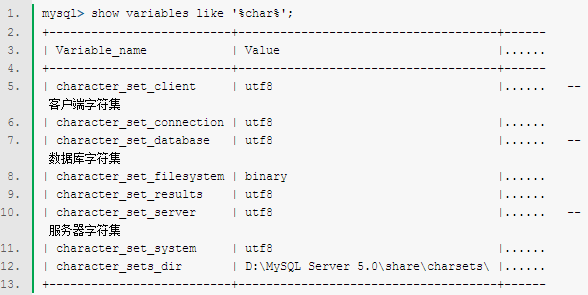
如果需要修改的话
set character_set_client=utf8;
二、查看MySQL数据表(table)的MySQL字符集,spring_user是数据库的名字,t_user是表名
mysql> show table status from spring_user like '%t_user%';
或者
mysql> show create table t_user;
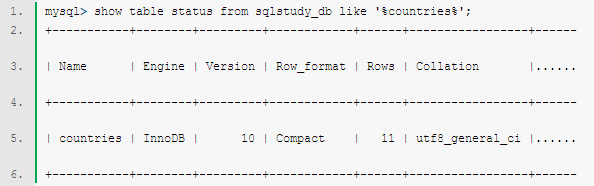
修改方法:
alter table t_user convert to character set utf8;
三、查看MySQL数据列(column)的MySQL字符集,t_user是表名
mysql> show full columns from t_user;
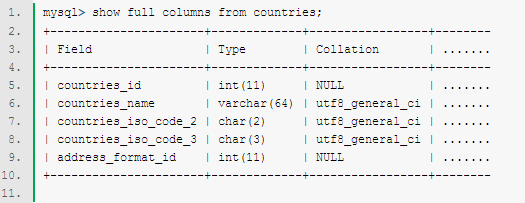
<6>sudo gedit /etc/my.cnf
因为ubuntu下mySQL默认的数据库的路径是在/var/lib/mysql,所以要修改这个路径的话,参考
http://www.2cto.com/database/201501/373939.html
注意修改的时候/mysql要加上
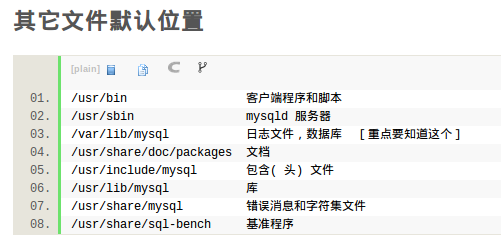
修改的my.cnf文件,修改完切记一定要重启电脑才能生效!!重启电脑!!重启电脑!!
#

# The MySQL database server configuration file.

#

# You can copy this to one of:

# - "/etc/mysql/my.cnf" to set global options,

# - "~/.my.cnf" to set user-specific options.

#

# One can use all long options that the program supports.

# Run program with --help to get a list of available options and with

# --print-defaults to see which it would actually understand and use.

#

# For explanations see

# http://dev.mysql.com/doc/mysql/en/server-system-variables.html

# This will be passed to all mysql clients

# It has been reported that passwords should be enclosed with ticks/quotes

# escpecially if they contain "#" chars...

# Remember to edit /etc/mysql/debian.cnf when changing the socket location.

[client]

port		= 3306

socket		= /var/run/mysqld/mysqld.sock

default-character-set=utf8

# Here is entries for some specific programs

# The following values assume you have at least 32M ram

# This was formally known as [safe_mysqld]. Both versions are currently parsed.

[mysqld_safe]

default-character-set=utf8

character_set_server = utf8

socket		= /var/run/mysqld/mysqld.sock

nice		= 0

[mysqld]

#

# * Basic Settings

#

user		= mysql

pid-file	= /var/run/mysqld/mysqld.pid

socket		= /var/run/mysqld/mysqld.sock

character_set_server=utf8

init_connect='SET NAMES utf8'

port		= 3306

basedir		= /usr

datadir		= /home/common/software/database/mysql

tmpdir		= /tmp

lc-messages-dir	= /usr/share/mysql

skip-external-locking

#

# Instead of skip-networking the default is now to listen only on

# localhost which is more compatible and is not less secure.

bind-address		= 127.0.0.1

#

# * Fine Tuning

#

key_buffer		= 16M

max_allowed_packet	= 16M

thread_stack		= 192K

thread_cache_size       = 8

# This replaces the startup script and checks MyISAM tables if needed

# the first time they are touched

myisam-recover         = BACKUP

#max_connections        = 100

#table_cache            = 64

#thread_concurrency     = 10

#

# * Query Cache Configuration

#

query_cache_limit	= 1M

query_cache_size        = 16M

#

# * Logging and Replication

#

# Both location gets rotated by the cronjob.

# Be aware that this log type is a performance killer.

# As of 5.1 you can enable the log at runtime!

#general_log_file        = /var/log/mysql/mysql.log

#general_log             = 1

#

# Error log - should be very few entries.

#

log_error = /var/log/mysql/error.log

#

# Here you can see queries with especially long duration

#log_slow_queries	= /var/log/mysql/mysql-slow.log

#long_query_time = 2

#log-queries-not-using-indexes

#

# The following can be used as easy to replay backup logs or for replication.

# note: if you are setting up a replication slave, see README.Debian about

#       other settings you may need to change.

#server-id		= 1

#log_bin			= /var/log/mysql/mysql-bin.log

expire_logs_days	= 10

max_binlog_size         = 100M

#binlog_do_db		= include_database_name

#binlog_ignore_db	= include_database_name

#

# * InnoDB

#

# InnoDB is enabled by default with a 10MB datafile in /var/lib/mysql/.

# Read the manual for more InnoDB related options. There are many!

#

# * Security Features

#

# Read the manual, too, if you want chroot!

# chroot = /var/lib/mysql/

#

# For generating SSL certificates I recommend the OpenSSL GUI "tinyca".

#

# ssl-ca=/etc/mysql/cacert.pem

# ssl-cert=/etc/mysql/server-cert.pem

# ssl-key=/etc/mysql/server-key.pem

[mysqldump]

quick

quote-names

max_allowed_packet	= 16M

[mysql]

default-character-set=utf8

#no-auto-rehash	# faster start of mysql but no tab completition

[isamchk]

key_buffer		= 16M

#

# * IMPORTANT: Additional settings that can override those from this file!

#   The files must end with '.cnf', otherwise they'll be ignored.

#

!includedir /etc/mysql/conf.d/
Ubuntu下Eclipse部署MySQL JDBC驱动
参考http://www.linuxidc.com/Linux/2011-10/44355.htm中的上半部分
Linux下自动启动MySQL

一、查看MySQL数据库服务器和数据库MySQL字符集。
命令:
mysql> show variables like '%char%'; |

二、查看MySQL数据表(table)的MySQL字符集。
命令:
mysql> show table status from sqlstudy_db like '%countries%'; |

三、查看MySQL数据列(column)的MySQL字符集。
命令:
mysql> show full columns from countries; |

四、修改MySQL的密码
首先用root登录MySQL,然后执行
UPDATE user SET password=PASSWORD('123456') WHERE user='root';

FLUSH PRIVILEGES;
或者
SET PASSWORD FOR 'root'@'localhost' = PASSWORD('newpass');
如果要安装5.6版本的mysql
sudo add-apt-repository 'deb http://archive.ubuntu.com/ubuntu trusty universe'

sudo apt-get update

sudo apt install mysql-server-5.6 mysql-client-5.6
如果卸载5.7再安装的时候遇到
/var/cache/apt/archives/mysql-server-5.6_5.6.16-1~exp1_amd64.deb E: Sub-process /usr/bin/dpkg returned an error code (1)
sudo apt-get remove --purge mysql-server mysql-client mysql-common

sudo apt-get autoremove

sudo apt-get autoclean
先确保 mysql service是启动的,没启动会报找不到mysqld.sock
service mysql status

service mysql start
Ubuntu下的MySQL安装的更多相关文章
- ubuntu下root和安装mysql
sudo password创建新的root密码: 1.用当前登录用户打开终端,在终端输入命令 sudo passwd,输入当前用户的密码然后回车 2.会提示输入新密码,输入完成后回车(http://w ...
- Ubuntu下Apache的安装
Ubuntu下可快速安装LAMP server(Apache+MySQL+PHP5),参见<Ubuntu下快速安装LAMP server>一文. 也可以手动安装Apache.本文介绍如何手 ...
- ubuntu下修改mysql默认字符编码出现的Job failed to start解决办法
ubuntu下修改mysql默认字符编码出现的Job failed to start解决办法 前几天卸掉了用了好多年的Windows,安装了Ubuntu12.04,就开始各种搭环境.今天装好了MySQ ...
- Ubuntu下git的安装与使用
Ubuntu下git的安装与使用 Ubuntu下git的安装与使用与Windows下的大致相同,只不过个人感觉在Ubuntu下使用git更方便. 首先,确认你的系统是否已安装git,可以通过git指令 ...
- Ubuntu下Speedtest的安装
要安装Speedtest,需要先安装apache,参见<Ubuntu下Apache的安装>一文:*(再安装LAMP server,参见<Ubuntu下快速安装LAMP server& ...
- ubuntu下的openfire安装、配置、运行
openfire服务器 Openfire 采用Java开发,开源的实时协作(RTC)服务器基于XMPP(Jabber)协议.您可以使用它轻易的构建高效率的即时通信服务器.Op ...
- ubuntu下boost编译安装
ubuntu下boost编译安装 boost 安装 1.依赖安装 apt-get install mpi-default-dev libicu-dev python-dev python3-dev l ...
- 2010-01-20 12:09 ubuntu下minicom的安装及使用
转http://hi.baidu.com/npugtawqdnbgqrq/item/106f805409b42813db163527 ubuntu下minicom的安装及使用 安装: sudo apt ...
- ubuntu 下redis的安装简介
Linux公社:https://www.linuxidc.com/topicnews.aspx?page=2&tid=2 简单介绍下ubuntu下redis的安装方式: 第一种: 1:进入re ...
随机推荐
- 【mysql】关于事务的隔离级别
一.锁的种类 MySQL中锁的种类很多,有常见的表锁和行锁,也有新加入的Metadata Lock等等,表锁是对一整张表加锁,虽然可分为读锁和写锁,但毕竟是锁住整张表,会导致并发能力下降,一般是做dd ...
- [iOS]坑爹的ALAsset(Assets Library Framework)
Assets Library Framework 可以用来做iOS上的多选器,选照片视频啥的啦就不介绍了. 目前的项目有点类似dropbox,可以选择设备内的照片然后帮你上传文件,使用了Assets ...
- jni调试3(线程调试env变量问题)
jni层调试线程死机原因 一,导致死机原因: jni层中 线程函数中 只要添加调用env 的函数 ,,就会死机 二,解决方法 第一我们应该理解: ①(独立性) JNIEnv 是一个与线 ...
- 2015.1.25 Delphi打开网址链接的几种方法
Delphi打开网址链接的几种方法1.使用shellapi打开系统中默认的浏览器 首先需在头部引用 shellapi单元即在uses中添加shellapi,这里我们需要知道有 ...
- Python学习记录day6
title: Python学习记录day6 tags: python author: Chinge Yang date: 2016-12-03 --- Python学习记录day6 @(学习)[pyt ...
- 字符串切分 String.Split 和 Regex.Split
当切割字符串的是单个字符时可使用String.Split string strSample="ProductID:20150215,Categroy:Food,Price:15.00&quo ...
- BZOJ 3343: 教主的魔法 [分块]【学习笔记】
3343: 教主的魔法 Time Limit: 10 Sec Memory Limit: 256 MBSubmit: 1172 Solved: 526[Submit][Status][Discus ...
- hadoop安装
环境 RedHad Linux9.0 java6 hadoop1.2.1 hadoop下载地址:http://mirror.bit.edu.cn/apache/hadoop/common/ 版本 ...
- H5框架之Bootstrap(一)
H5框架之Bootstrap(一) 接下来的时间里,我将和大家一起对当前非常流行的前端框架Bootstrap进行速度的学习,以案例的形式.对刚开始想学习Bootstrap的同学而找不着边的就很有帮助了 ...
- Spring知识点提炼
原文出处: 朱小厮 1. Spring框架的作用 轻量:Spring是轻量级的,基本的版本大小为2MB 控制反转:Spring通过控制反转实现了松散耦合,对象们给出它们的依赖,而不是创建或查找依赖的对 ...