
Compiler Error Message: CS0016: Could not write to output
打开网页是报错:
Server Error in '/' Application.
Compilation Error
Description: An error occurred during the compilation of a resource required to service this request. Please review the following specific error details and modify your source code appropriately.
Compiler Error Message: CS0016: Could not write to output file 'c:\Windows\Microsoft.NET\Framework64\v4.0.30319\Temporary ASP.NET Files\root\d08c021e\3b2d272f\App_GlobalResources.3fyayowo.dll' -- '拒绝访问。 '
Source Error:
[No relevant source lines] |
Source File: Line: 0
Version Information: Microsoft .NET Framework Version:4.0.30319; ASP.NET Version:4.0.30319.34280
解决办法:
1、错误原因:Users 用户对 C:\Windows 目录下的 temp 文件夹没有修改,当 .net 需要向 temp 文件夹写临时文件时,因无权限写入而产生异常。
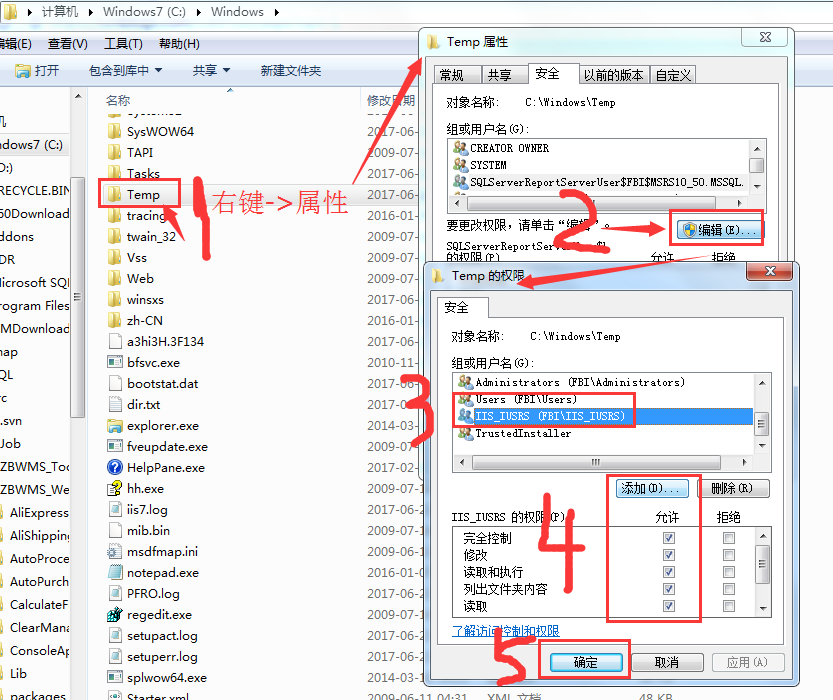
2、解决办法:只需向 C:\Windows 目录下的 temp 文件夹添加 Users 用户并分配“修改”权限;如果 temp 文件夹已经有 Users 用户,勾选“修改”权限即可。
方法如下:
A、右键 temp 文件夹,选择“属性” → “安全”选项卡 → 编辑
B、选中 Users 用户,勾选“修改”,单击“确定”即可。
C、如果 Users 用户不在“组或用户名”中,单击“添加” → 高级 → 立即查找 → 双击“搜索结果”中的 Users 用户 → 确定。
Compiler Error Message: CS0016: Could not write to output的更多相关文章
- Compiler Error Message: CS0016: Could not write to output file 回绝访问
Compiler Error Message: CS0016: Could not write to output file 'c:\Windows...dll' 拒绝访问 C:\Windows\Te ...
- server error in '/' applecation----Compiler Error Message: CS0016: Could not write to output file 'c:\Windows\Microsoft.NET\Framework64\v4.0.30319\Temporary ASP.NET Files\root\xx' -- 'Access is denied
今天在阿里云虚拟机上部署新站点后出现下面的错误:server error in '/' applecation Compiler Error Message: CS0016: Could not wr ...
- Local IIS 7.0 - CS0016: Could not write to output file / Microsoft.Net > Framework > v4.0.30319 > Temporary ASP.NET Files
This week I went nuts over my local IIS. I have never swore to a machine that much in my whole life. ...
- undefined reference to typeinfo - C++ error message
undefined reference to typeinfo - C++ error message There are some compiler and loader error message ...
- MSVC 12: compiler error in boost/type_traits/common_type.hpp
来自: https://svn.boost.org/trac10/ticket/11885 MSVC 12: compiler error in boost/type_traits/common_ty ...
- idea报错:error java compilation failed internal java compiler error
idea下面报如下问题 error java compilation failed internal java compiler error 解决办法:Setting->Compiler-> ...
- c++ builder 2010 错误 F1004 Internal compiler error at 0x9740d99 with base 0x9
今天遇到一个奇怪的问题,拷贝项目后,在修改,会出现F1004 Internal compiler error at 0x9740d99 with base 0x9 ,不管怎么改,删除改动,都没用,关闭 ...
- idea Error:java: Compilation failed: internal java compiler error
idea 遇到Error:java: Compilation failed: internal java compiler error 是提示说你当前使用的编译器jdk版本不对. 按住Ctrl+Alt ...
- idea之internal java compiler error
启动错误:Error:java: Compilation failed: internal java compiler error 解决:将圈选地方改为对应的jdk版本即可
随机推荐
- 《从0到1学习Flink》—— Flink Data transformation(转换)
前言 在第一篇介绍 Flink 的文章 <<从0到1学习Flink>-- Apache Flink 介绍> 中就说过 Flink 程序的结构 Flink 应用程序结构就是如上图 ...
- 浅谈堆-Heap(一)
应用场景和前置知识复习 堆排序 排序我们都很熟悉,如冒泡排序.选择排序.希尔排序.归并排序.快速排序等,其实堆也可以用来排序,严格来说这里所说的堆是一种数据结构,排序只是它的应用场景之一 Top N的 ...
- drools的error:Jboss rule 6.4.0 Cannot find a default StatelessKieSession
drools的kmodule.xml文件,如果是默认加载必须放在META-INF的文件夹下,如下图 官网大佬原话 Have you defined kieSession and KieBase nam ...
- jQuery获取url
JS获取当前页面的URL信息 设置或获取对象指定的文件名或路径. <script> alert(window.location.pathname) </script> 设置或获 ...
- SpringMVC 返回自定义属性名
SpringMVC 返回的属性名默认是小写驼峰形式的实体对象中的属性名,如 userID 属性名它会返回 userId. 如果接口方式之前已经定下来,这样前端按原来的方式取数据会读取失败的,那有没有方 ...
- chart.js 使用方法 特别说明不是中文的
以上是一个饼图的案例,其他统计类型查看文档 http://www.chartjs.org/docs/latest/charts/doughnut.html 注意看域名 chartjs.org 不是 ...
- iOS 力学动画生成器UIKit Dynamics 之碰撞效果讲解
UIKit Dynamic是iOS7 新增的一组类和方法,可赋予UIView逼真的行为和特征,不需要写动画效果那些繁琐的代码,让开发人员能够轻松地改善应用的用户体验.一共有6个可用于定制UIDynam ...
- EF和linq语句查询条件不等于某个参数出现的问题
where t.a!=字符串 这是错误的写法,正确为 where t.a!=字符串.trim() 其他类型变量需要保持实体类型和查询条件参数的类型是一致的,不然出现的语句可能会是 类似`Exten ...
- ehcache常用API整理
鉴于csdn的blog的不稳定, 及混乱的编辑器, 和无上传功能, 遂决定彻底投诚javaeye的blog. 数月前整理的一个东西, 作为cache的扫盲文档.参考了它的官方文档. 对ehcache感 ...
- hdu-1233 还是畅通工程---MST模板
题目链接: http://acm.hdu.edu.cn/showproblem.php?pid=1233 题目大意: 求MST最小生成树 解题思路: Prim算法直接套即可 #include<b ...