
python - 接口自动化测试 - ReadConfig - 读取配置文件封装
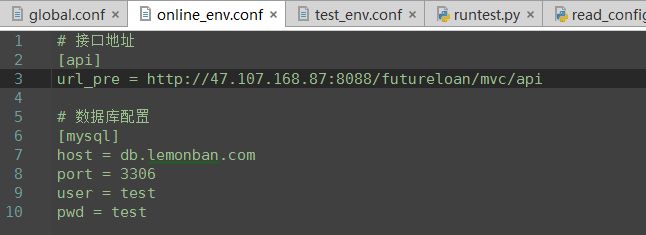
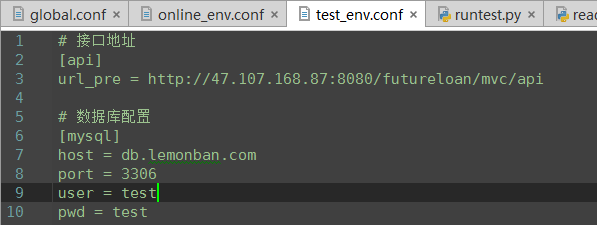
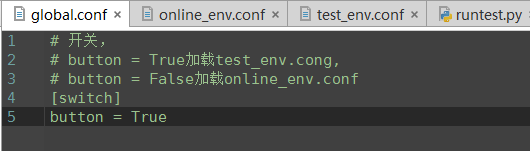
# -*- coding:utf-8 -*-

'''

@project: ApiAutoTest

@author: Jimmy

@file: read_config.py

@ide: PyCharm Community Edition

@time: 2018-12-21 13:53

@blog: https://www.cnblogs.com/gotesting/

'''

import configparser

import os

from Common import contants

# 创建实例

# 加载配置文件

# 根据section option获取值

class ReadConfig:

    # 初始化函数:实例化conf对象,读取传入的配置文件

    def __init__(self):

        self.conf = configparser.ConfigParser()

        file = os.path.join(contants.conf_dir,'global.conf')

        self.conf.read(file)

        if self.get_config_boolean('switch','button'):

            test_conf = os.path.join(contants.conf_dir,'test_env.conf')

            self.conf.read(test_conf)

        else:

            online_conf = os.path.join(contants.conf_dir,'online_env.conf')

            self.conf.read(online_conf)

    def get_config_str(self,section,option):

        return self.conf.get(section,option)

    def get_config_boolean(self,section,option):

        return self.conf.getboolean(section,option)

    def get_config_int(self,section,option):

        return self.conf.getint(section,option)

    def get_config_float(self,section,option):

        return self.conf.getfloat(section,option)
python - 接口自动化测试 - ReadConfig - 读取配置文件封装的更多相关文章
- python - 接口自动化测试 - MysqlUtil - 数据库操作封装
# -*- coding:utf-8 -*- ''' @project: ApiAutoTest @author: Jimmy @file: mysql_util.py @ide: PyCharm C ...
- python接口自动化测试--批量读取数据
为了便于维护,python接口自动化测试用例可以利用xlrd模块读取excal表格进行数据分离.我们可以利用xlrd模块的row_values()和cell_value()两种方法读取Excal表格. ...
- 一篇文章告诉你Python接口自动化测试中读取Text,Excel,Yaml文件的方法
前言 不管是做Ui自动化和接口自动,代码和数据要分离,会用到Text,Excel,Yaml.今天讲讲如何读取文件数据 Python也可以读取ini文件,传送门 记住一点:测试的数据是不能写死在代码里面 ...
- python - 接口自动化测试 - ReadExcel - 读取测试数据封装
# -*- coding:utf-8 -*- ''' @project: ApiAutoTest @author: Jimmy @file: read_excel.py @ide: PyCharm C ...
- python - 接口自动化测试 - GetLog - 日志类封装
# -*- coding:utf-8 -*- ''' @project: ApiAutoTest @author: Jimmy @file: get_logger.py @ide: PyCharm C ...
- python - 接口自动化测试 - HttpRequest - 接口测试类封装
# -*- coding:utf-8 -*- ''' @project: ApiAutoTest @author: Jimmy @file: http_request.py @ide: PyCharm ...
- Python接口自动化测试框架实战 从设计到开发
第1章 课程介绍(不要错过)本章主要讲解课程的详细安排.课程学习要求.课程面向用户等,让大家很直观的对课程有整体认知! 第2章 接口测试工具Fiddler的运用本章重点讲解如何抓app\web的htt ...
- 基于Python接口自动化测试框架+数据与代码分离(进阶篇)附源码
引言 在上一篇<基于Python接口自动化测试框架(初级篇)附源码>讲过了接口自动化测试框架的搭建,最核心的模块功能就是测试数据库初始化,再来看看之前的框架结构: 可以看出testcase ...
- python接口自动化测试二十七:密码MD5加密 ''' MD5加密 ''' # 由于MD5模块在python3中被移除 # 在python3中使用hashlib模块进行md5操作 import hashlib # 待加密信息 str = 'asdas89799,.//plrmf' # 创建md5对象 hl = hashlib.md5() # Tips # 此处必须声明encode # 若写法为
python接口自动化测试二十七:密码MD5加密 ''' MD5加密 '''# 由于MD5模块在python3中被移除# 在python3中使用hashlib模块进行md5操作import has ...
随机推荐
- LeetCode Reverse Bits 反置位值
题意:给定一个无符号32位整数,将其二进制形式左右反置,再以整型返回. 思路:循环32轮,将n往右挤出一位就补到ans的尾巴上. class Solution { public: uint32_t r ...
- linux 命令——21 find(转)
在 使用 find命令的-exec选项处理匹配到的文件时, find命令将所有匹配到的文件一起传递给exec执行.但有些系统对能够传递给exec的命 令长度有限制,这样在find命令运行几分钟之后,就 ...
- Android(java)学习笔记74:ListViewProject案例(ListView + ArrayAdapter)
1. 首先是MainActivity.java文件,如下: package com.himi.lv1; import java.util.ArrayList; import java.util.Lis ...
- Java Web报错:getOutputStream() has already been called for this response解决方案
今天做了个导出excel表的功能.大概代码如下: ouputStream = response.getOutputStream(); wb.write(ouputStream); ouputStrea ...
- FW 数据库迁移之从oracle 到 MySQL
方式一: 手动方式导入导出 手动的方式导入, 就是操作步骤会比较繁琐一些. 对Table 的结构和数据: 1. 使用 SQL Developer 把 oracle 的 table 的schema 和 ...
- 扩展 -------jQuery
本文摘要:http://www.liaoxuefeng.com/ 编写jQuery插件 为了满足需求,我们经常会调用一些插件,js插件都是别人写的,今天就来了解了解一些方法. 给jQuery对象绑定一 ...
- 微信小程序页面跳转绑定点击事件
https://www.cnblogs.com/mrszhou/p/7931747.html
- 十九、MySQL GROUP BY 语句
MySQL GROUP BY 语句 GROUP BY 语句根据一个或多个列对结果集进行分组. 在分组的列上我们可以使用 COUNT, SUM, AVG,等函数. GROUP BY 语法 SELECT ...
- swpan&expect交互脚本
#!/usr/bin/expectset timeout 30set user USERNAMEset pass PASSWORDspawn sudo pg_dump npi -U admin -p ...
- Python3爬取人人网(校内网)个人照片及朋友照片,并一键下载到本地~~~附源代码
题记: 11月14日早晨8点,人人网发布公告,宣布人人公司将人人网社交平台业务相关资产以2000万美元的现金加4000万美元的股票对价出售予北京多牛传媒,自此,人人公司将专注于境内的二手车业务和在美国 ...