
python - 接口自动化测试 - MysqlUtil - 数据库操作封装
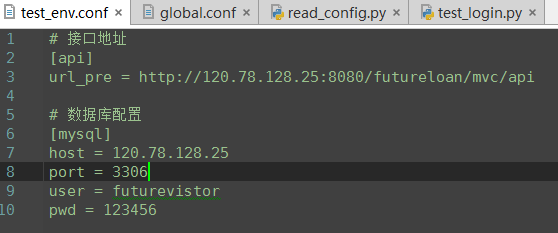
# -*- coding:utf-8 -*-

'''

@project: ApiAutoTest

@author: Jimmy

@file: mysql_util.py

@ide: PyCharm Community Edition

@time: 2018-12-22 10:30

@blog: https://www.cnblogs.com/gotesting/

'''

'''

1. 连接数据库

2. 查询

3. 建立游标

4. 执行

'''

import pymysql

import traceback

from Common.read_config import ReadConfig

class MysqlUtil:

    # 读取配置文件中的数据库配置信息,连接数据库

    def __init__(self):

        read_config = ReadConfig()

        host = read_config.get_config_str('mysql','host')

        port = read_config.get_config_int('mysql','port')

        user = read_config.get_config_str('mysql','user')

        password = read_config.get_config_str('mysql','pwd')

        try:

            self.mysql = pymysql.connect(host=host,port=port,user=user,password=password,cursorclass=pymysql.cursors.DictCursor)

        except Exception as e:

            print('mysql connect failed , please check')

            raise e

    # 查询sql数据,并返回

    def fetch_one(self,sql):

        db = self.mysql

        cursor = db.cursor() # 建立游标

        try:

            cursor.execute(sql) # 执行sql语句

            result = cursor.fetchone() # 返回一条数据

        except:

            traceback.print_exc() # 输出异常信息

            db.rollback()

        return result

    def fetch_all(self,sql):

        db = self.mysql

        cursor = db.cursor()

        try:

            cursor.execute(sql)

            result = cursor.fetchall()

        except:

            traceback.print_exc()

        return result
python - 接口自动化测试 - MysqlUtil - 数据库操作封装的更多相关文章
- python - 接口自动化测试 - GetLog - 日志类封装
# -*- coding:utf-8 -*- ''' @project: ApiAutoTest @author: Jimmy @file: get_logger.py @ide: PyCharm C ...
- python - 接口自动化测试 - HttpRequest - 接口测试类封装
# -*- coding:utf-8 -*- ''' @project: ApiAutoTest @author: Jimmy @file: http_request.py @ide: PyCharm ...
- python - 接口自动化测试 - ReadConfig - 读取配置文件封装
# -*- coding:utf-8 -*- ''' @project: ApiAutoTest @author: Jimmy @file: read_config.py @ide: PyCharm ...
- python接口自动化测试二十七:密码MD5加密 ''' MD5加密 ''' # 由于MD5模块在python3中被移除 # 在python3中使用hashlib模块进行md5操作 import hashlib # 待加密信息 str = 'asdas89799,.//plrmf' # 创建md5对象 hl = hashlib.md5() # Tips # 此处必须声明encode # 若写法为
python接口自动化测试二十七:密码MD5加密 ''' MD5加密 '''# 由于MD5模块在python3中被移除# 在python3中使用hashlib模块进行md5操作import has ...
- Python接口自动化测试框架实战 从设计到开发
第1章 课程介绍(不要错过)本章主要讲解课程的详细安排.课程学习要求.课程面向用户等,让大家很直观的对课程有整体认知! 第2章 接口测试工具Fiddler的运用本章重点讲解如何抓app\web的htt ...
- 基于Python接口自动化测试框架+数据与代码分离(进阶篇)附源码
引言 在上一篇<基于Python接口自动化测试框架(初级篇)附源码>讲过了接口自动化测试框架的搭建,最核心的模块功能就是测试数据库初始化,再来看看之前的框架结构: 可以看出testcase ...
- python接口自动化测试七:获取登录的Cookies
python接口自动化测试七:获取登录的Cookies,并关联到下一个请求 获取登录的cookies:loginCookies = r.cookies 把获取到的cookies传入请求:cooki ...
- python接口自动化测试二十八:连接SQL sever操作
1.中文乱码问题: (1).文件头加上# -*- coding:utf-8 -*- 或者 #coding=utf8 (2).pymssql.connect连接串中charset是要跟你数据库的编码一样 ...
- C# .NET更智能的数据库操作封装项目
前面两篇文章介绍了框架的思路及里面大概的实现过程,那时候忘记上传项目,就补发一下.顺便介绍下框架使用方式,并分析下框架使用的优缺点. 先发一下前两章的链接 篇一:http://www.cnblogs. ...
随机推荐
- 【extjs6学习笔记】0.4 准备: 书籍与文档
Ext JS 6 By Example Ext JS Essentials Learning Ext JS - Fourth Edition Ext JS 6: Getting Started htt ...
- 详情介绍win7:编辑文件夹时提示操作无法完成,因为其中的文件夹或文件已在另一个程序中打开的解决过程
我们在使用电脑中,总会遇到下面这种情况: 那怎么解决呢,现在就开始教程: 在电脑的底下显示各种图标那一行点击右键,再选择“启动任务管理器” 接下来你就可以对你刚刚要操作的文件进行重命名.删除等操作啦! ...
- coursera_ML_1
机器学习定义: A computer program is said to leran from experience E with respect to some task T and some ...
- JIRA Plugin Development——Configurable Custom Field Plugin
关于JIRA Plugin开发的中文资料相当少,这可能还是由于JIRA Plugin开发在国内比较小众的原因吧,下面介绍下自己的一个JIRA Plugin开发的详细过程. 业务需求 创建JIRA IS ...
- git入门使用摘录
无论使用github或者gitlab,第一步都是在本地生产ssh-key,ssh-key作为客户端的身份证存放在user用户的.ssh文件夹下.如果之前没有生产过,需要用ssh-keygen命令生成. ...
- UVA 11600 Masud Rana(概率dp)
当两个城市之间有安全的道路的时候,他们是互相可到达的,这种关系满足自反.对称和传递性, 因此是一个等价关系,在图论中就对应一个连通块. 在一个连通块中,当前点是那个并不影响往其他连通块的点连边,因此只 ...
- JSON对象转成formData对象,formData对象转成JSON对象
在向后端请求时,如果上传的数据里存在file文件对象,需要用到表单提交,这时候我们需要将JSON对象,转成formData对象,具体见代码 const formData = new FormData( ...
- LigerUI的下拉框行和树的设置(表单生成)
http://blog.csdn.net/dxnn520/article/details/8194767 // ---------------------- // [下拉树设置 -- 单选] {dis ...
- HTML复选框checkbox默认样式修改
此方法可以将复选框的默认样式替换成任意样式.如图: 未选择: 选择时: 思路:将复选框隐藏,利用lebal元素的焦点传递特性,用lebal的样式替代复选框. 代码如下: <!DOCTYPE ht ...
- SPOJ2713GSS4 - Can you answer these queries IV(线段树)
题意 Sol 讲过无数次了..很显然,一个$10^12$的数开方不超过$8$次后就会变为$1$ 因此直接暴力更改即可,维护一下这段区间是否被全改为了$1$ 双倍经验:https://www.luogu ...