
XFire Web Service客户端开发
一、项目创建:
创建一个Maven的web工程
Maven包导入pom.xml
<project xmlns="http://maven.apache.org/POM/4.0.0" xmlns:xsi="http://www.w3.org/2001/XMLSchema-instance"

         xsi:schemaLocation="http://maven.apache.org/POM/4.0.0 http://maven.apache.org/xsd/maven-4.0.0.xsd">

    <modelVersion>4.0.0</modelVersion>

    <groupId>org.yoki.edu</groupId>

    <artifactId>WebServiceLearn</artifactId>

    <version>1.0-SNAPSHOT</version>

    <packaging>war</packaging>

    <name>WebServiceLearn</name>

    <url>http://maven.apache.org</url>

    <properties>

        <project.build.sourceEncoding>UTF-8</project.build.sourceEncoding>

    </properties>

    <dependencies>

        <dependency>

            <groupId>javax.servlet</groupId>

            <artifactId>servlet-api</artifactId>

            <version>2.3</version>

        </dependency>

        <!-- xfire webservice -->

        <dependency>

            <groupId>org.codehaus.xfire</groupId>

            <artifactId>xfire-all</artifactId>

            <version>1.2.6</version>

            <exclusions>

                <exclusion>

                    <!-- 不去除报版本冲突 -->

                    <artifactId>activation</artifactId>

                    <groupId>javax.activation</groupId>

                    <!--<version>1.0.2</version>-->

                </exclusion>

            </exclusions>

        </dependency>

        <!-- xfire webservice -->

    </dependencies>

    <build>

        <plugins>

            <plugin>

                <!-- jetty -->

                <groupId>org.mortbay.jetty</groupId>

                <artifactId>maven-jetty-plugin</artifactId>

                <version>6.1.26</version>

                <configuration>

                    <webAppSourceDirectory>${basedir}/src/main/webapp</webAppSourceDirectory>

                </configuration>

            </plugin>

        </plugins>

    </build>

</project>
二、服务端编写:
1、创建服务端接口:HelloWorldService.java
package org.yoki.edu.service;

/**

 * Created by SunnyWen on 2017/9/4.

 */

public interface HelloWorldService {

    /**

     * return welcome

     *

     * @param username

     * @return

     */

    String sayHello(String username);

}
2、创建服务端接口实现:HelloWorldServiceImpl.java
package org.yoki.edu.service.impl;

/**

 * Created by SunnyWen on 2017/9/4.

 */

public class HelloWorldServiceImpl {

    public String sayHello(String name) {

        return "Hello , " + name + " welcome to new world";

    }

}
3、web.xml文件配置:
<?xml version="1.0" encoding="UTF-8"?>

<!--

 Licensed to the Apache Software Foundation (ASF) under one or more

  contributor license agreements.  See the NOTICE file distributed with

  this work for additional information regarding copyright ownership.

  The ASF licenses this file to You under the Apache License, Version 2.0

  (the "License"); you may not use this file except in compliance with

  the License.  You may obtain a copy of the License at

      http://www.apache.org/licenses/LICENSE-2.0

  Unless required by applicable law or agreed to in writing, software

  distributed under the License is distributed on an "AS IS" BASIS,

  WITHOUT WARRANTIES OR CONDITIONS OF ANY KIND, either express or implied.

  See the License for the specific language governing permissions and

  limitations under the License.

-->

<web-app xmlns="http://xmlns.jcp.org/xml/ns/javaee"

         xmlns:xsi="http://www.w3.org/2001/XMLSchema-instance"

         xsi:schemaLocation="http://xmlns.jcp.org/xml/ns/javaee

                      http://xmlns.jcp.org/xml/ns/javaee/web-app_3_1.xsd"

         version="3.1"

         metadata-complete="true">

    <servlet>

        <servlet-name>XFireServlet</servlet-name>

        <servlet-class>

            org.codehaus.xfire.transport.http.XFireConfigurableServlet

        </servlet-class>

    </servlet>

    <servlet-mapping>

        <servlet-name>XFireServlet</servlet-name>

        <url-pattern>/services/*</url-pattern>

    </servlet-mapping>

</web-app>
4、编写services.xml配置:
在classpath目录下创建META-INF/xfire/services.xml,并加入如下配置:
<beans xmlns="http://xfire.codehaus.org/config/1.0">

    <service>

        <!-- 服务名称 -->

        <name>HelloWorldService</name>

        <!-- 命名空间 -->

        <namespace>http://org.yoki.edu/HelloWoldService</namespace>

        <!-- 服务提供类 -->

        <serviceClass>org.yoki.edu.service.HelloWorldService</serviceClass>

        <!-- 服务提供实现类 -->

        <implementationClass>org.yoki.edu.service.impl.HelloWorldServiceImpl</implementationClass>

    </service>

</beans>
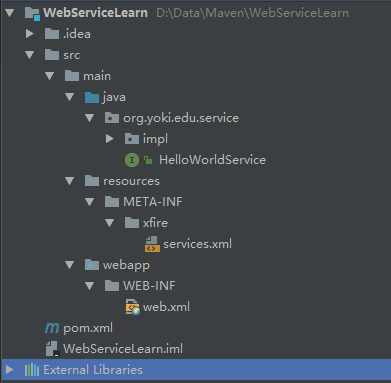
4、启动项目:
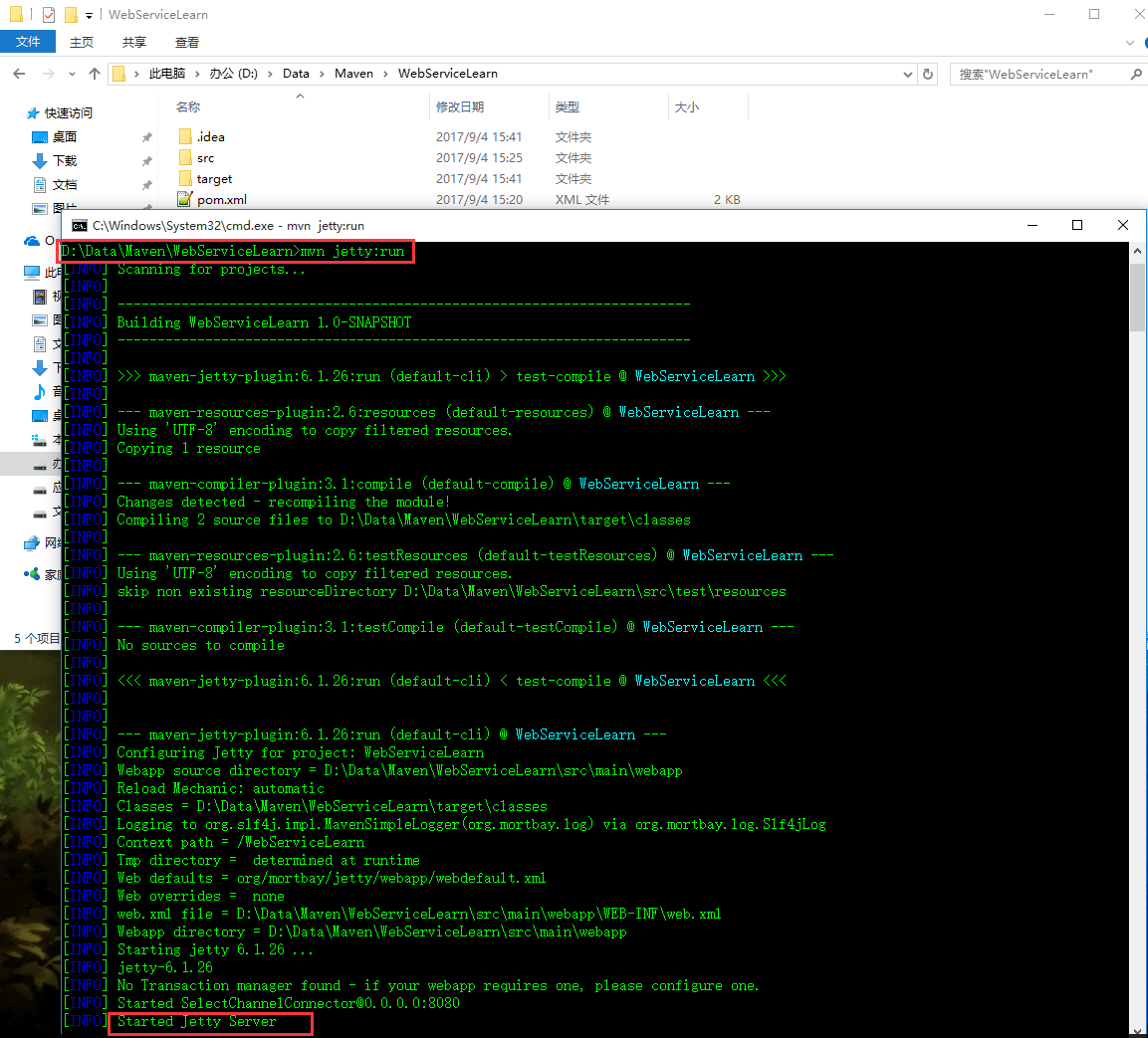
因为我们在pom.xml文件中配置了jetty,所有可以直接使用命令mvn jetty:run运行项目,如下:
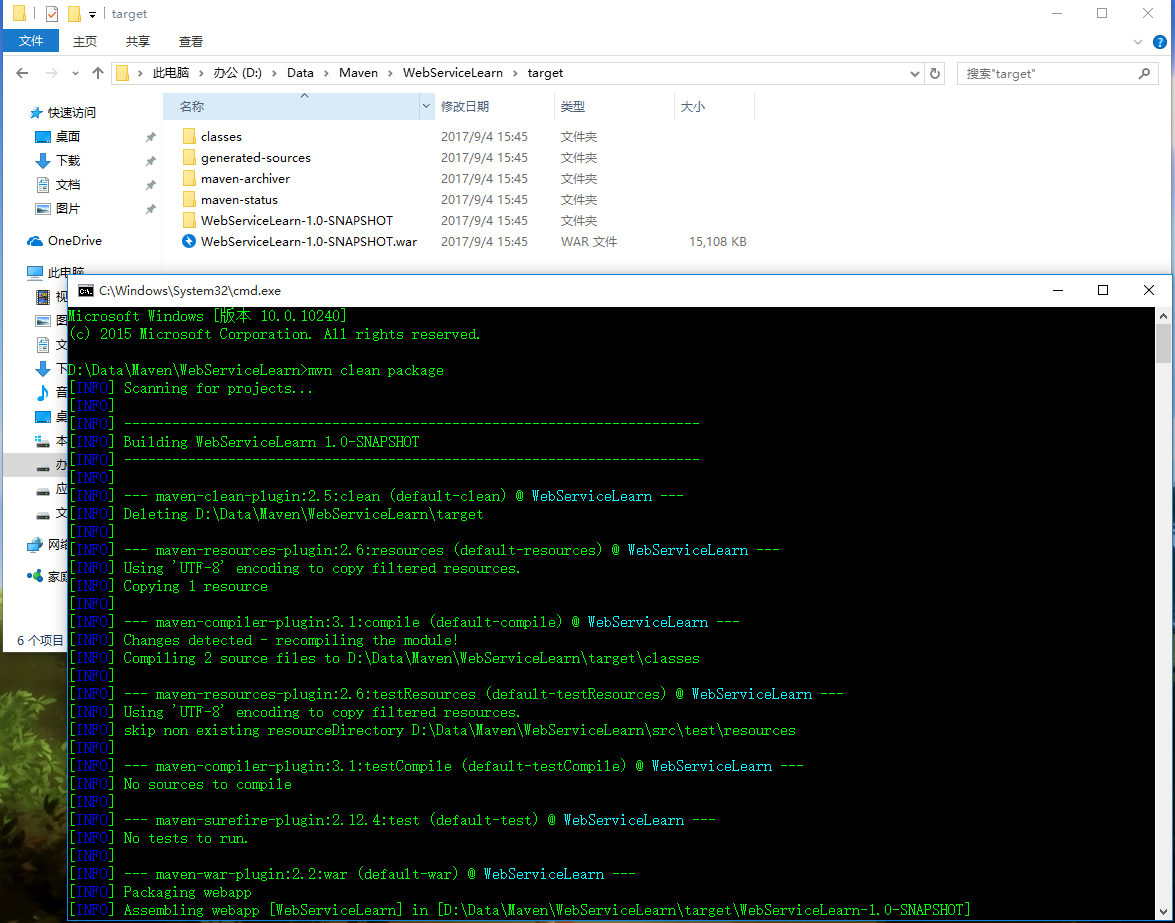
或者使用mvn clean package命令打包成war,放在web容器中运行:
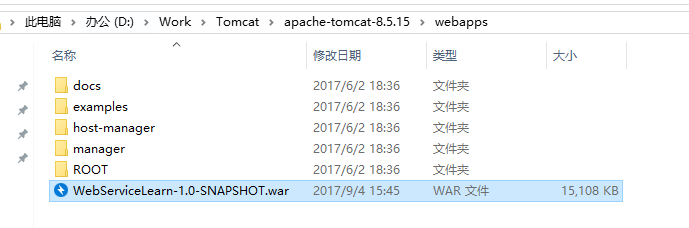
放入Tomcat中并运行Tomcat:
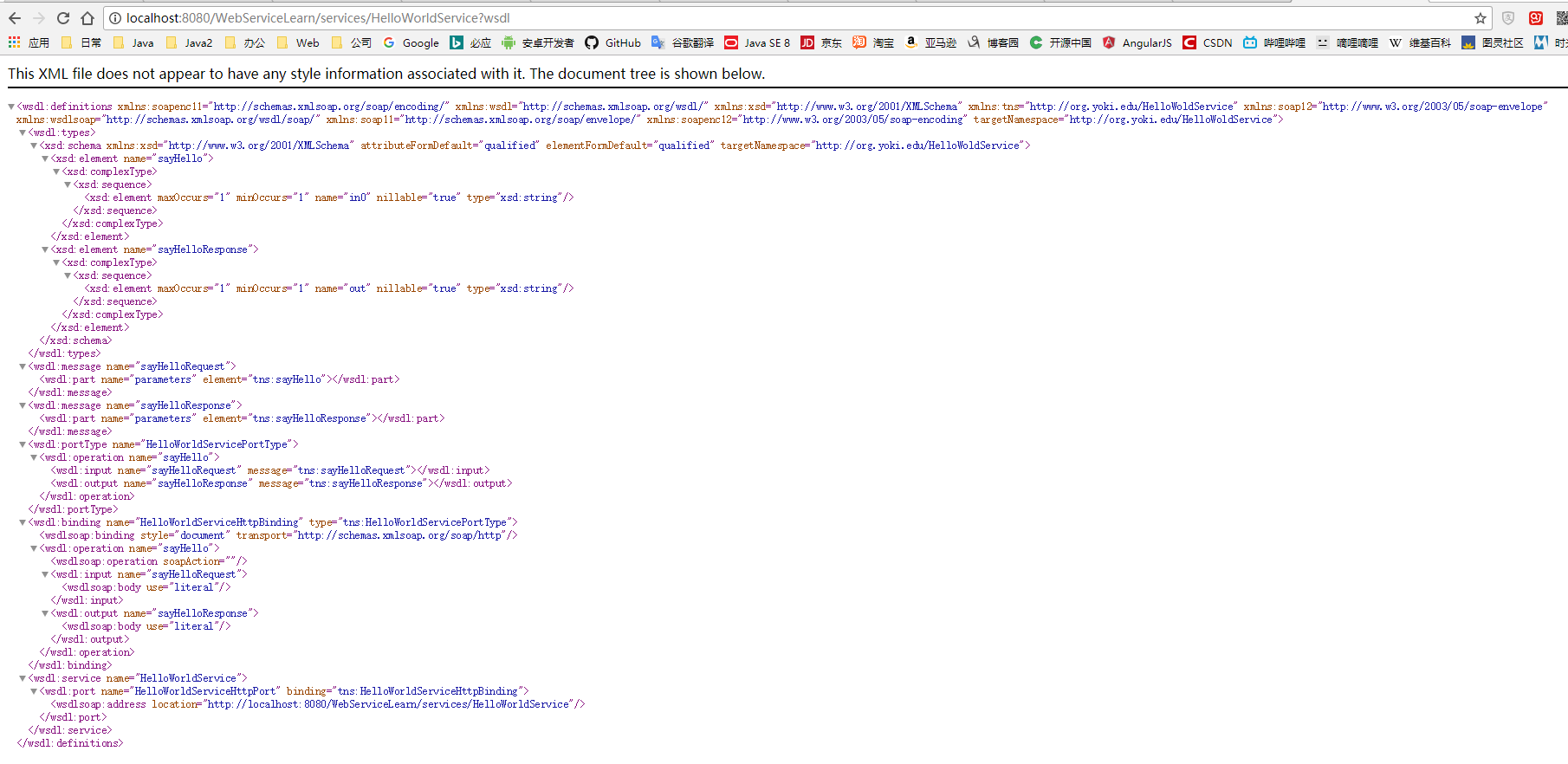
访问网站http://localhost:8080/WebServiceLearn/services/HelloWorldService?wsdl:
二、客户端编写:
package com.yunzhitx.sdy.task.utils;

import org.codehaus.xfire.client.Client;

import org.codehaus.xfire.transport.http.CommonsHttpMessageSender;

import org.springframework.stereotype.Component;

import javax.xml.namespace.QName;

import java.net.HttpURLConnection;

import java.net.URL;

import java.util.Observable;

/**

 * Created by SunnyWen on 2017/8/8.

 */

@Component

public class WsXfireClientUtil {

    public Sender buildSender(String url, String method, Object[] param) {

        Sender sender = new Sender(url, method, param);

        return sender;

    }

    public class Sender extends Observable {

        /**

         * WebService 访问地址

         */

        private String url;

        /**

         * WebService 访问方法

         */

        private String method;

        /**

         * 需要传递的参数

         */

        private Object[] param;

        /**

         * 设置命名空间

         */

        private String targetNamespace;

        /**

         * 是否同步,默认为异步

         */

        private Boolean isSynchro = false;

        public Sender(String url, String method, Object[] param) {

            this.url = url;

            this.method = method;

            this.param = param;

        }

        private Sender setTargetNamespace(String targetNamespace) {

            this.targetNamespace = targetNamespace;

            return this;

        }

        public Sender setSynchro() {

            this.isSynchro = true;

            return this;

        }

        public void send() {

            Runnable runnable = new Runnable() {

                @Override

                public void run() {

                    privateSend() ;

                }

            };

            Thread thread = new Thread(runnable);

            if (!isSynchro)

                thread.start();

            else

                thread.run();

        }

        public Object[] sendSynchro() {

            return privateSend() ;

        }

        private Object[] privateSend(){

            Object[] results = null;

            try {

                HttpURLConnection httpConnection = (HttpURLConnection) new URL(url).openConnection();

                httpConnection.setReadTimeout(240000);//设置http连接的读超时,单位是毫秒

                httpConnection.connect();

                Client client = new Client(httpConnection.getInputStream(), null);

                client.setProperty(CommonsHttpMessageSender.HTTP_TIMEOUT, String.valueOf(240000));//设置发送的超时限制,单位是毫秒;

                client.setProperty(CommonsHttpMessageSender.DISABLE_KEEP_ALIVE, "true");

                client.setProperty(CommonsHttpMessageSender.DISABLE_EXPECT_CONTINUE, "true");

                //Client client = new Client(new URL(wsURL));

                //client.setTimeout(20000);

                // 解决服务端收不到时参数值的情况 (设置的值为:targetNamespace)

                if (null != targetNamespace && targetNamespace.length() > 0)

                    client.getService().setName(new QName(targetNamespace));

                if(null == param)

                    param = new Object[0] ;

                results = client.invoke(method, param);

//                System.out.println("Web Service Xfire 发送数据成功!发送地址:" + url);

                setChanged();

                this.notifyObservers(results);

            } catch (Exception e) {

                e.printStackTrace();

            }

            return results ;

        }

    }

    public static void main(String[] args){

        WsXfireClientUtil ws = new WsXfireClientUtil() ;

        ws.buildSender("http://localhost:8088/ws/countries2.wsdl" , "getCountry2" , null).send();

    }

}
XFire Web Service客户端开发的更多相关文章
- SOAP: java+xfire(web service) + php客户端
作者: 吴俊杰 web service这项技术暂不说它有多落伍,但是项目中用到了,没法逃避! xml和json各有各的好处,但是JSON无疑是当今数据交互的主流了.客户soap服务器端用的是 j ...
- XFire构建web service客户端的五种方式
这里并未涉及到JSR 181 Annotations 的相关应用,具体的三种方式如下 ① 通过WSDL地址来创建动态客户端 ② 通过服务端提供的接口来创建客户端 ③ 使用Ant通过WSDL文件来生成客 ...
- XFire Web Service
Web Service 创建HelloWorldService项目 首先要启动Web Service Project 向导.该向导由三个页面组成,第一页设置Web项目配置的详细信息:第二页设置XFir ...
- .NET基础拾遗(7)Web Service的开发与应用基础
Index : (1)类型语法.内存管理和垃圾回收基础 (2)面向对象的实现和异常的处理 (3)字符串.集合与流 (4)委托.事件.反射与特性 (5)多线程开发基础 (6)ADO.NET与数据库开发基 ...
- MyEclipse XFire Web Service
我们在做系统集成时,经常会需要调用webservice接口,本文将讲解在myeclipse中建立一个webservice项目,编写接口和实现类, 并且发布webservice,最后在myeclipse ...
- Web Service 之 开发、部署
一.C#开发WebService 在 VS2010 中新建 ASP.NET Web 应用程序,取名 WebTest. 应用程序下新建项其实最简单的就是建一个网站项目,直接" 添加新项→Web ...
- MyEclipse JAX-WS Web Service
在Myeclipse8.5下开发Web service程序,目前系统支持的开发框架有3个,JAX-WS,REST(JAX-RS),XFire.其中系统建议不要使用XFire 的框架,可能是要被淘汰了( ...
- MyEclipse 10 之下Web Service 的创建和实现
(一)Web service服务端开发 1. 新建一个Web service project, 菜单New -> Web Service Project, 2. 新建一个 Java Bean, ...
- 4.菜鸟教你一步一步开发 web service 之 axis 客户端创建
转自:https://blog.csdn.net/shfqbluestone/article/details/37723517 在上个教程中我们创建了一个 axis 服务端的 web service ...
随机推荐
- 【HDOJ5951】Winning an Auction(博弈DP)
题意:A和B两个人做一个拍卖游戏.每一轮两人分别给出一个价格,出价高者获得该轮的物品,出价相同则奇数轮A优先,偶数轮B优先. 两个人的目标都是最大化自己的商品数量,给定轮数n与两人分别的总资金a,b, ...
- form+iframe+file 页面无刷新上传文件并获取返回值
<!DOCTYPE html><html lang="en"><head> <meta charset="UTF-8" ...
- Http协议和Tomcat服务器安装与eclipse集成(重要)
一.Http协议 1.什么是Http协议 HTTP,超文本传输协议(HyperText Transfer Protocol)是互联网上应用最为广泛的 一种网络协议.所有的WWW文件都必须遵守这 ...
- 《手把手教你学C语言》学习笔记(7)---程序的输入与输出
程序设计中,为了观察程序的运行状态和结构,需要输出指定的内容:为了让程序能够更加灵活,可以根据需求输入内容,让计算机处理和运行:所以程序的输入输出就显的尤为重要.主要包括printf和scanf函数. ...
- linux下kodi没有声音的解决
前几天,心血来潮,就安装了manjaro的pre3版本,由于是mini kde版本的,就随手安装了kodi,可以用来看视频,听音乐和看图片. 结果在所有插件都折腾好了之后发现,在屏幕的右上角有一个喇叭 ...
- hdu 5698(杨辉三角的性质+逆元)
---恢复内容开始--- 瞬间移动 Accepts: 1018 Submissions: 3620 Time Limit: 4000/2000 MS (Java/Others) Memory Limi ...
- windows下安装oracle,sqlplus连接启动oracle(oracle 主机字符串输入是什么)
1.oracle安装 参考http://wenku.baidu.com/view/d01ffd43336c1eb91a375d68.html,这里不再赘述 2.命令行sqlplus连接oracle ...
- 2018 Multi-University Training Contest 7
GuGuFishtion dls真厉害,快速求$\sum_{a=1}^n \sum_{b=1}^m gcd(a,b) $的个数,我想的方法是根据上节课dls讲的方法,要容过来容过去,这次不用了. 则$ ...
- Needle in a haystack: efficient storage of billions of photos 【转】
转自09年的blog,因为facebook在国内无法访问,故此摘录. The Photos application is one of Facebook’s most popular features ...
- Topcoder SRM 668 DIV 2
VerySecureEncryption 模拟 题意: 给你个串message,然后一个置换key,输出置换K次后的结果. 题解: 直接模拟就好. 代码: #include<iostream&g ...