
GooglePlay - 文件上传限制的扩展
Google Play应用商店在上传限制100MB大小,超过该大小的应用必须将超过部分以扩展文件的形式进行上传处理。 总共可上传2个扩展文件,每个最大文件可为2GB,同时obb文件格式可自选。
官网地址:http://developer.android.com/google/play/expansion-files.html
1、在sdk Manager中下载对应的支持库,play_licensing及play_apk_expansion如下:


2、生成需要的obb文件,并在上传apk包的同时选择上传扩展文件。
obb文件生成可参考jobb工具生成(官网推荐),http://developer.android.com/tools/help/jobb.html
也可以直接用参考stackoverflow上Sanket Kachhela的回答(个人推荐):http://stackoverflow.com/questions/14495483/read-content-from-apk-expansion-file-from-obb-file#answer-18953778,直接利用zip压缩工具选择存储模式。
3、如果上述采用zip压缩的话,这里就还需要unzip准备,利用zipHelper直接解压下载包并正常使用。
参考stackoverflow上Bhavesh Hirpara的回答:http://stackoverflow.com/questions/14495483/read-content-from-apk-expansion-file-from-obb-file#answer-15150977
1、在eclipse打开需要的库工程,如下:
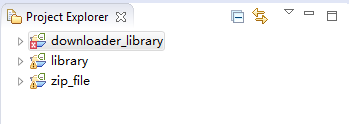
2、如果downloader_library出现错误 AESObfuscator cannot be resolved 则说明Eclipse没有选择自动编辑,勾选下project->build automatically即可。
3、添加游戏项目,并添加对应的依赖项目如下图:
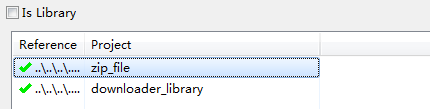
1、添加对应的权限。
<manifest ...>

    <!-- Required to access Google Play Licensing -->

    <uses-permission android:name="com.android.vending.CHECK_LICENSE" />

    <!-- Required to download files from Google Play -->

    <uses-permission android:name="android.permission.INTERNET" />

    <!-- Required to keep CPU alive while downloading files

        (NOT to keep screen awake) -->

    <uses-permission android:name="android.permission.WAKE_LOCK" />

    <!-- Required to poll the state of the network connection

        and respond to changes -->

    <uses-permission

        android:name="android.permission.ACCESS_NETWORK_STATE" />

    <!-- Required to check whether Wi-Fi is enabled -->

    <uses-permission android:name="android.permission.ACCESS_WIFI_STATE"/>

    <!-- Required to read and write the expansion files on shared storage -->

    <uses-permission

        android:name="android.permission.WRITE_EXTERNAL_STORAGE" />

    ...

</manifest>
2、从~sdk\play_apk_expansion\downloader_sample项目复制src\com\example\expansion\downloader下的sample文件到游戏目录下,并对应修改包名的引用等。
a、将onCreate下的判断obb文件存在的注释处理添加如下:
                // otherwise, download not needed so we fall through to

                // starting the movie

                validateXAPKZipFiles();
b、修改 validateXAPKZipFiles 方法,去除验证,直接添加解压方法到对应的游戏下载目录。
    // 解压到游戏下载目录

    private void upzipApkExFile(){

        try {

            ZipResourceFile expansionFile = APKExpansionSupport

                    .getAPKExpansionZipFile(this, VERSION_CODE, 0);

            ZipEntryRO[] zip = expansionFile.getAllEntries();

             Log.i("upzipApkExFile", "mZipFileName : " + zip[0].mZipFileName);

             String path  = getApplicationContext().getFilesDir().getAbsolutePath();

            File file = new File(path + "");

            ZipHelper.unzip(zip[0].mZipFileName, file);

            if (file.exists()) {

                Log.e("", "unzipped : " + file.getAbsolutePath());

            }

        } catch (Exception e) {

            e.printStackTrace();

        }

    }

   /**

     * Go through each of the Expansion APK files and open each as a zip file.

     * Calculate the CRC for each file and return false if any fail to match.

     *

     * @return true if XAPKZipFile is successful

     */

    void validateXAPKZipFiles() {

        upzipApkExFile();

        Intent myIntent = new Intent(this, AppActivity.class); //跳转到游戏Activity

        startActivity(myIntent);

        this.finish();

    }
c、修改SampleDownloaderService文件下的BASE64_PUBLIC_KEY。将其改成对应的Google Play上申请的应用的Key。
3、添加对应下载接受服务监听。
<application ...>

    <service android:name="com.test123.expansion.downloader.SampleDownloaderService" />

    <receiver android:name="com.test123.expansion.downloader.SampleAlarmReceiver" />

    ...

</application>
4、主游戏AppActivity处理。在启动的Activity中进行判断,如果已经下载并解压了文件则进入游戏,否则跳转到下载的Activity。
    protected void onCreate(final Bundle savedInstanceState){

        super.onCreate(savedInstanceState);

        String path  = getApplicationContext().getFilesDir().getAbsolutePath();

        File boolfile = new File(path + "/downloaded");

        if(!boolfile.exists())

        {

            Intent myIntent = new Intent(this, SampleDownloaderActivity.class);

            startActivity(myIntent);

            this.finish();

            return;

        }

        Log.i("upzipApkExFile", "already unziped!!");
  }
为了让下载的扩展文件直接应用到游戏中,我们要稍微修改下cocos2dx引擎的读取文件处理。
首先,找到引擎目录下cocos2d\cocos\platform\CCFileUtils.cpp文件。
其次,对方法进行如下修改,使其先在getWritablePath目录下需找文件。
std::string FileUtils::fullPathForFilename(const std::string &filename) const

{

    if (filename.empty())

    {

        return "";

    }

    if (isAbsolutePath(filename))

    {

        return filename;

    }

    // Already Cached ?

    auto cacheIter = _fullPathCache.find(filename);

    if(cacheIter != _fullPathCache.end())

    {

        return cacheIter->second;

    }

    // Get the new file name.

    const std::string newFilename( getNewFilename(filename) );

    std::string fullpathWritablePath = getWritablePath() + newFilename;

    if (isFileExistInternal(fullpathWritablePath))

    {

        if (fullpathWritablePath.length() > )

        {

            // Using the filename passed in as key.

            //_fullPathCache.insert(std::make_pair(filename, fullpathWritablePath));

            _fullPathCache[filename] = fullpathWritablePath;

            return fullpathWritablePath;

        }

    }

    std::string fullpath;

    for (const auto& searchIt : _searchPathArray)

    {

        for (const auto& resolutionIt : _searchResolutionsOrderArray)

        {

            fullpath = this->getPathForFilename(newFilename, resolutionIt, searchIt);

            if (fullpath.length() > )

            {

                // Using the filename passed in as key.

                _fullPathCache.insert(std::make_pair(filename, fullpath));

                return fullpath;

            }

        }

    }

    if(isPopupNotify()){

        CCLOG("cocos2d: fullPathForFilename: No file found at %s. Possible missing file.", filename.c_str());

    }

    // The file wasn't found, return empty string.

    return "";

}
而这里getWritablePath获取的目录正是我们之前解压obb文件的目录getApplicationContext().getFilesDir().getAbsolutePath()。
因此,到这里就可以在游戏中跟使用在assert中文件一样使用obb解压出来的文件了。
GooglePlay - 文件上传限制的扩展的更多相关文章
- PHP图片文件上传类型限制扩展名限制大小限制与自动检测目录创建。
程序测试网址:http://blog.z88j.com/fileuploadexample/index.html 代码分为两部分: 一部分form表单: <!doctype html> & ...
- laravel 文件上传
laravel 文件上传 先开扩展 表单中能够选择图片 数据处理C层, 接图片并保存 保存图片: 设置目录 store()的第一个参数说明: 存放图片的子目录. 如何获取文件的类型 大小: $uplo ...
- php文件上传与下载(附封装好的函数文件)
单文件上传前端页面 <!DOCTYPE html> <html lang="en"> <head> <meta charset=" ...
- Android OkHttp文件上传与下载的进度监听扩展
http://www.loongwind.com/archives/290.html 上一篇文章介绍了用Retrofit实现文件的上传与下载,但是我们发现没办法监听上传下载的进度,毕竟我们在做开发的时 ...
- PHP 文件上传之如何识别文件伪装?——PHP的fileinfo扩展可!
问题:文件上传时候需要验证上传的文件是否合法,文件伪装如何识别? 一个简单测试:把txt文件后缀直接改成jpg;上传 <!DOCTYPE html> <html> <ti ...
- 一款基于uploadify扩展的多文件上传插件,完全适用于Html5
http://www.uploadify.com/documentation/ 官网里面有两个插件,一个是要使用flash插件才能文件上传的插件,另外一个是不需要使用要flash插件的文件上传插件完 ...
- jquery.uploadify文件上传组件
1.jquery.uploadify简介 在ASP.NET中上传的控件有很多,比如.NET自带的FileUpload,以及SWFUpload,Uploadify等等,尤其后面两个控件的用户体验比较好, ...
- 11、Struts2 的文件上传和下载
文件上传 表单准备 要想使用 HTML 表单上传一个或多个文件 须把 HTML 表单的 enctype 属性设置为 multipart/form-data 须把 HTML 表单的method 属性设置 ...
- Web开发安全之文件上传安全
很长一段时间像我这种菜鸡搞一个网站第一时间反应就是找上传,找上传.借此机会把文件上传的安全问题总结一下. 首先看一下DVWA给出的Impossible级别的完整代码: <?php if( iss ...
随机推荐
- Python虚拟环境virtualenv
用意 virtualenv可以搭建虚拟且独立的python运行环境, 使得单个项目的运行环境与其它项目独立起来. 安装 virtualenv本质上是个python包, 使用pip安装 pip inst ...
- 201521123084 《Java程序设计》第10周学习总结
1. 本周学习总结 1.1 以你喜欢的方式(思维导图或其他)归纳总结异常与多线程相关内容. 1)线程:指进程中的一个执行流程: 2)一个进程可以同时运行多个不同线程,不同线程执行不同的任务: 3)创建 ...
- 【Beta】阶段 第五次Daily Scrum Meeting
每日任务 1.本次会议为第五次 Meeting会议: 2.本次会议在周五下午15:35,在禹洲楼召开,召开本次会议为10分钟. 一.今日站立式会议照片 二.每个人的工作 (有work item 的ID ...
- 201521123042 《Java程序设计》第6周学习总结
1. 本周学习总结 1.1 面向对象学习暂告一段落,请使用思维导图,以封装.继承.多态为核心概念画一张思维导图,对面向对象思想进行一个总结. 2. 书面作业 Q1.clone方法 1.1 Object ...
- 201521123047 《Java程序设计》第4周学习总结
1. 本周学习总结 1.1 尝试使用思维导图总结有关继承的知识点. 1.2 使用常规方法总结其他上课内容. 答: - 只能有一个父类,即单继承,子类继承父类的全部成员(属性和方法),并可能有自己特有的 ...
- 201521123033《Java程序设计》第4周学习总结
1. 本周学习总结 1.1 尝试使用思维导图总结有关继承的知识点. answer: 1.2 使用常规方法总结其他上课内容. answer:学了继承以及各种关键字 2. 书面作业 1.注释的应用 使用类 ...
- 201521123081《Java程序设计》 第10周学习总结
1. 本周学习总结 1.1 以你喜欢的方式(思维导图或其他)归纳总结异常与多线程相关内容. 参考资料:XMind 2. 书面作业 本次PTA作业题集异常.多线程. Q1. finally 题目4-2 ...
- ROS学习记录(四)————怎样建立一个package包?
功能包是什么? 英文表述package,我可没有在炫英文啊,我的英文很烂的,只是在提醒大家,在ROS系统中,这个词使用的频率非常之高,你必须记住它,要不就没法正确的看懂信息.言归正传,package是 ...
- Spark Streaming socketTextStream简单demo
正文 SparkStreaming的入口是StreamingContext,通过scala实现 一个简单的实时获取数据.代码SparkStreaming官网也可以找到. object SocketDS ...
- linux下svn命令大全(转)
1.将文件checkout到本地目录 svn checkout path(path是服务器上的目录) 例如:svn checkout svn://192.168.1.1/pro/domain 简写:s ...