
Ambari安装之安装并配置Ambari-server(三)
不多说,直接上干货!
前期博客
安装并配置Ambari-server
(1)检查仓库是否可用
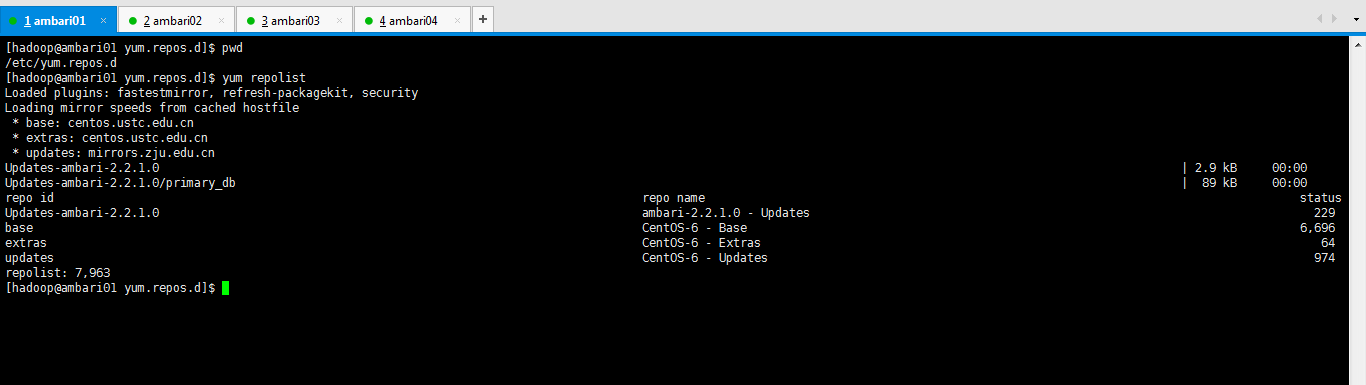
[hadoop@ambari01 yum.repos.d]$ pwd

/etc/yum.repos.d

[hadoop@ambari01 yum.repos.d]$ yum repolist

Loaded plugins: fastestmirror, refresh-packagekit, security

Loading mirror speeds from cached hostfile

 * base: centos.ustc.edu.cn

 * extras: centos.ustc.edu.cn

 * updates: mirrors.zju.edu.cn

Updates-ambari-2.2.1.0                                                                                                                                                  | 2.9 kB     :

Updates-ambari-2.2.1.0/primary_db                                                                                                                                       |   kB     :

repo id                                                                                    repo name                                                                                     status

Updates-ambari-2.2.1.0                                                                     ambari-2.2.1.0 - Updates

base                                                                                       CentOS- - Base                                                                               ,

extras                                                                                     CentOS- - Extras

updates                                                                                    CentOS- - Updates

repolist: ,

[hadoop@ambari01 yum.repos.d]$
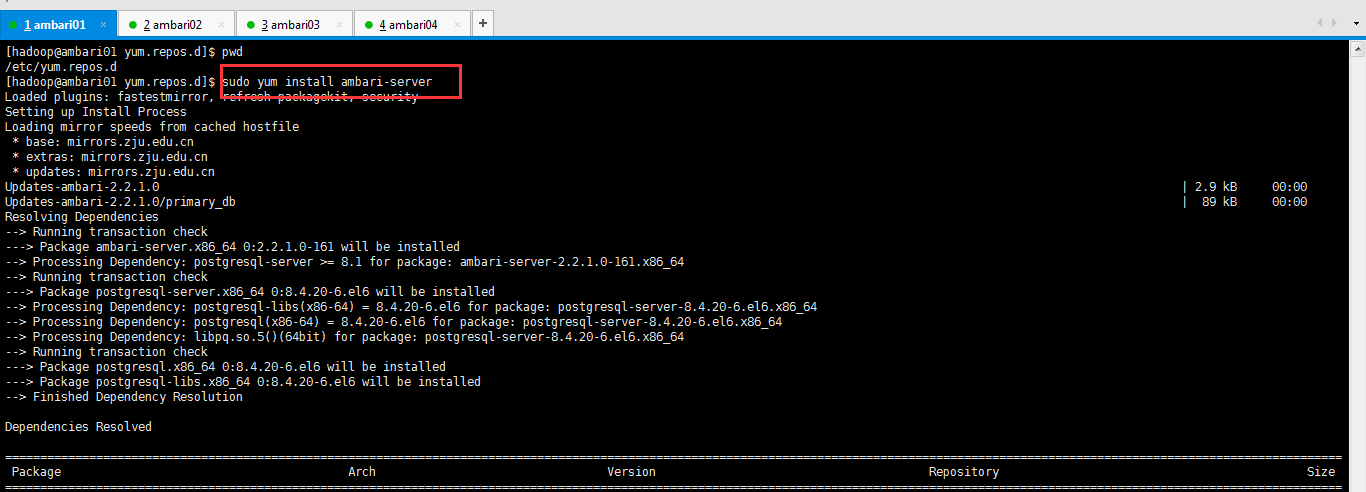
(2)安装Ambari-server

[hadoop@ambari01 yum.repos.d]$ pwd

/etc/yum.repos.d

[hadoop@ambari01 yum.repos.d]$ sudo yum install ambari-server

Loaded plugins: fastestmirror, refresh-packagekit, security

Setting up Install Process

Loading mirror speeds from cached hostfile

 * base: mirrors.zju.edu.cn

 * extras: mirrors.zju.edu.cn

 * updates: mirrors.zju.edu.cn

Updates-ambari-2.2.1.0                                                                                                                                                  | 2.9 kB     :

Updates-ambari-2.2.1.0/primary_db                                                                                                                                       |   kB     :

Resolving Dependencies

--> Running transaction check

---> Package ambari-server.x86_64 :2.2.1.0- will be installed

--> Processing Dependency: postgresql-server >= 8.1 for package: ambari-server-2.2.1.0-.x86_64

--> Running transaction check

---> Package postgresql-server.x86_64 :8.4.-.el6 will be installed

--> Processing Dependency: postgresql-libs(x86-) = 8.4.-.el6 for package: postgresql-server-8.4.-.el6.x86_64

--> Processing Dependency: postgresql(x86-) = 8.4.-.el6 for package: postgresql-server-8.4.-.el6.x86_64

--> Processing Dependency: libpq.so.()(64bit) for package: postgresql-server-8.4.-.el6.x86_64

--> Running transaction check

---> Package postgresql.x86_64 :8.4.-.el6 will be installed

---> Package postgresql-libs.x86_64 :8.4.-.el6 will be installed

--> Finished Dependency Resolution

Dependencies Resolved

===============================================================================================================================================================================================

 Package                                         Arch                                 Version                                       Repository                                            Size

===============================================================================================================================================================================================

Installing:

 ambari-server                                   x86_64                               2.2.1.0-                                   Updates-ambari-2.2.1.0                                M

Installing for dependencies:

 postgresql                                      x86_64                               8.4.-.el6                                  base                                                 2.6 M

 postgresql-libs                                 x86_64                               8.4.-.el6                                  base                                                  k

 postgresql-server                               x86_64                               8.4.-.el6                                  base                                                 3.4 M

Transaction Summary

===============================================================================================================================================================================================

Install        Package(s)

Total download size:  M

Installed size:  M

Is this ok [y/N]: y

Downloading Packages:

(/): ambari-server-2.2.1.0-.x86_64.rpm                                                                                                                             |  MB     :

(/): postgresql-8.4.-.el6.x86_64.rpm                                                                                                                               | 2.6 MB     :

(/): postgresql-libs-8.4.-.el6.x86_64.rpm                                                                                                                          |  kB     :

(/): postgresql-server-8.4.-.el6.x86_64.rpm                                                                                                                        | 3.4 MB     :

-----------------------------------------------------------------------------------------------------------------------------------------------------------------------------------------------

Total                                                                                                                                                            MB/s |  MB     :

Running rpm_check_debug

Running Transaction Test

Transaction Test Succeeded

Running Transaction

  Installing : postgresql-libs-8.4.-.el6.x86_64                                                                                                                                         /

  Installing : postgresql-8.4.-.el6.x86_64                                                                                                                                              /

  Installing : postgresql-server-8.4.-.el6.x86_64                                                                                                                                       /

  Installing : ambari-server-2.2.1.0-.x86_64                                                                                                                                            /

  Verifying  : postgresql-server-8.4.-.el6.x86_64                                                                                                                                       /

  Verifying  : postgresql-8.4.-.el6.x86_64                                                                                                                                              /

  Verifying  : postgresql-libs-8.4.-.el6.x86_64                                                                                                                                         /

  Verifying  : ambari-server-2.2.1.0-.x86_64                                                                                                                                            /

Installed:

  ambari-server.x86_64 :2.2.1.0-

Dependency Installed:

  postgresql.x86_64 :8.4.-.el6                           postgresql-libs.x86_64 :8.4.-.el6                           postgresql-server.x86_64 :8.4.-.el6

Complete!

[hadoop@ambari01 yum.repos.d]$
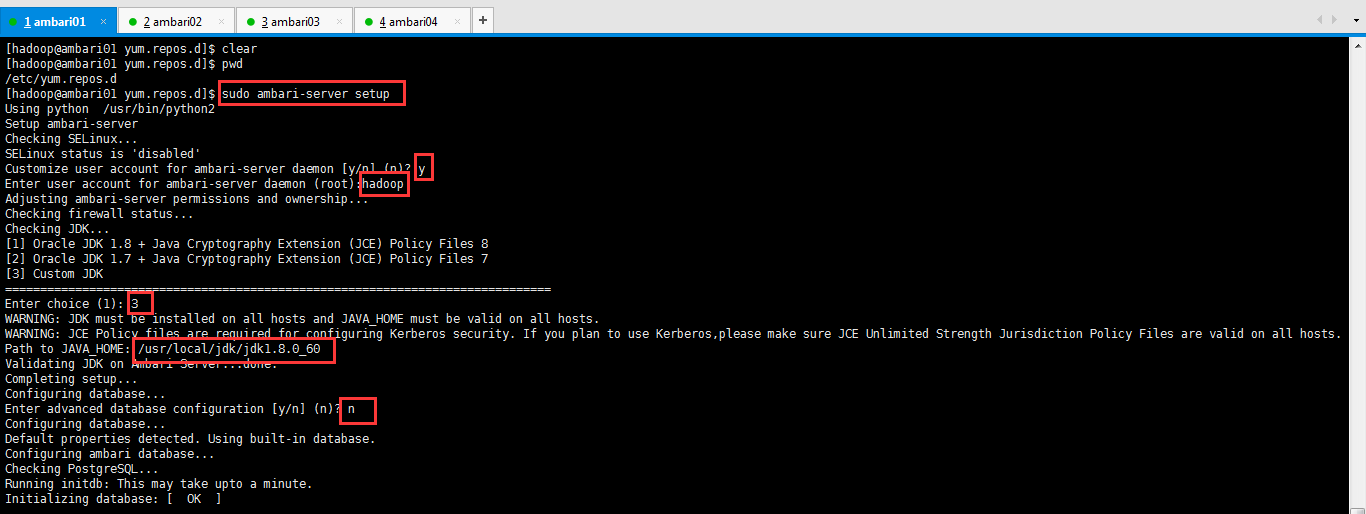
(3)配置Ambari-server

[hadoop@ambari01 yum.repos.d]$ pwd

/etc/yum.repos.d

[hadoop@ambari01 yum.repos.d]$ sudo ambari-server setup

Using python  /usr/bin/python2

Setup ambari-server

Checking SELinux...

SELinux status is 'disabled'

Customize user account for ambari-server daemon [y/n] (n)? y

Enter user account for ambari-server daemon (root):hadoop

Adjusting ambari-server permissions and ownership...

Checking firewall status...

Checking JDK...

[] Oracle JDK 1.8 + Java Cryptography Extension (JCE) Policy Files

[] Oracle JDK 1.7 + Java Cryptography Extension (JCE) Policy Files

[] Custom JDK

==============================================================================

Enter choice ():

WARNING: JDK must be installed on all hosts and JAVA_HOME must be valid on all hosts.

WARNING: JCE Policy files are required for configuring Kerberos security. If you plan to use Kerberos,please make sure JCE Unlimited Strength Jurisdiction Policy Files are valid on all hosts.

Path to JAVA_HOME: /usr/local/jdk/jdk1..0_60

Validating JDK on Ambari Server...done.

Completing setup...

Configuring database...

Enter advanced database configuration [y/n] (n)? n

Configuring database...

Default properties detected. Using built-in database.

Configuring ambari database...

Checking PostgreSQL...

Running initdb: This may take upto a minute.

Initializing database: [  OK  ]

About to start PostgreSQL

Configuring local database...

Connecting to local database...done.

Configuring PostgreSQL...

Restarting PostgreSQL

Extracting system views...

.ambari-admin-2.2.1.0..jar

.....

Adjusting ambari-server permissions and ownership...

Ambari Server 'setup' completed successfully.

[hadoop@ambari01 yum.repos.d]$
注意:
如果你是root用户,则这里就写root (推荐)
好比我这里是hadoop用户,则这里就写hadoop(不建议)
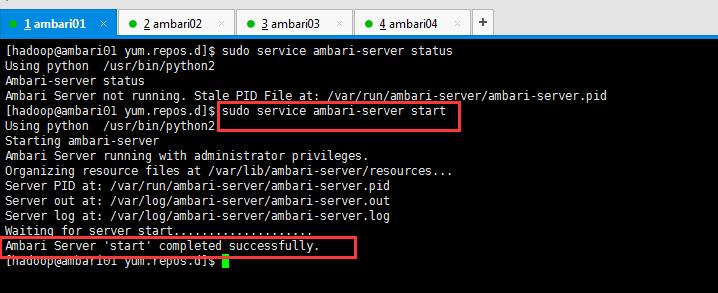
(4)查看并启动Ambari-server
[hadoop@ambari01 yum.repos.d]$ sudo service ambari-server status

Using python  /usr/bin/python2

Ambari-server status

Ambari Server not running. Stale PID File at: /var/run/ambari-server/ambari-server.pid

[hadoop@ambari01 yum.repos.d]$ sudo service ambari-server start

Using python  /usr/bin/python2

Starting ambari-server

Ambari Server running with administrator privileges.

Organizing resource files at /var/lib/ambari-server/resources...

Server PID at: /var/run/ambari-server/ambari-server.pid

Server out at: /var/log/ambari-server/ambari-server.out

Server log at: /var/log/ambari-server/ambari-server.log

Waiting for server start....................

Ambari Server 'start' completed successfully.

[hadoop@ambari01 yum.repos.d]$
(5)在C:\Windows\System32\drivers\etc目录下配置hosts文件

(6)输入地址登录ambari
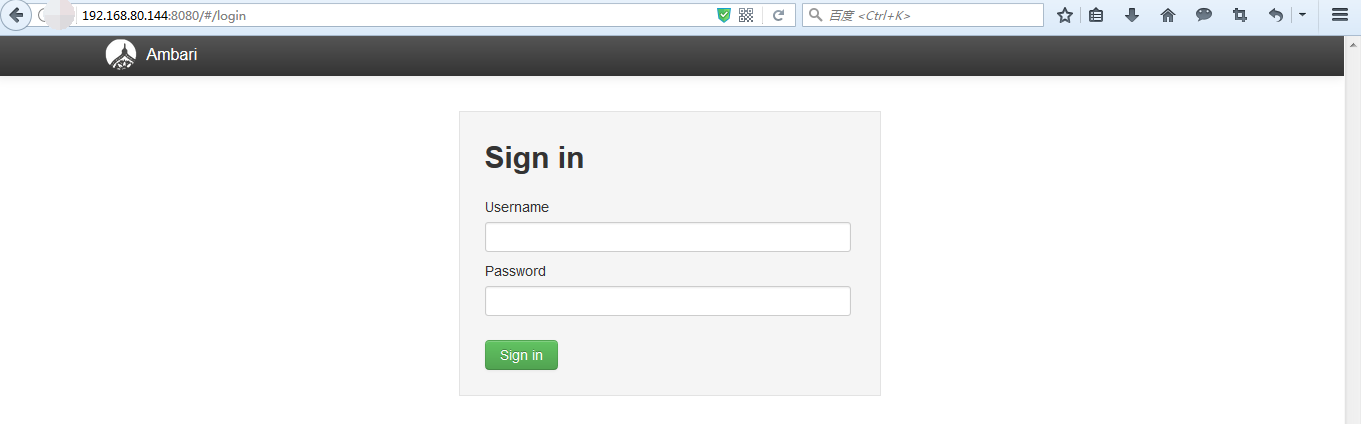
默认的用户名和密码都为admin
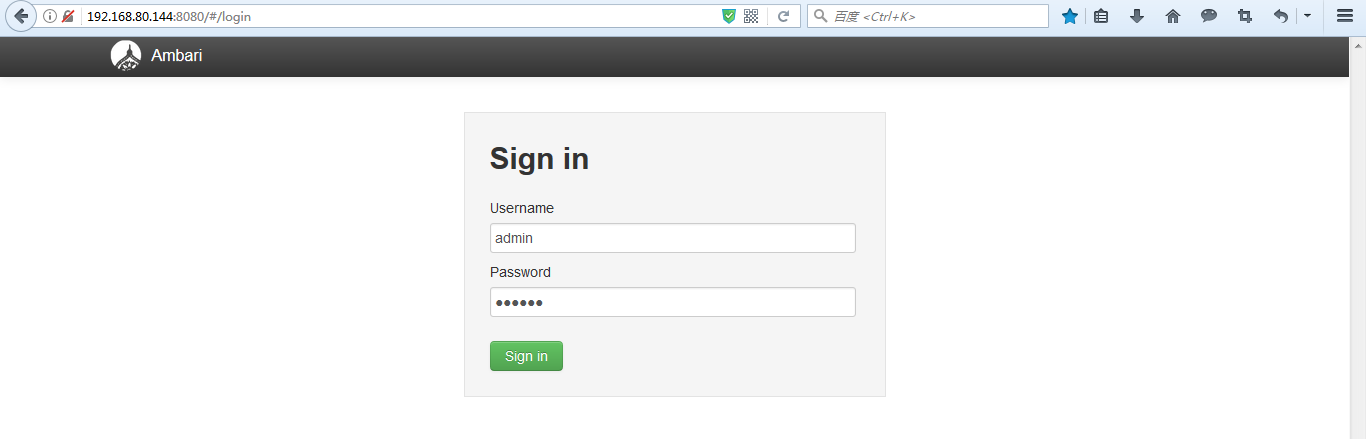
登录之后的界面如下

那么到此为止,我们集群部署前的所有准备工作就做好了,接下来我们就可以部署hadoop集群了。
同时,大家可以关注我的个人博客:
http://www.cnblogs.com/zlslch/ 和 http://www.cnblogs.com/lchzls/ http://www.cnblogs.com/sunnyDream/
详情请见:http://www.cnblogs.com/zlslch/p/7473861.html
人生苦短,我愿分享。本公众号将秉持活到老学到老学习无休止的交流分享开源精神,汇聚于互联网和个人学习工作的精华干货知识,一切来于互联网,反馈回互联网。
目前研究领域:大数据、机器学习、深度学习、人工智能、数据挖掘、数据分析。 语言涉及:Java、Scala、Python、Shell、Linux等 。同时还涉及平常所使用的手机、电脑和互联网上的使用技巧、问题和实用软件。 只要你一直关注和呆在群里,每天必须有收获
对应本平台的讨论和答疑QQ群:大数据和人工智能躺过的坑(总群)(161156071)



Ambari安装之安装并配置Ambari-server(三)的更多相关文章
- 虚拟机(Vmware)安装ubuntu18.04和配置调整(三)
三.ubuntu安装软件 1.安装常用软件 python程序员: $ sudo apt install ipython $ sudo apt install ipython3 $ sudo a ...
- ambari介绍及安装
Ambari简介 Ambari概述 Apache Ambari是一种基于Web的工具,支持Apache Hadoop集群的创建.管理和监控.Ambari已支持大多数Hadoop组件,包括HDFS.Ma ...
- [转]Win7下安装配置sharepoint server 2010
转自:http://blog.sina.com.cn/s/blog_5d93d7aa010151lp.html 要开发SharePoint 2010应用程序,开发人员必须构建一个SharePoint ...
- openvpn-在Linux中安装和配置OpenVPN Server的最简便方法!(转)
在Linux中安装和配置OpenVPN Server 出于本文的需要,我将使用两个运行CentOS 7 64位版本的系统.一个充当OpenVPN服务器,另一个充当OpenVPN客户机.下面是测试系统的 ...
- 在Linux中安装和配置OpenVPN Server的最简便方法!
本文介绍了如何在基于RPM和DEB的系统中安装和配置OpenVPN服务器.我们在本文中将使用一个名为openvpn-install的脚本,它使整个OpenVPN服务器的安装和配置过程实现了自动化.该脚 ...
- 【2】循序渐进学 Zabbix:安装配置 Zabbix Server 服务端
上一篇 [1]循序渐进学 Zabbix :初识与基础依赖环境搭建( LNMP ) 安装 Zabbix Server 上篇我们在 192.168.200.101 上面安装了 Zabbix 所依赖的 LN ...
- 在Fedora 22下安装配置RealVNC Server 5.2.3的经验总结
RealVNC是目前功能最全.性能最好的VNC商业软件套件,很多时候为了确保性能和功能的统一,还是大量地在使用RealVNC.最近在Fedora 22工作站上安装RealVNC Server 5.2. ...
- RedHat6.1通过配置yum server安装软件包
1.获取镜像RHEL_6.1\ x86_64\ Disc\ 1 2.配置yum server #cd /etc/yum.repos.d #tar -cvf 20141114bak.tar *.repo ...
- Ubuntu22.04 安装配置VNC Server
如果转载, 请注明出处 https://www.cnblogs.com/milton/p/16730512.html Ubuntu22.40下VNC和远程桌面的区别 使用远程桌面时, 用户必须在hos ...
- 史上最全Windows版本搭建安装React Native环境配置
史上最全Windows版本搭建安装React Native环境配置 配置过React Native 环境的都知道,在Windows React Native环境配置有很多坑要跳,为了帮助新手快速无误的 ...
随机推荐
- 第二天0605下午——超链接<a>与图片<img>
今天下午学习了超链接<a>标签和图片<img>标签,以下面代码为例: <!DOCTYPE html PUBLIC "-//W3C//DTD XHTML 1.0 ...
- jquery表单序列化
$(function(){ $('#send').click(function(){ $.ajax({ type: "GET", url: "test.json" ...
- Bootstrap 常用组件汇总
Bootstrap 官方文档:http://www.bootcss.com/ Bootstrap Multiselect 多选下拉组件 官方文档:http://www.kuitao8.com/demo ...
- .NET Framework 各个版本介绍
.NET Framework 1.1 自1.0版本以来的改进:自带了对mobile asp .net控件的支持.这在1.0版本是以附加功能方式实现的,现在已经集成到框架的内部.安全方面的变更 - 使得 ...
- DataTable数据导出Excel 并且下载
public string Excel(System.Data.DataTable dt) { //模板的路径 string strUploadPath = HttpContext.Current.S ...
- 转 使用HAProxy,PHPRedis,和MySQL支撑10亿请求每周架构细节
[编者按]在公司的发展中,保证服务器的可扩展性对于扩大企业的市场需要具有重要作用,因此,这对架构师提出了一定的要求.Octivi联合创始人兼软件架构师Antoni Orfin将向你介绍一个非常简单的架 ...
- Laravel踩坑笔记——illuminate/html被抛弃
起因 在使用如下代码的时候发生报错 {!! Form::open() !!} 错误信息 [Symfony\Component\Debug\Exception\FatalErrorException] ...
- 关于MATLAB处理大数据坐标文件2017530
今天使用了所有特征并且用SVM测试数据 理由:SVM可以使用特征将测试集划分区域,比较单调.死板 结果:成绩很不理想,无疑又一次说明随机森林更适合大数据处理 第二次提交数据 用MATLAB运行11次运 ...
- mysql数据与Hadoop之间导入导出之Sqoop实例
前面介绍了sqoop1.4.6的 如何将mysql数据导入Hadoop之Sqoop安装,下面就介绍两者间的数据互通的简单使用命令. 显示mysql数据库的信息,一般sqoop安装测试用 sqoop l ...
- Sql_Case_When用法
http://wenku.baidu.com/link?url=XBnkUzGtiJFhTnQk5HbmdgndhVEYJdcfDEhSEIFeTRn9-41KMLf_49wKiydNCF-4g3Qi ...