
音频特征提取——librosa工具包使用
作者:桂。
时间:2017-05-06 11:20:47
链接:http://www.cnblogs.com/xingshansi/p/6816308.html

前言
本文主要记录librosa工具包的使用,librosa在音频、乐音信号的分析中经常用到,是python的一个工具包,这里主要记录它的相关内容以及安装步骤,用的是python3.5以及win8.1环境。
一、MIR简介
音乐信息检索(Music information retrieval,MIR)主要翻译自wikipedia.
MIR是从音乐中检索信息的跨学科科学,该领域需要心理学、乐理学、信号处理、机器学习等学科的背景知识。
目前MIR的商业应用主要包括:
- 推荐系统
目前音乐推荐的应用很多,但很少是基于MIR技术实现的,现在主流技术是通过人工标记或者用户的评论以及收听历史等简介数据进行分类判断,进而实现推荐,但事实上不同音乐本身的相似性是很多的- 轨道分离及乐器识别
实现音乐的轨道分离,以及从音乐中识别出是何种乐器在演奏- 自动录音
根据音乐自动转换成MIDI文件或者乐谱- 音乐分类
根据音乐的产地、艺术家身份、音乐节奏等特征,借助机器学习方法进行音乐分类- 自动生成音乐
利用数据库训练模式,让机器自主创造音乐MIR领域涉及到的知识包括:
- 语料库:没有音乐库,利用机器学习挖掘历史出统计规律,是不够现实的
- 特征提取:例如常见的MFCC,是音色的一种度量,另外和弦、和声、节奏等音乐的特性,都需要合适的特征来进行表征
- 统计学习方法以及机器学习的相关知识
MIR用到的相关工具包可以参考isMIR主页。
二、Librosa功能简介
librosa对于MIR来讲就是特征提取的工具,当然一般音频分析也可以借用librosa。
A-主要功能
更多细节可以参考其主页。
- 音频处理
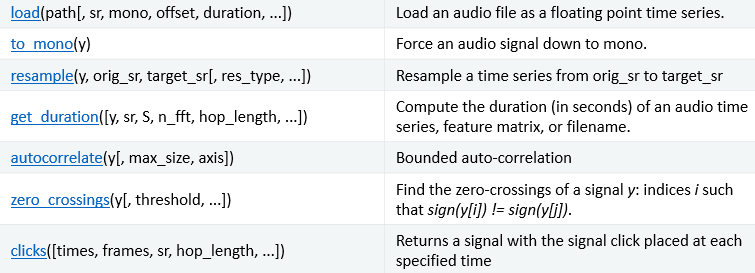
load:读取文件,可以是wav、mp3等格式;resample:重采样;get_duration:计算音频时长;autocorrelate:自相关函数;zero crossings:过零率;
- 频谱特性
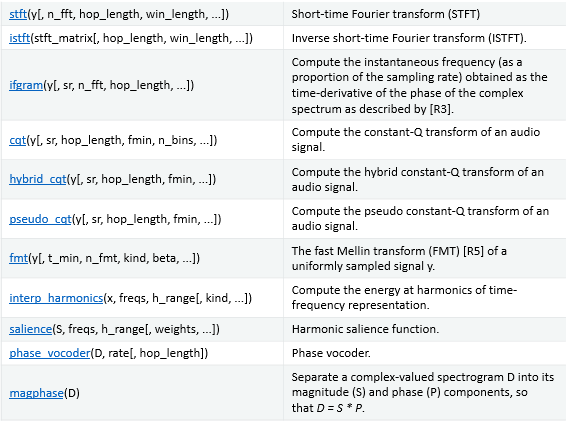
stft:短时傅里叶变换;istft:逆短时傅里叶变换;ifgram:瞬时频率;cqt:音乐中常用的CQT算法(constant-Q transform);hybrid cqt:混合CQT变换;fmt:快速梅林变换;interp harmonics:主要计算时频信号中谐波的能量;salience:谐波显示功能;phase vocoder:相位声码;magphase:相位幅值
- 幅度
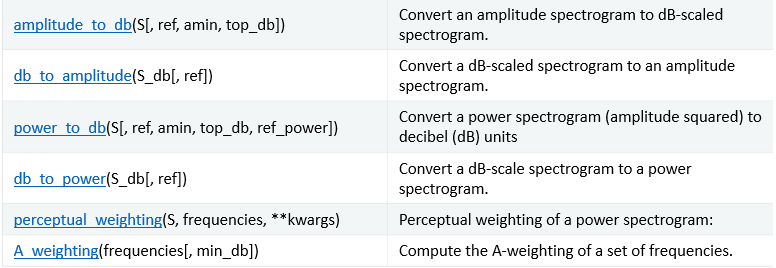
就是一些数值不同度量的转化。
- 时频转化
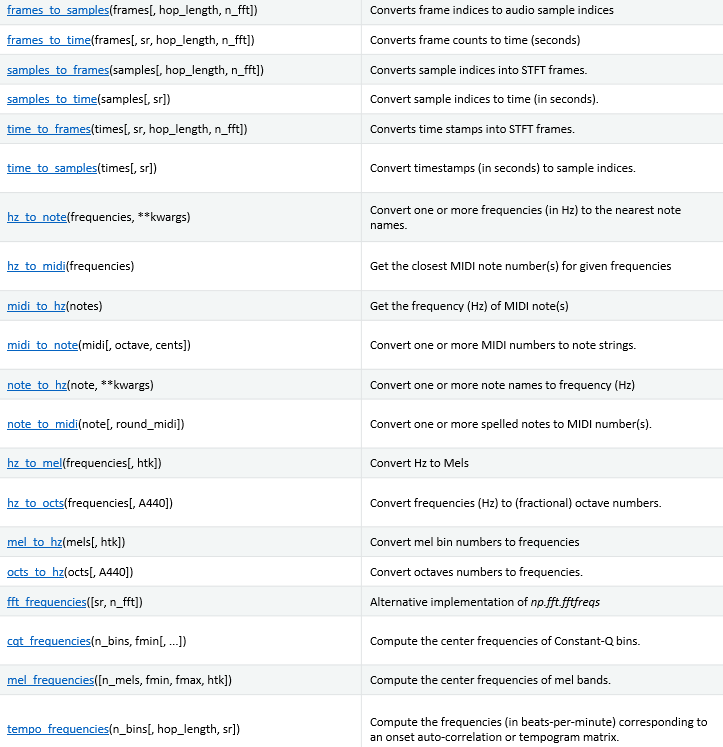
这个比较直观,就不啰嗦了。
- Pitch and tuning(音调和曲调?清楚的麻烦说一下二者具体区别)

- Dynamic Time Warping
就是DWT,动态时间规整。

以上只是一部分,其他的功能还有很多:
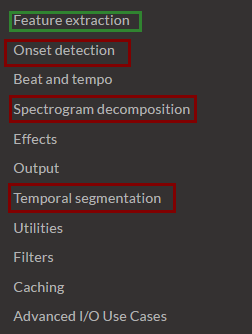
例如常用的MFCC提取就是Feature extraction中的一个函数而已。
B-常用功能
比如读取一个音频信号:
import librosa

# 1. Get the file path to the included audio example

filepath = 'C:\\Users\\Nobleding\\Documents\\FileRecv\\'

filename =filepath+'bluesky.wav'

# 2. Load the audio as a waveform `y`

#    Store the sampling rate as `sr`

y, sr = librosa.load(filename,sr=None)
load默认的采样率是22050,如果需要读取原始采样率,需要.load(filename,sr=None)而不是load(filename)
例如读取一段音频,判断节奏,并画出时频特性:
# Beat tracking example

#from __future__ import print_function

import librosa

import matplotlib.pyplot as plt

import librosa.display

# 1. Get the file path to the included audio example

# Sonify detected beat events

y, sr = librosa.load(librosa.util.example_audio_file())

tempo, beats = librosa.beat.beat_track(y=y, sr=sr)

y_beats = librosa.clicks(frames=beats, sr=sr)

# Or generate a signal of the same length as y

y_beats = librosa.clicks(frames=beats, sr=sr, length=len(y))

# Or use timing instead of frame indices

times = librosa.frames_to_time(beats, sr=sr)

y_beat_times = librosa.clicks(times=times, sr=sr)

# Or with a click frequency of 880Hz and a 500ms sample

y_beat_times880 = librosa.clicks(times=times, sr=sr,

                                 click_freq=880, click_duration=0.5)

# Display click waveform next to the spectrogram

plt.figure()

S = librosa.feature.melspectrogram(y=y, sr=sr)

ax = plt.subplot(2,1,2)

librosa.display.specshow(librosa.power_to_db(S, ref=np.max),

                         x_axis='time', y_axis='mel')

plt.subplot(2,1,1, sharex=ax)

librosa.display.waveplot(y_beat_times, sr=sr, label='Beat clicks')

plt.legend()

plt.xlim(15, 30)

plt.tight_layout()
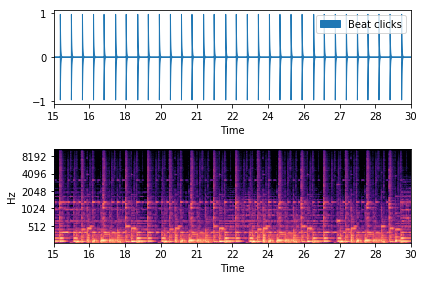
关于可视化多说两句,librosa.display模块并不默认包含在librosa中,所以开头两句都要有:
import librosa

import librosa.display
例如这个时候想显示语谱图:
import librosa

import matplotlib.pyplot as plt

import numpy as np

import librosa.display

# 1. Get the file path to the included audio example

filepath = 'C:\\Users\\Nobleding\\Documents\\FileRecv\\'

filename =filepath+'bluesky1.wav'

# 2. Load the audio as a waveform `y`

#    Store the sampling rate as `sr`

y, sr = librosa.load(filename,sr=None)

plt.figure(figsize=(12, 8))

D = librosa.amplitude_to_db(librosa.stft(y), ref=np.max)

plt.subplot(4, 2, 1)

librosa.display.specshow(D, y_axis='linear')

plt.colorbar(format='%+2.0f dB')

plt.title('Linear-frequency power spectrogram')
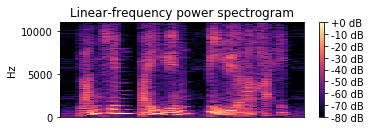
例如想观察CQT变换:
CQT = librosa.amplitude_to_db(librosa.cqt(y, sr=16000), ref=np.max)

plt.subplot(4, 2, 3)

librosa.display.specshow(CQT, y_axis='cqt_note')

plt.colorbar(format='%+2.0f dB')

plt.title('Constant-Q power spectrogram (note)')
其他以此类推。

MFCC提取:
import librosa

import librosa.display

# 1. Get the file path to the included audio example

# Sonify detected beat events

y, sr = librosa.load(librosa.util.example_audio_file())

librosa.feature.mfcc(y=y, sr=sr)
librosa在youtube上有简要的教程。
三、librosa的安装
libsora对应的链接点击这里。安装报错两个:
关于microsoft visual c++ 14.0 :

解决思路是:
- Download Microsoft Visual C++ Build Tools 2015
- Install this, making sure in the install options to select the “Windows SDK” appropriate for your version of Windows. Windows 7 systems should use Windows 8.1 SDK.
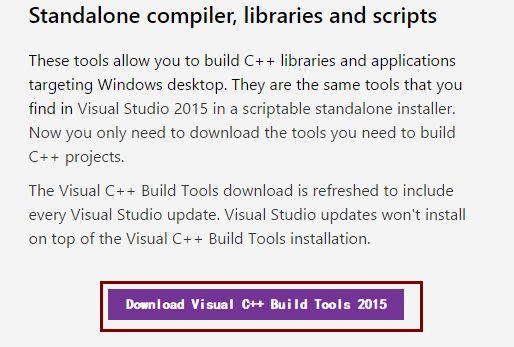
找到visual C++下载页面,点击这里:
安装完成后,安装resampy。
关于resampy(同样依赖microsoft visual c++ 14.0):
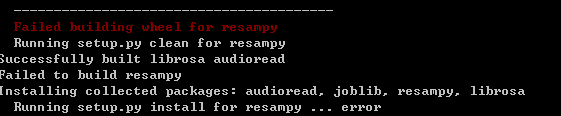
resampy是采样率转化工具,github关于resampy的安装包点击这里。
cd到对应文件夹,我放在了\pkgs\lib文件夹内,输入:
pip install resampy
可以看到resampy已经成功安装:
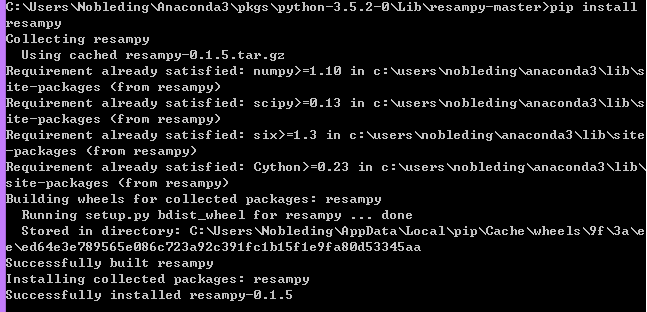
进一步安装librosa,同样放在\pkgs\lib文件夹内,cd到对应目录,输入:
pip install librosa
即可完成librosa的安装。

参考:
音频特征提取——librosa工具包使用的更多相关文章
- 音频特征提取——pyAudioAnalysis工具包
作者:桂. 时间:2017-05-04 18:31:09 链接:http://www.cnblogs.com/xingshansi/p/6806637.html 前言 语音识别等应用离不开音频特征的 ...
- python特征提取——pyAudioAnalysis工具包
作者:桂. 时间:2017-05-04 18:31:09 链接:http://www.cnblogs.com/xingshansi/p/6806637.html 前言 语音识别等应用离不开音频特征的 ...
- librosa音频特征提取,python librosa库在centos上依赖llvm的问题?
win10下安装使用: https://blog.csdn.net/qq_39516859/article/details/80679718 https://blog.csdn.net/qq_3951 ...
- pyAudioAnalysis-audioFeatureExtraction 错误纠正
1. TypeError: mfccInitFilterBanks() takes 2 positional arguments but 7 were given The issue In the f ...
- 学习笔记TF046:TensoFlow开发环境,Mac、Ubuntu/Linux、Windows,CPU版本、GPU版本
下载TensorFlow https://github.com/tensorflow/tensorflow/tree/v1.1.0 .Tags选择版本,下载解压. pip安装.pip,Python包管 ...
- 顶级Python库
绝不能错过的24个顶级Python库 Python有以下三个特点: · 易用性和灵活性 · 全行业高接受度:Python无疑是业界最流行的数据科学语言 · 用于数据科学的Python库的数量优势 事实 ...
- 一文总结数据科学家常用的Python库(下)
用于建模的Python库 我们已经到达了本文最受期待的部分 - 构建模型!这就是我们大多数人首先进入数据科学领域的原因,不是吗? 让我们通过这三个Python库探索模型构建. Scikit-learn ...
- 总结数据科学家常用的Python库
概述 这篇文章中,我们挑选了24个用于数据科学的Python库. 这些库有着不同的数据科学功能,例如数据收集,数据清理,数据探索,建模等,接下来我们会分类介绍. 您觉得我们还应该包含哪些Python库 ...
- Wavenet运行
作者:桂. 时间:2017-05-10 19:17:32 链接:http://www.cnblogs.com/xingshansi/p/6832219.html 一.环境 python3.5 Win ...
随机推荐
- JSP配置了虚拟目录使用JavaBean报错
今天遇到一个很棘手的问题,在jsp文件中使用useBean,网页返回码出现了500服务器内部错误,报错信息如下: The value for the useBean class attribute w ...
- Java实现非递归删除目录
最近在学C#的文件系统, 发现C#的文件系统貌似比java的东西少一点, 居然连删除目录都直接做好封装了, 想到学java的时候还要自己写递归删除, 好像没写过非递归的,就在网上查了下, 关于非递归删 ...
- iOS开发之单例模式
1.概述 单例模式是一种常用的软件设计模式,通过单例模式可以保证系统中一个类只有一个实例而且该实例易于外界访问,从而方便对实例个数的控制并节约系统资源. 如果希望系统中某个类的对象只能存在一个,单例模 ...
- unity插件开发——MenuItem
有unity中的菜单栏是我们经常使用到的地方,如下图: MenuItem的作用就是增加一个自己的菜单 使用方法: 在工程中Assets目录下任意一个Editor目录(以后简称Editor目录,如果不存 ...
- scss语法介绍
这里既然是对语法的介绍,那么至于如何安装和编译scss我就不多少了,主要是因为本人在群里认识的小伙伴有的不会用scss,所以就借着放假的机会来对scss语法做个总结,博主在开发过程中用scss蛮多,所 ...
- 手机自动化测试:appium源码分析之bootstrap四
手机自动化测试:appium源码分析之bootstrap四 Orientation是调整屏幕方向的操作 package io.appium.android.bootstrap.handler; i ...
- UIDatePicker的使用
UIDatePicker的介绍 UIDatePicker这个类的对象让用户可以在多个车轮上选择日期和时间.iPhone手机上的‘时钟’应用程序中的时间与闹铃中便使用了该控件.使用这个控件时,如果你能配 ...
- VC++6.0中不兼容问题
记得上次用VC++6.0已经是很长一段时间之前的事情了.这次由于需要学习计算机图形学,要开始学这写一些算法之类的,我又开始了VC++之旅. 重新安装一个vc++,我用的是Visual C++ 6.0( ...
- 01 The Learning Problem
什么时候适合用机器学习算法? 1.存在某种规则/模式,能够使性能提升,比如准确率: 2.这种规则难以程序化定义,人难以给出准确定义: 3.存在能够反映这种规则的资料. 所以,机器学习就是设计算法A,从 ...
- AngularJS1.X学习笔记14-动画(解读文档)
最近在看算法分析,那个大O啊,小o啊,分治法啊(目前就看到这里),真是搞死了.这回呢休息一下,学学AngularJS动画,上一篇文章根据自由男人的书简单谈到了动画的话题,发现反响很大(好吧,我说慌了, ...