
设备offline时如何自动重置
在linux底层
Linux/include/uapi/linux/usbdevice_fs.h中,重置_IO('U', 20)可以重置usb设备。
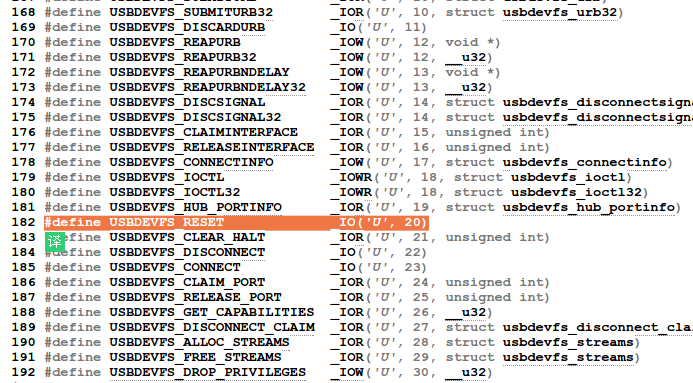
因此,我们可以在脚本中利用这个方法去重置USB
代码链接:https://gist.github.com/PaulFurtado/fce98aef890469f34d51
"""

    Example code for resetting the USB port that a Teensy microcontroller is

    attached to. There are a lot of situations where a Teensy or Arduino can

    end up in a bad state and need resetting, this code is useful for

"""

import os

import fcntl

import subprocess

# Equivalent of the _IO('U', 20) constant in the linux kernel.

USBDEVFS_RESET = ord('U') << (4*2) | 20

def get_teensy():

    """

        Gets the devfs path to a Teensy microcontroller by scraping the output

        of the lsusb command

        The lsusb command outputs a list of USB devices attached to a computer

        in the format:

            Bus 002 Device 009: ID 16c0:0483 Van Ooijen Technische Informatica Teensyduino Serial

        The devfs path to these devices is:

            /dev/bus/usb/<busnum>/<devnum>

        So for the above device, it would be:

            /dev/bus/usb/002/009

        This function generates that path.

    """

    proc = subprocess.Popen(['lsusb'], stdout=subprocess.PIPE)

    out = proc.communicate()[0]

    lines = out.split('\n')

    for line in lines:

        if 'Teensyduino' in line:

            parts = line.split()

            bus = parts[1]

            dev = parts[3][:3]

            return '/dev/bus/usb/%s/%s' % (bus, dev)

def send_reset(dev_path):

    """

        Sends the USBDEVFS_RESET IOCTL to a USB device.

        dev_path - The devfs path to the USB device (under /dev/bus/usb/)

                   See get_teensy for example of how to obtain this.

    """

    fd = os.open(dev_path, os.O_WRONLY)

    try:

        fcntl.ioctl(fd, USBDEVFS_RESET, 0)

    finally:

        os.close(fd)

def reset_teensy():

    """

        Finds a teensy and reset it.

    """

    send_reset(get_teensy())
设备offline时如何自动重置的更多相关文章
- PDOMySQL实现类, 自动重置无效连接
PHP连接MySQL时, 有可能因为MySQL的原因,而使得php里生成的连接无效.比如超过8小时, MySQL自动断开空闲连接的问题,虽然可以调高这个时间,但显然这不是比较文艺的实现方式.现在洒家用 ...
- 自动重置Language level 5 与 Java Complier 1.5
Intellij IDEA用Maven来构建项目,若pom.xml没有指定版本,总是默认Language level 5 与 Java Compiler 1.5. 以下是两种修改方式: 1. 手动进行 ...
- 【极品代码】一般人我不告诉他,手机端h5播放时不自动全屏代码
已测适用于ios,某些安卓手机微信下播放视频会出现播放器控件(这个实在是无力吐槽噢,因为之前还遇到过微信播放完视频后竟然无法退出全屏出现广告的情况,只有播放完后刷新页面并且要放到框架页里才能屏蔽微信视 ...
- EditText中输入手机号码时,自动添加空格
输入手机号码时,自动添加空格,更容易辨别 public class PhoneWatcher implements TextWatcher { private EditText _text; publ ...
- Ajax实现提交表单时验证码自动验证(原创自Zjmainstay)
本文通过源码展示如何实现表单提交前,验证码先检测正确性,不正确则不提交表单,更新验证码. 1.前端代码 index.html <!DOCTYPE html> <html> &l ...
- [QualityCenter]设置工作流脚本-新建缺陷时字段自动生成
需求:新建缺陷时,自动生成缺陷状态.检查者和检查日期的值. 在脚本编辑器找到Defects_Bug_New函数,然后填写以下代码: Sub Defects_Bug_New On Error Re ...
- Qt窗体关闭时,如何自动销毁窗体类对象
Qt窗体关闭时,如何自动销毁窗体类对象 要对你的窗口设置WA_DeleteOnClose属性,默认的情况下关闭窗口仅仅意味着隐藏它 ImgWindow1->setAttribute(Qt ...
- ie10中元素超出父元素的宽度时不能自动隐藏
(从已经死了一次又一次终于挂掉的百度空间人工抢救出来的,发表日期2014-02-21) 今天遇到一个问题,ie10中元素超出父元素的宽度时不能自动隐藏,而其余浏览器却正常显示. 解决方法是,手动给其设 ...
- 触发器修改后保存之前的数据 表中插入数据时ID自动增长
create or replace trigger t before update on test5 for each rowbegin insert into test55 values (:old ...
随机推荐
- 1692: [Usaco2007 Dec]队列变换(BZOJ1640强化版)
1692: [Usaco2007 Dec]队列变换 Time Limit: 5 Sec Memory Limit: 64 MBSubmit: 682 Solved: 280[Submit][Sta ...
- CoreGraphics--饼状图
//传入数据,饼状图 pieChartView.dataArr = @[@20,@50,@80,@70,@40]; - (void)drawRect:(CGRect)rect { // Drawing ...
- Python3处理配置文件
1.说明:python3使用configparser模块来处理ini配置文件.2.代码示例:需要生成conf.ini配置文件如下:[config]v1 = 100v2 = abcv3 = truev4 ...
- 计算机程序的思维逻辑 (75) - 并发容器 - 基于SkipList的Map和Set
上节我们介绍了ConcurrentHashMap,ConcurrentHashMap不能排序,容器类中可以排序的Map和Set是TreeMap和TreeSet,但它们不是线程安全的.Java并发包中与 ...
- 跑马灯、短信与反射EditText
1.1.跑马灯功能 Android自带支持跑马灯功能,实现此功能需要设置已下属性: android:ellipsize="marquee" // 必选,跑马灯样式 android: ...
- 深入浅出数据结构C语言版(3)——递归简论
相信学习过C语言的读者都已经接触过递归(不论是谭浩强的C程序设计还是C Primer Plus都有递归程序),本文就是对递归的基本原则进行简要介绍.首先,我们写一个基本的递归函数作为例子: int ...
- yii2邮件配置教程,报Expected response code 250 but got code "553"原因
main.php(或main-local.php)中的邮件配置如下: 'mailer' => [ 'class' => 'yii\swiftmailer\Mailer', 'viewPat ...
- 走入PHP-变量、运算符
通过define()定义常量: PHP 5.3.0之后,可以使用const关键字在类定义之外定义常量: 下面是PHP的几个魔术变量: PHP支持一个执行运算符:反引号(``),PHP将尝试将反引号中的 ...
- CodeBlocks常用重要快捷键大全!!
CodeBlocks常用操作快捷键 编辑部分: Ctrl + A:全选 Ctrl + C:复制 Ctrl + X: 剪切 Ctrl + V:粘贴 Ctrl + Z:撤销(后退一步) Ctrl + S: ...
- 无线接收信号强度(RSSI)那些事儿
本文由嵌入式企鹅圈原创团队成员黄鑫供稿. 本文所述的原理适用于所有无线传输技术,只是用蓝牙来举例.应该说,嵌入式企鹅圈更加偏重于嵌入式和物联网.安卓技术原理方面的知识分享和传播,其次才是实践,尽管很多 ...