
DS-5新加交叉编译工具
Adding New Compiler Toolchains to DS-5
Introduction
From Arm DS-5 Development Studio v5.20, you can add new compiler toolchains (Arm Compiler 5, Arm Compiler 6 and GCC) and configure them for your project more easily. Different versions of the same toolchain will keep their flags when you switch between them and projects can be shared between you and your colleagues without re-configuring the path.
Note: If you are installing Arm Compiler 6 alongside DS-5 and you don't have a DS-5 Ultimate Edition license, you will need to set the following environment variable: ARM_TOOL_VARIANT=pro. This can be done using set ARM_TOOL_VARIANT=pro in DS-5 Command Prompt, or as a global environment variable in your OS.
DS-5 Settings
Open up DS-5 and click Window > Preferences followed by DS-5.
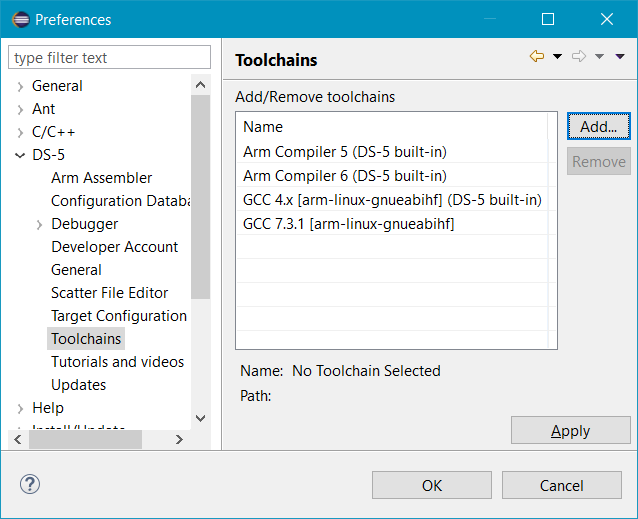
Select Toolchains, which will bring up the following dialog:

DS-5 includes three compiler toolchains: Arm Compiler 5, Arm Compiler 6 and GCC. These are listed as "built-in", showing that they're already installed.
Note: DS-5 lists the major version number of the compiler (i.e. Arm Compiler 5). This allows your projects to be portable between DS-5 versions when we update the included compilers. When you add a specific version, such as Arm Compiler 5.04u2, this will show up with the sub version.
Click Add...
If you have already downloaded a compiler toolchain, browse to the location of the toolchain bin directory.
Otherwise you can either:
Go to ds.arm.com and download the Arm Compiler 6 toolchain.
Or
Download a GCC toolchain:
- If you are compiling for Cortex-A, select a toolchain from linaro.org.
- For more information regarding the Linaro Toolchain releases, support, and selection, go to https://wiki.linaro.org/WorkingGroups/ToolChain/FAQ. - If you are compiling for Cortex-R or Cortex-M, select a toolchain from GNU Arm Embedded Toolchain.
- For more information regarding the GNU Arm Embedded Toolchain releases, support, and selection, go to https://developer.arm.com/open-source/gnu-toolchain/gnu-rm.
- If you are compiling for Cortex-A, select a toolchain from linaro.org.
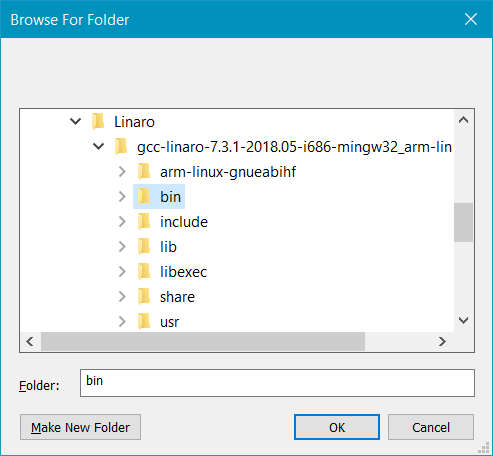
In this case, I've downloaded and installed GCC 7.3.1.
Click Next > to run autodetection. In most cases, this should provide a full set of information about the toolchain. However, for custom implementations of GCC, you can manually edit these fields.
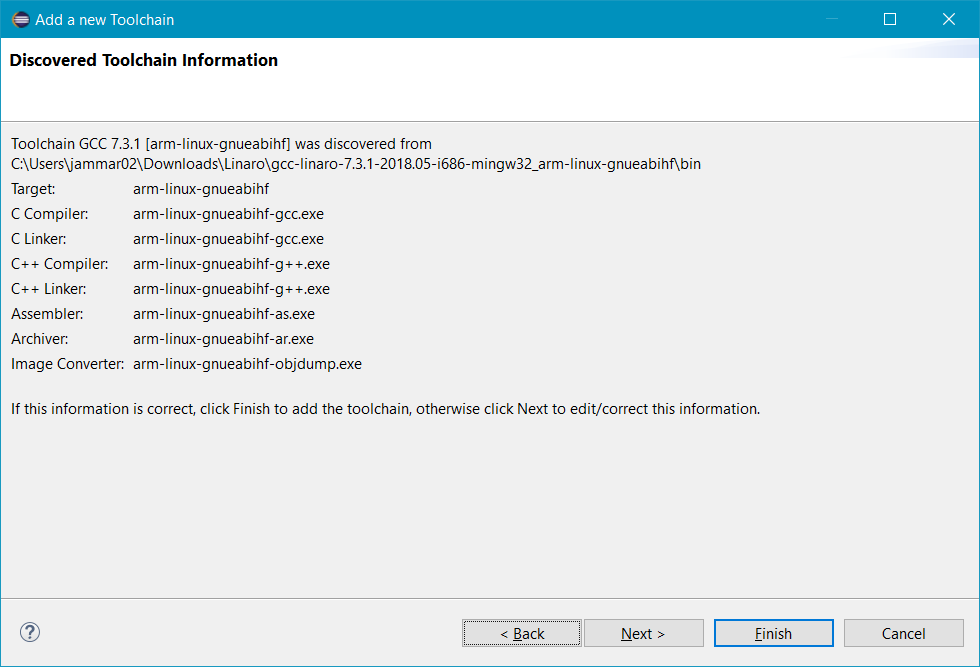
Click Finish to complete the process.
You should now see the new toolchain listed alongside the built-in toolchains:
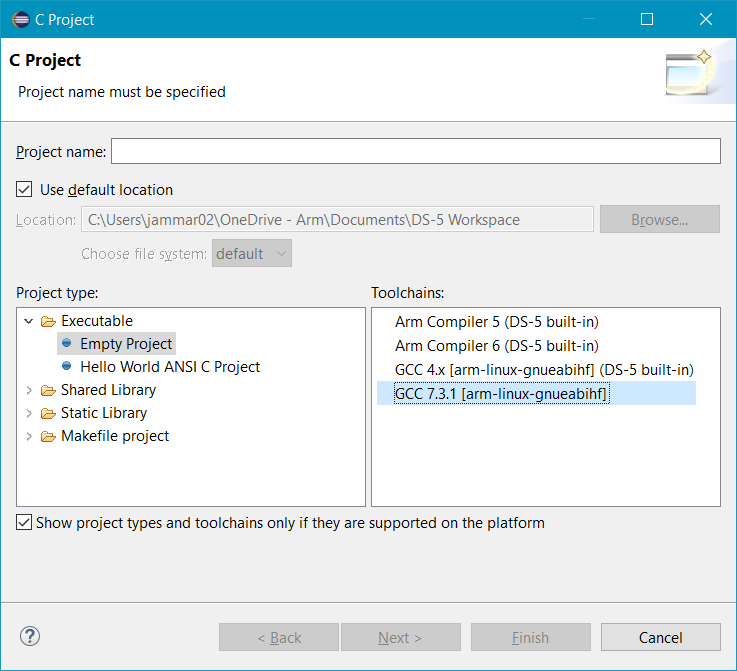
You'll be prompted to restart Eclipse for these changes to apply. When you've done this, you will be able to see the new toolchain listed as an option when you start a new project:
Additionally, you can reconfigure existing projects to use the newly added toolchain by right-clicking on the project, selecting Properties > C/C++ Build > Tool Chain Editor and then choosing it in the Current toolchain dropdown:
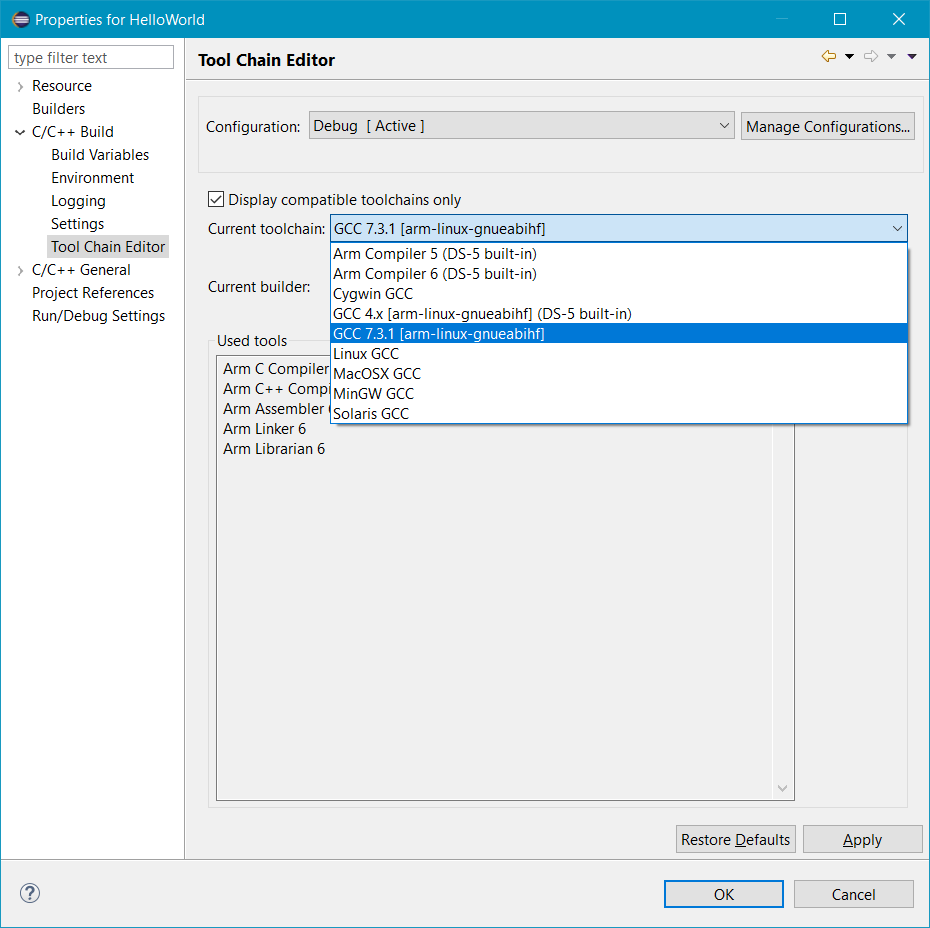
Finally, you'll notice that if you swap between different versions of the same toolchain, DS-5 will now remember your flags and other settings, so there's no need to re-enter them. However, this is not the case when moving between different toolchains (such as Arm Compiler 5 and Arm Compiler 6).
It's also possible to add and/or select new toolchains using the DS-5 Command Prompt. You'll notice that on startup, the Command Prompt now contains a message explaining that no toolchain is set by default, along with the select_toolchain command to begin the process of selecting one.
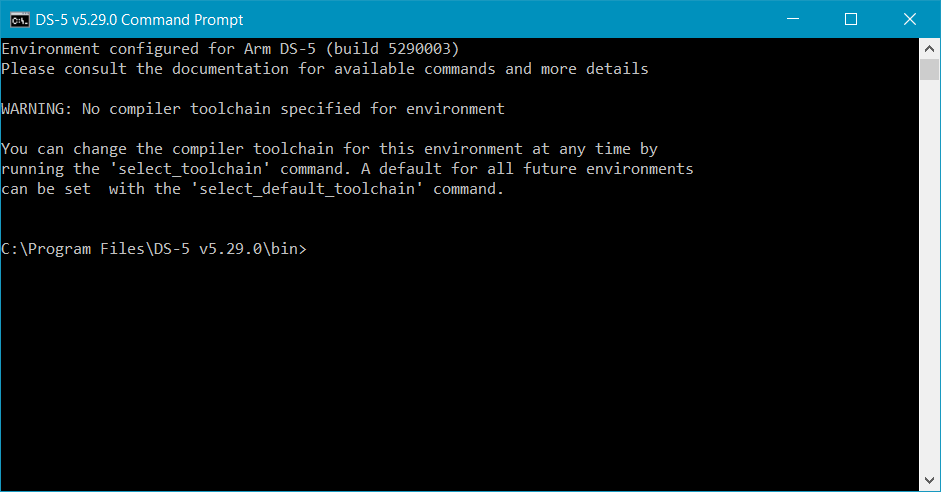
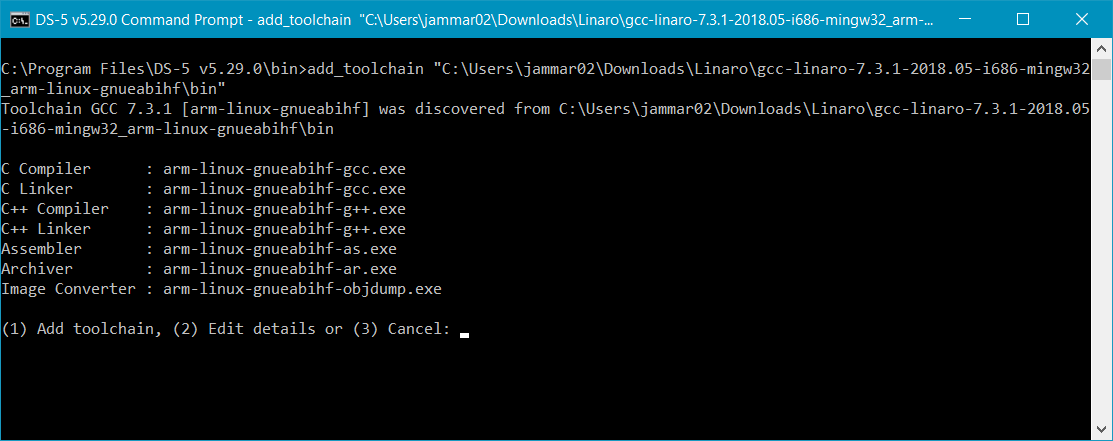
To add a new toolchain, use the add_toolchain command followed by the path to the folder where the binary is located. For example add_toolchain "C:\Program Files (x86)\Linaro\gcc-linaro-aarch64-linux-gnu-4.9-2014.05\bin". Just like the GUI, you will then have the opportunity to finish the process, or manually edit the details:
Entering select_toolchain brings up a numbered list including the new toolchain:

DS-5新加交叉编译工具的更多相关文章
- 为DS5添加新的gcc工具链
环境: 步骤: 1.下载mingw32版本的工具链 下面有两个下载工具链的网站: ARM官网的: https://developer.arm.com/tools-and-software/open-s ...
- Linux ARM交叉编译工具链制作过程【转】
本文转载自:http://www.cnblogs.com/Charles-Zhang-Blog/archive/2013/02/21/2920999.html 一.下载源文件 源代码文件及其版本与下载 ...
- Crosstool-ng制作交叉编译工具链
Crosstool-ng制作交叉编译工具链 交叉编译器可以用现成的,比如CodeSourcery制作的交叉编译器,也可以自己制作,一般是用kernel+gcc+glibc+binutils的源码包来编 ...
- 2015 GOOGLE I/O大会看点总结:新的开发工具及云端测试工具
http://ask.android-studio.org/?/article/48 尽管凌晨开始的主题演讲略显晦涩并继承了谷歌一贯的东一句西一句想起啥说啥的混乱风格,但期待用技术改变世界的技 ...
- 64位的ubuntu14.04 LTS安装 Linux交叉编译工具链及32位“ia32-libs”依赖库
ubuntu又迎来了其新一代的长期支持版本 14.04 LTS,其带来了许多令人期待的新特新,遂决定进行升级. 装好了64位版本及安装 Linux交叉编译工具链 运行GCC,${CROSS_COMPI ...
- 使用buildroot创建自己的交叉编译工具链【转】
本文转载自:https://blog.csdn.net/linczone/article/details/45894181 使用buildroot创建自己的交叉编译工具链 关键字:buildroot ...
- 交叉编译工具链介绍《Building Embedded Linux Systems》
1.前言 配置和编译一个合适的GNU工具链是相对复杂的并且需要很精细的操作,包括你需要对不同软件库之间的依赖关系.它们的各自的任务,不同软件库版本情况都有比较好的了解,编译工具链是一个乏味的工作. 2 ...
- arm-linux交叉编译工具链的制作(基于S3C2440)【转】
本文转载自:http://eric-gao.iteye.com/blog/2160622 制作arm-linux交叉编译工具链一般通过crosstool工具或者crosstool-NG,前者使用方便, ...
- 安装交叉编译工具arm-linux-gcc-4.3.2 并且修改环境变量
安装交叉编译工具arm-linux-gcc-4.3.2 2011-07-08 00:55:28| 分类: 嵌入式|举报|字号 订阅 环境:Fedora 9STEP 1: 下载arm-linu ...
随机推荐
- fiddler工具使用大全
Fiddler基础知识 Fiddler是强大的抓包工具,它的原理是以web代理服务器的形式进行工作的,使用的代理地址是:127.0.0.1,端口默认为8888,我们也可以通过设置进行修改. 代理就是在 ...
- HTML的footer置于页面最底部
vue项目中,使用element-ui的布局,仍然出现footer不固定页面底部的情况,网上找到的一个管用的 方法是:footer高度固定+绝对定位 <html> <head> ...
- IntelliJ IDEA使用报错
GZIPResponseStream不是抽象的, 并且未覆盖javax.servlet.ServletOutputStream中 继承了某个抽象类, 或者 实现某个接口这时候你必须 把基类或接口中的所 ...
- (四十二)golang--管道
假设我们现在有这么一个需求: 计算1-200之间各个数的阶乘,并将每个结果保存在mao中,最终显示出来,要求使用goroutime. 分析: (1)使用goroutime完成,效率高,但是会出现并发/ ...
- 使用Xdroid进行端口映射,出现adb server version (36) doesn't match this client (39); killing...的解决方案
第一反应就是adb冲突了,因为Xdroid这个产品看起来就不像是给开发人员用的模拟器,因为不能选择各种版本进行适配,所以肯定自带了一个adb. whereis命令发现果然有两个adb,一个直接是安装在 ...
- 【2018寒假集训 Day2】【动态规划】抢金块
抢金块 输入文件:gold.in 输出文件:gold.out 问题描述: 地面上有一些格子,每个格子上面都有金块,但不同格子上的金块有不同的价值,你一次可以跳S至T步 .如果S=2,T=4.你就可以跳 ...
- setBounds方法,与setLayout(null)
首先把相关容器的布局方式设为 setLayout(null); 然后调用组件的 setBounds() 方法 设置button的位置为(100,100) 长宽分别为 60,25 jButton.se ...
- 洛谷P1426-小鱼会有危险吗
原题链接: https://www.luogu.org/problem/P1426 题面简述: 有一次,小鱼要从A处沿直线往右边游,小鱼第一秒可以游7米,从第二秒开始每秒游的距离只有前一秒的98%98 ...
- 甲小蛙战记:PHP2Java 排雷指南
(马蜂窝技术原创内容,申请转载请在公众后后台留言,ID:mfwtech ) 大家好,我是来自马蜂窝电商旅游平台的甲小蛙,从前是一名 PHP 工程师,现在可能是一名 PHJ 工程师,以后...... 前 ...
- CCNA 之 十二 Frame Relay 帧中继
Fram Relay 帧中继 帧中继简介 VC.LMI.DLCI的概念 帧中继映射 Inverse-ARP的操作 帧中继配置 帧中继简介 分组交换广域网接入方式的一个代表,分组交换是以分组的形式在广域 ...