
一个简单的利用 WebClient 异步下载的示例(四)
接上一篇,我们继续优化它。
1. DownloadEntry 类
    public class DownloadEntry

    {

        public string Url { get; set; }

        public string Path { get; set; }

        /// <summary>

        /// 当前处理的数据

        /// </summary>

        public object Data { get; set; }

        public DownloadEntry(string url, string savedPath)

            : this(url, savedPath, null)

        {

        }

        public DownloadEntry(string url, string savedPath, object data)

        {

            Url = url;

            Path = savedPath;

            Data = data;

        }

    }
2. 增加事件
    /// <summary>

    /// 当单个下载前的事件处理

    /// </summary>

    /// <param name="current">当前处理的数据,有可能为 NULL,请注意判断</param>

    public delegate void WhenSingleDownloadingEventHandler(DownloadEntry current);

    /// <summary>

    /// 当全部下载完毕后的事件处理

    /// </summary>

    public delegate void WhenAllDownloadedEventHandler();

    /// <summary>

    /// 当下载错误时

    /// </summary>

    /// <param name="ex"></param>

    public delegate void WhenDownloadingErrorEventHandler(Exception ex);
3. 提取出 SkyWebClient 的基类
    /// <summary>

    /// SkyWebClient 的基类

    /// </summary>

    public class SkyWebClientBase : INotifyPropertyChanged

    {

        #region 字段、属性

        public event PropertyChangedEventHandler PropertyChanged;

        protected virtual void OnPropertyChanged(string prop)

        {

            if (PropertyChanged != null)

            {

                PropertyChanged(this, new PropertyChangedEventArgs(prop));

            }

        }

        /// <summary>

        /// 当单个下载前的事件处理

        /// </summary>

        public event WhenSingleDownloadingEventHandler WhenSingleDownloading;

        protected virtual void OnWhenSingleDownloading(DownloadEntry next)

        {

            if (WhenSingleDownloading != null)

            {

                WhenSingleDownloading(next);

            }

        }

        /// <summary>

        /// 当全部下载完毕后的事件处理

        /// </summary>

        public event WhenAllDownloadedEventHandler WhenAllDownloaded;

        protected virtual void OnWhenAllDownloaded()

        {

            if (WhenAllDownloaded != null)

            {

                WhenAllDownloaded();

            }

        }

        /// <summary>

        /// 当全部下载完毕后的事件处理

        /// </summary>

        public event WhenDownloadingErrorEventHandler WhenDownloadingError;

        protected virtual void OnWhenDownloadingError(Exception ex)

        {

            if (WhenDownloadingError != null)

            {

                WhenDownloadingError(ex);

            }

        }

        bool _canChange = true;

        public bool CanChange

        {

            get

            {

                return _canChange;

            }

            set

            {

                _canChange = value;

                OnPropertyChanged("CanChange");

            }

        }

        #endregion

    }
4. SkyParallelWebClient
    /// <summary>

    /// 并行的 WebClient

    /// </summary>

    public class SkyParallelWebClient : SkyWebClientBase

    {

        ConcurrentQueue<DownloadEntry> OptionDataList = new ConcurrentQueue<DownloadEntry>(); //比如说:有 500 个元素

        ConcurrentQueue<Task> ProcessingTasks = new ConcurrentQueue<Task>(); //当前运行中的

        public int ParallelCount { get; set; }

        private bool IsCompleted { get; set; }

        private static object lockObj = new object();

        /// <summary>

        /// 构造函数

        /// </summary>

        /// <param name="downloadConfigs">要下载的全部集合,比如 N 多要下载的,N无限制</param>

        /// <param name="parallelCount">单位内,并行下载的个数。切忌:该数字不能过大,否则可能很多文件因为 WebClient 超时,而导致乱文件(即:文件不完整)一般推荐 20 个左右</param>

        public SkyParallelWebClient(IEnumerable<DownloadEntry> downloadConfigs, int parallelCount)

        {

            if (downloadConfigs == null)

            {

                throw new ArgumentNullException("downloadConfigs");

            }

            this.ParallelCount = parallelCount;

            foreach (var item in downloadConfigs)

            {

                OptionDataList.Enqueue(item);

            }

        }

        /// <summary>

        /// 启动(备注:由于内部采用异步下载,所以方法不用加 Try 和返回值)

        /// </summary>

        public void Start()

        {

            System.Net.ServicePointManager.DefaultConnectionLimit = int.MaxValue;

            StartCore();

        }

        protected void StartCore()

        {

            if (OptionDataList.Count <= )

            {

                if (!IsCompleted)

                {

                    lock (lockObj)

                    {

                        if (!IsCompleted)

                        {

                            OnWhenAllDownloaded();

                            IsCompleted = true;

                        }

                    }

                }

                return;

            }

            while (OptionDataList.Count >  && ProcessingTasks.Count <= ParallelCount)

            {

                DownloadEntry downloadEntry;

                if (!OptionDataList.TryDequeue(out downloadEntry))

                {

                    break;

                }

                var task = DownloadFileAsync(downloadEntry);

                ProcessingTasks.Enqueue(task);

                OnWhenSingleDownloading(downloadEntry);

            }

        }

        private Task DownloadFileAsync(DownloadEntry downloadEntry)

        {

            using (WebClient webClient = new WebClient())

            {

                //set this to null if there is no proxy

                webClient.Proxy = null;

                webClient.DownloadFileCompleted += WebClient_DownloadFileCompleted;

                return webClient.DownloadFileTaskAsync(new Uri(downloadEntry.Url), downloadEntry.Path);

            }

        }

        private void WebClient_DownloadFileCompleted(object sender, AsyncCompletedEventArgs e)

        {

            Task task;

            ProcessingTasks.TryDequeue(out task);

            StartCore();

        }

    }
5. TaskDemo101
     public static class TaskDemo101

    {

        public static string GetRandomUrl(Random rd)

        {

            string url1 = "http://www.xxx.me/Uploads/image/20130129/2013012920080761761.jpg";

            string url2 = "http://www.xxx.me/Uploads/image/20121222/20121222230686278627.jpg";

            string url3 = "http://www.xxx.me/Uploads/image/20120606/20120606222018461846.jpg";

            string url4 = "http://www.xxx.me/Uploads/image/20121205/20121205224383848384.jpg";

            string url5 = "http://www.xxx.me/Uploads/image/20121205/20121205224251845184.jpg";

            string resultUrl;

            int randomNum = rd.Next(, );

            switch (randomNum)

            {

                case : resultUrl = url1; break;

                case : resultUrl = url2; break;

                case : resultUrl = url3; break;

                case : resultUrl = url4; break;

                case : resultUrl = url5; break;

                default: throw new Exception("");

            }

            return resultUrl;

        }

        public static string GetSavedFileFullName()

        {

            string targetFolderDestination = Path.Combine(AppDomain.CurrentDomain.BaseDirectory, "downloads\\images\\");

            try

            {

                Directory.CreateDirectory(targetFolderDestination);

            }

            catch (Exception)

            {

                Console.WriteLine("创建文件夹失败!");

            }

            string targetFileDestination = Path.Combine(targetFolderDestination, string.Format("img_{0}{1}.png", DateTime.Now.ToString("yyyy-MM-dd_HH-mm-ss"), Guid.NewGuid().ToString()));

            return targetFileDestination;

        }

        public static async Task<bool> RunByHttpClient(SkyHttpClient skyHttpClient, int id)

        {

            var task = skyHttpClient.DownloadImage(GetRandomUrl(new Random()));

            return await task.ContinueWith<bool>(t => {

                File.WriteAllBytes(GetSavedFileFullName(), t.Result);

                return true;

            });

        }

        public static void RunByWebClient(WebClient webClient, int id)

        {

            webClient.DownloadFileAsync(new Uri(GetRandomUrl(new Random())), GetSavedFileFullName());

        }

    }
6. Form1
    public partial class Form1 : Form

    {

        public Form1()

        {

            InitializeComponent();

        }

        private List<int> GetDownloadIds()

        {

            List<int> ids = new List<int>();

            for (int i = ; i <= ; i++)

            {

                ids.Add(i);

            }

            return ids;

        }

        private void WhenAllDownloading()

        {

            this.listBoxLog.Items.Insert(, string.Format("当前时间:{0},准备开始下载...", DateTime.Now.ToString("yyyy-MM-dd HH:mm:ss")));

            //禁用按钮

            EnableOrDisableButtons(false);

        }

        private void EnableOrDisableButtons(bool enabled)

        {

            this.btnRunByHttpClient.Enabled = enabled;

            this.btnRunByWebClient.Enabled = enabled;

        }

        private void WhenSingleDownloading(int id)

        {

            this.listBoxLog.Items.Insert(, string.Format("当前时间:{0},编号 {1} 准备开始下载...", DateTime.Now.ToString("yyyy-MM-dd HH:mm:ss"), id));

        }

        private void WhenAllDownloaded()

        {

            this.listBoxLog.Items.Insert(, string.Format("当前时间:{0},下载完毕!", DateTime.Now.ToString("yyyy-MM-dd HH:mm:ss")));

            //启用按钮

            EnableOrDisableButtons(true);

        }

        private async void btnRunByHttpClient_Click(object sender, EventArgs e)

        {

            SkyHttpClient skyHttpClient = new SkyHttpClient();

            try

            {

                WhenAllDownloading();

                foreach (var id in GetDownloadIds())

                {

                    bool singleDownloadSuccess = await TaskDemo101.RunByHttpClient(skyHttpClient, id);

                    WhenSingleDownloading(id);

                }

                WhenAllDownloaded();

            }

            catch (Exception ex)

            {

                MessageBox.Show(ex.Message, "Download Error!");

            }

        }

        private void btnRunByWebClient_Click(object sender, EventArgs e)

        {

            WhenAllDownloading();

            var ids = GetDownloadIds();

            List<DownloadEntry> downloadConfigs = new List<DownloadEntry>();

            Random rd = new Random();

            foreach (var id in ids)

            {

                downloadConfigs.Add(new DownloadEntry(TaskDemo101.GetRandomUrl(rd), TaskDemo101.GetSavedFileFullName(), id));

            }

            //搜索: Parallel WebClient

            // 方案1

            //SkyWebClient skyWebClient = new SkyWebClient(downloadConfigs, this.progressBar1);

            //skyWebClient.WhenAllDownloaded += SkyWebClient_WhenAllDownloaded;

            //skyWebClient.WhenSingleDownloading += SkyWebClient_WhenSingleDownloading;

            //skyWebClient.WhenDownloadingError += SkyWebClient_WhenDownloadingError;

            //skyWebClient.Start();

            // 方案2(代码已经调整,无法恢复)

            //ThreadPool.QueueUserWorkItem(new WaitCallback(AsyncRunSkyParallelWebClient), downloadConfigs);

            // 方案3

            SkyParallelWebClient skyParallelWebClient = new SkyParallelWebClient(downloadConfigs, );

            skyParallelWebClient.WhenAllDownloaded += SkyWebClient_WhenAllDownloaded;

            skyParallelWebClient.WhenSingleDownloading += SkyWebClient_WhenSingleDownloading;

            skyParallelWebClient.WhenDownloadingError += SkyWebClient_WhenDownloadingError;

            skyParallelWebClient.Start();

        }

        private void SkyWebClient_WhenDownloadingError(Exception ex)

        {

            MessageBox.Show("下载时出现错误: " + ex.Message);

        }

        private void SkyWebClient_WhenSingleDownloading(DownloadEntry current)

        {

            WhenSingleDownloading((int)current.Data);

        }

        private void SkyWebClient_WhenAllDownloaded()

        {

            btnRunByWebClient.Text = "用 WebClient 开始下载";

            WhenAllDownloaded();

        }

    }
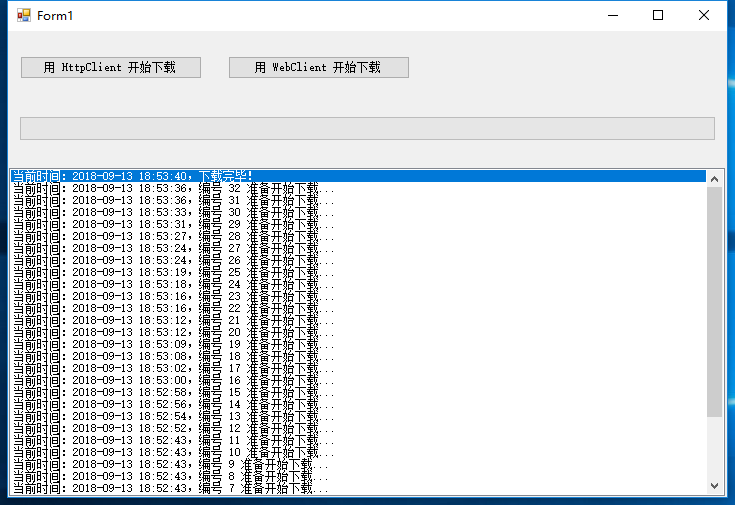
7. 运行截图:
如图:

8. 总结
还算比较完美,唯独 下载完毕后,可能会多次调用事件,需要优化。
下载:https://files.cnblogs.com/files/Music/SkyParallelWebClient_v2018-09-18.rar
谢谢浏览!
一个简单的利用 WebClient 异步下载的示例(四)的更多相关文章
- 一个简单的利用 WebClient 异步下载的示例(三)
继续上一篇 一个简单的利用 WebClient 异步下载的示例(二) 后,继续优化它. 1. 直接贴代码了: DownloadEntry: public class DownloadEntry { p ...
- 一个简单的利用 WebClient 异步下载的示例(二)
继上一篇 一个简单的利用 WebClient 异步下载的示例(一) 后,我想把核心的处理提取出来,成 SkyWebClient,如下: 1. SkyWebClient 该构造函数中 downloadC ...
- 一个简单的利用 WebClient 异步下载的示例(一)
继上一篇文章 一个简单的利用 HttpClient 异步下载的示例 ,我们知道不管是 HttpClient,还算 WebClient,都不建议每次调用都 new HttpClient,或 new We ...
- 一个简单的利用 WebClient 异步下载的示例(五)(完结篇)
接着上一篇,我们继续来优化.我们的 SkyParallelWebClient 可否支持切换“同步下载模式”和“异步下载模式”呢,好处是大量的代码不用改,只需要调用 skyParallelWebClie ...
- 一个简单的利用 HttpClient 异步下载的示例
可能你还会喜欢 一个简单的利用 WebClient 异步下载的示例 ,且代码更加新. 1. 定义自己的 HttpClient 类. using System; using System.Collec ...
- VC6下OpenGL 开发环境的构建外加一个简单的二维网络棋盘绘制示例
一.安装GLUT 工具包 GLUT 不是OpenGL 所必须的,但它会给我们的学习带来一定的方便,推荐安装. Windows 环境下的GLUT 本地下载地址:glut-install.zip(大小约为 ...
- [.NET] 一步步打造一个简单的 MVC 电商网站 - BooksStore(四)
一步步打造一个简单的 MVC 电商网站 - BooksStore(四) 本系列的 GitHub地址:https://github.com/liqingwen2015/Wen.BooksStore &l ...
- 一个简单的AXIS远程调用Web Service示例
我们通常都将编写好的Web Service发布在Tomcat或者其他应用服务器上,然后通过浏览器调用该Web Service,返回规范的XML文件.但是如果我们不通过浏览器调用,而是通过客户端程序调用 ...
- [c#]WebClient异步下载文件并显示进度
摘要 在项目开发中经常会用到下载文件,这里使用winform实现了一个带进度条的例子. 一个例子 using System; using System.Collections.Generic; usi ...
随机推荐
- PI对于两个SAP客户端通道的了解
你把你的报文放到ESR的MM里面试一下就知道了 日期格式之类的,可能有转换的你要输入2019-05-13这种 OA到PI不选,都是到一个系统,由PI再来分流 如果你要做成由OA来选的,就要参考类似于 ...
- es6 最新函数封装(简易版)
map封装: Array.prototype.map=function(fn){ var arr=this; var newArr=[] for(var i=0;i<arr.length;i++ ...
- bacula备份工具
源码下载:http://www.bacula.org bacula适合数据业务量巨大,每天都在迅速增长,还需要以tar打包方式进行低级备份而且没有异地容灾策略.Bacula是一个完美的增量备份功能,同 ...
- ucoreOS_lab 1~8 实验报告导航
所有的实验已经全部完成,实验的源代码及报告都在 Github 上,欢迎大家批评指正,如果觉得对你有帮助的话,欢迎为此项目 star & watch & fork 三连,让更多的朋友们看 ...
- Windows Cluster失败后,AlwaysOn在残存Server节点上快速恢复DB的详细步骤
AlwaysOn是一种集合了高可用和灾难恢复两种功能的技术,它支持一个或多个数据库整体的发生故障转移,它实现了一定程度上的负载均衡,减轻了主服务器的压力,是目前最好的一种选择.那么当极端情况发生时,集 ...
- Python__new__方法、定制属性访问、描述符与装饰器
__new__方法的运行顺序 装饰器的概念的用法 三个内置装饰器 类中属性的访问过程 __new__方法 创建实例的方法 __new__方法是在类创建实例的时候自动调用的 实例是通过类里面的__new ...
- docker 简单介绍与安装
主机虚拟化(vmware,visual box等) type-Ⅰ type=Ⅱ 主机虚拟化是隔离最彻底的,但是由于多隔了一个虚拟的操作系统,性能会慢一些. 容器虚拟化(docker等) 隔离没有主机虚 ...
- emacs semantic,speedbar,gdb汇总
在emacs 里使用gdb emacs speedbar功能介绍 semantic功能介绍 上面3篇文章精华,都汇总到下面的.emacs文件里了. ;;启动semantic功能 (semantic-m ...
- Java面试题-基础篇二(干货)
11.是否可以从一个static方法内部发出对非static方法的调用? 不可以.因为非static方法是要与对象关联在一起的,必须创建一个对象后,才可以在该对象上进行方法调用,而static方法调用 ...
- 201871010111-刘佳华《面向对象程序设计(java)》第十三周学习总结
201871010111-刘佳华<面向对象程序设计(java)>第十三周学习总结 实验十一 图形界面事件处理技术 实验时间 2019-11-22 第一部分:理论知识总结 1.事件源:能够产 ...