
SpringCloud学习笔记(五、SpringCloud Netflix Hystrix)
目录:
- Hystrix简介
- 线程隔离:线程池、信号量
- 服务降级、服务熔断、请求缓存、请求合并
- Hystrix完整流程、Hystrix属性值
- 注解方式实现Hystrix
- Hystrix Dashboard
Hystrix简介:
1、Hystrix是什么
Hystrix是Netflix的一款开源的分布式容错和延迟库,目的是用于隔离分布式服务的故障。它提供了优雅的服务降级、熔断机制,使得服务能够快速的失败,而不是一直等待响应,并且它还能从失败中快速恢复。
2、Hystrix解决的问题
)限制分布式服务的资源使用,当某一个调用的服务出现问题时不会影响其他服务的调用,通过线程隔离和信号量来实现
)提供了优雅的降级机制,超时降级、资源不足时降级;降级后可通过降级接口返回托底数据
)提供了熔断机制,当失败率达到了阀值时会自动降级,并且可以快速恢复
)提供了请求缓存和请求合并的实现
线程隔离:线程池、信号量:
我们知道Hystrix对于限制分布式服务的资源使用是通过线程隔离和信号量来实现了,那我们就来说说这两个。
1、线程隔离之线程池
)什么是线程隔离
线程隔离其实就是对线程资源的隔离,它可以将系统资源分开,在发生故障的时候缩小影响范围;如登录时需要sso和加载广告,当用户登录时加载广告的接口挂了,那么便会影响用户的登录,但其实主流程只是sso,广告挂了也不能影响主流程啊;而线程隔离便可以解决这一问题。
Hystrix的线程隔离便是,把Tomcat请求的任务转交给自己内部的线程去执行,这样Tomcat便可以响应更多的请求,然后Hystrix将任务执行完后再把结果交给Tomcat。
)Hystrix线程隔离demo
 public class HystrixCommand4ThreadPool extends HystrixCommand<String> {

     private final String name;

     public HystrixCommand4ThreadPool(String name) {

         super(Setter

                 // 线程组名称

                 .withGroupKey(HystrixCommandGroupKey.Factory.asKey("ThreadPoolGroup"))

                 // 命令名称

                 .andCommandKey(HystrixCommandKey.Factory.asKey("ThreadPoolCommandKey"))

                 // 线程池名称

                 .andThreadPoolKey(HystrixThreadPoolKey.Factory.asKey("ThreadPoolKey"))

                 // 请求超时时间

                 .andCommandPropertiesDefaults(HystrixCommandProperties.Setter().withExecutionTimeoutInMilliseconds())

                 // 定义Hystrix线程池中线程数量

                 .andThreadPoolPropertiesDefaults(HystrixThreadPoolProperties.Setter().withCoreSize())

         );

         this.name = name;

     }

     /***

      * 降级策略

      * @return

      */

     @Override

     protected String getFallback() {

         System.err.println(Thread.currentThread() + "Hi This is Fallback for name:" + this.name);

         return this.name;

     }

     @Override

     protected String run() throws Exception {

         System.out.println(Thread.currentThread() + " This is run in HystrixCommand , name :" + this.name);

         return name;

     }

 }
测试代码1:queue() >>> 异步调用
 public static class UnitTest {

     @Test

     public void testHystrixCommand4ThreadPool() {

         System.out.println("Thread.currentThread():" + Thread.currentThread());

         for (int i = 0; i < 10; i++) {

             try {

                 // queue() >>> 异步调用

                 Future<String> queue = new HystrixCommand4ThreadPool("Thread " + i).queue();

                 // 在执行Hystrix任务的时候, 同时做其他任务的调度

                 System.out.println(i + " - 干点别的");

                 // 得到了线程执行的结果,等待结果的返回

                 System.out.println("终于得到结果了:" + queue.get(1, TimeUnit.SECONDS));

             } catch (Exception e) {

                 e.printStackTrace();

             }

         }

     }

 }
测试代码2:execute() >>> 同步调用
 public static class UnitTest {

     @Test

     public void testHystrixCommand4ThreadPool() {

         System.out.println("Thread.currentThread():" + Thread.currentThread());

         for (int i = 0; i < 10; i++) {

             try {

                 // execute() 同步调用

                 System.out.println("result" + new HystrixCommand4ThreadPool("Thread " + i).execute());

             } catch (Exception e) {

                 e.printStackTrace();

             }

         }

     }

 }
测试代码3:响应式
我们首先修改HystrixCommand4ThreadPool的run方法,让其休眠1s;然后我们再看看HystrixCommand4ThreadPool的第16行,线程池中最大线程数为3,而我们同时起10个线程,那此时肯定会有线程拿不到资源然后走降级(资源不足时降级,降级后可通过降级接口返回托底数据)
 @Override

 protected String run() throws Exception {

     TimeUnit.SECONDS.sleep(1);

     System.out.println(Thread.currentThread() + " This is run in HystrixCommand , name :" + this.name);

     return name;

 }

 public static class UnitTest {

     @Test

     public void testHystrixCommand4ThreadPool() {

         System.out.println("Thread.currentThread():" + Thread.currentThread());

         for (int i = 0; i < 10; i++) {

             try {

                 Observable<String> observe = new HystrixCommand4ThreadPool("Thread " + i).observe();

                 System.out.println("哈哈哈,怎么了,还没完成吗? i=" + i);

                 // 订阅Observalbe

                 observe.subscribe(res -> System.out.println("得到结果:" + res));

             } catch (Exception e) {

                 e.printStackTrace();

             }

         }

     }

 }
然后我们看看返回结果,发现果然仅有3个线程正常拿到结果,未走降级
 哈哈哈,怎么了,还没完成吗? i=0

 哈哈哈,怎么了,还没完成吗? i=1

 哈哈哈,怎么了,还没完成吗? i=2

 Thread[main,5,main]Hi This is Fallback for name:Thread 3

 哈哈哈,怎么了,还没完成吗? i=3

 得到结果:Thread 3

 Thread[main,5,main]Hi This is Fallback for name:Thread 4

 哈哈哈,怎么了,还没完成吗? i=4

 得到结果:Thread 4

 Thread[main,5,main]Hi This is Fallback for name:Thread 5

 哈哈哈,怎么了,还没完成吗? i=5

 得到结果:Thread 5

 Thread[main,5,main]Hi This is Fallback for name:Thread 6

 哈哈哈,怎么了,还没完成吗? i=6

 得到结果:Thread 6

 Thread[main,5,main]Hi This is Fallback for name:Thread 7

 哈哈哈,怎么了,还没完成吗? i=7

 得到结果:Thread 7

 Thread[main,5,main]Hi This is Fallback for name:Thread 8

 哈哈哈,怎么了,还没完成吗? i=8

 得到结果:Thread 8

 Thread[main,5,main]Hi This is Fallback for name:Thread 9

 哈哈哈,怎么了,还没完成吗? i=9

 得到结果:Thread 9
2、线程隔离之信号量
信号量隔离其实和线程池隔离差不多,只是信号量隔离是内部的限流控制。
 public class HystrixCommand4Semaphore extends HystrixCommand<String> {

     private static SimpleDateFormat sdf = new SimpleDateFormat("yyyy-MM-dd hh:mm:ss");

     private final String name;

     public HystrixCommand4Semaphore(String name) {

         super(Setter.withGroupKey(HystrixCommandGroupKey.Factory.asKey("SemaphoreGroup"))

                 .andCommandKey(HystrixCommandKey.Factory.asKey("SemaphoreKey"))

                 .andThreadPoolKey(HystrixThreadPoolKey.Factory.asKey("SemaphoreThreadPoolKey"))

                 // 信号量隔离

                 .andCommandPropertiesDefaults(HystrixCommandProperties.Setter()

                         .withExecutionIsolationStrategy(HystrixCommandProperties.ExecutionIsolationStrategy.SEMAPHORE)

                         .withExecutionTimeoutInMilliseconds(3000)

                         // 配置信号量大小

                         .withExecutionIsolationSemaphoreMaxConcurrentRequests(3)

                         // 配置降级并发量(一般不会配置)

                         .withFallbackIsolationSemaphoreMaxConcurrentRequests(1)

                 )

         );

         this.name = name;

     }

     @Override

     protected String run() throws Exception {

         System.out.println(sdf.format(new Date()) + "," + Thread.currentThread() + " This is run in HystrixCommand , name :" + this.name);

         return this.name;

     }

     @Override

     protected String getFallback() {

         System.out.println(sdf.format(new Date()) + "," + Thread.currentThread() + "Hi This is Fallback for name:" + this.name);

         return this.name;

     }

     public static class UnitTest {

         @Test

         public void testHystrixCommand4Semaphore() {

             for (int i = 0; i < 5; i++) {

                 final int j = i;

                 try {

                     new Thread(() -> new HystrixCommand4Semaphore("Thread " + j).execute()).start();

                 } catch (Exception e) {

                     e.printStackTrace();

                 }

             }

             try {

                 TimeUnit.SECONDS.sleep(10);

             } catch (InterruptedException e) {

                 e.printStackTrace();

             }

         }

     }

 }
3、线程池与信号量的比较
| 线程池 | 信号量 | |
| 线程 | 与调度线程非同一线程 | 与调度线程是同一线程 |
| 开销 | 排队、调度、上下文切换等开销 | 无线程切换,开销低 |
| 异步 | 支持 | 不支持 |
|
并发支持 |
支持(由线程池大小决定) | 支持(由信号量大小决定) |
服务降级:
当请求出现异常、超时、服务不可以等情况时,Hystrix可以自定义降级策略,防止返回null或抛出异常。

注意:
1、无限循环属于超时,会导致降级
2、Hystrix降级就是用HystrixBadRequestException来处理的,所以抛出这个异常不会走降级
demo:
 public class HystrixCommand4Fallback extends HystrixCommand<String> {

     private final String name;

     public HystrixCommand4Fallback(String name) {

         super(Setter.withGroupKey(HystrixCommandGroupKey.Factory.asKey("FallbackGroup"))

                 // 超时时间1秒

                 .andCommandPropertiesDefaults(HystrixCommandProperties.Setter().withExecutionTimeoutInMilliseconds(1000)));

         this.name = name;

     }

     @Override

     protected String getFallback() {

         System.err.println(Thread.currentThread() + " Hi This is Fallback for name:" + this.name);

         return this.name;

     }

     @Override

     protected String run() throws Exception {

         // 1.无限循环,默认1秒钟超时。

         while (true) {

         }

     }

 //    @Override

 //    protected String run() throws Exception {

 //        // 2.运行时异常

 //        int i = 1 / 0;

 //        return name;

 //    }

 //    @Override

 //    protected String run() throws Exception {

 //        // 3.throw 异常

 //        throw new Exception("xyz");

 //    }

 //    @Override

 //    protected String run() throws Exception {

 //        // 4.HystrixBadRequestException异常不会触发降级

 //        throw new HystrixBadRequestException("xtz");

 //    }

     public static class UnitTest {

         @Test

         public void testHystrixCommand4Fallback() throws ExecutionException, InterruptedException {

             System.out.println("--");

             Future<String> threadFallback = new HystrixCommand4Fallback("Thread Fallback").queue();

             threadFallback.get();

         }

     }

 }
服务熔断:
熔断也叫做过载保护,它其实就是一个统计,统计在一段时间内请求成功和失败的次数,当失败次数达到一定后下次请求直接走fallback;过一段时间后又会尝试走正常流程,若成功的话后面流程便会重新走正常流程。
注意:
1、若在指定时间内没有达到请求数量,即使所有的请求失败了,也不会打开断路器
2、必须满足时间、请求数、失败比例三个条件才会触发断路器
demo:
 public class HystrixCommand4CircuitBreaker extends HystrixCommand<String> {

     private final String name;

     protected HystrixCommand4CircuitBreaker(String name) {

         super(Setter.withGroupKey(HystrixCommandGroupKey.Factory.asKey("circuitBreakerGroupKey"))

                 .andCommandKey(HystrixCommandKey.Factory.asKey("circuitBreakerKey"))

                 .andThreadPoolKey(HystrixThreadPoolKey.Factory.asKey("circuitThreadPoolKey"))

                 .andThreadPoolPropertiesDefaults(HystrixThreadPoolProperties.Setter().withCoreSize(200))

                 .andCommandPropertiesDefaults(HystrixCommandProperties.Setter().withCircuitBreakerEnabled(true)

                         // 10s内至少请求10次,如果10s内没有接收到10次请求,即使所有请求都失败了,断路器也不会打开

                         .withMetricsRollingStatisticalWindowInMilliseconds(10000)

                         .withCircuitBreakerRequestVolumeThreshold(10)

                         // 当出错率超过50%后开启断路器.

                         .withCircuitBreakerErrorThresholdPercentage(50)

                         // 断路器打开后的休眠时间

                         .withCircuitBreakerSleepWindowInMilliseconds(5000)));

         this.name = name;

     }

     @Override

     protected String getFallback() {

         System.out.println(Thread.currentThread() + "Hi This is Fallback for name:" + this.name);

 //        // 当熔断后, fallback流程由main线程执行, 设置sleep, 体现熔断恢复现象.

 //        try {

 //            TimeUnit.MILLISECONDS.sleep(900);

 //        } catch (InterruptedException e) {

 //            e.printStackTrace();

 //        }

         return this.name;

     }

     @Override

     protected String run() throws Exception {

         System.out.println("-----" + name);

         int num = Integer.valueOf(name);

         // 模拟执行成功

         if (num % 2 == 1) {

             System.out.println("Hi This is HystrixCommand for name:" + this.name);

             return name;

         } else {

             // 模拟异常

             while (true) {

             }

         }

     }

     public static class UnitTest {

         @Test

         public void testHystrixCommand4CircuitBreaker() {

             final long start = System.currentTimeMillis();

             for (int i = 0; i < 50; i++) {

                 try {

                     // queue() 异步调用 , execute() 同步调用

                     new HystrixCommand4CircuitBreaker(i + "").execute();

                 } catch (Exception e) {

                     System.out.println("run 捕获异常 ");

                     e.printStackTrace();

                 }

             }

         }

     }

 }
运行后发现10秒内请求数量超时10个,且有一半以上失败时后续的请求便会走fallback。
然后我们再看第16行,我们设置了断路器执行时间,当断路器执行5秒后则会休眠,继续重试正常流程;我们将23 - 28行注释打开便会发现断路器执行5秒后便会重试正常流程。
请求缓存:
Hystrix可以将请求的数据缓存起来,当后续有相同请求参数时会直接拿缓存的;这样避免了直接调用服务,而减轻了服务器的压力。
 public class HystrixCommand4Cache extends HystrixCommand<Boolean> {

     private final int key;

     private final String value;

     protected HystrixCommand4Cache(int key, String value) {

         super(Setter.withGroupKey(HystrixCommandGroupKey.Factory.asKey("CacheGroup")).andCommandPropertiesDefaults(

                 HystrixCommandProperties.Setter().withExecutionTimeoutInMilliseconds(1000)));

         this.key = key;

         this.value = value;

     }

     @Override

     protected Boolean run() {

         System.out.println("This is Run... ");

         return true;

     }

     @Override

     protected String getCacheKey() {

         // 构建cache的key;如果调用getCacheKey 得到的结果是相同的, 说明是相同的请求  可以走缓存

         return key + value;

     }

     @Override

     protected Boolean getFallback() {

         System.err.println("fallback");

         return false;

     }

     public static class UnitTest {

         @Test

         public void testHystrixCommand4Cache() {

             //同一个请求上下文中

             HystrixRequestContext.initializeContext();

             HystrixCommand4Cache command2a = new HystrixCommand4Cache(2, "HystrixCommand4RequestCacheTest");

             HystrixCommand4Cache command2b = new HystrixCommand4Cache(2, "HystrixCommand4RequestCacheTest");

             HystrixCommand4Cache command2c = new HystrixCommand4Cache(2, "NotCache");

             System.out.println("command2a:" + command2a.execute());

             // 第一次请求,不可能命中缓存

             System.err.println("第1次请求是否命中缓存:" + command2a.isResponseFromCache());

             System.out.println("command2b:" + command2b.execute());

             // 命中缓存

             System.err.println("第2次请求是否命中缓存:" + command2b.isResponseFromCache());

             System.out.println("command2c:" + command2c.execute());

             //未命中缓存

             System.err.println("第3次请求是否命中缓存:" + command2c.isResponseFromCache());

             // 开启一个新的请求,会重新获取一个新的上下文(清空缓存)

             HystrixRequestContext.initializeContext();

             HystrixCommand4Cache command3a = new HystrixCommand4Cache(2, "HystrixCommand4RequestCacheTest");

             HystrixCommand4Cache command3b = new HystrixCommand4Cache(2, "HystrixCommand4RequestCacheTest");

             System.out.println("command3a:" + command3a.execute());

             // 新的请求上下文中不会命中上一个请求中的缓存

             System.err.println("第4次请求是否命中缓存:" + command3a.isResponseFromCache());

             // 从新的请求上下文中command3a.execute()执行中得到的cache

             System.out.println("command3b:" + command3b.execute());

             System.err.println("第5次请求是否命中缓存:" + command3b.isResponseFromCache());

         }

     }

 }
请求合并:
Hystrix可以将相同类型的请求合并,而不是分别调用服务提供方,这样可以减少服务端的压力。
1、首先拿到一段时间类类似的请求
如:
)localhost:8080/order/1
)localhost:8080/order/2
)localhost:8080/order/3
2、从getRequestArgument()获得key,然后合并
3、绑定不同请求与结果的关系
还差demo:
Hystrix流程:

1、每次调用创建一个新的HystrixCommand,其执行逻辑都在run()方法中
2、通过执行execute() | queue()方法做同步或异步的调用(底层都是通过toObservable()具体调用)
3、判断是否有请求缓存,有则用缓存
4、判断熔断器是否打开,打开则见8进行降级
5、判断线程池 | 信号量是否已满,若慢则见8进行降级
6、调用HystrixObservableCommand.construct() | HystrixCommand.run()执行具体逻辑
)若逻辑执行有误,见8
)若逻辑调用超时,见8
7、计算熔断器状态及所有的运行状态(成功、失败、拒绝、超时)上报给熔断器,用于判断熔断器状态
8、调用getFallback()方法执行降级逻辑
触发getFallback()方法的条件
)run()方法抛出非HystrixBadRequestException异常
)run()方法超时
)熔断器开启
)线程池或信号量已满
9、返回执行结果
Hystrix属性:
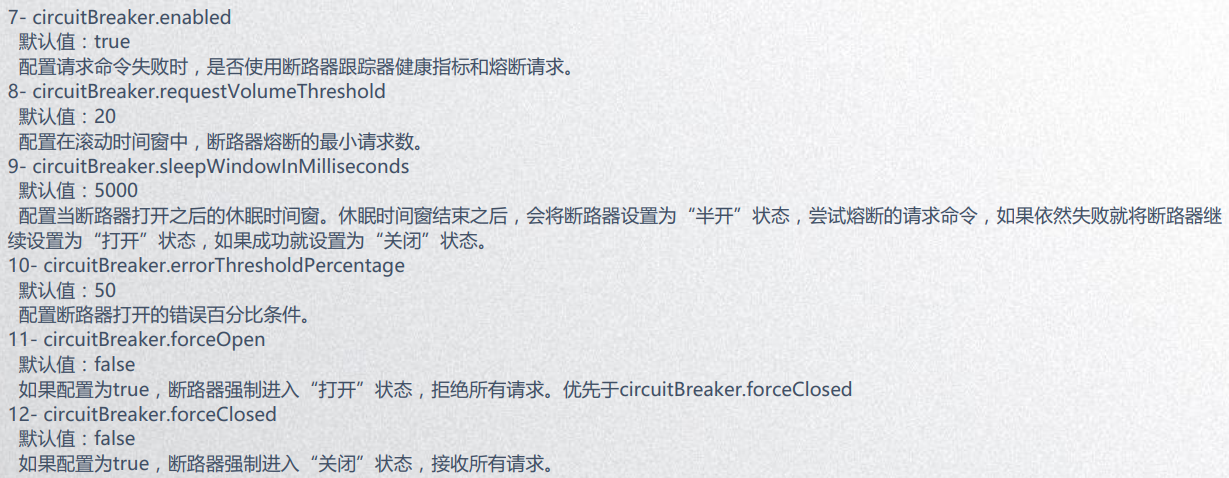
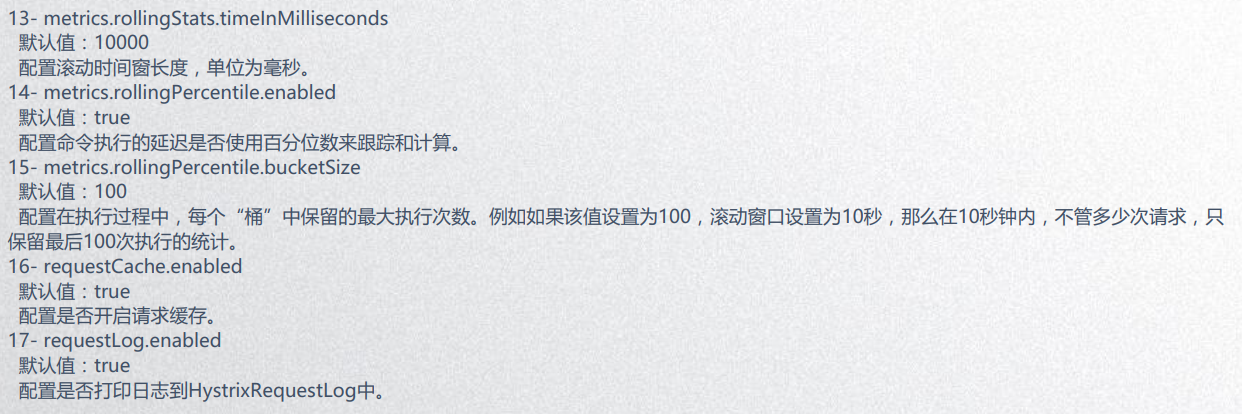
1、CommandProperties

2、ThreadPoolProperties
注解方式实现Hystrix:
 @GetMapping("/testThread")

 @HystrixCommand(

         groupKey = "ThreadPoolGroupKey",

         commandKey = "ThreadPoolCommandKey",

         threadPoolKey = "ThreadPoolKey",

         fallbackMethod = "fallbackMethod",

         commandProperties = {

                 @HystrixProperty(name = "execution.isolation.thread.timeoutInMilliseconds", value = "1000"),

                 @HystrixProperty(name = "execution.timeout.enabled", value = "true"),

                 @HystrixProperty(name = "execution.isolation.strategy", value = "THREAD")

         },

         threadPoolProperties = {

                 @HystrixProperty(name = "coreSize", value = "15")

         }

 )

 public String testThread() {

     return "Thread Pool";

 }
Hystrix Dashboard:
Hystrix Dashboard是一款图形化的Hystrix服务信息工具。
它的使用方式很简单:
1、创建HystrixDashboard项目
2、增加依赖
 <dependency>

     <groupId>org.springframework.cloud</groupId>

     <artifactId>spring-cloud-starter-netflix-hystrix-dashboard</artifactId>

 </dependency>
3、启动类上增加@EnableHystrixDashboard注解
以上是单机Hystrix的监控方法,如果是Hystrix集群的话还需要依赖turbine:
1、首先将所有结点及HystrixDashboard注册到eureka
2、Hystrix添加依赖
 <dependency>

     <groupId>org.springframework.cloud</groupId>

     <artifactId>spring-cloud-starter-netflix-turbine</artifactId>

 </dependency>
3、启动类加上@EnableTurbine
4、配置properties
eureka.client.serviceUrl.defaultZone=http://localhost:9091/eureka

## 配置Turbine管理端服务名称

turbine.app-config=helloServer,helloServer

## 默认集群名称

turbine.cluster-name-expression=new String("default")
SpringCloud学习笔记(五、SpringCloud Netflix Hystrix)的更多相关文章
- springcloud学习04- 断路器Spring Cloud Netflix Hystrix
依赖上个博客:https://www.cnblogs.com/wang-liang-blogs/p/12072423.html 1.断路器存在的原因 引用博客 https://blog.csdn.ne ...
- SpringCloud学习笔记:SpringCloud简介(1)
1. 微服务 微服务具有的特点: ◊ 按照业务划分服务 ◊ 每个微服务都有独立的基础组件,如:数据库.缓存等,且运行在独立的进程中: ◊ 微服务之间的通讯通过HTTP协议或者消息组件,具有容错能力: ...
- SpringCloud学习笔记(4):Hystrix容错机制
简介 在微服务架构中,微服务之间的依赖关系错综复杂,难免的某些服务会出现故障,导致服务调用方出现远程调度的线程阻塞.在高负载的场景下,如果不做任何处理,可能会引起级联故障,导致服务调用方的资源耗尽甚至 ...
- SpringCloud学习笔记(5):Hystrix Dashboard可视化监控数据
简介 上篇文章中讲了使用Hystrix实现容错,除此之外,Hystrix还提供了近乎实时的监控.本文将介绍如何进行服务监控以及使用Hystrix Dashboard来让监控数据图形化. 项目介绍 sc ...
- SpringCloud学习笔记(七):Hystrix断路器
概述 什么时候需要断路器?熔断? 举个简单的例子:小明喜欢小美,可是小美没有电话,小美给了小明家里的座机,小明打给座机,这个时候小美的妈妈接到了,小明怕妈妈知道自己喜欢小美,就跟小美妈妈说让小美哥接电 ...
- SpringCloud学习笔记(2):使用Ribbon负载均衡
简介 Spring Cloud Ribbon是基于Netflix Ribbon实现的一套客户端负载均衡工具,在注册中心对Ribbon客户端进行注册后,Ribbon可以基于某种负载均衡算法,如轮询(默认 ...
- SpringCloud学习笔记(3):使用Feign实现声明式服务调用
简介 Feign是一个声明式的Web Service客户端,它简化了Web服务客户端的编写操作,相对于Ribbon+RestTemplate的方式,开发者只需通过简单的接口和注解来调用HTTP API ...
- SpringCloud学习笔记(6):使用Zuul构建服务网关
简介 Zuul是Netflix提供的一个开源的API网关服务器,SpringCloud对Zuul进行了整合和增强.服务网关Zuul聚合了所有微服务接口,并统一对外暴露,外部客户端只需与服务网关交互即可 ...
- SpringCloud学习笔记:服务支撑组件
SpringCloud学习笔记:服务支撑组件 服务支撑组件 在微服务的演进过程中,为了最大化利用微服务的优势,保障系统的高可用性,需要通过一些服务支撑组件来协助服务间有效的协作.各个服务支撑组件的原理 ...
- SpringCloud学习笔记(7):使用Spring Cloud Config配置中心
简介 Spring Cloud Config为分布式系统中的外部化配置提供了服务器端和客户端支持,服务器端统一管理所有配置文件,客户端在启动时从服务端获取配置信息.服务器端有多种配置方式,如将配置文件 ...
随机推荐
- Shell—引入外部脚本文件
在Shell中要如何调用别的shell脚本,或别的脚本中的变量,函数呢? 方式1:. filename 方式2:source filename 需要注意: 两个点之间 ...
- Python 实现 Hangman 小游戏
Hangman--游戏简介--> 百度百科 打印Hangman def printHangman(N): # 第一行 print("\t____") # 第二行 print( ...
- 201871010123-吴丽丽《面向对象程序设计(Java)》第十二周学习总结
201871010123-吴丽丽<面向对象程序设计(Java)>第十二周学习总结 项目 内容 这个作业属于哪个课程 https://www.cnblogs.com/nwnu-daizh/ ...
- python操作队列
进行队列的操作,首先要引入queue这个库 一:设置队列(括号中是队列可容纳数据的多少,如果不设置,则可以一直增加) import queue q = queue.Queue(10) 二:添加/获取元 ...
- mysql中group by 使用
问题描述 我现在需要查询表test,里面需要安装字段a 进行分组.分组之后还有按照b字段最大的.还要查询出字段c. 我先在使用的数据库是mysql8.0 解决 需注意: group by 分组的时候是 ...
- spring-framework-core-ioc Container
阅读须知 实例化bean xml方式实例化bean 注解方式实例化bean java方式实例化bean ClassPathXmlApplication和AnnotationConfigApplicat ...
- IT兄弟连 Java语法教程 数组 经典案例
案例需求: 编程实现双色球中奖号码的生成 1)应用知识: ● 数组的声明 ● 数组的使用 ● for循环 2)需求解析: 在该程序中,需要定义一个长度为7的数组,用来存储中奖号码,使用Rando ...
- 07-Django模板(1)
模板介绍 作为web框架,Django提供了模板,用于编写html代码(嵌入模板代码,更快更方便的完成页面开发,在通过视图中渲染模板,将最终生成的页面返回给浏览器(客户端)).模板是关于外表的渲染的, ...
- 微信小程序 没有找到可以构建的npm包
问题如图: 1.进入小程序根目录,打开cmd,输入:npm init:然后,输入命令后一直点回车 2.输入命令:npm i vant-weapp -S --production 执行命令完之后,然后再 ...
- clientHeight—scrollHeight—offsetHeight三者的区别
clientHeight,scrollHeight,offsetHeight 这三个dom属性有时让人觉得相似但又不相似 以前对它们的理解也有一些模糊,现在总结一下,方便以后复习 clientHeig ...