
Highlight List View Objects 突出显示列表视图对象
In this lesson, you will learn how to format data that satisfies the specified criteria. For this purpose, the Conditional Appearance module will be added to the application. You will highlight the DemoTask objects whose Status property is not set to Completed. In addition, you will highlight the Priority property when it contains the High value.
在本课中,您将学习如何设置满足指定条件的数据的格式。为此,条件外观模块将添加到应用程序中。您将突出显示其 Status 属性未设置为"已完成"的演示任务对象。此外,当"Priority"属性包含"高"值时,将突出显示该属性。
- Add the Conditional Appearance module to your MySolution.Module project. For this purpose, double-click the Module.cs (Module.vb) file, located in the MySolution.Module project. The Module Designer will be invoked. In the Toolbox, navigate to the DX.19.2: XAF Modules tab, and drag the ConditionalAppearanceModule item from this tab to the Designer's Required Modules section, as shown below.
- 将条件外观模块添加到 MySolution.模块项目中。为此,双击位于 MySolution.module 项目中的Module.cs(Module.vb)文件。将调用模块设计器。在工具箱中,导航到 DX.19.2:XAF 模块选项卡,并将条件外观模块项从此选项卡拖动到"设计器的必需模块"部分,如下所示。
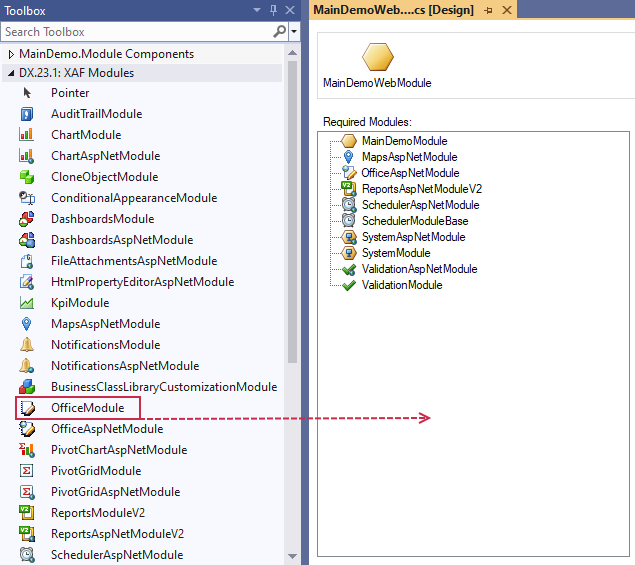
- Rebuild your solution after you have made changes in the Module Designer.
To declare a conditional appearance rule for the DemoTask class, apply the AppearanceAttribute attribute to this class. As the first parameter, specify the Appearance Rule identifier (e.g., "FontColorRed"). Then, specify the following parameters.
在模块设计器中进行更改后重新生成解决方案。
要声明 DemoTask 类的条件外观规则,请将"外观属性"属性应用于此类。作为第一个参数,请指定外观规则标识符(例如,"FontColorRed")。然后,指定以下参数。
| Parameter | Settings |
|---|---|
| Target UI elements to be affected by the rule. | Set the AppearanceAttribute.AppearanceItemType parameter to "ViewItem" and the AppearanceAttribute.TargetItems parameter to "*". This means that the rule generated from the attribute will affect all DemoTask properties displayed in the current View. |
| Conditions under which the rule must be in effect. | Set the AppearanceAttribute.Context parameter to "ListView" and the AppearanceAttribute.Criteria parameter to "Status!='Completed'". In this instance, the rule generated from the attribute will be in effect in a DemoTask List View for the object whose Status property is not set to Completed. |
| Conditional appearance applied by the rule. | Set the AppearanceAttribute.FontColor named parameter to "Red". |
The following code demonstrates the applied attribute and its parameters to the DemoTask class, that was declared in BusinessObjects\DemoTask.cs (DemoTask.vb) file.
以下代码演示了在 BusinessObjects_DemoTask.cs (DemoTask.vb) 文件中声明的 DemoTask 类所应用的属性及其参数。
using DevExpress.ExpressApp.ConditionalAppearance;

// ...

[Appearance("FontColorRed", AppearanceItemType = "ViewItem", TargetItems = "*", Context = "ListView",

    Criteria = "Status!='Completed'", FontColor = "Red")]

public class DemoTask : Task {

    // ...

}
Note 注意
The Criteria value must be specified using the Criteria Language Syntax.
必须使用"条件语言语法"指定条件值。
Apply the AppearanceAttribute attribute to the DemoTask class' Priority property. As the first positional parameter, specify the Appearance Rule identifier (e.g., "PriorityBackColorPink"). Then, specify the following parameters.
- 将外观属性应用于演示任务类的"优先级"属性。作为第一个位置参数,请指定外观规则标识符(例如,"优先级回颜色粉红")。然后,指定以下参数。
Specify the target UI elements to be affected by the rule
Set the AppearanceAttribute.AppearanceItemType parameter to "ViewItem". This means that the rule generated from the attribute will affect the Priority property displayed in the current View.
- 指定要受规则影响的目标 UI 元素
将外观属性.外观项目类型参数设置为"查看项目"。这意味着从该属性生成的规则将影响当前视图中显示的"优先"属性。 Specify the conditions under which the rule must be in effect
Set the AppearanceAttribute.Context parameter to "Any" and the AppearanceAttribute.Criteria parameter to "Priority=2". In this instance, the rule generated from the attribute will affect the Priority property when it is set to 2 (High) in any DemoTask View.
- 指定规则必须生效的条件
将"外观属性.上下文"参数设置为"任意",将"外观属性"标准参数设置为"优先级{2}"。在这种情况下,从该属性生成的规则将影响"优先"属性,当它在任何演示任务视图中设置为 2(高)。 Specify the conditional appearance applied by the rule
Set the AppearanceAttribute.BackColor parameter to "255, 240, 240".
- 指定规则应用的条件外观
将外观属性.BackColor 参数设置为"255、240、240"。
The following code demonstrates the applied attribute and its parameters.
以下代码演示应用的属性及其参数。
public class DemoTask : Task {

    // ...

    [Appearance("PriorityBackColorPink", AppearanceItemType = "ViewItem", Context = "Any",

        Criteria = "Priority=2", BackColor = "255, 240, 240")]

    public Priority Priority {

        // ...

    }

    // ...

}
Run the WinForms or ASP.NET application. The DemoTask List View and Detail View data will be highlighted, as demonstrated in the following image.
运行 WinForms 或ASP.NET应用程序。演示任务列表视图和详细信息视图数据将突出显示,如下图所示。

Note 注意
Appearence Rules that are declared in code are available in the Model Editor. To access them, you can run the Model Editor for the MySolution.Module project. Navigate to the BOModel | DemoTask | AppearanceRules node. This node has two child nodes (FontColorRed and PriorityBackColorPink) that are generated automatically from Appearance attributes applied to the DemoTask class and the DemoTask.Priority property. You can create new Appearance Rules directly in the Model Editor by adding child nodes to the AppearanceRules node.
在代码中声明的显示规则在模型编辑器中可用。要访问它们,您可以运行 MySolution.模块项目的模型编辑器。导航到 BOModel |演示任务 |外观规则节点。此节点有两个子节点(FontColorRed 和优先级BackColorPink),它们从应用于 DemoTask 类和 DemoTask.Priority 属性的外观属性自动生成。通过将子节点添加到"外观规则"节点,可以直接在模型编辑器中创建新的外观规则。
You can see the changes made in the lesson in the DemoTask.cs (DemoTask.vb) file located in the MainDemo.Module project of the MainDemo solution. The MainDemo application is installed in %PUBLIC%\Documents\DevExpress Demos 19.2\Components\eXpressApp Framework\MainDemo by default. The ASP.NET version is available online at http://demos.devexpress.com/XAF/MainDemo/
您可以在 mainDemo 解决方案的 MainDemo.模块项目中的DemoTask.cs (DemoTask.vb) 文件中看到本课中所做的更改。主演示应用程序安装在%PUBLIC%\Documents\DevExpress Demos 19.2\Components\eXpressApp Framework\MainDemo by default. The ASP.NET version is available online at http://demos.devexpress.com/XAF/MainDemo/
.
Highlight List View Objects 突出显示列表视图对象的更多相关文章
- Apply Grouping to List View Data 将分组应用于列表视图数据
This lesson will teach you how to apply grouping to List View data. For this purpose, you will group ...
- Change Field Layout and Visibility in a List View 在列表视图中更改字段布局和可见性
This lesson will guide you through the steps needed to select columns displayed in the List View. Fo ...
- [Swift通天遁地]六、智能布局-(2)视图对象的尺寸和位置相对约束
★★★★★★★★★★★★★★★★★★★★★★★★★★★★★★★★★★★★★★★★➤微信公众号:山青咏芝(shanqingyongzhi)➤博客园地址:山青咏芝(https://www.cnblogs. ...
- Display a Detail View with a List View 主子视图-列表视图与详细信息视图同时显示
In this lesson, you will learn how to display a Detail View together with a List View. For this purp ...
- How to: Display a List of Non-Persistent Objects in a Popup Dialog 如何:在弹出对话框中显示非持久化对象列表
This example demonstrates how to populate and display a list of objects that are not bound to the da ...
- Make a List View Editable 使列表视图可编辑
In this lesson, you will learn how to make a List View editable. For this purpose, the DemoTask List ...
- Add a Preview to a List View将预览添加到列表视图
In this lesson, you will learn how to show a preview section in a List View's grid. For this purpose ...
- Android列表视图(List View)
Android列表视图(ListView) ListView是一个显示滚动项列表的示视图组(viewgroup),通过使用适配器(Adapter)把这些列表项自动插入到列表中.适配器比如从一个数组或是 ...
- .NET MVC+ EF+LINQ 多表联查VIEW显示列表
1.VIEW 页面显示代码 <link href="~/Content/bootstrap.css" rel="stylesheet" /> < ...
随机推荐
- 封装扩展Kendo UI Grid
封装后的代码如下: function DataGrid(options) { this.options = { height: "100%", sortable: true, re ...
- 如何编写可怕的Java代码?
我决定告诉你如何编写可怕的Java代码.如果你厌倦了所有这些美丽的设计模式和最佳实践,并且想写些疯狂的东西,请继续阅读. 如果你正在寻找有关如何编写良好代码的建议,请查看其它文章! 对一切使用异常 你 ...
- 【玩转MLS系列】基础教程
1.申请华为机器学习服务MLS标准版服务: 1.如果还未注册华为云,请先进入华为云官网https://www.huaweicloud.com/进行注册:如果已注册,请登录,转第2步. 2.在华为云官网 ...
- Java修炼——面向对象的三大特征_封装的使用
封装的作用含义:程序设计追求"高内聚,低耦合" 1.提高代码的安全性 2.提高代码的复用性 3."高内聚":封装细节,便于修改内部代码,提高可 维护性 4.&q ...
- ACM-ICPC 2018 焦作赛区网络预赛J题 Participate in E-sports
Jessie and Justin want to participate in e-sports. E-sports contain many games, but they don't know ...
- JsonClassGenerAtor 使用json字符串生成对象
https://pan.baidu.com/s/1Mz1xB6L3blqrRiRAMuJpIg 链接
- Task 的一些个人见解
Task确实比较好用且优雅 我感觉.NET要成为艺术家... public class TheTask { /// <summary> /// 直接调用是同步方法 /// </sum ...
- 关注图像采集视频传输之USB3.0 应用
参考文献 百度文库 http://baike.baidu.com/link?url=82OyhoL1AsNaT35CvscmeZqHjlggtFw-Cez2qYwjLHNXGhXfv38pUlsIJB ...
- Hadoop HDFS 源码解析记录
版权说明: 本文章版权归本人及博客园共同所有,转载请标明原文出处( https://www.cnblogs.com/mikevictor07/p/12047502.html ),以下内容为个人理解,仅 ...
- Python3 函数实践之简易购物系统
函数实践之简易购物系统 项目主要需求: 用户可以自行选择功能 该购物系统具有注册/登录/购物/购物车/退出登录功能 用户在登录后才能使用购物/购物车/退出登录功能 ''' 注册 登录 购物 购物车 退 ...