
新版本SpringCloud sleuth整合zipkin
SpringCloud Sleuth 简介
Spring Cloud Sleuth为Spring Cloud实现了分布式跟踪解决方案。
Spring Cloud Sleuth借鉴了Dapper的术语。
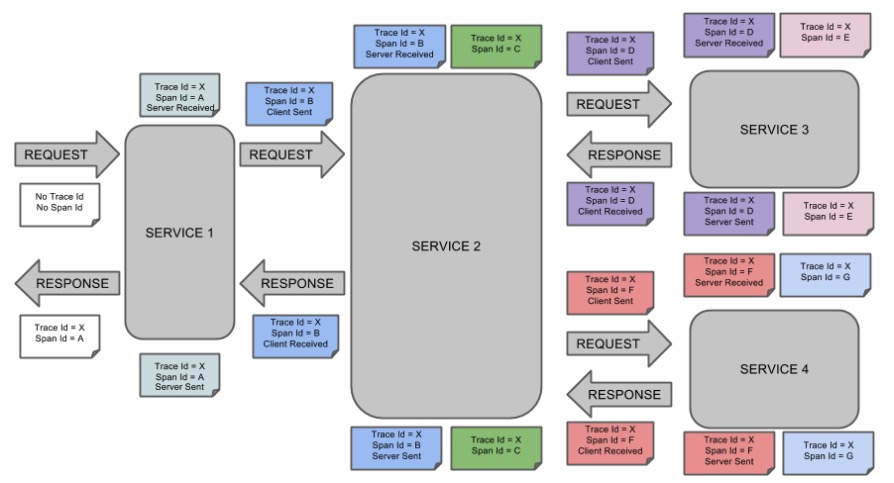
Span:基本的工作单元。Span包括一个64位的唯一ID,一个64位trace码,描述信息,时间戳事件,key-value 注解(tags),span处理者的ID(通常为IP)。
Trace:一组Span形成的树形结构。
Annotation:用于及时记录存在的事件。常用的Annotation如下:
- cs:客户端发送(client send) 客户端发起一个请求,表示span开始
- sr:服务器接收(server received) 服务器接收到客户端的请求并开始处理,sr - cs 的时间为网络延迟
- ss:服务器发送(server send) 服务器处理完请求准备返回数据给客户端。ss - sr 的时间表示服务器端处理请求花费的时间
- cr:客户端接收(client received) 客户端接收到处理结果,表示span结束。 cr - cs 的时间表示客户端接收服务端数据的时间
下图展示了Span和Trace在系统中的联系
Sleuth 默认采用 Http 方式将 span 传输给 Zipkin
在application.properties文件中指定
spring.zipkin.sender.type=web
使用 RabbitMQ 异步发送 span 信息
为什么选择 RabbitMQ 消息中间件发送 span 信息
- sleuth 默认采用 http 通信方式,将数据传给 zipkin 作页面渲染,但是 http 传输过程中如果由于不可抗因素导致 http 通信中断,那么此次通信的数据将会丢失。而使用中间件的话,RabbitMQ 消息队列可以积压千万级别的消息,下次重连之后可以继续消费。
- 随着线程增多,并发量提升之后,RabbitMQ 异步发送数据明显更具有优势。
- RabbitMQ 支持消息、队列持久化,可以通过消息状态落库、重回队列、镜像队列等技术手段保证其高可用。
示例
示例简介
示例包含sleuth-search、sleuth-cart、sleuth-order三个系统,用来模拟电商系统中下单的流程,用户可以搜索商品然后立即下单,也可以搜索多个商品后加入购物车,然后下单,调用情况即 search -> cart -> order,或 search -> order。
示例使用 RestTemplate 来完成三个系统间的 http 请求响应,请求方式也都遵循Restful风格。
版本说明
版本一定要对应好,一些低版本的SpringBoot无法兼容新版本的SpringCloud和zipkin
| 工具 | 版本 |
|---|---|
| SpringBoot | 2.1.6.RELEASE |
| SpringCloud | Greenwich.SR3 |
| zipkin | 2.16.2 |
项目结构
demo-cloudsleuth

	|- sleuth-search

	|- sleuth-cart

	|- sleuth-order

	pom.xml
导入依赖
    <!-- 引入 springboot 和 springcloud 父工程 -->

    <parent>

        <groupId>org.springframework.boot</groupId>

        <artifactId>spring-boot-starter-parent</artifactId>

        <version>2.1.6.RELEASE</version>

        <relativePath/>

    </parent>

    <dependencyManagement>

        <dependencies>

            <dependency>

                <groupId>org.springframework.cloud</groupId>

                <artifactId>spring-cloud-dependencies</artifactId>

                <version>Greenwich.SR3</version>

                <type>pom</type>

                <scope>import</scope>

            </dependency>

        </dependencies>

    </dependencyManagement>

    <dependencies>

        <dependency>

            <groupId>org.springframework.cloud</groupId>

            <artifactId>spring-cloud-starter-zipkin</artifactId>

        </dependency>

        <dependency>

            <groupId>org.springframework.amqp</groupId>

            <artifactId>spring-rabbit</artifactId>

        </dependency>

        <!-- Springboot 相关 -->

        <dependency>

            <groupId>org.springframework.boot</groupId>

            <artifactId>spring-boot-starter-web</artifactId>

        </dependency>

        <dependency>

            <groupId>org.springframework.boot</groupId>

            <artifactId>spring-boot-starter-test</artifactId>

            <scope>test</scope>

        </dependency>

    </dependencies>
配置 RestTemplate,RestTemplate是SpringBoot提供的封装好的http工具类,可以帮助我们简化http的使用。
package com.anqi.cart.resttmplate;

import org.springframework.context.annotation.Bean;

import org.springframework.context.annotation.Configuration;

import org.springframework.http.client.ClientHttpRequestFactory;

import org.springframework.http.client.SimpleClientHttpRequestFactory;

import org.springframework.web.client.RestTemplate;

@Configuration

public class RestTemplateConfig {

    @Bean

    public RestTemplate restTemplate(ClientHttpRequestFactory factory) {

        return new RestTemplate(factory);

    }

    @Bean

    public ClientHttpRequestFactory clientHttpRequestFactory() {

        SimpleClientHttpRequestFactory factory = new SimpleClientHttpRequestFactory();

        factory.setConnectTimeout(5000);

        factory.setReadTimeout(5000);

        return factory;

    }

}
三个系统下的application.properties,端口分别是8081 8082 8083
#server.port=8081 server.port=8082

server.port=8083

server.servlet.context-path=/

spring.zipkin.base-url=http://localhost:9411/

spring.zipkin.service.name=sleuth-cart

#使用默认 http 方式收集 span 需要配置此项

#spring.zipkin.sender.type=web

#sleuth 使用 rabbitmq 来向 zipkin 发送数据

spring.zipkin.sender.type=rabbit

spring.rabbitmq.host=localhost

spring.rabbitmq.port=5672

spring.rabbitmq.username=guest

spring.rabbitmq.password=guest

#设置采样率默认为 0.1 注意之前的版本是percentage 新版本中更换为 probability

spring.sleuth.sampler.probability=1
三个系统下的RestTemplate的配置,用来简化 http 请求
package com.anqi.cart.resttmplate;

import org.springframework.context.annotation.Bean;

import org.springframework.context.annotation.Configuration;

import org.springframework.http.client.ClientHttpRequestFactory;

import org.springframework.http.client.SimpleClientHttpRequestFactory;

import org.springframework.web.client.RestTemplate;

@Configuration

public class RestTemplateConfig {

    @Bean

    public RestTemplate restTemplate(ClientHttpRequestFactory factory) {

        return new RestTemplate(factory);

    }

    @Bean

    public ClientHttpRequestFactory clientHttpRequestFactory() {

        SimpleClientHttpRequestFactory factory = new SimpleClientHttpRequestFactory();

        factory.setConnectTimeout(5000);

        factory.setReadTimeout(5000);

        return factory;

    }

}
@RequestMapping("cart")

@RestController

public class CartController {

    @Autowired

    RestTemplate restTemplate;

    @Autowired

    CartService cartService;

    private static final String orderUrl = "http://localhost:8084/order/create";

    @GetMapping("/add/{cartId}")

    public String addToCart(@PathVariable("cartId") String cartId) {

        cartService.addProductToCart(cartId, "小米8");

        ResponseEntity<String> res = restTemplate.getForEntity(orderUrl, String.class);

        return res.getBody();

    }

}
@RequestMapping("order")

@RestController

public class OrderController {

    @GetMapping("/create")

    public String creatOrder() {

        System.out.println("create order");

        return "create_order";

    }

}
@RestController

public class SearchController {

    @Autowired

    RestTemplate restTemplate;

    private static final String cartUrl = "http://localhost:8083/cart/add/1";

    private static final String orderUrl = "http://localhost:8084/order/create";

    @GetMapping("/search")

    public String search() {

        ResponseEntity<String> cartRes = restTemplate.getForEntity(cartUrl, String.class);

        ResponseEntity<String> orderRes = restTemplate.getForEntity(orderUrl, String.class);

        return "cart:" + cartRes.getBody() + "- order:" + orderRes.getBody();

    }

}
运行结果分析
默认 http 传输 span 信息
启动Zipkin
java -jar zipkin-server-2.16.2-exec.jar
网页中手动访问
http://localhost:8082/search
我们访问zipkin站点查询调用情况
http://localhost:9411/zipkin/traces/94b954d843012ca9
可以从下图中完整清晰的看到三个系统的调用关系

下图为zipkin调用预览,我们请求四次http://localhost:8082/search来更直观的观察数据。在以下界面中,较为简洁的显示Span的个数以及调用总时延。
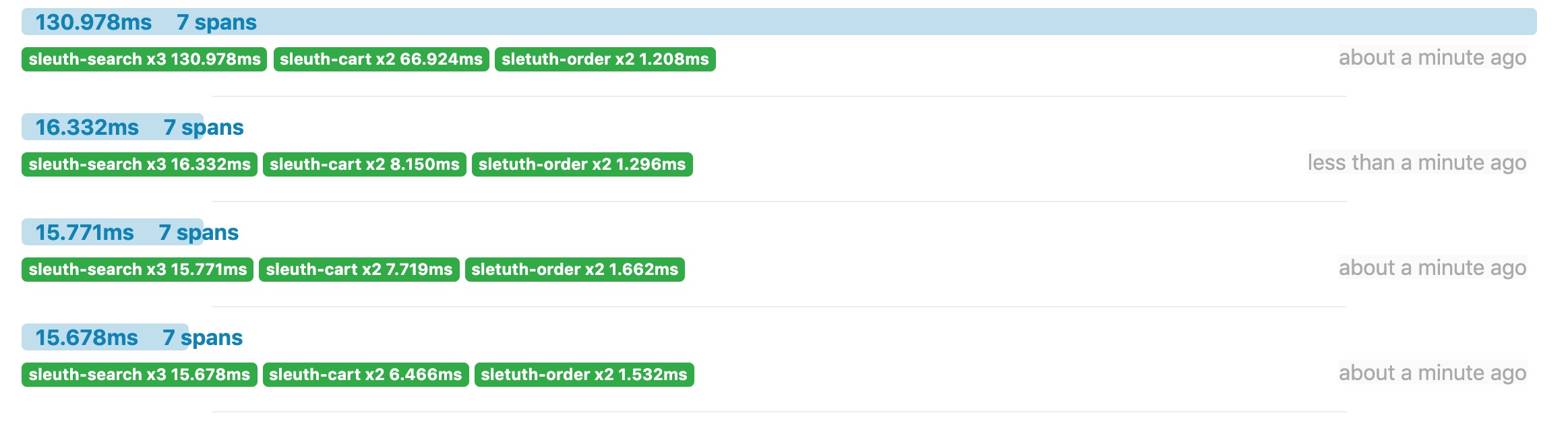
我们进入一个完整的调用链后访问其中的一个节点得到以下数据。

以下为一次全链路追踪的详细信息,包含7个span的所有信息,以上看到的页面展示均有以下数据加以渲染而成。
[

  {

    "traceId": "94b954d843012ca9",

    "parentId": "bab70b1e69a5f3e3",

    "id": "96387b33a823ca8f",

    "kind": "SERVER",

    "name": "get /order/create",

    "timestamp": 1569060494069123,

    "duration": 1161,

    "localEndpoint": {

      "serviceName": "sletuth-order",

      "ipv4": "192.168.0.107"

    },

    "remoteEndpoint": {

      "ipv4": "127.0.0.1",

      "port": 49863

    },

    "tags": {

      "http.method": "GET",

      "http.path": "/order/create",

      "mvc.controller.class": "OrderController",

      "mvc.controller.method": "creatOrder"

    },

    "shared": true

  },

  {

    "traceId": "94b954d843012ca9",

    "parentId": "94b954d843012ca9",

    "id": "90f7e5cfa89e0d80",

    "kind": "SERVER",

    "name": "get /order/create",

    "timestamp": 1569060494076287,

    "duration": 1296,

    "localEndpoint": {

      "serviceName": "sletuth-order",

      "ipv4": "192.168.0.107"

    },

    "remoteEndpoint": {

      "ipv4": "127.0.0.1",

      "port": 49864

    },

    "tags": {

      "http.method": "GET",

      "http.path": "/order/create",

      "mvc.controller.class": "OrderController",

      "mvc.controller.method": "creatOrder"

    },

    "shared": true

  },

  {

    "traceId": "94b954d843012ca9",

    "parentId": "94b954d843012ca9",

    "id": "bab70b1e69a5f3e3",

    "kind": "CLIENT",

    "name": "get",

    "timestamp": 1569060494063693,

    "duration": 10374,

    "localEndpoint": {

      "serviceName": "sleuth-search",

      "ipv4": "192.168.0.107"

    },

    "tags": {

      "http.method": "GET",

      "http.path": "/cart/add/1"

    }

  },

  {

    "traceId": "94b954d843012ca9",

    "parentId": "94b954d843012ca9",

    "id": "90f7e5cfa89e0d80",

    "kind": "CLIENT",

    "name": "get",

    "timestamp": 1569060494074966,

    "duration": 2848,

    "localEndpoint": {

      "serviceName": "sleuth-search",

      "ipv4": "192.168.0.107"

    },

    "tags": {

      "http.method": "GET",

      "http.path": "/order/create"

    }

  },

  {

    "traceId": "94b954d843012ca9",

    "id": "94b954d843012ca9",

    "kind": "SERVER",

    "name": "get /search",

    "timestamp": 1569060494062631,

    "duration": 16332,

    "localEndpoint": {

      "serviceName": "sleuth-search",

      "ipv4": "192.168.0.107"

    },

    "remoteEndpoint": {

      "ipv6": "::1",

      "port": 49859

    },

    "tags": {

      "http.method": "GET",

      "http.path": "/search",

      "mvc.controller.class": "SearchController",

      "mvc.controller.method": "search"

    }

  },

  {

    "traceId": "94b954d843012ca9",

    "parentId": "bab70b1e69a5f3e3",

    "id": "96387b33a823ca8f",

    "kind": "CLIENT",

    "name": "get",

    "timestamp": 1569060494067090,

    "duration": 3197,

    "localEndpoint": {

      "serviceName": "sleuth-cart",

      "ipv4": "192.168.0.107"

    },

    "tags": {

      "http.method": "GET",

      "http.path": "/order/create"

    }

  },

  {

    "traceId": "94b954d843012ca9",

    "parentId": "94b954d843012ca9",

    "id": "bab70b1e69a5f3e3",

    "kind": "SERVER",

    "name": "get /cart/add/{cartid}",

    "timestamp": 1569060494066140,

    "duration": 8150,

    "localEndpoint": {

      "serviceName": "sleuth-cart",

      "ipv4": "192.168.0.107"

    },

    "remoteEndpoint": {

      "ipv4": "127.0.0.1",

      "port": 49862

    },

    "tags": {

      "http.method": "GET",

      "http.path": "/cart/add/1",

      "mvc.controller.class": "CartController",

      "mvc.controller.method": "addToCart"

    },

    "shared": true

  }

]
使用 RabbitMQ 情况
启动 zipkin,注意参数
java -jar zipkin-server-2.16.2-exec.jar --RABBIT_ADDRESSES=localhost:5672 --RABBIT_USER=guest --RABBIT_PASSWORD=guest --RABBIT_VIRTUAL_HOST=/
启动 rabbitmq
rabbitmq-server
在测试的时候发现 mq 和以上方式时延相差无几,但是随着线程数的增加也就是并发量的增加,mq 传输时延将会大大低于 http。
新版本SpringCloud sleuth整合zipkin的更多相关文章
- spring cloud 入门系列八:使用spring cloud sleuth整合zipkin进行服务链路追踪
好久没有写博客了,主要是最近有些忙,今天忙里偷闲来一篇. =======我是华丽的分割线========== 微服务架构是一种分布式架构,微服务系统按照业务划分服务单元,一个微服务往往会有很多个服务单 ...
- SpringCloud之整合Zipkin+Sleuth(十四)
1.添加依赖 在项目的pom.xml文件中添加下面依赖 <!--里面包含两个依赖--> <dependency> <groupId>org.springframew ...
- SpringCloud入门(十一):Sleuth 与 Zipkin分布式链路跟踪
现今业界分布式服务跟踪的理论基础主要来自于 Google 的一篇论文<Dapper, a Large-Scale Distributed Systems Tracing Infrastructu ...
- springcloud -- sleuth+zipkin整合rabbitMQ详解
为什么使用RabbitMQ? 我们已经知道,zipkin的原理是服务之间的调用关系会通过HTTP方式上报到zipkin-server端,然后我们再通过zipkin-ui去调用查看追踪服务之间的调用链路 ...
- SpringCloud Sleuth + Zipkin 实现链路追踪
一.Sleuth介绍 为什么要使用微服务跟踪? 它解决了什么问题? 1.微服务的现状? 随着业务的发展,单体架构变为微服务架构,并且系统规模也变得越来越大,各微服务间的调用关系也变得越来越复杂 ...
- Spring Cloud 整合分布式链路追踪系统Sleuth和ZipKin实战,分析系统瓶颈
导读 微服务架构中,是否遇到过这种情况,服务间调用链过长,导致性能迟迟上不去,不知道哪里出问题了,巴拉巴拉....,回归正题,今天我们使用SpringCloud组件,来分析一下微服务架构中系统调用的瓶 ...
- springcloud 分布式服务跟踪sleuth+zipkin
原文:https://www.jianshu.com/p/6ef0b76b9c26 分布式服务跟踪需求 随着分布式服务越来越多,调用关系越来越复杂,组合接口越来越多,要进行分布式服务跟踪监控的需求也越 ...
- 跟我学SpringCloud | 第十一篇:使用Spring Cloud Sleuth和Zipkin进行分布式链路跟踪
SpringCloud系列教程 | 第十一篇:使用Spring Cloud Sleuth和Zipkin进行分布式链路跟踪 Springboot: 2.1.6.RELEASE SpringCloud: ...
- springcloud(十二):使用Spring Cloud Sleuth和Zipkin进行分布式链路跟踪
随着业务发展,系统拆分导致系统调用链路愈发复杂一个前端请求可能最终需要调用很多次后端服务才能完成,当整个请求变慢或不可用时,我们是无法得知该请求是由某个或某些后端服务引起的,这时就需要解决如何快读定位 ...
随机推荐
- Python模块之netmiko
一.简介 此模块用于简化paramiko与网络设备之间的ssh连接,可在windows与Unix平台使用 二.目前支持的设备 (2019.03.07) Regularly tested Arista ...
- DataTable转成List
DataTable转成List //把一个Datatable 赋值给一个List对象 //定义一个转换类 public class ConvertTool { public static List&l ...
- 从 Python 之父的对话聊起,关于知识产权、知识共享与文章翻译
一.缘起 前不久,我在翻译 Guido van Rossum(Python之父)的文章时,给他留言,申请非商业用途的翻译授权. 过程中起了点小误会,略去不表,最终的结果是:他的文章以CC BY-NC- ...
- FILEBEAT+ELK日志收集平台搭建流程
filebeat+elk日志收集平台搭建流程 1. 整体简介: 模式:单机 平台:Linux - centos - 7 ELK:elasticsearch.logstash.kiban ...
- Oracle数据库之Oracle的下载与安装
二.Oracle 的下载与安装 2.1.Oracle 简介 Oracle 公司是全球最大的信息管理软件及服务供应商,成立于 1977 年,主要的业务是推动电子商务平台的搭建.Oracle 公司有自己的 ...
- 微服务API通过ip可访问,域名不可访问问题分析
摘要 经常会有同学遇到api通过ip可以访问,但是通过域名却不可以访问.本篇文章总结了造成这种情况可能的原因. 因为与具体技术的选型.规则配置有关,所以没有深入讨论,只是列出可能性,仅供参考. 分析 ...
- 完结撒花!129 集 21 个小时,松哥自制的 Spring Boot2 系列视频教程杀青啦!
松哥的 Spring Boot 教程分为几个阶段. 2016 松哥最早在 2016 年底的时候开始写 Spring Boot 系列的教程,记得当时在广州上班,年底那段时间在深圳出差,在深圳人生地不熟, ...
- vux-scroller实现移动端上拉加载功能
本文将讲述vue-cli+vux-scroller实现移动端的上拉加载功能: 纠错声明:网上查阅资料看到很多人都将vux和vuex弄混,在这里我们先解释一下,vuex是vue框架自带的组件,是数据状态 ...
- eShopOnContainers部署在docker的坑
把eShopOnContainers(.net core 的版本是2.1)下载之后,部署到docker上,查看容器eShopOnContainers的项目都部署上去了. 用http://localho ...
- Java并发编程——线程池的使用
在前面的文章中,我们使用线程的时候就去创建一个线程,这样实现起来非常简便,但是就会有一个问题: 如果并发的线程数量很多,并且每个线程都是执行一个时间很短的任务就结束了,这样频繁创建线程就会大大降低系统 ...