
windows下安装react
在 Windows 10 64 下创建 React App
由 SHUIJINGWAN · 2018/03/26
1、在官方网站:https://nodejs.org/zh-cn/ 下载推荐版本:8.10.0 LTS,如图1
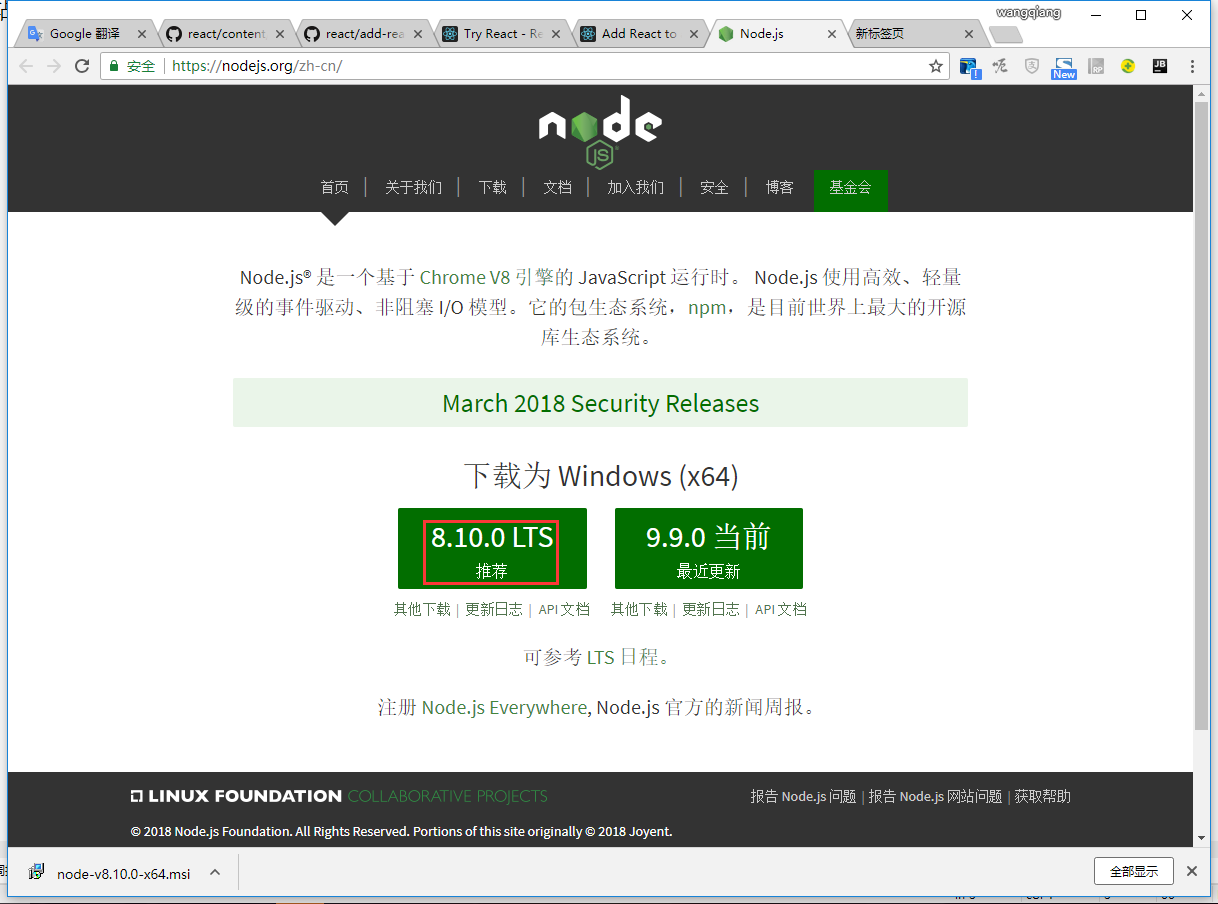
图1
2、右键安装,提示:Windows SmartScreen can’t be reached right now,点击 Run 按钮,如图2
Windows SmartScreen can’t be reached right now
Check your internet connection.Windows SmartScreen is unreachable and can’t help you decide if this app is okay to run.
Publisher: Node.js
App: Node-v8.10.0-x64.msi
Windows SmartScreen现在无法联系到
检查您的互联网连接.Windows SmartScreen无法访问,无法帮助您决定此应用是否可以运行。
发布者:Node.js
应用程序:Node-v8.10.0-x64.msi
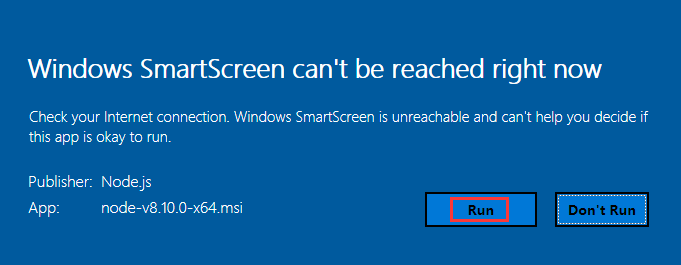
图2
3、Node.js Setup,点击 Next 按钮,如图3
Welcome to the Node.js Setup Wizard
The Setup Wizard will install Node.js on your computer.
欢迎来到Node.js安装向导
安装向导将在您的计算机上安装Node.js。
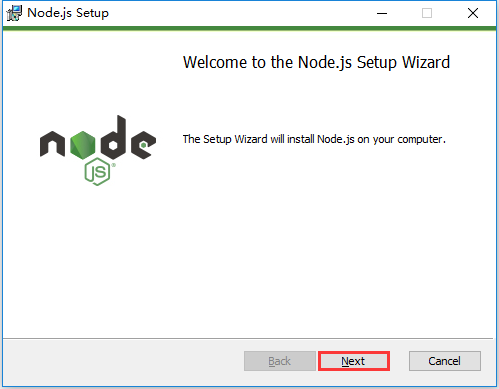
图3
4、Node.js Setup,勾选 I accept the terms in the license Agreement,点击 Next 按钮,如图4
End-User License Agreement
Please read the following license agreement carefully
I accept the terms in the license Agreement
终端用户许可协议
请仔细阅读以下许可协议
我接受许可协议中的条款
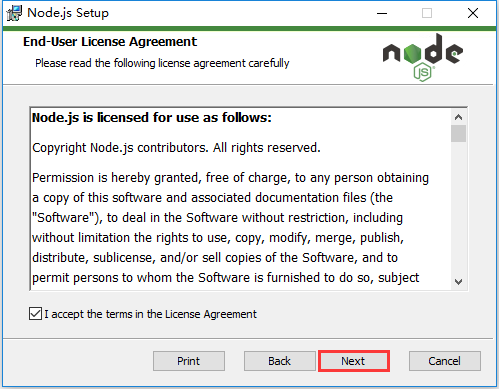
图4
5、Node.js Setup,点击 Next 按钮,如图5
Destination Folder
Choose a custom location or click Next to install.
Install Node.js to:
C:\Program Files\nodejs\
Change
目标文件夹
选择一个自定义位置或单击下一步进行安装。
安装 Node.js 到:
C:\Program Files\nodejs\
更改
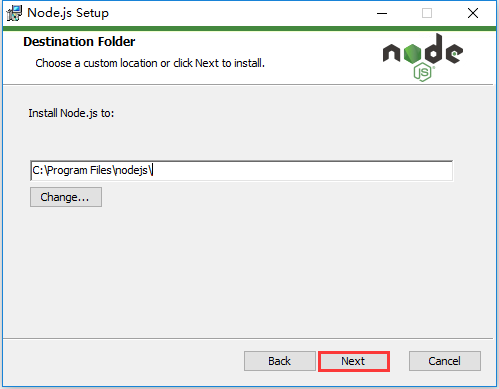
图5
6、Node.js Setup,默认设置就好,点击 Next 按钮,如图6
Custom Setup
Select the way you want features to be installed.
Click the icons in the tree below to change the way features will be installed.
自定义设置
选择您想要安装功能的方式。
单击下面树中的图标来更改要安装的功能的方式。
Node.js runtime: Install the core Node.js runtime(node.exe).This feature frees up 117KB on your hard drive.It has 2 of 2 subfeatures selected.The subfeatures require 0KB on your hard drive.
Will be installed on local hard drive
Entire featurn will be installed on local hard drive
Feature will be installed when required
Node.js运行时:安装核心Node.js运行时(node.exe)。该功能可在硬盘上释放117KB。它具有2个子功能中的2个。硬盘上的子功能需要0KB。
将安装在本地硬盘上
整个功能将安装在本地硬盘上
功能将在需要时安装
Performance counters: Install support for Node.js-specific performance counters.This feature requires 0KB on your hard drive.
Will be installed on local hard drive
Entire feature will be installed on local hard drive
Feature will be installed when required
Entire feature will be unavailable
性能计数器:安装对Node.js特定性能计数器的支持。此功能需要硬盘驱动器上有0KB。
将安装在本地硬盘上
整个功能将安装在本地硬盘上
功能将在需要时安装
整个功能将不可用
Event tracing(ETW): Install support for event tracing(ETW) events generated by Node.js.This feature requires 0KB on your hard drive.
Will be installed on local hard drive
Entire feature will be installed on local hard drive
Feature will be installed when required
Entire feature will be unavailable
事件跟踪(ETW):安装对由Node.js生成的事件跟踪(ETW)事件的支持。此功能需要硬盘驱动器上有0KB。
将安装在本地硬盘上
整个功能将安装在本地硬盘上
功能将在需要时安装
整个功能将不可用
npm package manager: Install npm,the recommended package manager for Node.js.This feature requires 1053KB on your hard drive.
Will be installed on local hard drive
Entire feature will be installed on local hard drive
Feature will be installed when required
Entire feature will be unavailable
npm软件包管理器:安装npm,Node.js的推荐软件包管理器。此功能需要硬盘上的1053KB。
将安装在本地硬盘上
整个功能将安装在本地硬盘上
功能将在需要时安装
整个功能将不可用
Online documentation shortcuts: Add start menu entries that link the the online documentation for Node.js and the Node.js website.This feature requires 1KB on your hard drive.
Will be installed on local hard drive
Entire feature will be installed on local hard drive
Feature will be installed when required
Entire feature will be unavailable
在线文档快捷方式:添加链接Node.js在线文档和Node.js网站的开始菜单条目。此功能需要1KB的硬盘驱动器。
将安装在本地硬盘上
整个功能将安装在本地硬盘上
功能将在需要时安装
整个功能将不可用
Add to PATH: Add Node.js,npm and modules that were globally installed by npm to the PATH environment variable.This feature requires 0KB on your hard drive.It has 2 or 2 subfeatures selected.The subfeatures require 2KB on your hard drive.
Will be installed on local hard drive
Entire feature will be installed on local hard drive
Will be installed to run from network
Entire feature will be installed to run from network
Feature will be installed when required
Entire feature will be unavailable
添加到PATH:将由npm全局安装的Node.js,npm和模块添加到PATH环境变量中。此功能需要硬盘驱动器上有0KB。它具有2或2个子功能。硬盘驱动器的子功能需要2KB。
将安装在本地硬盘上
整个功能将安装在本地硬盘上
将安装从网络运行
整个功能将安装从网络运行
功能将在需要时安装
整个功能将不可用
Node.js and npm: Add Node.js and npm(if installed) to the PATH environment variable.This feature requires 1KB on your hard drive.
Will be installed on local hard drive
Entire feature will be installed on local hard drive
Feature will be installed when required
Entire feature will be unavailable
Node.js和npm:将Node.js和npm(如果已安装)添加到PATH环境变量中。此功能在硬盘上需要1KB。
将安装在本地硬盘上
整个功能将安装在本地硬盘上
功能将在需要时安装
整个功能将不可用
npm modules: Add modules that are installed globally by npm to the PATH environment variable.This option works for the current user only;other users need to update their…This feature requires 1KB on your hard drive.
Will be installed on local hard drive
Entire feature will be installed on local hard drive
Feature will be installed when required
Entire feature will be unavailable
npm模块:将npm全局安装的模块添加到PATH环境变量中。此选项仅适用于当前用户;其他用户需要更新其…此功能需要1KB的硬盘驱动器。
将安装在本地硬盘上
整个功能将安装在本地硬盘上
功能将在需要时安装
整个功能将不可用
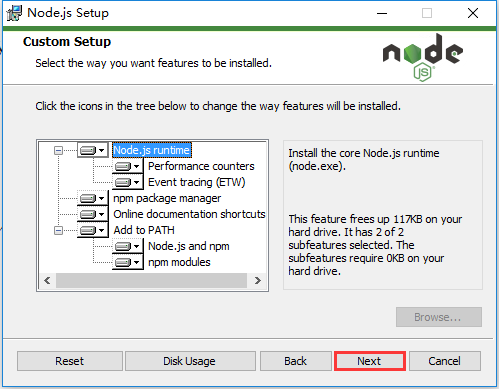
图6
7、Node.js Setup,点击 Install 按钮,如图7
Ready to install Node.js
Click Install to begin the installation.Click Back to review or change any of your installation settings.Click Cancel to exit the wizard.
准备好安装Node.js
单击安装开始安装。单击返回查看或更改任何安装设置。单击取消退出向导。
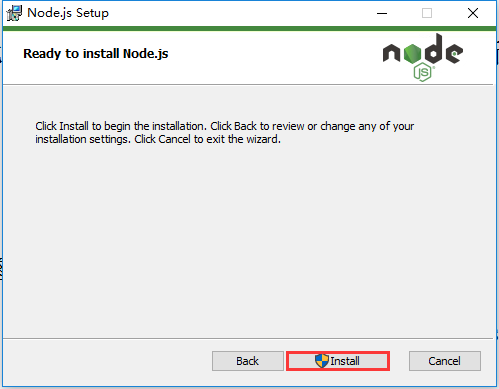
图7
8、Node.js Setup,点击 Finish 按钮,如图8
Completed the Node.js Setup Wizard
Click the Finish button to exit the Setup Wizard.
Node.js has been successfully installed.
完成了Node.js安装向导
单击完成按钮退出安装向导。
Node.js已成功安装。
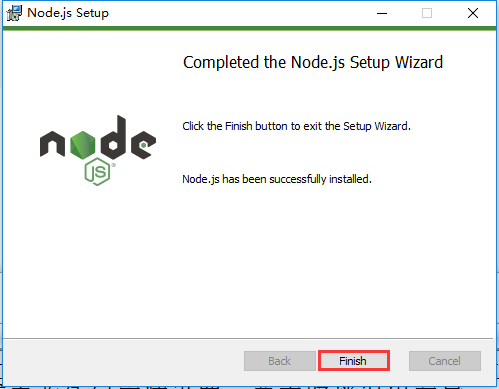
图8
9、使用 React 开发新项目,参考网址:https://doc.react-china.org/docs/add-react-to-a-new-app.html
10、以管理员身份运行 Windwos PowerShell,依次执行如下命令,报错:npm ERR! Error: EPERM: operation not permitted,如图9
npm install -g create-react-app
create-react-app my-app
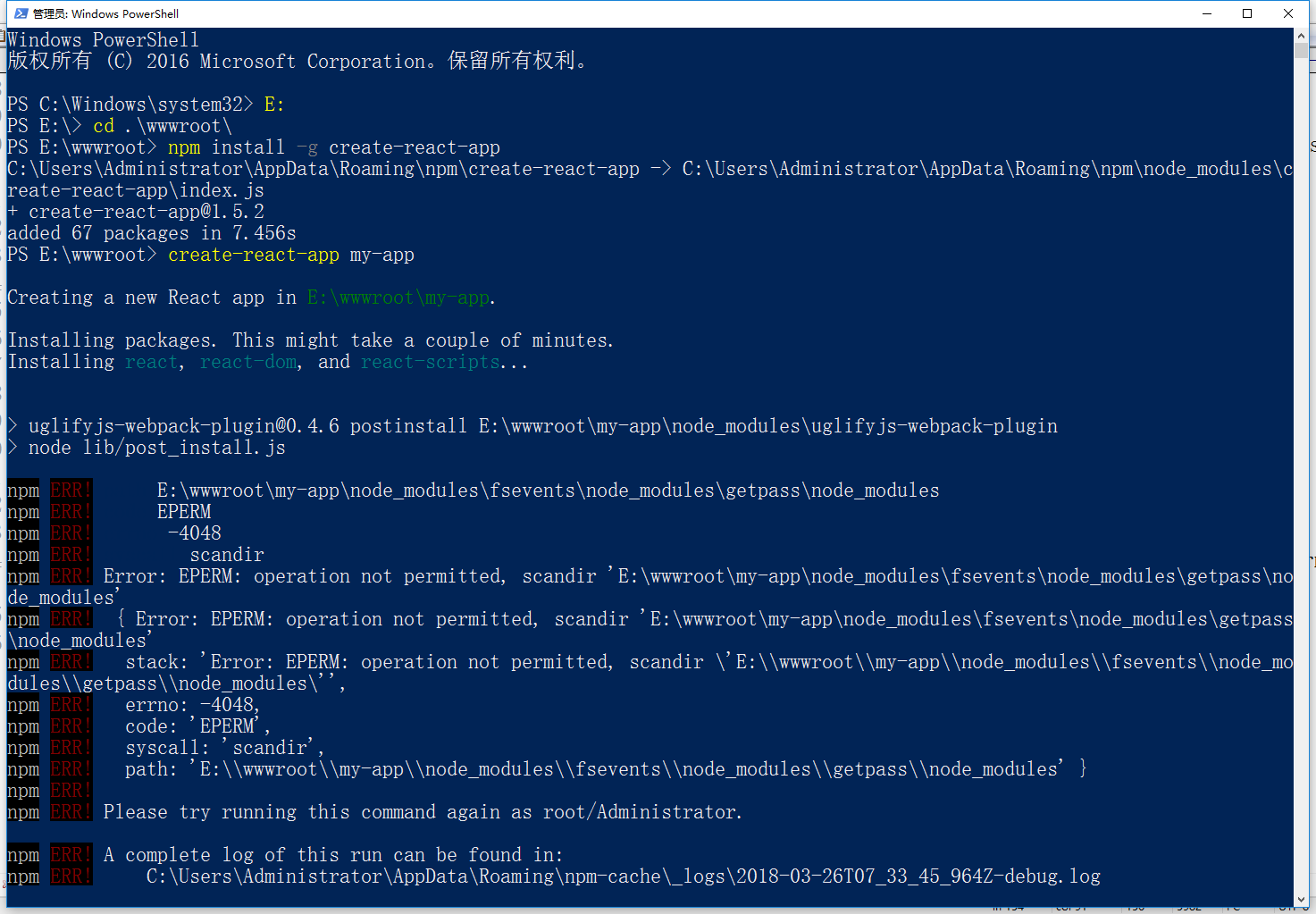
图9
|
1
2
3
4
5
6
7
8
9
10
11
12
13
14
15
16
17
18
19
20
21
22
23
24
25
26
27
28
29
30
31
32
33
34
35
36
|
Creating a new React app in E:\wwwroot\my-app.Installing packages. This might take a couple of minutes.Installing react, react-dom, and react-scripts...> uglifyjs-webpack-plugin@0.4.6 postinstall E:\wwwroot\my-app\node_modules\uglifyjs-webpack-plugin> node lib/post_install.jsnpm ERR! path E:\wwwroot\my-app\node_modules\fsevents\node_modules\getpass\node_modulesnpm ERR! code EPERMnpm ERR! errno -4048npm ERR! syscall scandirnpm ERR! Error: EPERM: operation not permitted, scandir 'E:\wwwroot\my-app\node_modules\fsevents\node_modules\getpass\node_modules'npm ERR! { Error: EPERM: operation not permitted, scandir 'E:\wwwroot\my-app\node_modules\fsevents\node_modules\getpass\node_modules'npm ERR! stack: 'Error: EPERM: operation not permitted, scandir \'E:\\wwwroot\\my-app\\node_modules\\fsevents\\node_modules\\getpass\\node_modules\'',npm ERR! errno: -4048,npm ERR! code: 'EPERM',npm ERR! syscall: 'scandir',npm ERR! path: 'E:\\wwwroot\\my-app\\node_modules\\fsevents\\node_modules\\getpass\\node_modules' }npm ERR!npm ERR! Please try running this command again as root/Administrator.npm ERR! A complete log of this run can be found in:npm ERR! C:\Users\Administrator\AppData\Roaming\npm-cache\_logs\2018-03-26T07_47_26_461Z-debug.logAborting installation. npm install --save --save-exact --loglevel error react react-dom react-scripts has failed.Deleting generated file... node_modulesDeleting generated file... package.jsonDeleting my-app / from E:\wwwrootDone. |
11、依次执行如下命令:验证:验证缓存文件夹的内容,垃圾收集任何不需要的数据,并验证缓存索引和所有缓存数据的完整性。如图10
npm cache verify
create-react-app my-app
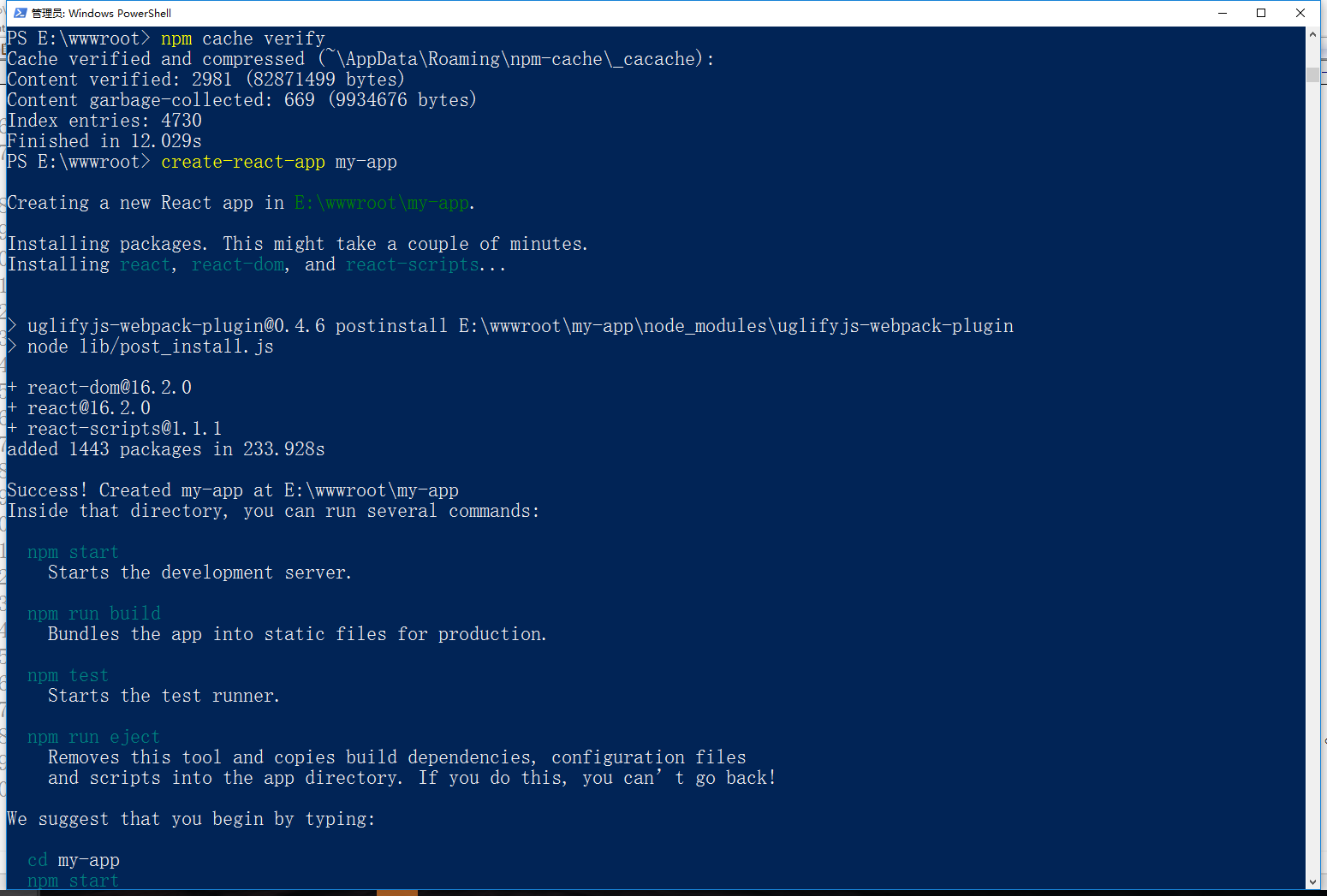
图10
|
1
2
3
4
5
6
7
8
9
10
11
12
13
14
15
16
17
18
19
20
21
22
23
24
25
26
27
28
29
30
31
32
33
34
35
36
|
Creating a new React app in E:\wwwroot\my-app.Installing packages. This might take a couple of minutes.Installing react, react-dom, and react-scripts...> uglifyjs-webpack-plugin@0.4.6 postinstall E:\wwwroot\my-app\node_modules\uglifyjs-webpack-plugin> node lib/post_install.js+ react-dom@16.2.0+ react@16.2.0+ react-scripts@1.1.1added 1443 packages in 233.928sSuccess! Created my-app at E:\wwwroot\my-appInside that directory, you can run several commands: npm start Starts the development server. npm run build Bundles the app into static files for production. npm test Starts the test runner. npm run eject Removes this tool and copies build dependencies, configuration files and scripts into the app directory. If you do this, you can’t go back!We suggest that you begin by typing: cd my-app npm startHappy hacking! |
12、依次执行如下命令:现在可以在浏览器中查看我的应用程序,如图11
cd my-app
npm start
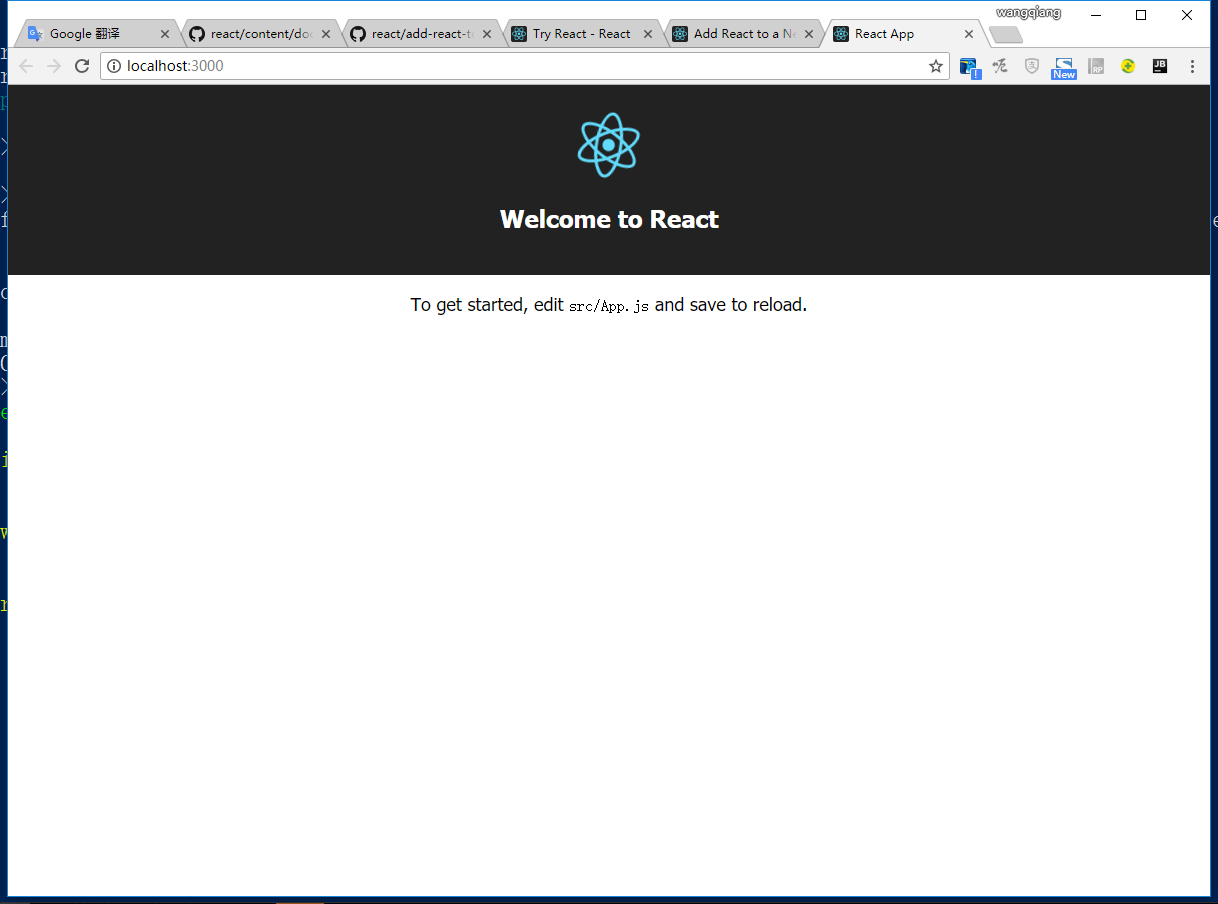
图11
windows下安装react的更多相关文章
- react-native —— 在Windows下搭建React Native Android开发环境
在Windows下搭建React Native Android开发环境 前段时间在开发者头条收藏了 @天地之灵_邓鋆 分享的<在Windows下搭建React Native Android开发环 ...
- 在windows下安装gulp —— 基于 Gulp 的前端集成解决方案(一)
相关连接导航 在windows下安装gulp —— 基于 Gulp 的前端集成解决方案(一) 执行 $Gulp 时发生了什么 —— 基于 Gulp 的前端集成解决方案(二) 常用 Gulp 插件汇总 ...
- Windows 下安装 MongoDB
Windows 下安装 MongoDB 的步骤:1.官网www.mongodb.com下载安装包或zip包2.解压下载的文件到文件夹 D:\mongo .3.使用管理员权限打开CMD,导航到目录 D: ...
- Coreseek Windows下安装调试
由于项目需要全文检索,后面就去网上查了下资料,找到了Sphinx[中文是狮身人面像]这个全文检索引擎,听说挺好用的,不过没有中文分词.后面又去找了一下,找到了Coreseek,一款中文全文检索/搜索软 ...
- 从零开始学 Java - Windows 下安装 Tomcat
谁都想分一杯羹 没有一个人是真正的无私到伟大的,我们试着说着做自己,与人为善,世界和平!殊不知,他们的真实目的当你知道后,你会被恶心到直摇头并下意识地迅速跑开,下辈子都不想见到他.不过,他没错,你也没 ...
- 从零开始学 Java - Windows 下安装 JDK
关于未来 "我要死在火星.在我死去的时候能够想着人类能有一个美好的未来--有可持续的能源,同时能够殖民其他的星球来避免人类灭绝的最坏可能." 官网下载 直接打开官网:http:// ...
- windows下安装nginx
说起开发,自己感到非常惭愧,由于公司让我给<绿电侠>项目写整体架构解决方案,才开始接触nginx这个东东,突然觉得它是一把非常好的利器. 本文主要记录在windows下安装nginx,另参 ...
- Redhat/Ubuntu/Windows下安装Docker
Redhat/Ubuntu/Windows下安装Docker 什么是Docker Docker是Docker.inc公司开源的一个基于LXC技术之上构建的Container容器引擎,基于Go语言并遵从 ...
- Windows下安装Redis
1.首先,Redis官方是支持Linux系统的,我这里不多说,需要的可以参考:http://www.oschina.net/question/12_18065/ 2.Windows 64位下载地址:h ...
随机推荐
- Matplotlib的使用
目录 1.pyplot基础语法 2.散点图与折线图 3.3D图与等高线图 1.pyplot基础语法 (1)创建画布 figure()创建一个空白画布,可以指定画布的大小figsize和设置分辨率dpi ...
- Java之缓冲流(字节/字符缓冲流)
概述 缓冲流,也叫高效流,是对4个基本的 FileXxx 流的增强,所以也是4个流,按照数据类型分类: 字节缓冲流: BufferedInputStream , BufferedOutputStrea ...
- Python爬虫基础面试题,为2020年初就业做准备
前言本文的文字及图片来源于网络,仅供学习.交流使用,不具有任何商业用途,版权归原作者所有,如有问题请及时联系我们以作处理.作者:qiaoziheng 一.题目部分1.python中常用的数据结构有哪些 ...
- Python 下JSON的两种编解码方式实例解析
概念 JSON(JavaScript Object Notation) 是一种轻量级的数据交换格式,易于人阅读和编写.在日常的工作中,应用范围极其广泛.这里就介绍python下它的两种编解码方法: ...
- Ansible-playbook之定义变量
1.引用变量 # 变量引用方式 "{{ }}" 2.定义变量 (vars) - hosts: web # 定义变量 vars: - play_var: This_is_play_v ...
- java开发,入职半年。对未来迷茫,如何发展?
蛮多人私密我一些问题,关于面试,关于技术的,我只能说有些路只能靠自己去走,没人可以帮到自己,哪怕偶尔帮一到两次,但是技术的路这么长,总归需要自己独自成长的.附一张自己藏书的照片,与各位共勉 工作三年多 ...
- 源码分析RocketMQ ACL实现机制
目录 1.BrokerController#initialAcl 2.PlainAccessValidator 2.1 类图 2.2 构造方法 2.3 parse方法 2.4 validate 方法 ...
- 操作mysql第一次访问速度慢(远程)
最近在使用java操作远程的mysql数据库的时候,第一次请求非常的慢,而且极其容易引起系统的崩溃报错连接超时 下面就这个问题来解决下把 ------------------------------- ...
- Java 读取excel表格文件
注意,本文使用的Jar包为jxl.jar,只能处理97-03版本xls格式的Excel jar包 maven依赖: <dependency> <groupId>net.sour ...
- Python如何运行程序
人生苦短,我用Python. 作为一个开发人员,如何写代码是必须要知道的,代码如何运行也是有必要了解的.通过了解代码如何运行,可指导我们写出效率更高的代码.下午看了<Python学习手册> ...