
Spring使用webjar
注意事项
这玩意很简单,但是我们第一次搞就是搞不成功,为什么呢?因为我们都用的是idea或者eclipse编译。webjar只能在maven上才能打包,所以在使用时,记得maven-clean和maven-package!
先丢代码地址
https://gitee.com/a247292980/lgp20151222
再丢pom.xml
<?xml version="1.0" encoding="UTF-8"?>

<project xmlns="http://maven.apache.org/POM/4.0.0" xmlns:xsi="http://www.w3.org/2001/XMLSchema-instance"

    xsi:schemaLocation="http://maven.apache.org/POM/4.0.0 http://maven.apache.org/xsd/maven-4.0.0.xsd">

    <modelVersion>4.0.0</modelVersion>

    <groupId>com.lgp</groupId>

    <artifactId>webjar</artifactId>

    <version>0.0.1-SNAPSHOT</version>

    <packaging>jar</packaging>

    <name>webjar</name>

    <description>Demo project for Spring Boot</description>

    <parent>

        <groupId>org.springframework.boot</groupId>

        <artifactId>spring-boot-starter-parent</artifactId>

        <version>1.5.10.RELEASE</version>

        <relativePath/> <!-- lookup parent from repository -->

    </parent>

    <properties>

        <project.build.sourceEncoding>UTF-8</project.build.sourceEncoding>

        <project.reporting.outputEncoding>UTF-8</project.reporting.outputEncoding>

        <java.version>1.8</java.version>

    </properties>

    <dependencies>

        <dependency>

            <groupId>org.springframework.boot</groupId>

            <artifactId>spring-boot-starter-thymeleaf</artifactId>

        </dependency>

        <dependency>

            <groupId>org.springframework.boot</groupId>

            <artifactId>spring-boot-starter-web</artifactId>

        </dependency>

        <dependency>

            <groupId>org.springframework.boot</groupId>

            <artifactId>spring-boot-starter-test</artifactId>

            <scope>test</scope>

        </dependency>

        <dependency>

            <groupId>org.webjars</groupId>

            <artifactId>bootstrap</artifactId>

            <version>3.3.7-1</version>

        </dependency>

        <dependency>

            <groupId>org.webjars</groupId>

            <artifactId>jquery</artifactId>

            <version>3.1.1</version>

        </dependency>

    </dependencies>

    <build>

        <plugins>

            <plugin>

                <groupId>org.springframework.boot</groupId>

                <artifactId>spring-boot-maven-plugin</artifactId>

            </plugin>

        </plugins>

    </build>

</project>
最后丢目录结构
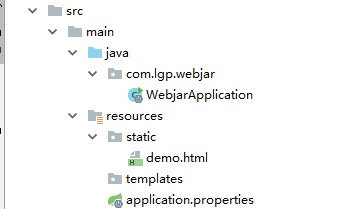
WebjarApplication
没动过
Demo.html
<!DOCTYPE html>

<html>

<head>

    <script src="/webjars/jquery/3.1.1/jquery.min.js"></script>

    <script src="/webjars/bootstrap/3.3.7-1/js/bootstrap.min.js"></script>

    <title>WebJars Demo</title>

    <link rel="stylesheet" href="/webjars/bootstrap/3.3.7-1/css/bootstrap.min.css" />

</head>

<body>

<div class="container"><br/>

    <div class="alert alert-success">

        <a href="#" class="close" data-dismiss="alert" aria-label="close">×</a>

        Hello, <strong>WebJars!</strong>

    </div>

</div>

</body>

</html>
高级技能
/**

 * Created by IntelliJ IDEA.

 * User: a247292980

 * Date: 2017/08/14
 *

 * webjars-locator 包的作用是处理WebJars,省略 webjar 的版本。

 * 比如对于请求 http://localhost:8080/webjars/jquery/3.1.0/jquery.js省略版本号 3.2.1

 * 直接使用http://localhost:8080/webjarslocator/jquery/jquery.js也可访问。

 * 其实吧,webjar,webjarslocator都耗系统性能的!!!!!

 **/

@Controller

public class WebJarController {

    private final WebJarAssetLocator assetLocator = new WebJarAssetLocator();

    @ResponseBody

    @RequestMapping("/webjarslocator/{webjar}/**")

    public ResponseEntity locateWebjarAsset(@PathVariable String webjar, HttpServletRequest request) {

        try {

            String mvcPrefix = "/webjarslocator/" + webjar + "/";

            String mvcPath = (String) request.getAttribute(HandlerMapping.PATH_WITHIN_HANDLER_MAPPING_ATTRIBUTE);

            String fullPath = assetLocator.getFullPath(webjar, mvcPath.substring(mvcPrefix.length()));

            return new ResponseEntity(new ClassPathResource(fullPath), HttpStatus.OK);

        } catch (Exception e) {

            return new ResponseEntity(HttpStatus.NOT_FOUND);

        }

    }

}
Spring使用webjar的更多相关文章
- Spring Boot笔记五: Web开发之Webjar和静态资源映射规则
目录 Webjar /** 访问当前项目的任何资源 欢迎页 标签页图标 Webjar 开始讲到Spring Boot的Web开发了,先介绍Webjar,这个其实就是把一些前端资源以jar包的形式导入到 ...
- 使用 Spring Boot 快速构建 Spring 框架应用--转
原文地址:https://www.ibm.com/developerworks/cn/java/j-lo-spring-boot/ Spring 框架对于很多 Java 开发人员来说都不陌生.自从 2 ...
- Spring Boot 静态资源处理
spring Boot 默认的处理方式就已经足够了,默认情况下Spring Boot 使用WebMvcAutoConfiguration中配置的各种属性. 建议使用Spring Boot 默认处理方式 ...
- Spring boot 内存优化
转自:https://dzone.com/articles/spring-boot-memory-performance It has sometimes been suggested that Sp ...
- 使用 Spring Boot 快速构建 Spring 框架应用,PropertyPlaceholderConfigurer
Spring 框架对于很多 Java 开发人员来说都不陌生.自从 2002 年发布以来,Spring 框架已经成为企业应用开发领域非常流行的基础框架.有大量的企业应用基于 Spring 框架来开发.S ...
- Spring Boot Memory Performance
The Performance Zone is brought to you in partnership with New Relic. Quickly learn how to use Docke ...
- 十二、 Spring Boot 静态资源处理
spring Boot 默认为我们提供了静态资源处理,使用 WebMvcAutoConfiguration 中的配置各种属性. 建议大家使用Spring Boot的默认配置方式,如果需要特殊处理的再通 ...
- spring.resources
@EnableWebMvcNormally you would add @EnableWebMvc for a Spring MVC app, but Spring Boot adds it auto ...
- Spring基础系列-Web开发
原创作品,可以转载,但是请标注出处地址:https://www.cnblogs.com/V1haoge/p/9996902.html SpringBoot基础系列-web开发 概述 web开发就是集成 ...
随机推荐
- sublimeText3 中配置sass环境,并将编译后文件保存到指定文件夹
sass基于ruby引擎,所以安装时ass.compass之前需要安装ruby.具体的链接应该是(http://rubyinstaller.org/downloads).下载并安装相应的版本,勾选第二 ...
- kubernetes进阶(05)kubernetes的命令
在Kubernetes中,Node.Pod.Replication Controller.Service等概念都可以看作一种资源对象,通过Kubernetes提供的Kubectl工具或者API调用进行 ...
- hadoop2.6.0实践:A02 问题处理 util.NativeCodeLoader: Unable to load native-hadoop library for your platform
############################################################# hadoop "util.NativeCodeLoader: Un ...
- Spring 环境与profile(三)——利用maven的resources、filter和profile实现不同环境使用不同配置文件
基本概念 profiles定义了各个环境的变量id filters中定义了变量配置文件的地址,其中地址中的环境变量就是上面profile中定义的值 resources中是定义哪些目录下的文件会被配置文 ...
- 智能提示含查询多列(html+JS+handler+ HttpRemoting)一、html示列 加 JS加 请求 Handler
<html> <head> </head> <body> <form id="recordform" name="r ...
- C/C++下调用matlab函数操作说明
1.matlab的安装 连接:http://pan.baidu.com/s/1qXuF7aO 安装32位版本的matlab(在目录下bin文件夹中有两个文件夹,选择win32文件夹下的setup进行安 ...
- java.lang.Class类
第一次接触Class类是在学习 jdbc中.Class.forName()是Class类的一个静态方法,用于手动加载一个类,例如数据库驱动. 其实每一个java类都拥有或者说对应一个Class的实例对 ...
- hive新特性reflect函数介绍
reflect函数可以支持在sql中调用java中的自带函数,秒杀一切udf函数. 使用案例1:所有记录执行相同的java内置函数 hive中建一张表test_udf:column1(int),col ...
- mysql之子查询作业
#数据准备drop table if exists class;create table class( class_no int(2) unsigned zerofill primary key ...
- codefroces 946F Fibonacci String Subsequences
Description定义$F(x)$为$F(x−1)$与$F(x−2)$的连接(其中$F(0)="0"$,$F(1)="1"$)给出一个长度为$n$的$01$ ...