
keras03 Aotuencoder 非监督学习 第一个自编码程序
# keras
# Autoencoder 自编码非监督学习
# keras的函数Model结构 (非序列化Sequential)
# 训练模型
# mnist数据集
# 聚类

https://www.bilibili.com/video/av31910829?t=115

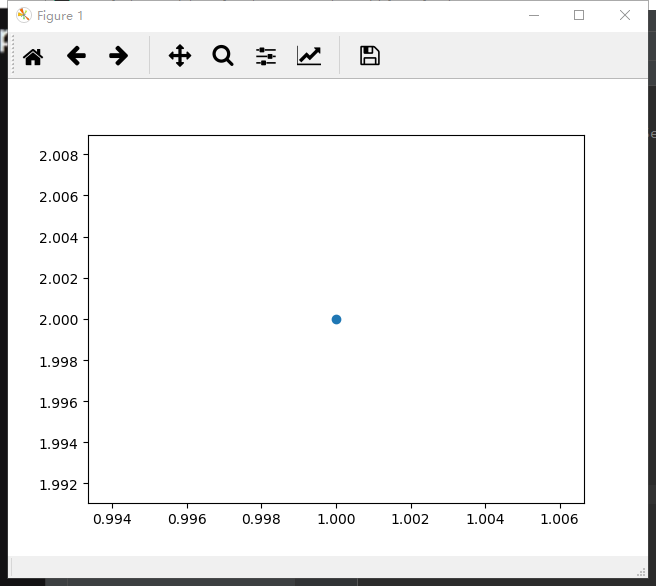
准备工作,array ——》 numpy ; plt.show()
import matplotlib.pyplot as plt

import numpy as np

a = [[1, 2]]

a = np.array(a)

c = a[:, 0]

b = a[:, 1]

print(c, b)

print(a.shape)

plt.scatter(c, b)

plt.show()
 # coding:utf-8

 import numpy as np

 from keras.datasets import mnist

 from keras.models import Model

 from keras.layers import Dense, Input

 import matplotlib.pyplot as plt

 '''

 1st 加载数据集 x (60000, 28, 28) y (10000, 1)

 '''

 (x_train, y_train), (x_test, y_test) = mnist.load_data()

 # 数据处理-归一化 转 浮点 , 不需要标签

 x_train = x_train.astype('float32')/255.0

 x_test = x_test.astype('float32')/255.0

 # reshape 数据形状 适用于dense层,是input需要的

 x_train = x_train.reshape(-1, 784)

 x_test = x_test.reshape(-1, 784)

 '''

 2nd encoded & decoded

 '''

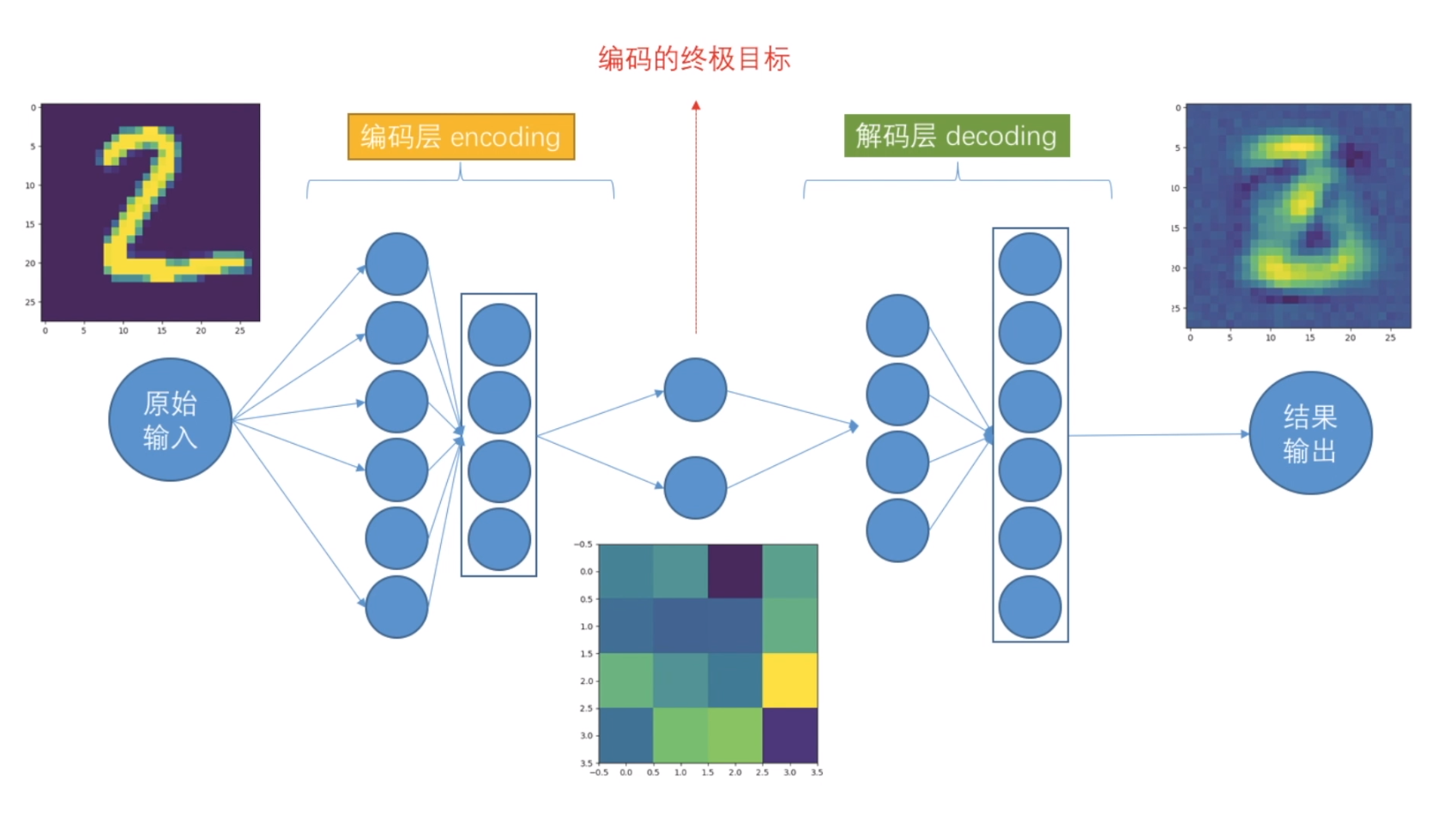
 # 定义encoding终极维度

 encoding_dim = 4  # 因为我们输出的时候, 需要一个二维坐标,二维坐标只有两个值. 高维无法可视化

 # 定义输入层input可以接受的数据shape,类似TensorFlow 的placeholder

 input_img = Input(shape=(784,))

 # 定义编码层 这里是把数据从大维度降低到小维度 如28*28或784 降低到2个维度

 # 特别注意 keras 这次用API函数模式构建网络层

 # ***第一层编码***

 encoded = Dense(units=128, activation='relu')(input_img)

 # ***第二层编码***

 encoded = Dense(units=64, activation='relu')(encoded)  # 后面的encoded是第一层的

 # ***第三层编码***

 encoded = Dense(units=32, activation='relu')(encoded)  # 后面的encoded是第2层的

 # ***第四层编码***(终极输出)和前面终极维度相对应 encoding_dim = 2,并给出解码层

 encoded_output = Dense(units=encoding_dim)(encoded)  # 这里up主少了(encoded)

 # ***可以输出结果 如果我想的话 2个维度结果*** 改为4个维度 2*2

 # 定义解码层

 # ***第一层解码***

 decoded = Dense(units=32, activation='relu')(encoded_output)

 # ***第二层解码***

 decoded = Dense(units=64, activation='relu')(decoded)

 # ***第三层解码***

 decoded = Dense(units=128, activation='relu')(decoded)

 # ***第四层解码***

 decoded = Dense(units=784, activation='tanh')(decoded)

 '''

 3rd autoencoder

 '''

 # 构建自动编码模型结构

 autoencoder = Model(inputs=input_img, outputs=decoded)

 # 构建编码模型结构

 encoder = Model(inputs=input_img, outputs=encoded_output)

 # 编译模型

 autoencoder.compile(optimizer='adam', loss='mse')  # mean square err

 # adam可以实例化,自行改参数

 # 训练

 autoencoder.fit(

     x=x_train,

     y=x_train,  # 非监督学习,比的不是label,而是自己

     epochs=20,

     batch_size=512,

     shuffle=True,  # 每个训练的epoch完成后,数据打乱每次结构 1 2 3 4 5 6 7 8 9这样的顺序会被打乱

 )

 # 打印结果

 encoded_img = encoder.predict(x_test)

 plt.scatter(x=encoded_img[:, 0], y=encoded_img[:, 1], c=y_test, s=3)  # y_test唯一用的地方

 plt.show()

 # 打印三个图对比

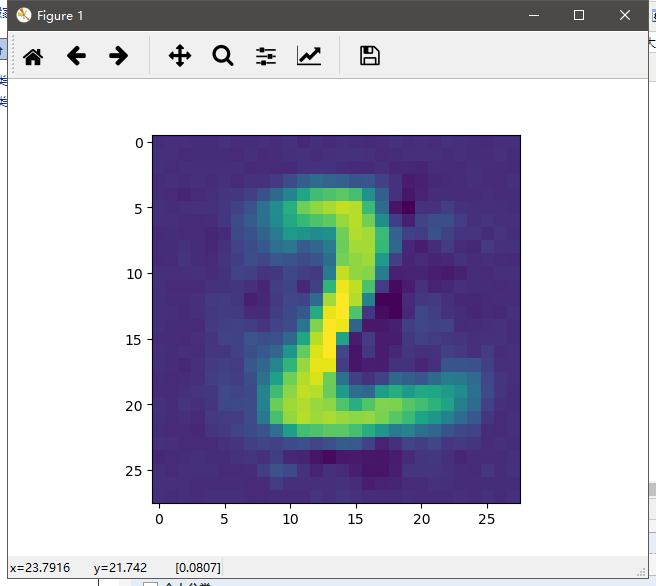
 decoded_img = autoencoder.predict(x_test[1].reshape(1, 784))

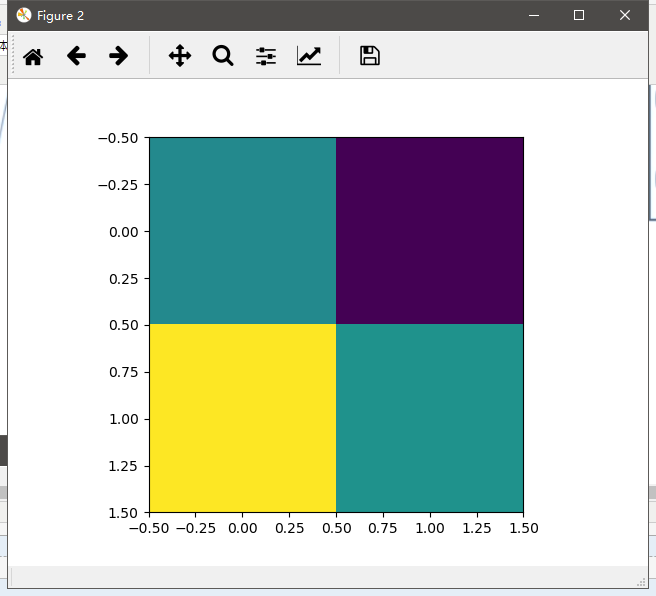
 encoded_img = encoder.predict(x_test[1].reshape(1, 784))

 plt.figure(1)

 plt.imshow(decoded_img[0].reshape(28, 28))

 plt.figure(2)

 plt.imshow(encoded_img[0].reshape(2, 2))

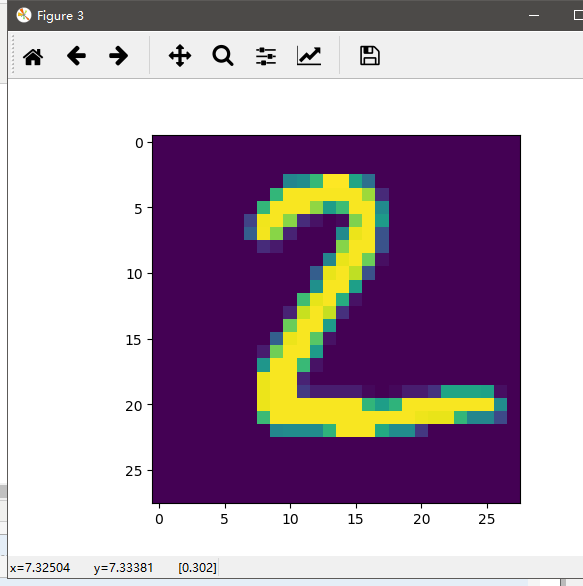
 plt.figure(3)

 plt.imshow(x_test[1].reshape(28, 28))

 plt.show()
运行结果,省略前面的epoch。
D:\Anaconda3\envs\tf\python.exe D:/adevelop/keras/autoencoder/ancoder.py

Using TensorFlow backend.

Epoch 1/20

2018-12-20 21:10:36.415134: I tensorflow/core/platform/cpu_feature_guard.cc:141] Your CPU supports instructions that this TensorFlow binary was not compiled to use: AVX AVX2

2018-12-20 21:10:36.589254: I tensorflow/core/common_runtime/gpu/gpu_device.cc:1432] Found device 0 with properties:

name: GeForce GTX 1060 6GB major: 6 minor: 1 memoryClockRate(GHz): 1.7845

pciBusID: 0000:01:00.0

totalMemory: 6.00GiB freeMemory: 4.97GiB

2018-12-20 21:10:36.589537: I tensorflow/core/common_runtime/gpu/gpu_device.cc:1511] Adding visible gpu devices: 0

2018-12-20 21:10:36.928535: I tensorflow/core/common_runtime/gpu/gpu_device.cc:982] Device interconnect StreamExecutor with strength 1 edge matrix:

2018-12-20 21:10:36.928694: I tensorflow/core/common_runtime/gpu/gpu_device.cc:988]      0

2018-12-20 21:10:36.928783: I tensorflow/core/common_runtime/gpu/gpu_device.cc:1001] 0:   N

2018-12-20 21:10:36.928967: I tensorflow/core/common_runtime/gpu/gpu_device.cc:1115] Created TensorFlow device (/job:localhost/replica:0/task:0/device:GPU:0 with 4720 MB memory) -> physical GPU (device: 0, name: GeForce GTX 1060 6GB, pci bus id: 0000:01:00.0, compute capability: 6.1)

.......

  512/60000 [..............................] - ETA: 0s - loss: 0.0291

 5120/60000 [=>............................] - ETA: 0s - loss: 0.0296

 9728/60000 [===>..........................] - ETA: 0s - loss: 0.0298

14336/60000 [======>.......................] - ETA: 0s - loss: 0.0298

19456/60000 [========>.....................] - ETA: 0s - loss: 0.0297

24064/60000 [===========>..................] - ETA: 0s - loss: 0.0296

28672/60000 [=============>................] - ETA: 0s - loss: 0.0297

33280/60000 [===============>..............] - ETA: 0s - loss: 0.0297

38400/60000 [==================>...........] - ETA: 0s - loss: 0.0297

43008/60000 [====================>.........] - ETA: 0s - loss: 0.0297

47616/60000 [======================>.......] - ETA: 0s - loss: 0.0297

52224/60000 [=========================>....] - ETA: 0s - loss: 0.0298

56832/60000 [===========================>..] - ETA: 0s - loss: 0.0297

60000/60000 [==============================] - 1s 11us/step - loss: 0.0297

Process finished with exit code 0

保存以及测试:终极编码
autoencoder.save('autoencoder.h5')

ex_img1 = Image.open('../mnist/4.png')

ex_img2 = Image.open('../mnist/7.jpg')

ex_img1 = np.array(ex_img1)

ex_img2 = np.array(ex_img2)

encoded_img1 = encoder.predict(ex_img1.reshape(1, 784))

encoded_img2 = encoder.predict(ex_img2.reshape(1, 784))

print(encoded_img1)

print(encoded_img2)
运行结果:
  512/60000 [..............................] - ETA: 0s - loss: 0.0293

 5632/60000 [=>............................] - ETA: 0s - loss: 0.0299

10752/60000 [====>.........................] - ETA: 0s - loss: 0.0299

15360/60000 [======>.......................] - ETA: 0s - loss: 0.0298

19968/60000 [========>.....................] - ETA: 0s - loss: 0.0298

25088/60000 [===========>..................] - ETA: 0s - loss: 0.0298

30208/60000 [==============>...............] - ETA: 0s - loss: 0.0299

34816/60000 [================>.............] - ETA: 0s - loss: 0.0299

39424/60000 [==================>...........] - ETA: 0s - loss: 0.0299

44544/60000 [=====================>........] - ETA: 0s - loss: 0.0299

49664/60000 [=======================>......] - ETA: 0s - loss: 0.0299

54784/60000 [==========================>...] - ETA: 0s - loss: 0.0299

59904/60000 [============================>.] - ETA: 0s - loss: 0.0299

60000/60000 [==============================] - 1s 11us/step - loss: 0.0299

[[  851.9073 -2038.2947  1888.9907 -3720.866 ]]

[[  462.43057 -2609.475    2269.1575  -5579.742  ]]
keras03 Aotuencoder 非监督学习 第一个自编码程序的更多相关文章
- Standford机器学习 聚类算法(clustering)和非监督学习(unsupervised Learning)
聚类算法是一类非监督学习算法,在有监督学习中,学习的目标是要在两类样本中找出他们的分界,训练数据是给定标签的,要么属于正类要么属于负类.而非监督学习,它的目的是在一个没有标签的数据集中找出这个数据集的 ...
- Deep Learning论文笔记之(三)单层非监督学习网络分析
Deep Learning论文笔记之(三)单层非监督学习网络分析 zouxy09@qq.com http://blog.csdn.net/zouxy09 自己平时看了一些论文,但老感 ...
- 如何区分监督学习(supervised learning)和非监督学习(unsupervised learning)
监督学习:简单来说就是给定一定的训练样本(这里一定要注意,样本是既有数据,也有数据对应的结果),利用这个样本进行训练得到一个模型(可以说是一个函数),然后利用这个模型,将所有的输入映射为相应的输出,之 ...
- 5.1_非监督学习之sckit-learn
非监督学习之k-means K-means通常被称为劳埃德算法,这在数据聚类中是最经典的,也是相对容易理解的模型.算法执行的过程分为4个阶段. 1.首先,随机设K个特征空间内的点作为初始的聚类中心. ...
- Machine Learning——Unsupervised Learning(机器学习之非监督学习)
前面,我们提到了监督学习,在机器学习中,与之对应的是非监督学习.无监督学习的问题是,在未加标签的数据中,试图找到隐藏的结构.因为提供给学习者的实例是未标记的,因此没有错误或报酬信号来评估潜在的解决方案 ...
- k-means 非监督学习聚类算法
非监督学习 非监督学习没有历史样本数据和标签,直接对数据分析或得结果. k-means 使用 >>> from sklearn.cluster import KMeans >& ...
- 监督学习&非监督学习
监督学习 1 - 3 - Supervised Learning 在监督学习中,数据集中的每个例子,算法将预测得到例子的""正确答案"",像房子的价格,或者溜 ...
- 【学习笔记】非监督学习-k-means
目录 k-means k-means API k-means对Instacart Market用户聚类 Kmeans性能评估指标 Kmeans性能评估指标API Kmeans总结 无监督学习,顾名思义 ...
- 数学模型:3.非监督学习--聚类分析 和K-means聚类
1. 聚类分析 聚类分析(cluster analysis)是一组将研究对象分为相对同质的群组(clusters)的统计分析技术 ---->> 将观测对象的群体按照相似性和相异性进行不同群 ...
随机推荐
- .NET Core TDD 前传: 编写易于测试的代码 -- 全局状态
第1篇: 讲述了如何创造"缝". "缝"(seam)是需要知道的概念. 第2篇, 避免在构建对象时写出不易测试的代码. 第3篇, 依赖项和迪米特法则. 本文是 ...
- ASP.NET Core 实战:Linux 小白的 .NET Core 部署之路
一.前言 最近一段时间自己主要的学习计划还是按照毕业后设定的计划,自己一步步的搭建一个前后端分离的 ASP.NET Core 项目,目前也还在继续学习 Vue 中,虽然中间断了很长时间,好歹还是坚持 ...
- 【Netty】(5)源码 Bootstrap
[Netty]5 源码 Bootstrap 上一篇讲了AbstractBootstrap,为这篇做了个铺垫. 一.概述 Bootstrap 是 Netty 提供的一个便利的工厂类, 我们可以通过它来完 ...
- Redis协议规范(RESP)
Redis 即 REmote Dictionary Server (远程字典服务): 而Redis的协议规范是 Redis Serialization Protocol (Redis序列化协议) 该协 ...
- [翻译]Mock 在 Python 中的使用介绍
目录 Mock 在 Python 中的使用介绍 原文链接与说明 恐惧系统调用 一个简单的删除函数 使用 Mock 重构 潜在陷阱 向 'rm' 中加入验证 将文件删除作为服务 方法 1:模拟实例的方法 ...
- Docker最全教程之树莓派和Docker(十五)
前言 树莓派(Raspberry Pi)是一台卡片电脑(只有信用卡大小),我们可以使用树莓派做很多事情,比如智能家居的中控.航空器.BT下载器.挖矿机.智能机器人.小型服务器(花生壳+网站)等等. 目 ...
- Python编程从入门到实践笔记——if语句
Python编程从入门到实践笔记——if语句 #coding=utf-8 cars=['bwm','audi','toyota','subaru','maserati'] bicycles = [&q ...
- k8s数据管理(八)--技术流ken
volume 我们经常会说:容器和 Pod 是短暂的.其含义是它们的生命周期可能很短,会被频繁地销毁和创建.容器销毁时,保存在容器内部文件系统中的数据都会被清除. 为了持久化保存容器的数据,可以使用 ...
- Docker在Linux上运行NetCore系列(三)在Linux上使用Docker运行Asp.NetCore
转发请注明此文章作者与路径,请尊重原著,违者必究. 系列文章:https://www.cnblogs.com/alunchen/p/10121379.html 开始说明 上几篇文章都是通过Linux运 ...
- 使用 pm2 守护你的 .NET Core 应用程序
一.守护进程的前世今生 守护进程,英文名:"daemon",也有守护神的意思.守护进程是一个在后台运行并且不受任何终端控制的进程,不会随着会话结束而退出.诸如 mysql.apac ...