
SSM-SpringMVC-02:SpringMVC最简单的小案例
------------吾亦无他,唯手熟尔,谦卑若愚,好学若饥-------------
咱们这个案例做什么?
就是用处理器代替Servlet处理请求
开发步骤:
1.引入jar包
<!--单元测试的依赖  ctrl+shif+/-->

        <dependency>

            <groupId>junit</groupId>

            <artifactId>junit</artifactId>

            <version>4.12</version>

            <scope>test</scope>

        </dependency>

        <dependency>

            <groupId>org.springframework</groupId>

            <artifactId>spring-context</artifactId>

            <version>4.2..RELEASE</version>

        </dependency>

        <!--引入beans节点-->

        <dependency>

            <groupId>org.springframework</groupId>

            <artifactId>spring-beans</artifactId>

            <version>4.2..RELEASE</version>

        </dependency>

        <dependency>

            <groupId> org.aspectj</groupId >

            <artifactId> aspectjweaver</artifactId >

            <version> 1.8.</version>

        </dependency>

        <!--SpringWebMVC-->

        <!-- https://mvnrepository.com/artifact/org.springframework/spring-webmvc -->

        <dependency>

            <groupId>org.springframework</groupId>

            <artifactId>spring-webmvc</artifactId>

            <version>4.2..RELEASE</version>

        </dependency>

        <!--ServletAPI-->

        <dependency>

            <groupId>javaee</groupId>

            <artifactId>javaee-api</artifactId>

            <version></version>

        </dependency>

        <dependency>

            <groupId>javax.servlet</groupId>

            <artifactId>jstl</artifactId>

            <version>1.2</version>

            <scope>runtime</scope>

        </dependency>

        <!--SpringWeb-->

        <dependency>

            <groupId>org.springframework</groupId>

            <artifactId>spring-web</artifactId>

            <version>4.2..RELEASE</version>

        </dependency>
2.具体的开发流程
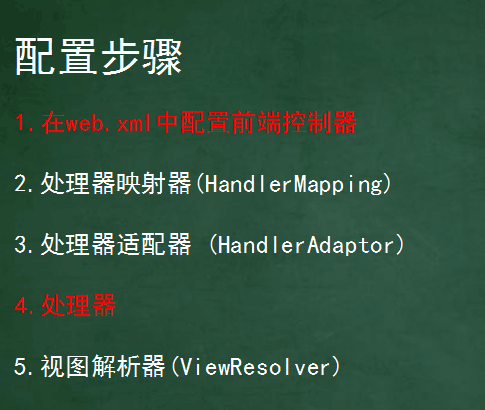
此处标红的表示需要配置的,未标红的表示本身就有默认值,可以无需配置springmvc也能执行
3.准备一个index.jsp页面
<%@ page contentType="text/html;charset=UTF-8" language="java" isELIgnored="false" %>

<html>

<body>

<h2>Hello SpringMVC!今天揭开你的新面纱</h2>

</body>

</html>
4.创建一个类FirstController
package cn.dawn.day01;

import org.springframework.web.servlet.ModelAndView;

import org.springframework.web.servlet.mvc.Controller;

import javax.servlet.http.HttpServletRequest;

import javax.servlet.http.HttpServletResponse;

/**

 * Created by Dawn on 2018/3/19.

 */

//处理器

public class FirstController implements Controller {

    /**

     * handleRequest    处理请求

     * @param httpServletRequest

     * @param httpServletResponse

     * @return

     * @throws Exception

     */

    public ModelAndView handleRequest(HttpServletRequest httpServletRequest, HttpServletResponse httpServletResponse) throws Exception {

        ModelAndView me=new ModelAndView();

        me.setViewName("index.jsp");

        return me;

    }

}
5.配置大配置文件ApplicationContext-day01.xml
<?xml version="1.0" encoding="UTF-8"?>

<beans xmlns="http://www.springframework.org/schema/beans"

       xmlns:xsi="http://www.w3.org/2001/XMLSchema-instance"

       xsi:schemaLocation="http://www.springframework.org/schema/beans http://www.springframework.org/schema/beans/spring-beans.xsd">

    <!--配置bean处理器-->

    <bean id="/first" class="cn.dawn.day01.FirstController"></bean>

</beans>
6.web.xml配置前端控制器
<!DOCTYPE web-app PUBLIC

 "-//Sun Microsystems, Inc.//DTD Web Application 2.3//EN"

 "http://java.sun.com/dtd/web-app_2_3.dtd" >

<web-app>

  <display-name>Archetype Created Web Application</display-name>

  <!--中央调度器-->

  <servlet>

    <servlet-name>springmvc</servlet-name>

    <servlet-class>org.springframework.web.servlet.DispatcherServlet</servlet-class>

    <init-param>

      <param-name>contextConfigLocation</param-name>

      <param-value>classpath:ApplicationContext-day01.xml</param-value>

    </init-param>

    <load-on-startup></load-on-startup>

  </servlet>

  <servlet-mapping>

    <servlet-name>springmvc</servlet-name>

    <url-pattern>/</url-pattern>

  </servlet-mapping>

</web-app>
配置完成,打开tomcat服务器中,在网页url中访问http://localhost:8080/项目名/first(根据你自己的配置来)
SSM-SpringMVC-02:SpringMVC最简单的小案例的更多相关文章
- SpringMVC 02: SpringMVC响应get和post请求 + 5种获取前端数据的方式
响应get和post请求 SpringMVC中使用@RequestMapping注解完成对get请求和post请求的响应 项目结构和配置文件与SpringMVC博客集中的"SpringMVC ...
- Turtle绘图——python简单上手小案例
Turtle绘图 Turtle模块提供了在二维平面上移动的环境. Turtle可以实现位置.航向和各种可能的状态和动作. import turtle as tu roo = tu.Turtle() # ...
- MyBatis小案例完善增强
https://blog.csdn.net/techbirds_bao/article/details/9233599 上链接为一个不错的Mybatis进阶博客 当你把握时间,时间与你为伍. 将上一个 ...
- 使用ssm(spring+springMVC+mybatis)创建一个简单的查询实例(二)(代码篇)
这篇是上一篇的延续: 用ssm(spring+springMVC+mybatis)创建一个简单的查询实例(一) 源代码在github上可以下载,地址:https://github.com/guoxia ...
- 简单易学的SSM(Spring+SpringMVC+MyBatis)整合
SSM(Spring+SpringMVC+MyBatis)的整合: 具体执行过程:1.用户在页面向后台发送一个请求 2.请求由DispatcherServlet 前端控制器拦截交给SpringMVC管 ...
- 使用ssm(spring+springMVC+mybatis)创建一个简单的查询实例(三)(错误整理篇)
使用ssm(spring+springMVC+mybatis)创建一个简单的查询实例(一) 使用ssm(spring+springMVC+mybatis)创建一个简单的查询实例(二) 以上两篇已经把流 ...
- 使用ssm(spring+springMVC+mybatis)创建一个简单的查询实例(一)
梳理下使用spring+springMVC+mybatis 整合后的一个简单实例:输入用户的 ID,之后显示用户的信息(此次由于篇幅问题,会分几次进行说明,此次是工程的创建,逆向生成文件以及这个简单查 ...
- SSM,即Spring+SpringMVC+MyBatis三个开源框架的整合框架集。
SSM(Spring+SpringMVC+MyBatis)框架集由Spring.SpringMVC.MyBatis三个开源框架整合而成,常作为数据源较简单的web项目的框架. 其中spring是一个轻 ...
- Maven+SSM框架(Spring+SpringMVC+MyBatis) - Hello World(转发)
[JSP]Maven+SSM框架(Spring+SpringMVC+MyBatis) - Hello World 来源:http://blog.csdn.net/zhshulin/article/de ...
随机推荐
- 调用bios喇叭发声
话不多说,上代码: #include <windows.h> #include <iostream> #include <map> using namespace ...
- Linux自动安装JDK的shell脚本
Linux自动安装JDK的shell脚本 A:本脚本运行的机器,Linux B:待安装JDK的机器, Linux 首先在脚本运行的机器A上确定可以ssh无密码登录到待安装jdk的机器B上,然后就可以在 ...
- 为多态基类声明virtual析构函数
一个函数的返回值为基类指针,而当指针指向一个派生类对象,接下来派生类对象被这个基类指针删除的时候,就出现了局部销毁的问题.因为C++指出,当派生类经由一个基类指针被删除,而该基类指针带着一个non-v ...
- Android studio导入工程很卡及下载网络jar很慢问题总结
AndroidStudio导入项目一直卡在Building gradle project info,实际上是因为你导入的这个项目使用的gradle与你已经拥有的gradle版本不一致,导致需要下载该项 ...
- 【LaTeX排版】LaTeX论文排版<二>
1.目录的生成 直接使用命令\tableofcontents即可.其默认格式如下: 我们会发现,这样的格式不一定是我们所期望的.比如说,我们也希望章标题与页码之间也有点连线,并且也希望将致谢. ...
- 苹果新的编程语言 Swift 语言进阶(十五)--协议
协议定义了适合某个特定任务或功能需要的方法.属性和其它需求的一个蓝图.协议本身不提供这些需求的实现,它只是描述了一个任务或功能实现的蓝图. 协议与java 语言中的接口定义类似,都是描述了一个实现可以 ...
- C++实现二叉树
#include <iostream> using namespace std ; class Tree { public : int number ; class Tree *left ...
- C语言之多线程机制(程序可以同时被执行而不会相互干扰)
接触过linux的人或多或少知道,linux有多线程的机制,也就是说程序可以同时执行,不受干扰,关于这个在我以前的博文里有过类似模拟的时间片轮转程序,跟这个其实是类似的.其实在window上,线程的头 ...
- obj-c编程10:Foundation库中类的使用(5)[时间对象]
隔了好久才有了这新的一篇,还是无奈的时间啊!so这次我们就着重谈谈它喽. F库中有很多时间相关的类,比如NSDate,NSTimeInterval,NSTimeZone,NSDateComponent ...
- PowerBI开发 第十篇:R 脚本
R是一种专门用于数据分析和统计的脚本语言,广泛应用在每一个需要统计和数据分析的领域.PowerBI支持R脚本,只不过,PowerBI Desktop默认没有安装R.在使用R脚本之前,必须向PowerB ...