
SpringBoot的 HelloWorld
SpringBoot HelloWorld
功能需求
浏览器发送hello请求,服务器接收请求并处理,相应HelloWorld字符串
1.创建一个maven工程;(jar)
2.导入SpringBoot相关依赖
<parent>

    <groupId>org.springframework.boot</groupId>

    <artifactId>spring-boot-starter-parent</artifactId>

    <version>1.5.9.RELEASE</version>

</parent>

<dependencies>

    <dependency>

        <groupId>org.springframework.boot</groupId>

        <artifactId>spring-boot-starter-parent</artifactId>

    </dependency>

</dependencies>
3.编写一个主程序,启动SpringBoot应用
/**

 * @SpringBootApplication 标注一个主程序类,说明这是一个SpringBoot 应用

 **/

@SpringBootApplication

public class HelloWorldMainApplication {

    public static void main(String[] args) {

        //启动Spring应用

        SpringApplication.run(HelloWorldMainApplication.class,args);

    }

}
4.编写相关的Controller、Service
@Controller

public class HelloController {

    @ResponseBody

    @RequestMapping("/hello")

    public String hello(){

        return "HelloWorld!";

    }

}
5.运行主程序测试
6. 简化部署
<!--    这个插件可以将应用打包成一个可执行的jar包-->

    <build>

        <plugins>

            <plugin>

                <groupId>org.springframework.boot</groupId>

                <artifactId>spring-boot-maven-plugin</artifactId>

            </plugin>

        </plugins>

    </build>
将这个应用打成jar包(自带tomcat),直接使用java -jar的命令进行执行
7.探究HalloWorld
1.POM文件
1.父项目
<parent>

    <groupId>org.springframework.boot</groupId>

    <artifactId>spring-boot-starter-parent</artifactId>

    <version>1.5.9.RELEASE</version>

</parent>

它的父项目是

	<parent>

		<groupId>org.springframework.boot</groupId>

		<artifactId>spring-boot-dependencies</artifactId>

		<version>1.5.9.RELEASE</version>

		<relativePath>../../spring-boot-dependencies</relativePath>

	</parent>

	真正管理Spring Boot应用里面的所有依赖版本;
Spring Boot版本仲裁中心(spring-boot-dependencies);
以后我们导入依赖默认是不需要些版本的;(没有在dependencies里面管理的依赖自然需要声明)
2.启动器starter
<dependency>

    <groupId>org.springframework.boot</groupId>

    <artifactId>spring-boot-starter-web</artifactId>

</dependency>
spring-boot-starter-web:
spring-boot-starter:spring-boot场景启动器;
spring-boot-starter-web帮我们导入了web模块正常运行所依赖的组件;
Spring Boot将所有功能场景都抽取出来,做成一个个的starters(启动器),只需要在项目里面引入这些starter相关场景的所有依赖都会导入进来
2.主程序类,主入口类
/**

 * @SpringBootApplication 标注一个主程序类,说明这是一个SpringBoot 应用

 **/

@SpringBootApplication

public class HelloWorldMainApplication {

    public static void main(String[] args) {

        //启动Spring应用

        SpringApplication.run(HelloWorldMainApplication.class,args);

    }

}
@SpringBootApplication:Spring Boot 应用标注在某个类上说明这个类是SpringBoot的主配置类,SpringBoot就应该运行这个类的方法来启动SpringBoot应用;
@Target({ElementType.TYPE})

@Retention(RetentionPolicy.RUNTIME)

@Documented

@Inherited

@SpringBootConfiguration

@EnableAutoConfiguration

@ComponentScan(

    excludeFilters = {@Filter(

    type = FilterType.CUSTOM,

    classes = {TypeExcludeFilter.class}

), @Filter(

    type = FilterType.CUSTOM,

    classes = {AutoConfigurationExcludeFilter.class}

)}

)

public @interface SpringBootApplication {
1.@SpringBootConfiguration:Spring Boot的配置类;
标注在某个类上,表示这是一个SpringBoot的配置类
包含@Configuration:配置类上来标注这个注解;
配置类就是以往的配置文件;将配置文件替换成配置类,使用该注解才能让springboot知道这是个配置类,配置类也是容器中的一个组件:@Component
2.@EnableAutoConfiguration:开启自动配置功能
以前我们需要配置的东西,Springboot帮我们自动配置;
@AutoConfigurationPackage

@Import({EnableAutoConfigurationImportSelector.class})

public @interface EnableAutoConfiguration {
@AutoConfigurationPackage:自动配置包
@Import({Registrar.class}):Spring的底层注解@Import,给容器中导入一个组件;导入的组件由{Registrar.class}来决定
将主配置类(@SpringBootApplication标注的类)的所在包以及所有子包里面的所有组件扫描到Spring容器中
@Import({EnableAutoConfigurationImportSelector.class})
给容器中导入组件
EnableAutoConfigurationImportSelector:导入哪些组件的选择器,将所有需要导入的组件以全类名返回,这些组件就会被添加到容器中
会给容器中导入96个自动配置类(xxxAutoConfigration):就是容器中导入这个场景需要的所有组件,并配置好这些组件;有了自动配置类,免去了我们手动编写配置注入功能组件等的工作;
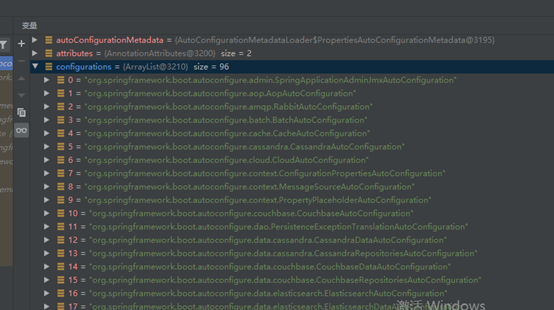
获取Configurations主要使用了
SpringFactoriesLoader.loadFactoryNames(EnableAutoConfigurationr.class, classLoader);
从类路径下获取 META-INF/spring.factories 资源文件(spring-boot-autoconfigure-1.5.9.RELEASE中),获取EnableAutoConfigurationr指定的值(如上图),将这些值作为自动配置类导入到容器中,自动配置类就生效了,即自动配置。
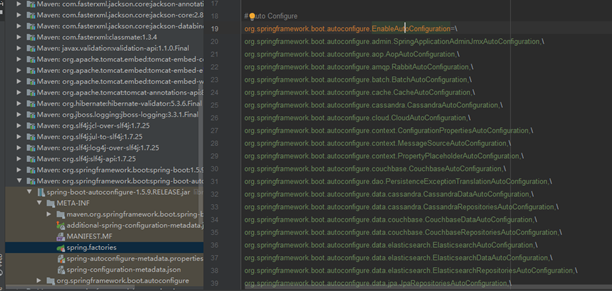
以前我们需要自己配置的东西,自动配置类都帮我们完成了。(eg.WebMvcAutoConfiguration)
@bean添加组件
//WebMvcAutoConfiguration

@Bean   //RequestMapping

@Primary

public RequestMappingHandlerMapping requestMappingHandlerMapping() {

 @Bean   //视图解析器

 @ConditionalOnMissingBean

 public InternalResourceViewResolver defaultViewResolver() {

 .....
J2EE的整体整合解决方案和自动配置都在spring-boot-autoconfigure-x.x.x.RELEASE.jar下的org.springframework.boot.autoconfigure中
SpringBoot的 HelloWorld的更多相关文章
- springboot之HelloWorld
简介 为了简化开发Spring的复杂度,Spring提供了SpringBoot可以快速开发一个应用,这里就简单介绍下SpringBoot如何快速开发一个J2EE应用 HelloWorld 首先在gra ...
- SpringBoot学习helloworld
这几天开始学习springBoot记录一下(Hello World) pom.xml <project xmlns="http://maven.apache.org/POM/4.0.0 ...
- SpringBoot的HelloWorld 应用及解释
参考链接: Spring Data JPA - Reference Documentation Spring Data JPA--参考文档 中文版 纯洁的微笑:http://www.ityouknow ...
- [一]SpringBoot 之 HelloWorld
(1)新建一个Maven Java工程 (2)在pom.xml文件中添加Spring BootMaven依赖 2.1在pom.xml中引入spring-boot-start-parent spring ...
- SpringBoot入门学习(一): Idea 创建 SpringBoot 的 HelloWorld
创建项目: 项目结构: 程序启动入口: 正式开始: package com.example.demo; import org.springframework.boot.SpringApplicatio ...
- redis整合springboot的helloworld
引入依赖 compile 'org.springframework.boot:spring-boot-starter-data-redis' 使用redis有两种方法 1.Jedis Jedis je ...
- SpringBoot——探究HelloWorld【三】
前言 前面我们写了helloworld的一个,这里我们对他进行分析 探究 那么下面就开始我们的探究之旅吧,首先从POM文件来,在POM文件中我们导入了项目所需要的依赖 POM文件 父项目 <pa ...
- spring-boot的helloWorld详解
1.运行环境 开发工具:intellij idea JDK版本:1.8 项目管理工具:Maven 3.2.5 2.Maven Plugin管理 pom.xml配置代码: <project xml ...
- eclipse springboot运行helloworld错误: 找不到或无法加载主类 xxx.xxx.xxx
这个错误,在网上搜找了好久,说是什么jar包冲突,什么环境配置,我经过验证均是正确的,javac java java -version 都没问题,环境变量也OK,各种解释均没有能够解决我的问题,最后好 ...
随机推荐
- 如何找到Hive提交的SQL相对应的Yarn程序的applicationId
最近的工作是利用Hive做数据仓库的ETL转换,大致方式是将ETL转换逻辑写在一个hsql文件中,脚本当中都是简单的SQL语句,不包含判断.循环等存储过程中才有的写法,仅仅支持一些简单的变量替换,比如 ...
- 循环结构(for、while)
3.4用for语句实现循环结构 什么是循环结构 for语句 1.什么是循环结构? 循环结构又称为重复结构,是利用计算机运算速度快以及能进行逻辑控制的特点来重复执行某些操作.重复执行的部分称为循环体. ...
- 使用天祥TX-1C调试DS18B20温度传感器的收获
翻查DS18B20的DataSheet编写操作函数,其过程遇到了不少坎,记下来备查. 对于单总线的DS18B20芯片,首先严格按照时序图写出正确的“写0”.“写1”和“读0.1”的基础函数,再以此写出 ...
- 【Scala】Actor并发编程实现单机版wordCount
文章目录 对单个文本文件进行单词计数 对多个文本文件进行单词计数 对单个文本文件进行单词计数 import scala.actors.Actor import scala.io.Source //读取 ...
- Mysql常用sql语句(九)- like 模糊查询
测试必备的Mysql常用sql语句,每天敲一篇,每次敲三遍,每月一循环,全都可记住!! https://www.cnblogs.com/poloyy/category/1683347.html 前言 ...
- STM32 外部中断详解(原理+配置代码)
本文介绍了STM32基于标准外设库的外部中断配置,以及基于参考手册如何更加寄存器配置外部中断 文章目录 1 前言 2 STM32的外部中断 3 中断服务函数的映射关系 4 外部中断的配置 5 寄存器的 ...
- u-boot: Not enough room for program headers, try linking with -N
在编译u-boot的时候出现了以下错误: arm-linux-gnueabi-ld.bfd: u-boot: Not enough room for program headers, try link ...
- Excel+Word:Jupyter
直接打开Excel,可以增改删,但如果只是查了?Jupyter Lab/Jupyter Notebook是件利器. 工作内容之一,是复制Excel的一条记录,姓名.身份证号.银行卡号,粘贴在Word的 ...
- [hdu4498]离散化,simpson求积分
题意:,求这个函数在[0,100]上的图像的长度. 思路:采用离散化的思想,求出所有交点 ,把交点排序,把[0,100]分成若干个小区间,这样原函数在每个小区间上的图像属于某一个二次函数或者是一条直线 ...
- 使用 PyCharm 添加 Django 项目
一.前置准备(PyCharm与Python的下载,已有的跳过) 1.首先下载PyCharm 地址:http://www.jetbrains.com/pycharm/ 2.然后下载Python 地址:h ...