
cenos7配置confluence+mysql5.6
一.准备阶段
我的环境为 腾讯云镜像centos7.4 ,centos 内置 mariadb 需要先删除
#检查是否安装了 mariadb

rpm -qa |grep mariadb

#删除mariadb

rpm -e --nodeps mariadb-libs

#进入/home 将安装包下载或上传的这个位置

cd /home
二.配置mysql
#使用wget 下载yum源的rpm包

 wget -c http://repo.mysql.com/mysql-community-release-el7-5.noarch.rpm

#安装rpm

sudo rpm -ivh mysql-community-release-el7-.noarch.rpm

#更新源

yum update

#安装 MySQL

yum install mysql-server

#启动服务

systemctl start mysqld.service
三.运行 MySQL 安全配置
#启动MySQL

systemctl start mysqld

#运行MySQL安全配置

mysql_secure_installation
NOTE: RUNNING ALL PARTS OF THIS SCRIPT IS RECOMMENDED FOR ALL MySQL

      SERVERS IN PRODUCTION USE!  PLEASE READ EACH STEP CAREFULLY!

In order to log into MySQL to secure it, we'll need the current

password for the root user.  If you've just installed MySQL, and

you haven't set the root password yet, the password will be blank,

so you should just press enter here.

Enter current password for root (enter for none):   #输入默认密码(默认为空,可直接回车)

ERROR  (): Access denied for user 'root'@'localhost' (using password: YES)

Enter current password for root (enter for none):

OK, successfully used password, moving on...

Setting the root password ensures that nobody can log into the MySQL

root user without the proper authorisation.

Set root password? [Y/n] y    #是否设置新密码 Y 设置

New password:                     #输入两次

Re-enter new password:

Password updated successfully!

Reloading privilege tables..

 ... Success!

By default, a MySQL installation has an anonymous user, allowing anyone

to log into MySQL without having to have a user account created for

them.  This is intended only for testing, and to make the installation

go a bit smoother.  You should remove them before moving into a

production environment.

Remove anonymous users? [Y/n] y       #是否删除匿名账户 Y

 ... Success!

Normally, root should only be allowed to connect from 'localhost'.  This

ensures that someone cannot guess at the root password from the network.

Disallow root login remotely? [Y/n] n  #不允许root账户远程登陆吗?

 ... skipping.

By default, MySQL comes with a database named 'test' that anyone can

access.  This is also intended only for testing, and should be removed

before moving into a production environment.

Remove test database and access to it? [Y/n] Y   #是否测试默认数据库

 - Dropping test database...

ERROR  (HY000) at line : Can't drop database 'test'; database doesn't exist

 ... Failed!  Not critical, keep moving...

 - Removing privileges on test database...

 ... Success!

Reloading the privilege tables will ensure that all changes made so far

will take effect immediately.

Reload privilege tables now? [Y/n] Y #重新加载权限表

 ... Success!

All done!  If you've completed all of the above steps, your MySQL

installation should now be secure.

Thanks for using MySQL!

Cleaning up...
四.安装JDK
#检查 是否安装了Java

#查看版本

java -version

#查看是否安装了 Java

rpm -qa |grep java

下载Java

官网 :http://www.oracle.com/technetwork/java/javase/overview/index.html

ftp 上传至 /home
#解压至/opt目录

tar zxvf jdk-10.0.2_linux-x64_bin.tar.gz -C  /opt/

#修改环境变量

vim /etc/profile

#在最下添加

export JAVA_HOME=/opt/jdk-10.0.

export PATH=$JAVA_HOME/bin:$PATH

export CLASSPATH=.:$JAVA_HOME/lib/dt.jar:$JAVA_HOME/lib/tools.jar:$CLASSPATH

#生效配置

source /etc/profile

#验证环境

java -version
五.安装confluence 官网:https://www.atlassian.com/software/confluence
wget -c https://product-downloads.atlassian.com/software/confluence/downloads/atlassian-confluence-6.10.2-x64.bin
#赋予权限

chmod +x atlassian-confluence-6.10.-x64.bin

#安装confluence

./atlassian-confluence-6.10.-x64.bin
#安装过程

Unpacking JRE ...

Starting Installer ...

This will install Confluence 6.10. on your computer.

OK [o, Enter], Cancel [c]  #是否安装

o

Click Next to continue, or Cancel to exit Setup.

Choose the appropriate installation or upgrade option.

Please choose one of the following:   # 安装方式

Express Install (uses default settings) [],

Custom Install (recommended for advanced users) [, Enter],

Upgrade an existing Confluence installation []

See where Confluence will be installed and the settings that will be used.

Installation Directory: /opt/atlassian/confluence

Home Directory: /var/atlassian/application-data/confluence

HTTP Port:

RMI Port:

Install as service: Yes       #安装端口  是否安装

Install [i, Enter], Exit [e]

i

Extracting files ...

Please wait a few moments while we configure Confluence.

Installation of Confluence 6.10. is complete

Start Confluence now?

Yes [y, Enter], No [n]          # 开始安装

y

Please wait a few moments while Confluence starts up.

Launching Confluence ...

Installation of Confluence 6.10. is complete

Your installation of Confluence 6.10. is now ready and can be accessed via

your browser.

Confluence 6.10. can be accessed at http://localhost:8090

Finishing installation ...  #安装完成
安装完成 ,开始配置confluence  confluence 安装成功自动启动

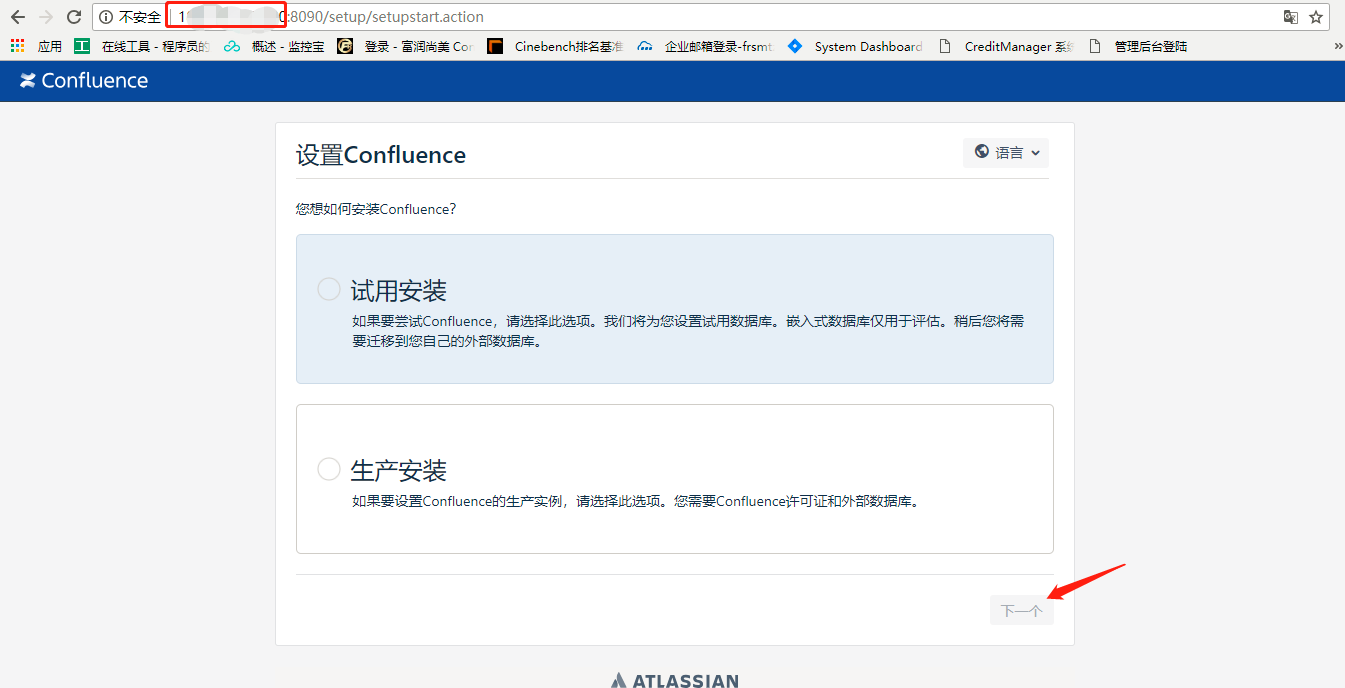
1.输入ip:8090 或 网址:8090,选择安装方式 我这里选择生产安装,下一步
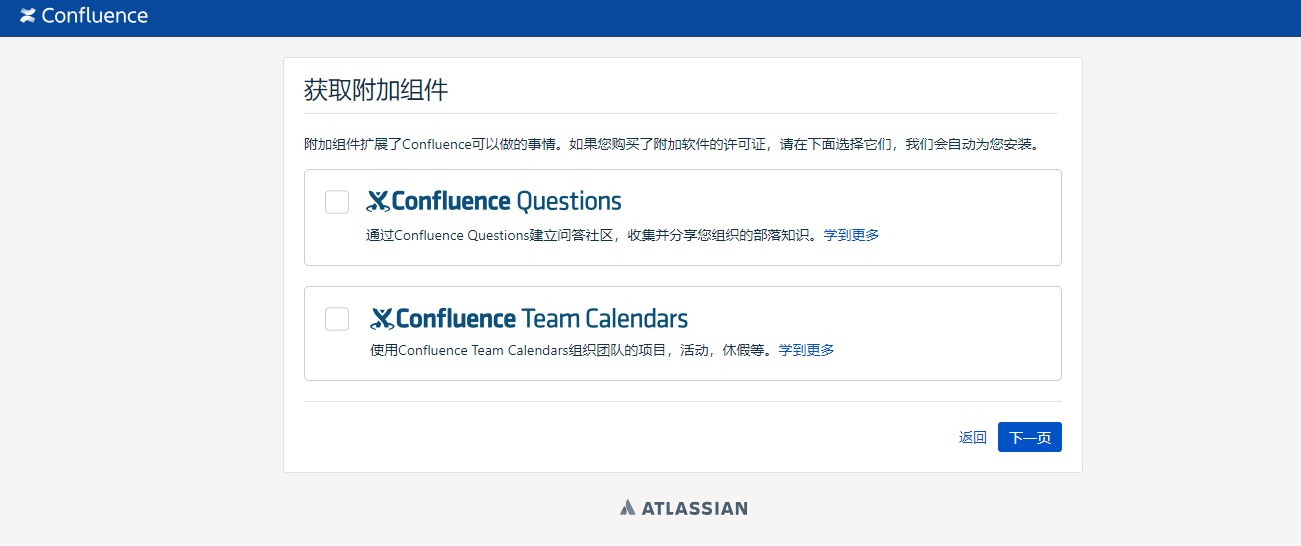
2.选择附加组件 ,因为我没有购买附加软件的许可证 所以我直接下一步
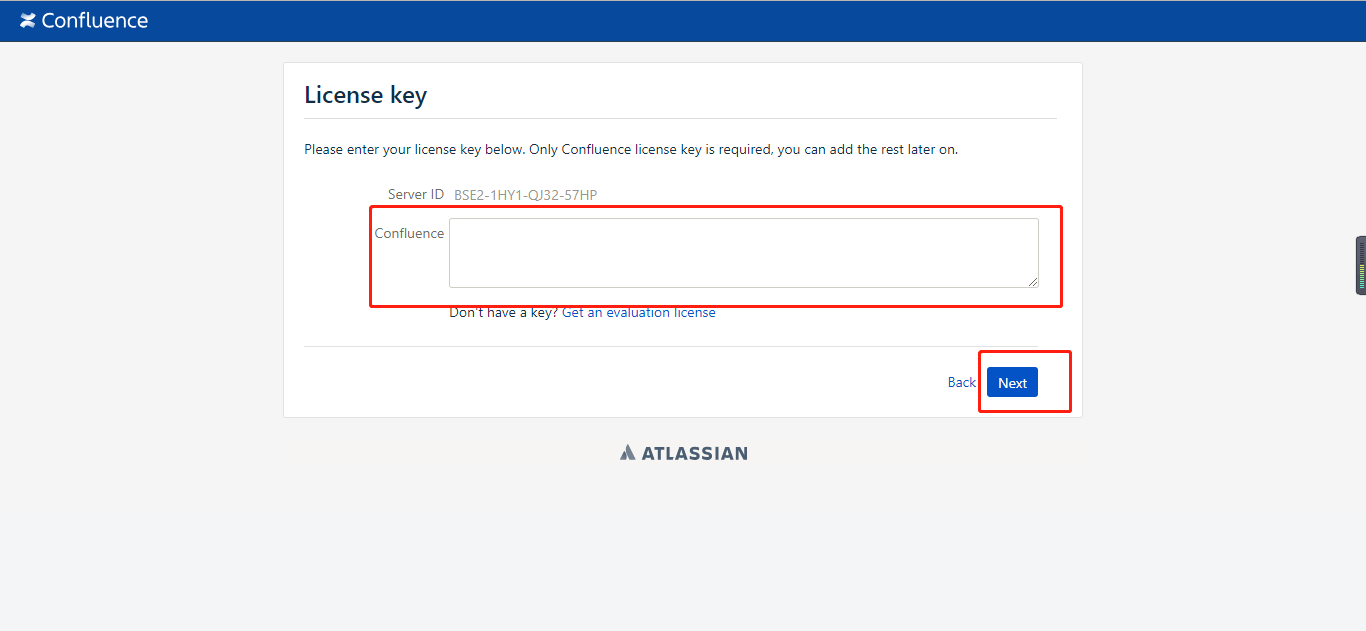
3.输入许可证,下一步
4.设置数据库 ,我用的是我刚才配置的MySQL 数据库 所以我选择我自己的数据库
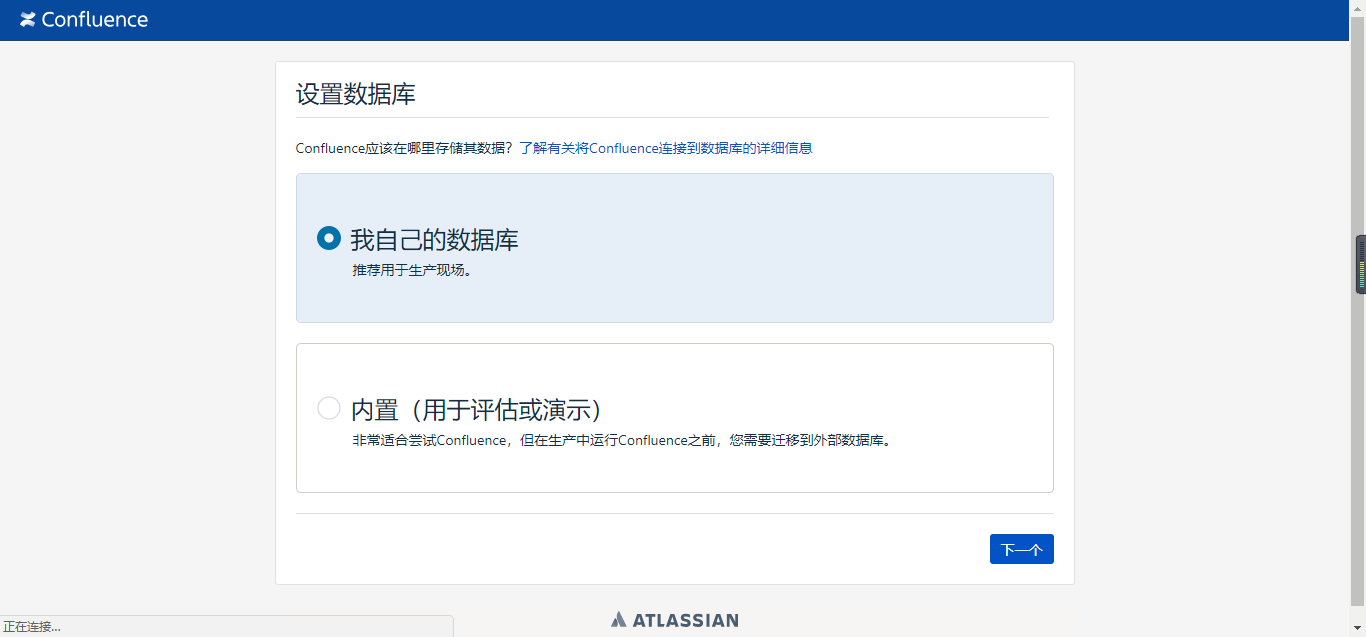
5.设置数据库,这里需要下载个插件 根据提示做就可以了 ,然后测试连接 正确配置后 点击下一步 开始自动配置数据库 或者参考官方文档 链接地址https://confluence.atlassian.com/doc/database-configuration-159764.html
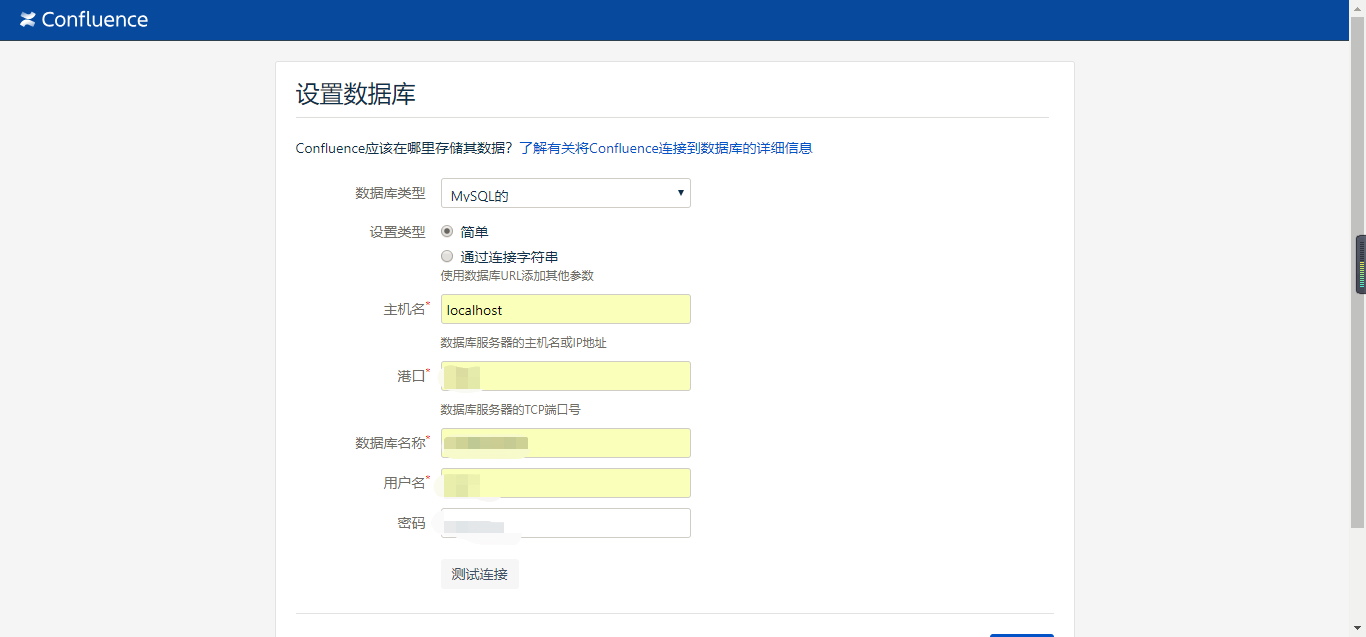
开始自动配置数据库,如果在这里报错 ,服务挂掉了,可以试试 重启下 服务 然后删除为confluence创建的数据库 ,在重建的同名的数据库 然后在访问confluence
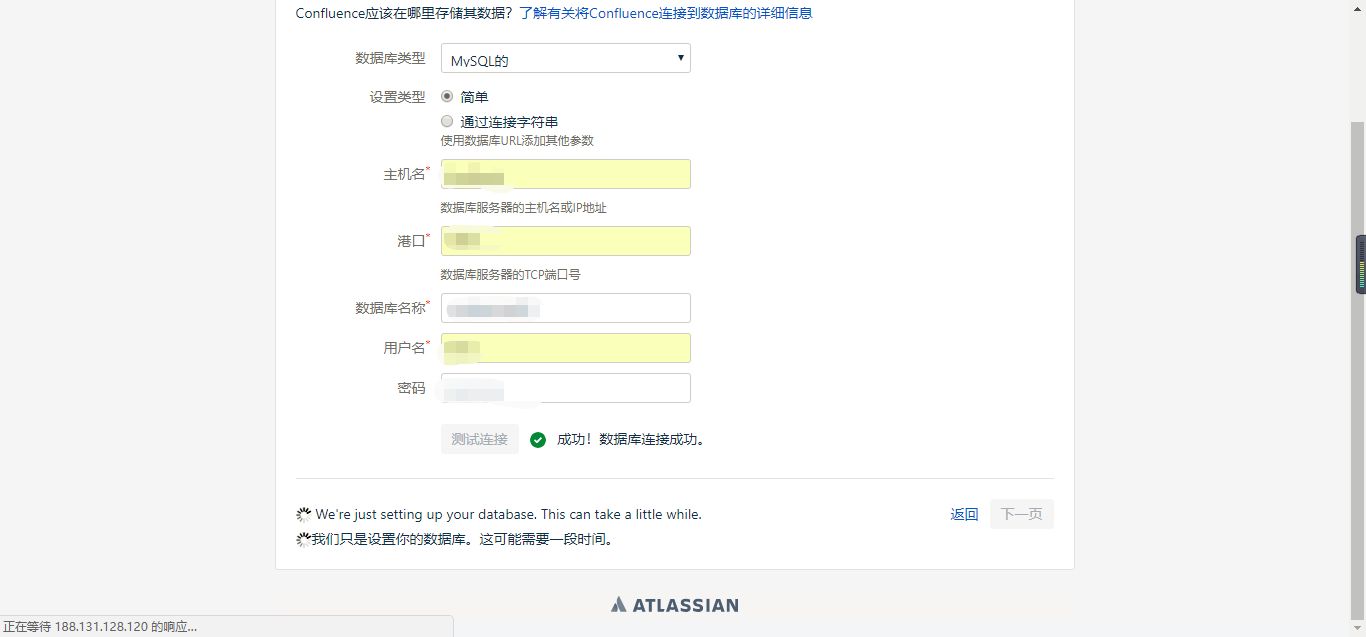
配置完成就可以进入confluence了 ,如果遇到什么问题,请在评论区留言,互相交流

小提示:我在linux下配置confluence连接MySQL数据库时,在连接数据库成功点击下一步进行设置数据库时总是失败,后来发现 我的linux系统里没有swap分区 ,然后我新建了一个交换分区 问题就神奇的解决了
cenos7配置confluence+mysql5.6的更多相关文章
- MySQL安装 MySQL5.7.10免安装版配置,mysql5.7.10免安装版
MySQL5.7.10免安装版配置,mysql5.7.10免安装版 最新版的 Mysql 不提供图形界面的安装了, 下载下来是一个压缩包的形式, 那么我们如何来使用它呢, 让它为我们工作呢? 环境: ...
- 2016/07/07 apmserv5.2.6 Apache启动失败,请检查相关配置。MySQL5.1已启动。
因为要用PHP做一个程序,在本机上配PHP环境,下了个APMServ5.26,安装很简单,不再多说,装好后,启动,提示错误,具体是:“Apache启动失败,请检查相关配置.√MySQL5.1已启动”, ...
- Centos7 安装配置Apache+Mysql5.7+PHP7.0+phpmyadmin
Centos7 下安装配置Apache+Mysql5.7+PHP7.0+phpmyadmin 搭建LAMP =========================================Apach ...
- VC++2010配置使用MySQL5.6
0.前提 安装后的文件概览 编译器: VC++2010 MySQL版本:MySQL5.6.19 for win64 Connector版本:connector c++ 1.1.3 在VS2010 ...
- 配置 Confluence 6 安全的最佳实践
让一个系统能够变得更加坚固的最好办法是将系统独立出来.请参考你公司的安全管理策略和相关人员来找到你公司应该采用何种安全策略.这里有很多事情需要我们考虑,例如考虑如何安装我们的操作系统,应用服务器,数据 ...
- Windows下Mysql主从配置(Mysql5.5)
主数据库IP:192.168.3.169从数据库IP:192.168.3.34 主数据库配置my.inin: 在[mysqld]下添加配置数据:server-id=1 #配一个唯一的ID编号, ...
- Ubuntu 14.04 配置confluence破解
1. 配置java环境,请参展我的另一篇博客 http://www.cnblogs.com/youran-he/p/8607155.html 2. 下载文件 https://pan.baidu.com ...
- MySQL SSL配置(mysql5.7和mysql5.6)
专题一:mysql5.7上开启并配置ssl [root@mysqlmaster01 bin]# ./mysql_ssl_rsa_setup --datadir=/data/mysql_data1/ - ...
- Apache启动失败,请检查相关配置。MySQL5.1已启动成功
解决办法 一: 把左下角的SSL钩上了,如果你没有用证书,就把那个去掉,有的朋友去掉就可以了.也可能再装了证书钩上SSL也可以用了. 二: 看了说的把SSL勾掉的办法,也解决不了.后来就去查卡巴,也没 ...
随机推荐
- sqllab less-1
1.访问sqllab 的less-1 按提示加入http://10.9.2.81/Less-1/?id=1 2. 后面加入单引号,发生报错http://10.9.2.81/Less-1/?id=1‘ ...
- Oracle忘记密码怎么办?
1.打开cmd,输入sqlplus /nolog,回车:输入“conn / as sysdba”;输入“alter user sys identified by 新密码”,注意:新密码最好以字母开头, ...
- np.ndarray与PIL.Image对象相互转换
Image对象有crop功能,也就是图像切割功能,但是使用opencv读取图像的时候,图像转换为了np.adarray类型,该类型无法使用crop功能,需要进行类型转换,所以使用下面的转换方式进行转换 ...
- 笔记-Python-性能优化
笔记-Python-性能优化 1. 开始 1.1. python性能差么? 做一个判断前,先问是不是. python运行效率低是事实. 1.2. 为什么? 原因: Python是 ...
- leetcode刷题-- 2. 排序(待更新)
排序 参考五分钟学算法 复杂度比较 时间复杂度 O(n2) 各种简单的排序:直接插入.直接选择.冒泡 O(nlog2n) 快速排序.堆排序.归并排序 O(n1+\(\lambda\)),希尔排序 线性 ...
- GO常量/枚举
常量中的数据类型只可以是布尔型.数字型(整数型.浮点型和复数)和字符串型. 常量的定义格式: const identifier [type] = value 你可以省略类型说明符 [type],因为编 ...
- 汇编语言从入门到精通-5微机CPU的指令系统2
微机CPU的指令系统 5.2.2 标志位操作指令 标志位操作指令是一组对标志位置位.复位.保存和恢复等操作的指令. 1.进位CF操作指令 a.清进位指令CLC(Clear Carry Flag):CF ...
- Java 常用转换
日期转换 SimpleDateFormat ft = new SimpleDateFormat("yyyy-MM-dd HH:mm:ss"); Date date = ft.par ...
- Linux命令:ifconfig命令
ifconfig功能:配置网络接口,CentOS7最小化安装不包含此命令,需要安装net-tools包. ifconfig常见的用法: ifconfig :显示所有活动接口的相关信息 ifconfig ...
- android.view.WindowManager$BadTokenException 崩掉
问题: 以前的项目,今天打开运行,Activity刚打开的时候,点开一个弹窗是好的,但是再点到另一个界面的时候,返回,再点弹窗就崩了. 解决: 网上查了一下,发现出现这个问题的还特别多,大体如下: 1 ...