
实战 迁移学习 VGG19、ResNet50、InceptionV3 实践 猫狗大战 问题
实战 迁移学习 VGG19、ResNet50、InceptionV3 实践 猫狗大战 问题
一、实践流程
1、数据预处理
主要是对训练数据进行随机偏移、转动等变换图像处理,这样可以尽可能让训练数据多样化
另外处理数据方式采用分批无序读取的形式,避免了数据按目录排序训练
- #数据准备
- def DataGen(self, dir_path, img_row, img_col, batch_size, is_train):
- if is_train:
- datagen = ImageDataGenerator(rescale=1./255,
- zoom_range=0.25, rotation_range=15.,
- channel_shift_range=25., width_shift_range=0.02, height_shift_range=0.02,
- horizontal_flip=True, fill_mode='constant')
- else:
- datagen = ImageDataGenerator(rescale=1./255)
- generator = datagen.flow_from_directory(
- dir_path, target_size=(img_row, img_col),
- batch_size=batch_size,
- shuffle=is_train)
- return generator
2、载入现有模型
这个部分是核心工作,目的是使用ImageNet训练出的权重来做我们的特征提取器,注意这里后面的分类层去掉
- base_model = InceptionV3(weights='imagenet', include_top=False, pooling=None,
- input_shape=(img_rows, img_cols, color),
- classes=nb_classes)
然后是冻结这些层,因为是训练好的
- for layer in base_model.layers:
- layer.trainable = False
而分类部分,需要我们根据现有需求来新定义的,这里可以根据实际情况自己进行调整,比如这样
- x = base_model.output
- # 添加自己的全链接分类层
- x = GlobalAveragePooling2D()(x)
- x = Dense(1024, activation='relu')(x)
- predictions = Dense(nb_classes, activation='softmax')(x)
或者
- x = base_model.output
- #添加自己的全链接分类层
- x = Flatten()(x)
- predictions = Dense(nb_classes, activation='softmax')(x)
3、训练模型
这里我们用fit_generator函数,它可以避免了一次性加载大量的数据,并且生成器与模型将并行执行以提高效率。比如可以在CPU上进行实时的数据提升,同时在GPU上进行模型训练
- history_ft = model.fit_generator(
- train_generator,
- steps_per_epoch=steps_per_epoch,
- epochs=epochs,
- validation_data=validation_generator,
- validation_steps=validation_steps)
二、猫狗大战数据集
训练数据540M,测试数据270M,大家可以去官网下载
https://www.kaggle.com/c/dogs-vs-cats-redux-kernels-edition/data
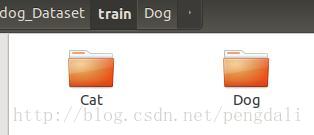
下载后把数据分成dog和cat两个目录来存放
三、训练
训练的时候会自动去下权值,比如vgg19_weights_tf_dim_ordering_tf_kernels_notop.h5,但是如果我们已经下载好了的话,可以改源代码,让他直接读取我们的下载好的权值,比如在resnet50.py中

1、VGG19
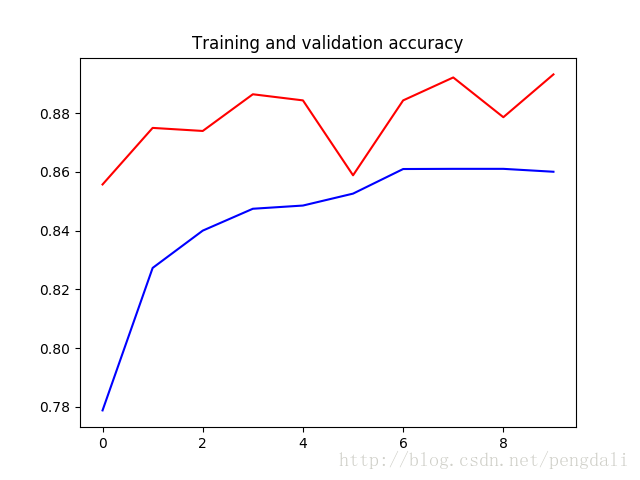
vgg19的深度有26层,参数达到了549M,原模型最后有3个全连接层做分类器所以我还是加了一个1024的全连接层,训练10轮的情况达到了89%
2、ResNet50
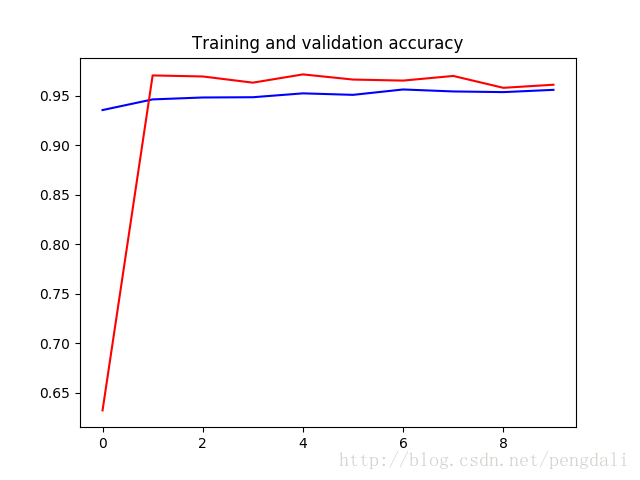
ResNet50的深度达到了168层,但是参数只有99M,分类模型我就简单点,一层直接分类,训练10轮的达到了96%的准确率
3、inception_v3
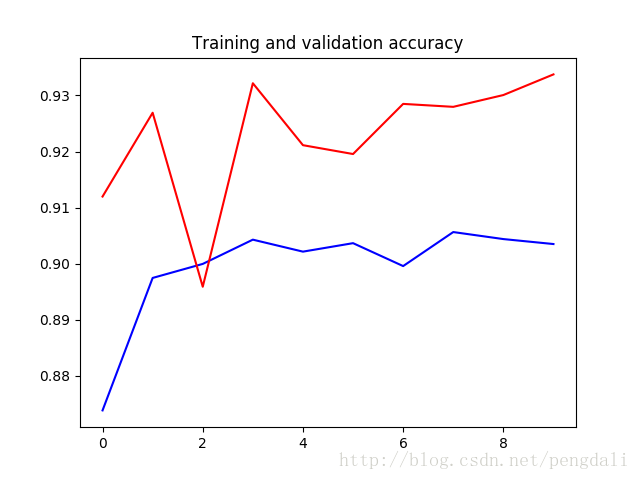
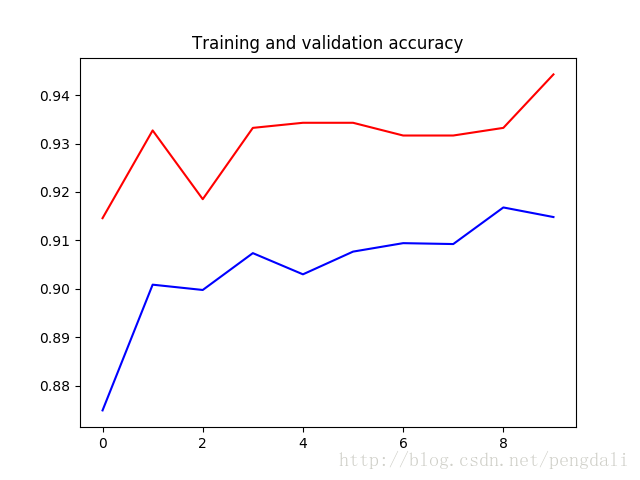
InceptionV3的深度159层,参数92M,训练10轮的结果
这是一层直接分类的结果
这是加了一个512全连接的,大家可以随意调整测试
四、完整的代码
- # -*- coding: utf-8 -*-
- import os
- from keras.utils import plot_model
- from keras.applications.resnet50 import ResNet50
- from keras.applications.vgg19 import VGG19
- from keras.applications.inception_v3 import InceptionV3
- from keras.layers import Dense,Flatten,GlobalAveragePooling2D
- from keras.models import Model,load_model
- from keras.optimizers import SGD
- from keras.preprocessing.image import ImageDataGenerator
- import matplotlib.pyplot as plt
- class PowerTransferMode:
- #数据准备
- def DataGen(self, dir_path, img_row, img_col, batch_size, is_train):
- if is_train:
- datagen = ImageDataGenerator(rescale=1./255,
- zoom_range=0.25, rotation_range=15.,
- channel_shift_range=25., width_shift_range=0.02, height_shift_range=0.02,
- horizontal_flip=True, fill_mode='constant')
- else:
- datagen = ImageDataGenerator(rescale=1./255)
- generator = datagen.flow_from_directory(
- dir_path, target_size=(img_row, img_col),
- batch_size=batch_size,
- #class_mode='binary',
- shuffle=is_train)
- return generator
- #ResNet模型
- def ResNet50_model(self, lr=0.005, decay=1e-6, momentum=0.9, nb_classes=2, img_rows=197, img_cols=197, RGB=True, is_plot_model=False):
- color = 3 if RGB else 1
- base_model = ResNet50(weights='imagenet', include_top=False, pooling=None, input_shape=(img_rows, img_cols, color),
- classes=nb_classes)
- #冻结base_model所有层,这样就可以正确获得bottleneck特征
- for layer in base_model.layers:
- layer.trainable = False
- x = base_model.output
- #添加自己的全链接分类层
- x = Flatten()(x)
- #x = GlobalAveragePooling2D()(x)
- #x = Dense(1024, activation='relu')(x)
- predictions = Dense(nb_classes, activation='softmax')(x)
- #训练模型
- model = Model(inputs=base_model.input, outputs=predictions)
- sgd = SGD(lr=lr, decay=decay, momentum=momentum, nesterov=True)
- model.compile(loss='categorical_crossentropy', optimizer=sgd, metrics=['accuracy'])
- #绘制模型
- if is_plot_model:
- plot_model(model, to_file='resnet50_model.png',show_shapes=True)
- return model
- #VGG模型
- def VGG19_model(self, lr=0.005, decay=1e-6, momentum=0.9, nb_classes=2, img_rows=197, img_cols=197, RGB=True, is_plot_model=False):
- color = 3 if RGB else 1
- base_model = VGG19(weights='imagenet', include_top=False, pooling=None, input_shape=(img_rows, img_cols, color),
- classes=nb_classes)
- #冻结base_model所有层,这样就可以正确获得bottleneck特征
- for layer in base_model.layers:
- layer.trainable = False
- x = base_model.output
- #添加自己的全链接分类层
- x = GlobalAveragePooling2D()(x)
- x = Dense(1024, activation='relu')(x)
- predictions = Dense(nb_classes, activation='softmax')(x)
- #训练模型
- model = Model(inputs=base_model.input, outputs=predictions)
- sgd = SGD(lr=lr, decay=decay, momentum=momentum, nesterov=True)
- model.compile(loss='categorical_crossentropy', optimizer=sgd, metrics=['accuracy'])
- # 绘图
- if is_plot_model:
- plot_model(model, to_file='vgg19_model.png',show_shapes=True)
- return model
- # InceptionV3模型
- def InceptionV3_model(self, lr=0.005, decay=1e-6, momentum=0.9, nb_classes=2, img_rows=197, img_cols=197, RGB=True,
- is_plot_model=False):
- color = 3 if RGB else 1
- base_model = InceptionV3(weights='imagenet', include_top=False, pooling=None,
- input_shape=(img_rows, img_cols, color),
- classes=nb_classes)
- # 冻结base_model所有层,这样就可以正确获得bottleneck特征
- for layer in base_model.layers:
- layer.trainable = False
- x = base_model.output
- # 添加自己的全链接分类层
- x = GlobalAveragePooling2D()(x)
- x = Dense(1024, activation='relu')(x)
- predictions = Dense(nb_classes, activation='softmax')(x)
- # 训练模型
- model = Model(inputs=base_model.input, outputs=predictions)
- sgd = SGD(lr=lr, decay=decay, momentum=momentum, nesterov=True)
- model.compile(loss='categorical_crossentropy', optimizer=sgd, metrics=['accuracy'])
- # 绘图
- if is_plot_model:
- plot_model(model, to_file='inception_v3_model.png', show_shapes=True)
- return model
- #训练模型
- def train_model(self, model, epochs, train_generator, steps_per_epoch, validation_generator, validation_steps, model_url, is_load_model=False):
- # 载入模型
- if is_load_model and os.path.exists(model_url):
- model = load_model(model_url)
- history_ft = model.fit_generator(
- train_generator,
- steps_per_epoch=steps_per_epoch,
- epochs=epochs,
- validation_data=validation_generator,
- validation_steps=validation_steps)
- # 模型保存
- model.save(model_url,overwrite=True)
- return history_ft
- # 画图
- def plot_training(self, history):
- acc = history.history['acc']
- val_acc = history.history['val_acc']
- loss = history.history['loss']
- val_loss = history.history['val_loss']
- epochs = range(len(acc))
- plt.plot(epochs, acc, 'b-')
- plt.plot(epochs, val_acc, 'r')
- plt.title('Training and validation accuracy')
- plt.figure()
- plt.plot(epochs, loss, 'b-')
- plt.plot(epochs, val_loss, 'r-')
- plt.title('Training and validation loss')
- plt.show()
- if __name__ == '__main__':
- image_size = 197
- batch_size = 32
- transfer = PowerTransferMode()
- #得到数据
- train_generator = transfer.DataGen('data/cat_dog_Dataset/train', image_size, image_size, batch_size, True)
- validation_generator = transfer.DataGen('data/cat_dog_Dataset/test', image_size, image_size, batch_size, False)
- #VGG19
- #model = transfer.VGG19_model(nb_classes=2, img_rows=image_size, img_cols=image_size, is_plot_model=False)
- #history_ft = transfer.train_model(model, 10, train_generator, 600, validation_generator, 60, 'vgg19_model_weights.h5', is_load_model=False)
- #ResNet50
- model = transfer.ResNet50_model(nb_classes=2, img_rows=image_size, img_cols=image_size, is_plot_model=False)
- history_ft = transfer.train_model(model, 10, train_generator, 600, validation_generator, 60, 'resnet50_model_weights.h5', is_load_model=False)
- #InceptionV3
- #model = transfer.InceptionV3_model(nb_classes=2, img_rows=image_size, img_cols=image_size, is_plot_model=True)
- #history_ft = transfer.train_model(model, 10, train_generator, 600, validation_generator, 60, 'inception_v3_model_weights.h5', is_load_model=False)
- # 训练的acc_loss图
- transfer.plot_training(history_ft)
实战 迁移学习 VGG19、ResNet50、InceptionV3 实践 猫狗大战 问题的更多相关文章
- keras系列︱迁移学习:利用InceptionV3进行fine-tuning及预测、完美案例(五)
引自:http://blog.csdn.net/sinat_26917383/article/details/72982230 之前在博客<keras系列︱图像多分类训练与利用bottlenec ...
- 基于深度学习和迁移学习的识花实践——利用 VGG16 的深度网络结构中的五轮卷积网络层和池化层,对每张图片得到一个 4096 维的特征向量,然后我们直接用这个特征向量替代原来的图片,再加若干层全连接的神经网络,对花朵数据集进行训练(属于模型迁移)
基于深度学习和迁移学习的识花实践(转) 深度学习是人工智能领域近年来最火热的话题之一,但是对于个人来说,以往想要玩转深度学习除了要具备高超的编程技巧,还需要有海量的数据和强劲的硬件.不过 Tens ...
- 1、VGG16 2、VGG19 3、ResNet50 4、Inception V3 5、Xception介绍——迁移学习
ResNet, AlexNet, VGG, Inception: 理解各种各样的CNN架构 本文翻译自ResNet, AlexNet, VGG, Inception: Understanding va ...
- 1 如何使用pb文件保存和恢复模型进行迁移学习(学习Tensorflow 实战google深度学习框架)
学习过程是Tensorflow 实战google深度学习框架一书的第六章的迁移学习环节. 具体见我提出的问题:https://www.tensorflowers.cn/t/5314 参考https:/ ...
- Google Tensorflow 迁移学习 Inception-v3
附上代码加数据地址 https://github.com/Liuyubao/transfer-learning ,欢迎参考. 一.Inception-V3模型 1.1 详细了解模型可参考以下论文: [ ...
- 【深度学习系列】迁移学习Transfer Learning
在前面的文章中,我们通常是拿到一个任务,譬如图像分类.识别等,搜集好数据后就开始直接用模型进行训练,但是现实情况中,由于设备的局限性.时间的紧迫性等导致我们无法从头开始训练,迭代一两百万次来收敛模型, ...
- 迁移学习︱艺术风格转化:Artistic style-transfer+ubuntu14.0+caffe(only CPU)
说起来这门技术大多是秀的成分高于实际,但是呢,其也可以作为图像增强的工具,看到一些比赛拿他作训练集扩充,还是一个比较好的思路.如何在caffe上面实现简单的风格转化呢? 好像网上的博文都没有说清楚,而 ...
- TensorFlow从1到2(九)迁移学习
迁移学习基本概念 迁移学习是这两年比较火的一个话题,主要原因是在当前的机器学习中,样本数据的获取是成本最高的一块.而迁移学习可以有效的把原有的学习经验(对于模型就是模型本身及其训练好的权重值)带入到新 ...
- 『TensorFlow』迁移学习
完全版见github:TransforLearning 零.迁移学习 将一个领域的已经成熟的知识应用到其他的场景中称为迁移学习.用神经网络的角度来表述,就是一层层网络中每个节点的权重从一个训练好的网络 ...
随机推荐
- Broadcast机制(二)
内容提纲: 在本节课当中,我会继续为大家讲解Android的广播机制,重点内容有以下的两个方面: a) 在应用程序当中注册BroadcastReceiver的方法 b) ...
- 「CF55D」Beautiful numbers
传送门 Luogu 解题思路 毒瘤数位DP,发现一个前缀我们只需要记录它对 \(\operatorname{lcm}(1,2,3,\cdots,9)=2520\) 取模的值即可,所以我们在 DP 时记 ...
- scikitlearn库中调用k-近邻算法的操作步骤
1.k近邻算法可以说是唯一一个没有训练过程的机器学习算法,它含有训练基础数据集,但是是一种没有模型的算法,为了将其和其他算法进行统一,我们把它的训练数据集当做它的模型本身.2.在scikitlearn ...
- keras人工神经网络构建入门
//2019.07.29-301.Keras 是提供一些高度可用神经网络框架的 Python API ,能帮助你快速的构建和训练自己的深度学习模型,它的后端是 TensorFlow 或者 Theano ...
- 吴裕雄--天生自然JAVA面向对象高级编程学习笔记:包装类
public class WrapperDemo01{ public static void main(String args[]){ int x = 30 ; // 基本数据类型 Integer i ...
- 站在巨人的肩膀上才能看得更加远[Amo]
本来只是路过,写详细一点. 我看楼主浮躁得不得了.现在什么都不要做了,先去看几遍<不要做浮躁的嵌入式工程师>这篇文章,想清楚了,再动手吧. 我做了个实例,不用ST的库来点LED,解答你的问 ...
- python SSTI绕过
原理首先以jinja2模板注入为例:{{request[request.args.param]}} 可以用 {{request|attr(request.args.param)}} 替代绕过" ...
- excel表格数据导入导出
/** * 导出数据到excel表格 * Created by shenjianhua on 2018-12-28 */ package com.luer.comm.excel; import jav ...
- Essay写作:Conclusion部分写作辅导
论文写到最后,一般正文就要以Conclusion结束了.Conclusion部分是一篇论文的正文结尾(the last section of a paper,last paragraph),主要是客观 ...
- win上java1.7和1.8版本修改环境变量无效.md
网上找了很多办法都没用. 解决办法: 看看自己 "系统环境变量" 中是不是有 "C:\ProgramData\Oracle\Java\javapath" 这项配 ...