
Vue.js(19)之 封装calendar组件
效果
需求
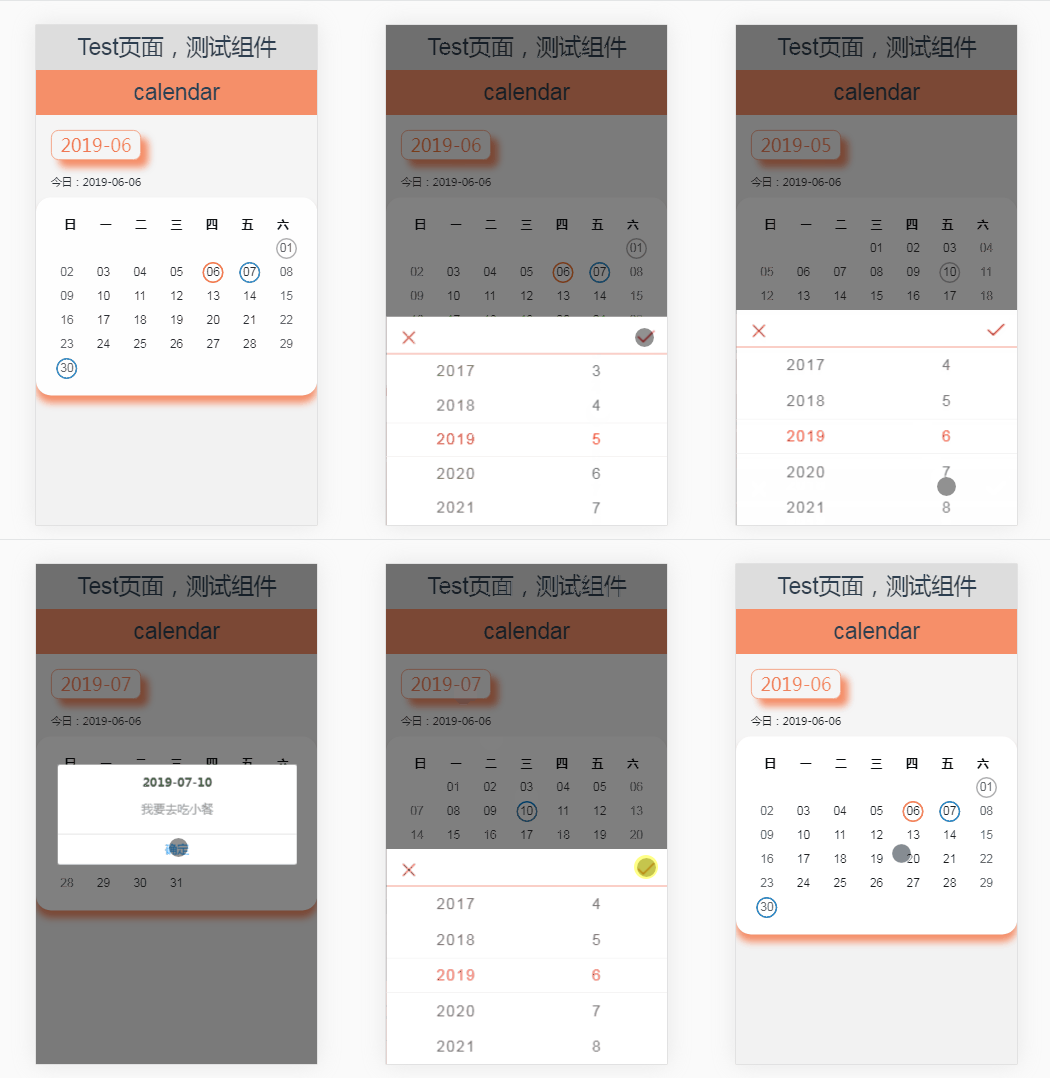
1、实现一个日历组件,如图:

2、显示某天的事项:

3、事项是模拟父组件请求接口返回的,数据格式如下:
[

        {

          id: '232',

          date: '2019-06-01',

          info: '我要去吃大餐'

        },

        {

          id: '292',

          date: '2019-06-06',

          info: '我要去吃大餐'

        },

        {

          id: '292',

          date: '2019-06-07',

          info: '我要去吃大餐'

        },

        {

          id: '369',

          date: '2019-06-30',

          info: '我要去吃大餐'

        }

      ]
4、把事项添加到日历组件中,数据格式如下:

代码解析
父组件页面:
<template>

  <div class="test-container">

    <h1>Test页面,测试组件</h1>

    <!-- 日历 -->

    <calendar v-if="calendarVisible" @getDateInfo="getDateInfo" :propsInfoList="propsInfoList" :propsTime="propsTime"></calendar>

  </div>

</template>

<script>

import calendar from '@/components/Calendar/Calendar.vue'

export default {

  name: 'test',

  components: {

    "calendar": calendar

  },

  data() {

    return {

      calendarVisible: true,

      propsTime: '',

      propsInfoList: '',

      middle: [

        {

          id: '232',

          date: '2019-06-01',

          info: '我要去吃大餐'

        },

        {

          id: '292',

          date: '2019-06-06',

          info: '我要去吃大餐'

        },

        {

          id: '292',

          date: '2019-06-07',

          info: '我要去吃大餐'

        },

        {

          id: '369',

          date: '2019-06-30',

          info: '我要去吃大餐'

        }

      ]

    }

  },

  created() {

    this.propsInfoList = JSON.stringify(this.middle)

    this.propsTime = this.getToday()

  },

  mounted() {

    window.alert('测试时间为19年 5、6、7月,完成是在6月')

  },

  methods: {

    // 格式化当前日期 YYYY-MM-DD

    getToday() {

      let nowDate = new Date()

      let yy = nowDate.getFullYear().toString()

      let mm = (nowDate.getMonth() + 1 + '').padStart(2,'0')

      let dd = (nowDate.getDate() + '').padStart(2,'0')

      // let hh = nowDate.getHours().toString().padStart(2,'0')

      // let mt = (nowDate.getMinutes() + '').padStart(2,'0')

      // let ss = (nowDate.getSeconds() + '').padStart(2,'0')

      return `${yy}-${mm}-${dd}` // -${hh}-${mt}-${ss}

    },

    // 组件传值

    getDateInfo(year, month) {

      let _this = this

      _this.propsTime = `${year}-${month}`

      _this.calendarVisible = false

      setTimeout(() => {

        _this.propsInfoList = []

        let middle

        if(month == '05') {

          middle  = [

            {

              id: '232',

              date: '2019-05-10',

              info: '我要去吃小餐'

            }

          ]

        } else if (month == '06') {

          middle = _this.middle

        } else if (month == '07') {

          middle  = [

            {

              id: '232',

              date: '2019-07-10',

              info: '我要去吃小餐'

            }

          ]

        } else {

          middle = ''

        }

        _this.propsInfoList = JSON.stringify(middle)

        _this.calendarVisible = true

      }, 100)

    }

  }

}

</script>
日历子组件:
<template>

  <div class="calendar-container">

    <h1>calendar</h1>

    <div class="show-date" @click="clickData">{{showDate}}</div>

    <div class="now-time">今日:{{exactTime}}</div>

    <div class="calendar">

      <ul class="calendar-header">

        <li>日</li>

        <li>一</li>

        <li>二</li>

        <li>三</li>

        <li>四</li>

        <li>五</li>

        <li>六</li>

      </ul>

      <ul class="calendar-body">

        <li class="calendar-row" v-for="(item, index) in JSON.parse(calendarData)" :key="index">

          <span v-for="(subItem, subIndex) in item" :class="[subIndex == 0 || subIndex == 6? 'weekend': 'weekday', subItem.type == '1'? 'exact-time': '', subItem.type == '0'? 'already-time': '', subItem.type == '2'? 'soon-time': '']" @click="showInfo(subItem)" :key="subIndex">

            {{subItem.date}}

          </span>

        </li>

      </ul>

    </div>

    <mt-popup v-model="popupVisible" position="bottom">

      <mt-picker :slots="slots" :showToolbar="true" :visibleItemCount="5" :itemHeight="itemsHeight" ref="picker">

        <img src="@/assets/images/picker_cancel.png" class="picker_cancel" v-on:click="cancelFunc()">

        <img src ="@/assets/images/picker_sure.png" class="picker_sure" v-on:click="sureFunc()">

      </mt-picker>

    </mt-popup>

  </div>

</template>
日历子组件逻辑:
import { MessageBox } from 'mint-ui'

export default {

  name: "calendar",

  props: {

    propsTime: String,

    propsInfoList: String

  },

  data() {

    return {

      time: '',

      infoList: '',

      calendarData: [],

      showDate: '',

      exactTime: '',

      itemsHeight: 95 * window.screen.height / 1334,

      popupVisible: false,

      slots: []

    }

  },

  created() {

    this.infoList = this.propsInfoList

    this.time = this.propsTime.split('-')

    const date = this.getToday()

    this.exactTime = date.slice(0,3).join('-')

    this.getCalendar(...(this.time))

    this.getSlotsArray(...(date.slice(0,2)))

  },

  methods: {

    // 日历组件

    getCalendar(year, month) {

      let _this = this

      const rightNow = _this.exactTime

      _this.showDate = `${year}-${month

      const firstDate = new Date(year, month - 1, 1)

      const firstDay = firstDate.getDay()

      const isLeapYear = year % 100 == 0? year % 400 == 0? 1: 0: year % 4 == 0 ? 1: 0

      const monthArray = [31, 28 + isLeapYear, 31, 30, 31, 30, 31, 31, 30, 31, 30, 31]

      const weeekLines =Math.ceil((monthArray[month - 1] + firstDay)/7)

      let calendar = []

      for(let i = 0; i < weeekLines; i++) {

        let weeekLinesInfo = []

        for(let j = 0; j < 7; j++) {

          const cellNo = i * 7 + j

          const datePerLine = cellNo - firstDay + 1

          if(datePerLine <= 0 || datePerLine > monthArray[month - 1]) {

            let outOfMonth = {

              "type" : 'null',

              "date" : ''

            }

            weeekLinesInfo[j] = outOfMonth

          } else {

            let day = (datePerLine + '').padStart(2,'0')

            let inOfMonth = {

              "type" : '',

              "date" : day,

              "isDone": '',

              "infor": ''

            }

            const propsDate = `${year}-${month}-${day}`

            if(propsDate == rightNow){

              inOfMonth.type = "1"

            }

            const reservations = JSON.parse(_this.infoList)

            for(let k = 0; k < reservations.length; k++) {

              if(propsDate == reservations[k].date){

                // inOfMonth.type = "1"

                inOfMonth.infor = reservations[k].info

                if(rightNow == reservations[k].date) {

                  inOfMonth.type = "1"

                  inOfMonth.isDone = "doing"

                } else if (rightNow > reservations[k].date) {

                  inOfMonth.type = "0"

                  inOfMonth.isDone = "pass"

                } else if (rightNow < reservations[k].date) {

                  inOfMonth.type = "2"

                  inOfMonth.isDone = "will"

                }

              }

            }

            weeekLinesInfo[j] = inOfMonth

          }

        }

        calendar.push(weeekLinesInfo)

      }

      window.console.log(calendar)

      _this.calendarData = JSON.stringify(calendar)

    },

    // 格式化当前日期 YYYY-MM-DD

    getToday() {

      let nowDate = new Date()

      let yy = nowDate.getFullYear().toString()

      let mm = (nowDate.getMonth() + 1 + '').padStart(2,'0')

      let dd = (nowDate.getDate() + '').padStart(2,'0')

      let hh = nowDate.getHours().toString().padStart(2,'0')

      let mt = (nowDate.getMinutes() + '').padStart(2,'0')

      let ss = (nowDate.getSeconds() + '').padStart(2,'0')

      return [yy, mm, dd, hh, mt, ss]

      // return `${yy}-${mm}-${dd}-${hh}-${mt}-${ss}`

    },

    // 组装 picker 数组

    getSlotsArray(year, month){

      let _this = this

      let yearArray = []

      for(let i = -10 ; i <= 10 ; i ++){

        yearArray.push(year - 1 + i)

      }

      let monthArray = [1, 2, 3, 4, 5, 6, 7, 8, 9, 10, 11, 12]

      let slots = [

        {

          values:yearArray,

          className:"slot1",

          defaultIndex: 11

        },

        {

          values:monthArray,

          className:"slot2",

          defaultIndex:month - 1

        }

      ]

      _this.slots = slots

    },

    // 显示日期弹窗

    clickData(){

      this.popupVisible = true

    },

    // 取消按钮

    cancelFunc(){

      this.popupVisible = false;

    },

    // 确认按钮

    sureFunc() {

      let _this = this

      _this.popupVisible = false

      const clickData = _this.$refs.picker.getValues()

      const year = clickData[0] + ''

      const month = (clickData[1] + '').padStart(2,'0')

      const day = _this.time[2]

      _this.getDateInfo(year, month)

      _this.getCalendar(year, month)

    },

    // 调用父组件定义的方法

    getDateInfo(year, month) {

      this.$emit('getDateInfo', year, month)

    },

    // 点击展示某天的事项信息

    showInfo(info) {

      let _this = this

      const infor = info

      if(infor.infor) {

        const [year, month] = _this.showDate.split('-')

        console.log(year, month, info)

        const titleDate = `${year}-${month}-${info.date}`

        const preview = info.infor

        MessageBox({

          title: titleDate,

          message: preview,

          showCancelButton: false,

          closeOnClickModal: true

        })

      }

    }

  }

}
其他:为了减少篇幅,省略样式
Vue.js(19)之 封装calendar组件的更多相关文章
- 每天记录一点:NetCore获得配置文件 appsettings.json vue-router页面传值及接收值 详解webpack + vue + node 打造单页面(入门篇) 30分钟手把手教你学webpack实战 vue.js+webpack模块管理及组件开发
每天记录一点:NetCore获得配置文件 appsettings.json 用NetCore做项目如果用EF ORM在网上有很多的配置连接字符串,读取以及使用方法 由于很多朋友用的其他ORM如S ...
- vue.js入门(3)——组件通信
5.2 组件通信 尽管子组件可以用this.$parent访问它的父组件及其父链上任意的实例,不过子组件应当避免直接依赖父组件的数据,尽量显式地使用 props 传递数据.另外,在子组件中修改父组件的 ...
- Vue.js 3.x 中跨层级组件如何传递数据?
provide/inject 基本用法 在 Vue.js 中,跨层级组件如果想要传递数据,我们可以直接使用 props 来将祖先组件的数据传递给子孙组件: 注:上图来自 Vue.js 官网:Prop ...
- Vue.js 2.x笔记:组件(5)
1. 组件简介 组件(Component)是 Vue.js 最强大的功能之一,组件可以扩展 HTML 元素,封装可重用的代码. 组件:为了拆分Vue实例的代码量,以不同的组件来划分不同的功能模块,需要 ...
- vue.js基础知识篇(6):组件详解
第11章:组件详解 组件是Vue.js最推崇也最强大的功能之一,核心目标是可重用性. 我们把组件代码按照template.style.script的拆分方式,放置到对应的.vue文件中. 1.注册 V ...
- vue.js 二维码生成组件
安装 通过NPM安装 npm install vue-qart --save 插件应用 将vue-qart引入你的应用 import VueQArt from 'vue-qart' new Vue({ ...
- Vue.js 系列教程 2:组件,Props,Slots
原文:intro-to-vue-2-components-props-slots 译者:nzbin 这是关于 JavaScript 框架 Vue.js 五个教程的第二部分.在这一部分,我们将学习组件, ...
- Vue.js 3 Step 创建一个组件
Step1:Vue.extend()创建组件 Step2:Vue.component()注册组件,注册的标签一定要用小写 Step3:挂载点使用组件 <!doctype html> < ...
- Vue.js 桌面端自定义滚动条组件|vue美化滚动条VScroll
基于vue.js开发的小巧PC端自定义滚动条组件VScroll. 前段时间有给大家分享一个vue桌面端弹框组件,今天再分享最近开发的一个vue pc端自定义滚动条组件. vscroll 一款基于vue ...
随机推荐
- Mixin类的实现
python类的多重继承由于C3算法的原因导致实现时需要提前规划先后顺序才能正常使用. 这会让人在python中使用多重继承时感到十分的麻烦. 而Mixin类则为我们带来了自由的多重继承和插拔式的舒适 ...
- Jquery动画效果设置大全
<!DOCTYPE html> <html lang="en"> <head> <meta charset="UTF-8&quo ...
- NO25 三剑客之SED行天下
功能说明 Sed是Stream Editor(流编辑器)缩写,是操作.过滤和转换文本内容的强大工具.常用功能有增删改查,过滤,取行. [root@oldboy ~]# sed --version #→ ...
- Docker 简单使用笔记
Docker笔记 安装 首先检查是否已经安装过Docker:yum list installed | grep docker,如果已经安装过需要删除旧的Docker:yum remove dock ...
- PyCharm配置TensorFlow开发环境
Anaconda自带的Jupyter Notebook很方便,但是执行速度较慢,缺少调试环境.PyCharm与Jupyter Notebook相比,执行速度更快,而且提供了类似Matlab的调试工具, ...
- [笔记]ul>li>a做分布时, 让其居中显示效果
结构: <div id="page"> <ul> <li><a href="#">首页</a>< ...
- 【WPF学习】第二十二章 文本控件
WPF提供了三个用于输入文本的控件:TextBox.RichTextBox和PasswordBox.PasswordBox控件直接继承自Control类.TextBox和RichTextBox控件间接 ...
- axios 如何取消已发送的请求?
前言 最近在项目中遇到一个问题,在连续发送同一请求时,如果第二次请求比第一次请求快,那么实际显示的是第一次请求的数据,这就会造成数据和我选择的内容不一致的问题.解决的方案:在后续发送请求时,判断之前的 ...
- windows搭建安装react-native环境
在win10环境下,利用Genymotion模拟器,配置react-native的环境. 一.安装JDK 在网上下载jdk,版本最好是1.8以上.安装后要对环境变量进行配置. 同时在 Path 中配置 ...
- CPU与内存
一.存储单元内存有被划分为若干个存储单元,每个存储单元可存放1一个字节,即8个二进制位.因此内存的最小寻址单位是以字节进行的,每个存储单元都有一个编号.比如1GB的内存,可以储存1024*1024*1 ...