
Synchronous and Asynchronous I/O [Windows]
There are two types of input/output (I/O) synchronization: synchronous I/O and asynchronous I/O. Asynchronous I/O is also referred to as overlapped I/O.
In synchronous file I/O, a thread starts an I/O operation and immediately enters a wait state until the I/O request has completed. A thread performing asynchronous file I/O sends an I/O request to the kernel by calling an appropriate function. If the request is accepted by the kernel, the calling thread continues processing another job until the kernel signals to the thread that the I/O operation is complete. It then interrupts its current job and processes the data from the I/O operation as necessary.
The two synchronization types are illustrated in the following figure.
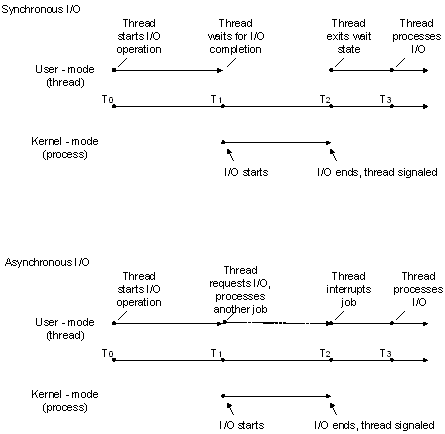
In situations where an I/O request is expected to take a large amount of time, such as a refresh or backup of a large database or a slow communications link, asynchronous I/O is generally a good way to optimize processing efficiency. However, for relatively fast I/O operations, the overhead of processing kernel I/O requests and kernel signals may make asynchronous I/O less beneficial, particularly if many fast I/O operations need to be made. In this case, synchronous I/O would be better. The mechanisms and implementation details of how to accomplish these tasks vary depending on the type of device handle that is used and the particular needs of the application. In other words, there are usually multiple ways to solve the problem.
Synchronous and Asynchronous I/O Considerations
If a file or device is opened for synchronous I/O (that is, FILE_FLAG_OVERLAPPED is not specified), subsequent calls to functions such as WriteFile can block execution of the calling thread until one of the following events occurs:
- The I/O operation completes (in this example, a data write).
- An I/O error occurs. (For example, the pipe is closed from the other end.)
- An error was made in the call itself (for example, one or more parameters are not valid).
- Another thread in the process calls the CancelSynchronousIo function using the blocked thread's thread handle, which terminates I/O for that thread, failing the I/O operation.
- The blocked thread is terminated by the system; for example, the process itself is terminated, or another thread calls the TerminateThread function using the blocked thread's handle. (This is generally considered a last resort and not good application design.)
In some cases, this delay may be unacceptable to the application's design and purpose, so application designers should consider using asynchronous I/O with appropriate thread synchronization objects such as I/O completion ports. For more information about thread synchronization, see About Synchronization.
A process opens a file for asynchronous I/O in its call to CreateFile by specifying the FILE_FLAG_OVERLAPPED flag in the dwFlagsAndAttributes parameter. If FILE_FLAG_OVERLAPPED is not specified, the file is opened for synchronous I/O. When the file has been opened for asynchronous I/O, a pointer to an OVERLAPPED structure is passed into the call to ReadFile and WriteFile. When performing synchronous I/O, this structure is not required in calls to ReadFile and WriteFile.
备注
If a file or device is opened for asynchronous I/O, subsequent calls to functions such as WriteFile using that handle generally return immediately but can also behave synchronously with respect to blocked execution. For more information, see https://support.microsoft.com/kb/156932.
Although CreateFile is the most common function to use for opening files, disk volumes, anonymous pipes, and other similar devices, I/O operations can also be performed using a handle typecast from other system objects such as a socket created by the socket or accept functions.
Handles to directory objects are obtained by calling the CreateFile function with the FILE_FLAG_BACKUP_SEMANTICS attribute. Directory handles are almost never used—backup applications are one of the few applications that will typically use them.
After opening the file object for asynchronous I/O, an OVERLAPPED structure must be properly created, initialized, and passed into each call to functions such as ReadFile and WriteFile. Keep the following in mind when using the OVERLAPPED structure in asynchronous read and write operations:
- Do not deallocate or modify the OVERLAPPED structure or the data buffer until all asynchronous I/O operations to the file object have been completed.
- If you declare your pointer to the OVERLAPPED structure as a local variable, do not exit the local function until all asynchronous I/O operations to the file object have been completed. If the local function is exited prematurely, the OVERLAPPED structure will go out of scope and it will be inaccessible to any ReadFile or WriteFile functions it encounters outside of that function.
You can also create an event and put the handle in the OVERLAPPED structure; the wait functions can then be used to wait for the I/O operation to complete by waiting on the event handle.
As previously stated, when working with an asynchronous handle, applications should use care when making determinations about when to free resources associated with a specified I/O operation on that handle. If the handle is deallocated prematurely, ReadFile or WriteFile may incorrectly report that the I/O operation is complete. Further, the WriteFile function will sometimes return TRUE with a GetLastError value of ERROR_SUCCESS, even though it is using an asynchronous handle (which can also return FALSE with ERROR_IO_PENDING). Programmers accustomed to synchronous I/O design will usually release data buffer resources at this point because TRUE and ERROR_SUCCESS signify the operation is complete. However, if I/O completion ports are being used with this asynchronous handle, a completion packet will also be sent even though the I/O operation completed immediately. In other words, if the application frees resources after WriteFile returns TRUE with ERROR_SUCCESS in addition to in the I/O completion port routine, it will have a double-free error condition. In this example, the recommendation would be to allow the completion port routine to be solely responsible for all freeing operations for such resources.
The system does not maintain the file pointer on asynchronous handles to files and devices that support file pointers (that is, seeking devices), therefore the file position must be passed to the read and write functions in the related offset data members of the OVERLAPPED structure. For more information, see WriteFile and ReadFile.
File pointer position for a synchronous handle is maintained by the system as data is read or written and can also be updated using the SetFilePointer or SetFilePointerEx function.
An application can also wait on the file handle to synchronize the completion of an I/O operation, but doing so requires extreme caution. Each time an I/O operation is started, the operating system sets the file handle to the nonsignaled state. Each time an I/O operation is completed, the operating system sets the file handle to the signaled state. Therefore, if an application starts two I/O operations and waits on the file handle, there is no way to determine which operation is finished when the handle is set to the signaled state. If an application must perform multiple asynchronous I/O operations on a single file, it should wait on the event handle in the specific OVERLAPPED structure for each I/O operation, rather than on the common file handle.
To cancel all pending asynchronous I/O operations, use either:
- CancelIo—this function only cancels operations issued by the calling thread for the specified file handle.
- CancelIoEx—this function cancels all operations issued by the threads for the specified file handle.
Use CancelSynchronousIo to cancel pending synchronous I/O operations.
The ReadFileEx and WriteFileEx functions enable an application to specify a routine to execute (see FileIOCompletionRoutine) when the asynchronous I/O request is completed.
Synchronous and Asynchronous I/O [Windows]的更多相关文章
- Java Messages Synchronous and Asynchronous
//The Consumer Class Consumes Messages in a Synchronous Manner public class Consumer { public static ...
- 操作系统OS - 阻塞(Blocking)非阻塞(Non-Blocking)与同步(Synchronous)异步(Asynchronous)
参考: http://blog.jobbole.com/103290/ https://www.zhihu.com/question/19732473/answer/23434554 http://b ...
- Asynchronous Disk I/O Appears as Synchronous on Windows
Summary File I/O on Microsoft Windows can be synchronous or asynchronous. The default behavior for I ...
- Should I expose asynchronous wrappers for synchronous methods?
Lately I've received several questions along the lines of the following, which I typically summarize ...
- 磁盘异步I / O在Windows上显示为同步
概要 Microsoft Windows上的文件I / O可以是同步或异步的.I / O的默认行为是同步的,其中调用I / O函数并在I / O完成时返回.异步I / O允许I / O函数立即将执行返 ...
- C#的多线程——使用async和await来完成异步编程(Asynchronous Programming with async and await)
https://msdn.microsoft.com/zh-cn/library/mt674882.aspx 侵删 更新于:2015年6月20日 欲获得最新的Visual Studio 2017 RC ...
- Testing for the End of a File (Windows 的异步 IO)
The ReadFile function checks for the end-of-file condition (EOF) differently for synchronous and asy ...
- Async/Await - Best Practices in Asynchronous Programming
https://msdn.microsoft.com/en-us/magazine/jj991977.aspx Figure 1 Summary of Asynchronous Programming ...
- Async/Await - Best Practices in Asynchronous Programming z
These days there’s a wealth of information about the new async and await support in the Microsoft .N ...
随机推荐
- 配置并验证Split分离解析
配置并验证Split分离解析 案例1:配置并验证Split分离解析 案例2:查看进程信 ...
- Spring(三):bean的自动装配
Bean的自动装配 自动装配是Spring满足bean依赖的一种方式. Spring会在上下文中自动寻找,并自动给bean装配属性 Spring中三种装配方式 在xml中显式的配置. 在java中显式 ...
- MySQL数据库三
MySQL数据库三 多表查询: 有条件的内连接 将两张表根据相同的id连接起来 select * from info join details on info.id = details.id sele ...
- C#多线程系列(1):Thread
目录 1,获取当前线程信息 2,管理线程状态 2.1 启动与参数传递 2.1.1 ParameterizedThreadStart 2.1.2 使用静态变量或类成员变量 2.1.3 委托与Lambda ...
- python3(四)list tuple
# !/usr/bin/env python3 # -*- coding: utf-8 -*- # list是一种有序的集合,可以随时添加和删除其中的元素. classmates = ['Michae ...
- 将class 编译后文件内容输入到 文本文件中的命令
javap -c InnerTest$1 > InnerTest$1.txt
- 通过bat文件 进行mysql 连接 或者 操作涉及 密码的,如果密码 中有 % 号的话要特殊处理
比如我想在bat文件中进行一个数据库的连接 或者进行一个数据库中的 数据 导入或者导出(mysqldump) 这样子都会用到数据库密码, 假如这个数据库的密码 中又有 % 的话就要特殊转义一下才行执行 ...
- 文件上传——客户端检测绕过(JavaScript检测)(一)
前言 通常再一个web程序中,一般会存在登陆注册功能,登陆后一般会有上传头像等功能,如果上传验证不严格就可能造成攻击者直接上传木马,进而控制整个web业务控制权.下面通过实例,如果程序只进行了客户端J ...
- 【Java】 Variable 变量
什么是Variable变量? - 变量是内存中的一个存储区域 - 这个存储区域内的数据允许在同一类型范围内不断变化 - 是程序最基本的存储单元,包含三个要素[变量类型][变量名][存储的值] 为什么需 ...
- Word文档创建目录
一.以设置两级目录为例: 1.设置两个标题,标题1对应第一级目录,标题2对应第二级目录. 点击标题1,点击修改: 设置好样式和格式: 同理设置标题2. 2.创建多级目录: 选择级别1,关联到标题1,设 ...