
Synchronous and Asynchronous I/O [Windows]
There are two types of input/output (I/O) synchronization: synchronous I/O and asynchronous I/O. Asynchronous I/O is also referred to as overlapped I/O.
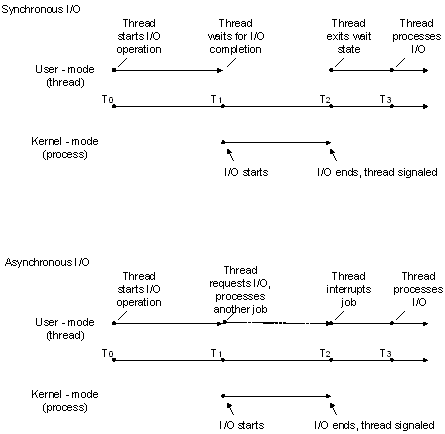
In synchronous file I/O, a thread starts an I/O operation and immediately enters a wait state until the I/O request has completed. A thread performing asynchronous file I/O sends an I/O request to the kernel by calling an appropriate function. If the request is accepted by the kernel, the calling thread continues processing another job until the kernel signals to the thread that the I/O operation is complete. It then interrupts its current job and processes the data from the I/O operation as necessary.
The two synchronization types are illustrated in the following figure.
In situations where an I/O request is expected to take a large amount of time, such as a refresh or backup of a large database or a slow communications link, asynchronous I/O is generally a good way to optimize processing efficiency. However, for relatively fast I/O operations, the overhead of processing kernel I/O requests and kernel signals may make asynchronous I/O less beneficial, particularly if many fast I/O operations need to be made. In this case, synchronous I/O would be better. The mechanisms and implementation details of how to accomplish these tasks vary depending on the type of device handle that is used and the particular needs of the application. In other words, there are usually multiple ways to solve the problem.
Synchronous and Asynchronous I/O Considerations
If a file or device is opened for synchronous I/O (that is, FILE_FLAG_OVERLAPPED is not specified), subsequent calls to functions such as WriteFile can block execution of the calling thread until one of the following events occurs:
- The I/O operation completes (in this example, a data write).
- An I/O error occurs. (For example, the pipe is closed from the other end.)
- An error was made in the call itself (for example, one or more parameters are not valid).
- Another thread in the process calls the CancelSynchronousIo function using the blocked thread's thread handle, which terminates I/O for that thread, failing the I/O operation.
- The blocked thread is terminated by the system; for example, the process itself is terminated, or another thread calls the TerminateThread function using the blocked thread's handle. (This is generally considered a last resort and not good application design.)
In some cases, this delay may be unacceptable to the application's design and purpose, so application designers should consider using asynchronous I/O with appropriate thread synchronization objects such as I/O completion ports. For more information about thread synchronization, see About Synchronization.
A process opens a file for asynchronous I/O in its call to CreateFile by specifying the FILE_FLAG_OVERLAPPED flag in the dwFlagsAndAttributes parameter. If FILE_FLAG_OVERLAPPED is not specified, the file is opened for synchronous I/O. When the file has been opened for asynchronous I/O, a pointer to an OVERLAPPED structure is passed into the call to ReadFile and WriteFile. When performing synchronous I/O, this structure is not required in calls to ReadFile and WriteFile.
备注
If a file or device is opened for asynchronous I/O, subsequent calls to functions such as WriteFile using that handle generally return immediately but can also behave synchronously with respect to blocked execution. For more information, see https://support.microsoft.com/kb/156932.
Although CreateFile is the most common function to use for opening files, disk volumes, anonymous pipes, and other similar devices, I/O operations can also be performed using a handle typecast from other system objects such as a socket created by the socket or accept functions.
Handles to directory objects are obtained by calling the CreateFile function with the FILE_FLAG_BACKUP_SEMANTICS attribute. Directory handles are almost never used—backup applications are one of the few applications that will typically use them.
After opening the file object for asynchronous I/O, an OVERLAPPED structure must be properly created, initialized, and passed into each call to functions such as ReadFile and WriteFile. Keep the following in mind when using the OVERLAPPED structure in asynchronous read and write operations:
- Do not deallocate or modify the OVERLAPPED structure or the data buffer until all asynchronous I/O operations to the file object have been completed.
- If you declare your pointer to the OVERLAPPED structure as a local variable, do not exit the local function until all asynchronous I/O operations to the file object have been completed. If the local function is exited prematurely, the OVERLAPPED structure will go out of scope and it will be inaccessible to any ReadFile or WriteFile functions it encounters outside of that function.
You can also create an event and put the handle in the OVERLAPPED structure; the wait functions can then be used to wait for the I/O operation to complete by waiting on the event handle.
As previously stated, when working with an asynchronous handle, applications should use care when making determinations about when to free resources associated with a specified I/O operation on that handle. If the handle is deallocated prematurely, ReadFile or WriteFile may incorrectly report that the I/O operation is complete. Further, the WriteFile function will sometimes return TRUE with a GetLastError value of ERROR_SUCCESS, even though it is using an asynchronous handle (which can also return FALSE with ERROR_IO_PENDING). Programmers accustomed to synchronous I/O design will usually release data buffer resources at this point because TRUE and ERROR_SUCCESS signify the operation is complete. However, if I/O completion ports are being used with this asynchronous handle, a completion packet will also be sent even though the I/O operation completed immediately. In other words, if the application frees resources after WriteFile returns TRUE with ERROR_SUCCESS in addition to in the I/O completion port routine, it will have a double-free error condition. In this example, the recommendation would be to allow the completion port routine to be solely responsible for all freeing operations for such resources.
The system does not maintain the file pointer on asynchronous handles to files and devices that support file pointers (that is, seeking devices), therefore the file position must be passed to the read and write functions in the related offset data members of the OVERLAPPED structure. For more information, see WriteFile and ReadFile.
File pointer position for a synchronous handle is maintained by the system as data is read or written and can also be updated using the SetFilePointer or SetFilePointerEx function.
An application can also wait on the file handle to synchronize the completion of an I/O operation, but doing so requires extreme caution. Each time an I/O operation is started, the operating system sets the file handle to the nonsignaled state. Each time an I/O operation is completed, the operating system sets the file handle to the signaled state. Therefore, if an application starts two I/O operations and waits on the file handle, there is no way to determine which operation is finished when the handle is set to the signaled state. If an application must perform multiple asynchronous I/O operations on a single file, it should wait on the event handle in the specific OVERLAPPED structure for each I/O operation, rather than on the common file handle.
To cancel all pending asynchronous I/O operations, use either:
- CancelIo—this function only cancels operations issued by the calling thread for the specified file handle.
- CancelIoEx—this function cancels all operations issued by the threads for the specified file handle.
Use CancelSynchronousIo to cancel pending synchronous I/O operations.
The ReadFileEx and WriteFileEx functions enable an application to specify a routine to execute (see FileIOCompletionRoutine) when the asynchronous I/O request is completed.
Synchronous and Asynchronous I/O [Windows]的更多相关文章
- Java Messages Synchronous and Asynchronous
//The Consumer Class Consumes Messages in a Synchronous Manner public class Consumer { public static ...
- 操作系统OS - 阻塞(Blocking)非阻塞(Non-Blocking)与同步(Synchronous)异步(Asynchronous)
参考: http://blog.jobbole.com/103290/ https://www.zhihu.com/question/19732473/answer/23434554 http://b ...
- Asynchronous Disk I/O Appears as Synchronous on Windows
Summary File I/O on Microsoft Windows can be synchronous or asynchronous. The default behavior for I ...
- Should I expose asynchronous wrappers for synchronous methods?
Lately I've received several questions along the lines of the following, which I typically summarize ...
- 磁盘异步I / O在Windows上显示为同步
概要 Microsoft Windows上的文件I / O可以是同步或异步的.I / O的默认行为是同步的,其中调用I / O函数并在I / O完成时返回.异步I / O允许I / O函数立即将执行返 ...
- C#的多线程——使用async和await来完成异步编程(Asynchronous Programming with async and await)
https://msdn.microsoft.com/zh-cn/library/mt674882.aspx 侵删 更新于:2015年6月20日 欲获得最新的Visual Studio 2017 RC ...
- Testing for the End of a File (Windows 的异步 IO)
The ReadFile function checks for the end-of-file condition (EOF) differently for synchronous and asy ...
- Async/Await - Best Practices in Asynchronous Programming
https://msdn.microsoft.com/en-us/magazine/jj991977.aspx Figure 1 Summary of Asynchronous Programming ...
- Async/Await - Best Practices in Asynchronous Programming z
These days there’s a wealth of information about the new async and await support in the Microsoft .N ...
随机推荐
- 并查集例题02.带权并查集(poj1182)
Description 动物王国中有三类动物A,B,C,这三类动物的食物链构成了有趣的环形.A吃B, B吃C,C吃A.现有N个动物,以1-N编号.每个动物都是A,B,C中的一种,但是我们并不知道它到底 ...
- 一夜搞懂 | Java 内存模型与线程
前言 本文已经收录到我的 Github 个人博客,欢迎大佬们光临寒舍: 我的 GIthub 博客 学习导图 一.为什么要学习内存模型与线程? 并发处理的广泛应用是 Amdah1 定律代替摩尔定律成为计 ...
- 将本地项目关联到git上面
1.github上面创建新项目 2.初始化项目-------------可忽略 首先加入git提交忽略的文件.gitignore文件 .idea 忽略以.idea文件logs/ 忽略logs文件夹* ...
- Appium自动化(2) - appium环境安装常见问题的解决方案
如果你还想从头学起Appium,可以看看这个系列的文章哦! https://www.cnblogs.com/poloyy/category/1693896.html 问题1:adb检测不到设备 解决 ...
- MySQL 解析 json 数组(mysql在5.7开始支持json解析)
1.函数 JSON_EXTRACT 表数据格式: 查询结果: sql 语句: -- ---------------------------- -- Table structure for json ...
- 鬼吹灯之龙岭迷窟百度云迅雷BT在线观看免费全集
看视频搜索微信公众号:qyw1091 还记得去年5月11日在高家堡举行的<鬼吹灯之龙岭迷窟>开机仪式吗?时隔数月,这部网剧于4月1日将在腾讯视频全网独播了! . <鬼吹灯之龙岭迷窟& ...
- 37.1 net-- udp传输
一.打开接收端 package day35_net_网络编程.udp传输; import java.io.IOException; import java.net.*; /* * 使用UDP协议接收数 ...
- .Net微服务实战之技术架构分层篇
一拍即合 上一篇<.Net微服务实战之技术选型篇>,从技术选型角度讲解了微服务实施的中间件的选择与协作,工欲善其事,必先利其器,中间件的选择是作为微服务的基础与开始,也希望给一直想在.Ne ...
- 【Selenium05篇】python+selenium实现Web自动化:读取ini配置文件,元素封装,代码封装,异常处理,兼容多浏览器执行
一.前言 最近问我自动化的人确实有点多,个人突发奇想:想从0开始讲解python+selenium实现Web自动化测试,请关注博客持续更新! 这是python+selenium实现Web自动化第五篇博 ...
- Linux c++ vim环境搭建系列(6)——CMakeLists.txt多文档多目录组织方法和编写示例
CMakeLists.txt学习 1. 概要 主要是关于cmakelists.txt的编写模板,和多文档多目录的组织方法详解, 涉及第三方库的添加使用方法. 这里主要介绍cmakelists.txt的 ...