
cas单点登录打包时下载慢!
环境:win10
百度网盘下载
版本: cas-overlay-template-5.3 提取码 d1b6
添加阿里的到pom.xml 注意添加到第一列
<!--阿里云仓库-->

        <repository>

            <id>aliyunmaven</id>

            <url>http://maven.aliyun.com/nexus/content/groups/public/</url>

        </repository>
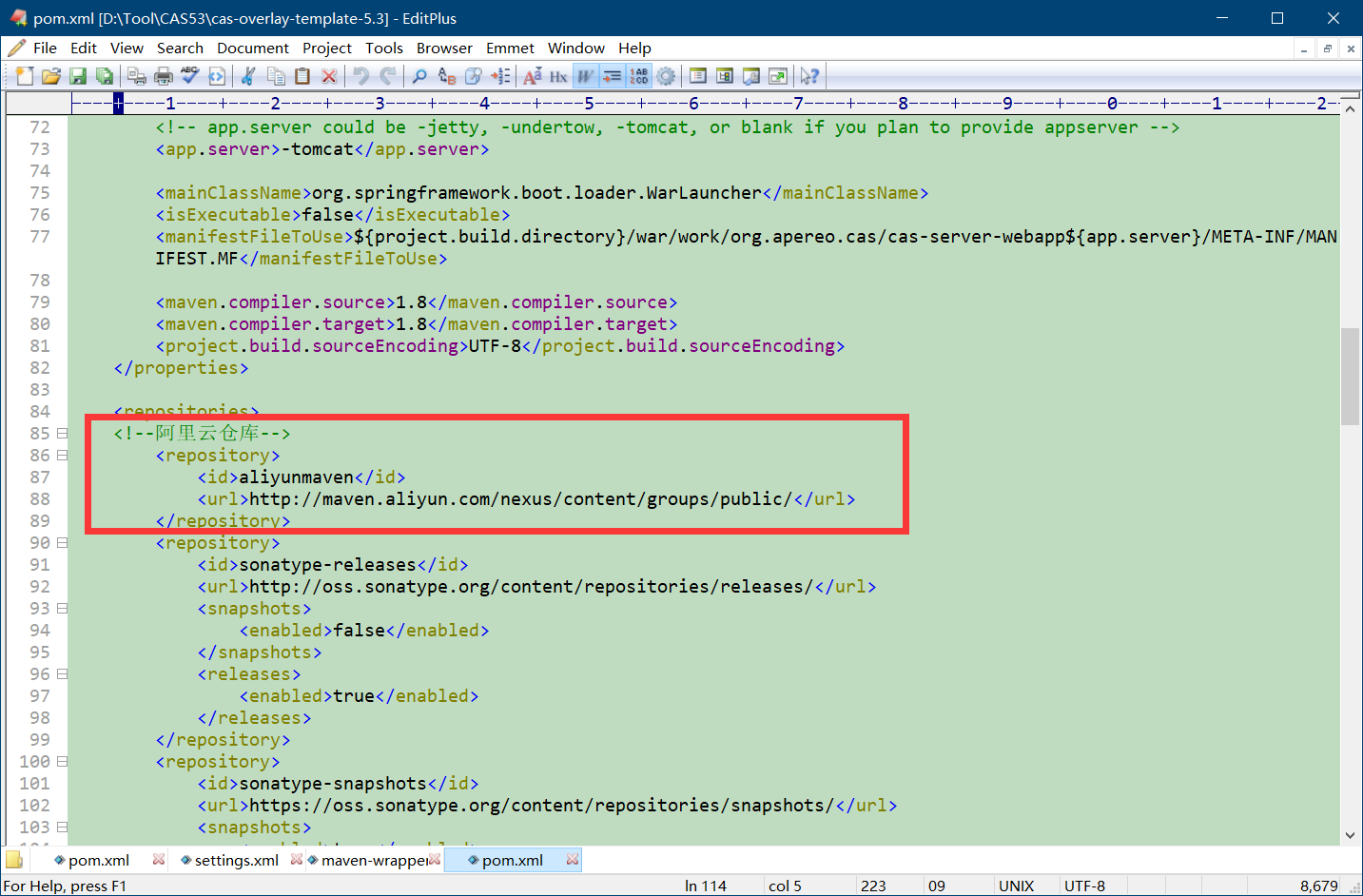
pom.xml 文件
<?xml version="1.0" encoding="UTF-8"?>

<project xmlns="http://maven.apache.org/POM/4.0.0"

         xmlns:xsi="http://www.w3.org/2001/XMLSchema-instance"

         xsi:schemaLocation="http://maven.apache.org/POM/4.0.0 http://maven.apache.org/xsd/maven-4.0.0.xsd ">

    <modelVersion>4.0.0</modelVersion>

    <groupId>org.apereo.cas</groupId>

    <artifactId>cas-overlay</artifactId>

    <packaging>war</packaging>

    <version>1.0</version>

    <build>

        <plugins>

            <plugin>

                <groupId>com.rimerosolutions.maven.plugins</groupId>

                <artifactId>wrapper-maven-plugin</artifactId>

                <version>0.0.5</version>

                <configuration>

                    <verifyDownload>true</verifyDownload>

                    <checksumAlgorithm>MD5</checksumAlgorithm>

                </configuration>

            </plugin>

            <plugin>

                <groupId>org.springframework.boot</groupId>

                <artifactId>spring-boot-maven-plugin</artifactId>

                <version>${springboot.version}</version>

                <configuration>

                    <mainClass>${mainClassName}</mainClass>

                    <addResources>true</addResources>

                    <executable>${isExecutable}</executable>

                    <layout>WAR</layout>

                </configuration>

                <executions>

                    <execution>

                        <goals>

                            <goal>repackage</goal>

                        </goals>

                    </execution>

                </executions>

            </plugin>

            <plugin>

                <groupId>org.apache.maven.plugins</groupId>

                <artifactId>maven-war-plugin</artifactId>

                <version>2.6</version>

                <configuration>

                    <warName>cas</warName>

                    <failOnMissingWebXml>false</failOnMissingWebXml>

                    <recompressZippedFiles>false</recompressZippedFiles>

                    <archive>

                        <compress>false</compress>

                        <manifestFile>${manifestFileToUse}</manifestFile>

                    </archive>

                    <overlays>

                        <overlay>

                            <groupId>org.apereo.cas</groupId>

                            <artifactId>cas-server-webapp${app.server}</artifactId>

                        </overlay>

                    </overlays>

                </configuration>

            </plugin>

            <plugin>

                <groupId>org.apache.maven.plugins</groupId>

                <artifactId>maven-compiler-plugin</artifactId>

                <version>3.3</version>

            </plugin>

        </plugins>

        <finalName>cas</finalName>

    </build>

    <properties>

        <cas.version>5.3.6</cas.version>

        <springboot.version>1.5.18.RELEASE</springboot.version>

        <!-- app.server could be -jetty, -undertow, -tomcat, or blank if you plan to provide appserver -->

        <app.server>-tomcat</app.server>

        <mainClassName>org.springframework.boot.loader.WarLauncher</mainClassName>

        <isExecutable>false</isExecutable>

        <manifestFileToUse>${project.build.directory}/war/work/org.apereo.cas/cas-server-webapp${app.server}/META-INF/MANIFEST.MF</manifestFileToUse>

        <maven.compiler.source>1.8</maven.compiler.source>

        <maven.compiler.target>1.8</maven.compiler.target>

        <project.build.sourceEncoding>UTF-8</project.build.sourceEncoding>

    </properties>

    <repositories>

        <repository>

            <id>aliyunmaven</id>

            <url>http://maven.aliyun.com/nexus/content/groups/public/</url>

            <snapshots>

                <enabled>false</enabled>

            </snapshots>

            <releases>

                <enabled>true</enabled>

            </releases>

        </repository>

        <repository>

            <id>sonatype-snapshots</id>

            <url>https://oss.sonatype.org/content/repositories/snapshots/</url>

            <snapshots>

                <enabled>true</enabled>

            </snapshots>

            <releases>

                <enabled>false</enabled>

            </releases>

        </repository>

        <repository>

            <id>shibboleth-releases</id>

            <url>https://build.shibboleth.net/nexus/content/repositories/releases</url>

        </repository>

    </repositories>

    <profiles>

        <profile>

            <activation>

                <activeByDefault>true</activeByDefault>

            </activation>

            <id>default</id>

            <dependencies>

                <dependency>

                    <groupId>org.apereo.cas</groupId>

                    <artifactId>cas-server-webapp${app.server}</artifactId>

                    <version>${cas.version}</version>

                    <type>war</type>

                    <scope>runtime</scope>

                </dependency>

                 <!--数据库认证相关  start-->

                <dependency>

                <groupId>org.apereo.cas</groupId>

                <artifactId>cas-server-support-jdbc</artifactId>

                <version>${cas.version}</version>

                </dependency>

                <dependency>

                <groupId>org.apereo.cas</groupId>

                <artifactId>cas-server-support-jdbc-drivers</artifactId>

                <version>${cas.version}</version>

                </dependency>

                <dependency>

                <groupId>mysql</groupId>

                <artifactId>mysql-connector-java</artifactId>

                <version>5.1.32</version>

                </dependency>

                <!--数据库认证相关  end-->

                <!--

                ...Additional dependencies may be placed here...

                -->

            </dependencies>

        </profile>

        <profile>

            <activation>

                <activeByDefault>false</activeByDefault>

            </activation>

            <id>exec</id>

            <properties>

                <mainClassName>org.apereo.cas.web.CasWebApplication</mainClassName>

                <isExecutable>true</isExecutable>

                <manifestFileToUse></manifestFileToUse>

            </properties>

            <build>

                <plugins>

                    <plugin>

                        <groupId>com.soebes.maven.plugins</groupId>

                        <artifactId>echo-maven-plugin</artifactId>

                        <version>0.3.0</version>

                        <executions>

                            <execution>

                                <phase>prepare-package</phase>

                                <goals>

                                    <goal>echo</goal>

                                </goals>

                            </execution>

                        </executions>

                        <configuration>

                            <echos>

                                <echo>Executable profile to make the generated CAS web application executable.</echo>

                            </echos>

                        </configuration>

                    </plugin>

                </plugins>

            </build>

        </profile>

        <profile>

            <activation>

                <activeByDefault>false</activeByDefault>

            </activation>

            <id>bootiful</id>

            <properties>

                <app.server>-tomcat</app.server>

                <isExecutable>false</isExecutable>

            </properties>

            <dependencies>

                <dependency>

                    <groupId>org.apereo.cas</groupId>

                    <artifactId>cas-server-webapp${app.server}</artifactId>

                    <version>${cas.version}</version>

                    <type>war</type>

                    <scope>runtime</scope>

                </dependency>

            </dependencies>

        </profile>

        <profile>

            <activation>

                <activeByDefault>false</activeByDefault>

            </activation>

            <id>pgp</id>

            <build>

                <plugins>

                    <plugin>

                        <groupId>com.github.s4u.plugins</groupId>

                        <artifactId>pgpverify-maven-plugin</artifactId>

                        <version>1.1.0</version>

                        <executions>

                            <execution>

                                <goals>

                                    <goal>check</goal>

                                </goals>

                            </execution>

                        </executions>

                        <configuration>

                            <pgpKeyServer>hkp://pool.sks-keyservers.net</pgpKeyServer>

                            <pgpKeysCachePath>${settings.localRepository}/pgpkeys-cache</pgpKeysCachePath>

                            <scope>test</scope>

                            <verifyPomFiles>true</verifyPomFiles>

                            <failNoSignature>false</failNoSignature>

                        </configuration>

                    </plugin>

                </plugins>

            </build>

        </profile>

    </profiles>

</project>
mvn package 打包ok
cas单点登录打包时下载慢!的更多相关文章
- CAS单点登录(SSO)完整教程
转:http://blog.csdn.net/frinder/article/details/7969925 CAS单点登录(SSO)完整教程(2012-02-01更新) 一.教程说明 前言 教程目的 ...
- CAS单点登录(SSO)服务端的部署和配置---连接MySQL进行身份认证
一.修改系统host,加入 127.0.0.1 server.test.com127.0.0.1 client1.test.com127.0.0.1 client2.test.com 二.安装grad ...
- CAS单点登录服务器搭建
关于cas单点登录的原理及介绍这里不做说明了,直接开始: 1.war包下载 去官网(https://www.apereo.org/projects/cas/download-cas)下载cas_ser ...
- 【CAS单点登录视频教程】 第04集 -- tomcat下配置https环境
目录 ----------------------------------------- [CAS单点登录视频教程] 第06集[完] -- Cas认证 学习 票据认证FormsAuthenticati ...
- SSO单点登录系列5:cas单点登录增加验证码功能完整步骤
本篇教程cas-server端下载地址:解压后,直接放到tomcat的webapp目录下就能用了,不过你需要登录的话,要修改数据源,C:\tomcat7\webapps\casServer\WEB-I ...
- Spring boot security权限管理集成cas单点登录
挣扎了两周,Spring security的cas终于搞出来了,废话不多说,开篇! Spring boot集成Spring security本篇是使用spring security集成cas,因此,先 ...
- CAS单点登录系列之极速入门于实战教程(4.2.7)
@ 目录 一. SSO简介 1.1 单点登录定义 1.2 单点登录角色 1.3 单点登录分类 二. CAS简介 2.1 CAS简单定义 2.2 CAS体系结构 2.3 CAS原理 三.CAS服务端搭建 ...
- SSO之CAS单点登录实例演示
本文目录: 一.概述 二.演示环境 三.JDK安装配置 四.安全证书配置 五.部署CAS-Server相关的Tomcat 六.部署CAS-Client相关的Tomcat 七. 测试验证SSO 一.概述 ...
- cas 单点登录出现org.jasig.cas.client.util.CommonUtils.getResponseFromServer - 拒绝连接 Connection refused
cas 单点登录出现org.jasig.cas.client.util.CommonUtils.getResponseFromServer - 拒绝连接 Connection refused 环境: ...
随机推荐
- LeetCode——230. 二叉搜索树中第K小的元素
给定一个二叉搜索树,编写一个函数 kthSmallest 来查找其中第 k 个最小的元素. 说明: 你可以假设 k 总是有效的,1 ≤ k ≤ 二叉搜索树元素个数. 示例 1: 输入: root = ...
- 吴裕雄--天生自然 PYTHON3开发学习:运算符
#!/usr/bin/python3 a = 21 b = 10 c = 0 c = a + b print ("1 - c 的值为:", c) c = a - b print ( ...
- 面向对象 part4 构造函数对象重写
出处 其中深奥之处非看一次能了解 !对象真的有点绕,但是又很严谨
- Django搭建后篇——启动服务器及创建视图
开启服务器,Django开启服务器的方式有两种,一种是在Ubuntu在开启,另一种是直接在pycharm开启.就方便而言肯定是第二种,但由于pycharm版本的问题,可能有的人无法直接在pycharm ...
- 12. docker 网络 docker network (docker 网络)
1. 环境准备 编写 Vagrantfile 为 # -*- mode: ruby -*- # vi: set ft=ruby : Vagrant.require_version "> ...
- 14 微服务电商【黑马乐优商城】:day04-项目搭建(一)
本项目的笔记和资料的Download,请点击这一句话自行获取. day01-springboot(理论篇) :day01-springboot(实践篇) day02-springcloud(理论篇一) ...
- socket 基础 X-mind
- Pooled genome sequence strategies |representative genome assembly approaches|Domestication|GERP|selective sweep|Hybridization|Introgression|iHS|SNP genotyping arrays|haplotype
Design based on biology 通过比较基因组学的方法,将脊椎动物基因组的数据,解决生物学各方面问题.新的调控注释(在脊椎动物的进化过程中的出现的)可以丰富物种树(比如不同功能蛋白质进 ...
- 爬虫笔记(十)——学会使用Fiddler
Fiddler是一个常见的抓包分析软件,同时我们可以利用它详细地对HTTP请求进行分析,并模拟对应的HTTP请求. 为什么使用Fiddler软件? 网络爬虫是自动爬取网页的程序,在爬取的过程中必然涉及 ...
- XMemcached 中文api
变更历史 2010-06-22 添加客户端分布和SASL验证两节,更新spring配置一节. 2010-06-23 添加maven依赖说明 2010-10-17 1.2.6 released 2011 ...