
DSP using MATLAB 示例 Example3.11

用到的性质

上代码:
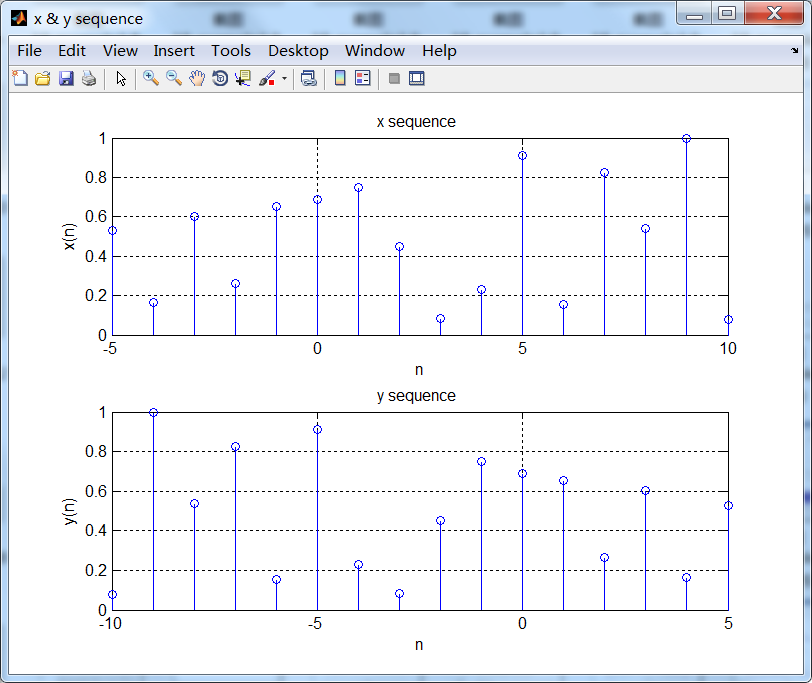
n = -5:10; x = rand(1,length(n));

k = -100:100; w = (pi/100)*k;                 % freqency between -pi and +pi  ,   [0,pi] axis divided into 101 points.

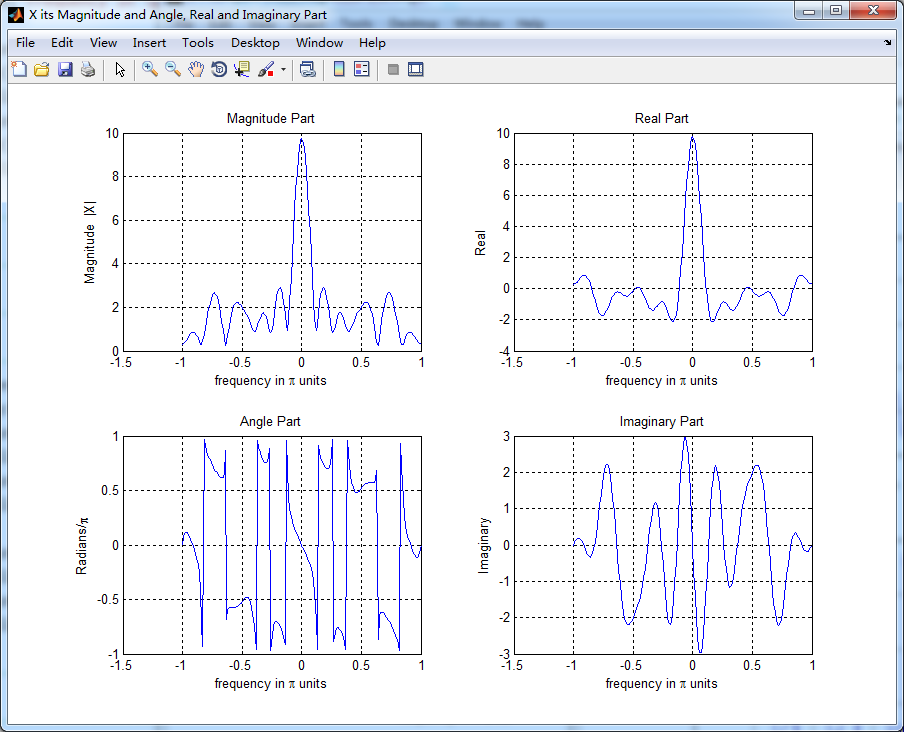
X = x * (exp(-j*pi/100)) .^ (n'*k);           % DTFT of x

% folding property

y = fliplr(x); m = -fliplr(n);                         % signal folding

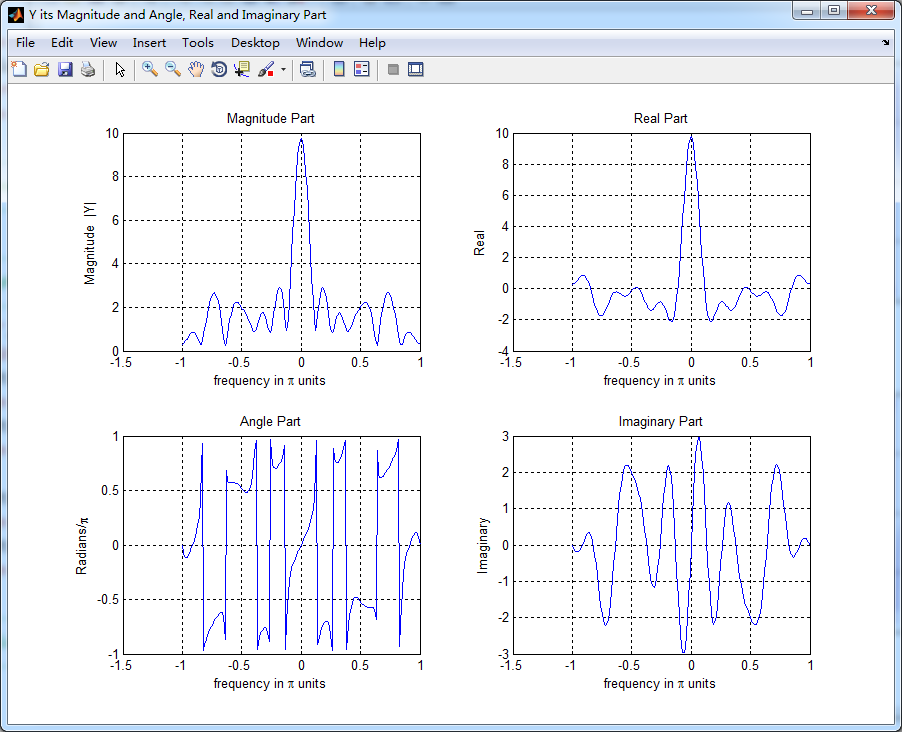
Y = y * (exp(-j*pi/100)) .^ (m'*k);           % DTFT of y

magX = abs(X); angX = angle(X); realX = real(X); imagX = imag(X);

magY = abs(Y); angY = angle(Y); realY = real(Y); imagY = imag(Y);

%verification

Y_check = fliplr(X);                                   % X(-w)

error = max(abs(Y-Y_check));                  % Difference

figure('NumberTitle', 'off', 'Name', 'x & y sequence')

set(gcf,'Color','white');

subplot(2,1,1); stem(n,x); title('x sequence ');         xlabel('n'); ylabel('x(n)'); grid on;

%subplot(2,2,2); stem(n,imag(x)); title('x sequence Imaginary Part');    xlabel('n'); ylabel('Imaginary x(n))'); grid on;

subplot(2,1,2); stem(m,y); title('y sequence ');         xlabel('n'); ylabel('y(n)'); grid on;

%subplot(2,2,4); stem(n,imag(y)); title('y sequence Imaginary Part');    xlabel('n'); ylabel('Imaginary y(n))'); grid on;

%% --------------------------------------------------------------

%%        START X's  mag ang real imag

%% --------------------------------------------------------------

figure('NumberTitle', 'off', 'Name', 'X its Magnitude and Angle, Real and Imaginary Part');

set(gcf,'Color','white');

subplot(2,2,1); plot(w/pi,magX); grid on;  % axis([-2,2,0,15]);

title('Magnitude Part');

xlabel('frequency in \pi units'); ylabel('Magnitude  |X|');

subplot(2,2,3); plot(w/pi, angX/pi); grid on;  % axis([-2,2,-1,1]);

title('Angle Part');

xlabel('frequency in \pi units'); ylabel('Radians/\pi');

subplot('2,2,2'); plot(w/pi, realX); grid on;

title('Real Part');

xlabel('frequency in \pi units'); ylabel('Real');

subplot('2,2,4'); plot(w/pi, imagX); grid on;

title('Imaginary Part');

xlabel('frequency in \pi units'); ylabel('Imaginary');

%% --------------------------------------------------------------

%%        END X's  mag ang real imag

%% --------------------------------------------------------------

%% --------------------------------------------------------------

%%        START Y's  mag ang real imag

%% --------------------------------------------------------------

figure('NumberTitle', 'off', 'Name', 'Y its Magnitude and Angle, Real and Imaginary Part');

set(gcf,'Color','white');

subplot(2,2,1); plot(w/pi,magY); grid on;  % axis([-2,2,0,15]);

title('Magnitude Part');

xlabel('frequency in \pi units'); ylabel('Magnitude  |Y|');

subplot(2,2,3); plot(w/pi, angY/pi); grid on;  % axis([-2,2,-1,1]);

title('Angle Part');

xlabel('frequency in \pi units'); ylabel('Radians/\pi');

subplot('2,2,2'); plot(w/pi, realY); grid on;

title('Real Part');

xlabel('frequency in \pi units'); ylabel('Real');

subplot('2,2,4'); plot(w/pi, imagY); grid on;

title('Imaginary Part');

xlabel('frequency in \pi units'); ylabel('Imaginary');

%% --------------------------------------------------------------

%%        END Y's  mag ang real imag

%% --------------------------------------------------------------

%% ----------------------------------------------------------------

%%        START Graphical verification

%% ----------------------------------------------------------------

figure('NumberTitle', 'off', 'Name', 'X Y compare theirs Magnitude and Angle');

set(gcf,'Color','white');

subplot(2,2,1); plot(w/pi,magX); grid on; %axis([-1,1,0,12]);

xlabel('frequency in \pi units'); ylabel('|X|'); title('Magnitude of X ');

subplot(2,2,2); plot(w/pi,angX/pi); grid on; axis([-1,1,-1,1]);

xlabel('frequency in \pi units'); ylabel('Radians/\pi'); title('Angle of X ');

subplot(2,2,3); plot(w/pi,magY); grid on; %axis([-1,1,0,12]);

xlabel('frequency in \pi units'); ylabel('|Y|'); title('Magnitude of Y ');

subplot(2,2,4); plot(w/pi,angY/pi); grid on; axis([-1,1,-1,1]);

xlabel('frequency in \pi units'); ylabel('Radians/\pi'); title('Angle of Y ');

%% ----------------------------------------------------------------

%%        END Graphical verification

%% ----------------------------------------------------------------
运行结果:

DSP using MATLAB 示例 Example3.11的更多相关文章
- DSP using MATLAB 示例Example3.21
代码: % Discrete-time Signal x1(n) % Ts = 0.0002; n = -25:1:25; nTs = n*Ts; Fs = 1/Ts; x = exp(-1000*a ...
- DSP using MATLAB 示例 Example3.19
代码: % Analog Signal Dt = 0.00005; t = -0.005:Dt:0.005; xa = exp(-1000*abs(t)); % Discrete-time Signa ...
- DSP using MATLAB示例Example3.18
代码: % Analog Signal Dt = 0.00005; t = -0.005:Dt:0.005; xa = exp(-1000*abs(t)); % Continuous-time Fou ...
- DSP using MATLAB 示例Example3.23
代码: % Discrete-time Signal x1(n) : Ts = 0.0002 Ts = 0.0002; n = -25:1:25; nTs = n*Ts; x1 = exp(-1000 ...
- DSP using MATLAB示例Example3.16
代码: b = [0.0181, 0.0543, 0.0543, 0.0181]; % filter coefficient array b a = [1.0000, -1.7600, 1.1829, ...
- DSP using MATLAB 示例Example3.8
代码: x = rand(1,11); n = 0:10; k = 0:500; w = (pi/500)*k; % [0,pi] axis divided into 501 points. X = ...
- DSP using MATLAB 示例Example3.7
上代码: x1 = rand(1,11); x2 = rand(1,11); n = 0:10; alpha = 2; beta = 3; k = 0:500; w = (pi/500)*k; % [ ...
- DSP using MATLAB 示例Example3.22
代码: % Discrete-time Signal x2(n) Ts = 0.001; n = -5:1:5; nTs = n*Ts; Fs = 1/Ts; x = exp(-1000*abs(nT ...
- DSP using MATLAB 示例Example3.17
随机推荐
- Div内部的内容超出部分显示省略号(仅仅只有一行内容)
效果如下:
- HTML标记语法之列表元素
1.无序列表 <ul> <li type=”项目符号类型”></li> <li type=”项目符号类型”></li> <li typ ...
- flume学习
下载 自定义sink(mysql) 1.ide打开下载后的源码 2.代码如下: /** * Licensed to the Apache Software Foundation (ASF) under ...
- C 替换字符方法--1
#include "stdafx.h" //linux 底下要去掉这一行 #include <stdio.h> #include<stdlib.h> #in ...
- Swift - 键盘弹出样式
Swift提供了11种键盘类型: 在开发中,我们可以根据不同的需求,选择不同的键盘样式,例如,当我们只需要输入手机号码时,可以选择纯数字类型的键盘(.NumbersAndPunctuation),当我 ...
- Volley学习总结
本文主要包括以下内容 volly基本操作(String与Json类型) volly图片操作 自定义volly volly源码分析 Volley简单易用,在性能方面也进行了大幅度的调整,它的设计目标就是 ...
- C#学习笔记----.net操作进程
进程(Process)是Windows系统中的一个基本概念,它包含着一个运行程序所需要的资源.进程之间是相对独立的,一个进程无法直接访问另一个进程的数据(除非分布式),一个进程运行的失败也不会影响其他 ...
- Linux snmp
http://www.cnblogs.com/amberly/p/4364072.html http://blog.csdn.net/awenluck/article/details/50220221
- 在多台服务器上简单实现Redis的数据主从复制(3)(转载)
转载地址:http://www.cnblogs.com/liping13599168/archive/2011/04/14/2016226.html Redis的主从复制功能非常强大,一个master ...
- OCJP(1Z0-851) 模拟题分析(六)over
Exam : 1Z0-851 Java Standard Edition 6 Programmer Certified Professional Exam 以下分析全都是我自己分析或者参考网上的,定有 ...