
DSP using MATLAB 示例Example3.7

上代码:
x1 = rand(1,11); x2 = rand(1,11); n = 0:10;

alpha = 2; beta = 3; k = 0:500;

w = (pi/500)*k;              % [0,pi] axis divided into 501 points.

X1 = x1 * (exp(-j*pi/500)) .^ (n'*k);      % DTFT of x1

X2 = x2 * (exp(-j*pi/500)) .^ (n'*k);      % DTFT of x2

x = alpha * x1 + beta * x2;                % Linear combination of x1 & x2

X = x * (exp(-j*pi/500)) .^ (n'*k);        % DTFT of x

magX1 = abs(X1); angX1 = angle(X1); realX1 = real(X1); imagX1 = imag(X1);

magX2 = abs(X2); angX2 = angle(X2); realX2 = real(X2); imagX2 = imag(X2);

magX  = abs(X);  angX  = angle(X);  realX  = real(X);  imagX  = imag(X);

%verification

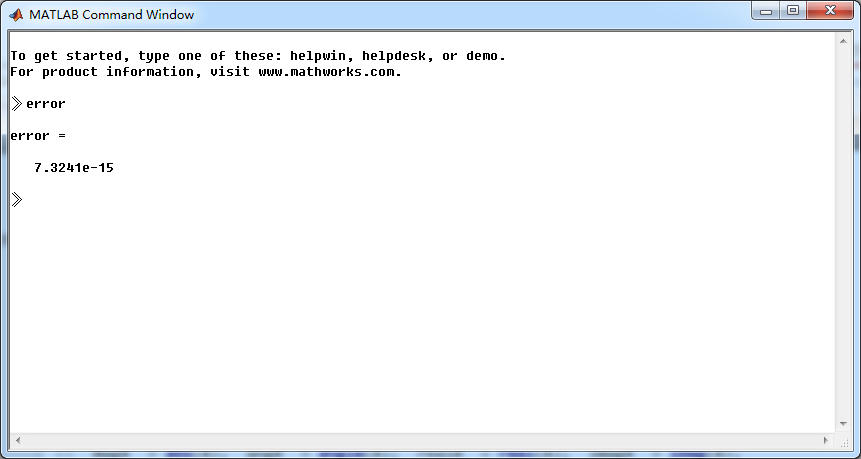
X_check = alpha*X1 + beta*X2;             % Linear combination of X1 & X2

error = max(abs(X-X_check));              % Difference

%% --------------------------------------------------------------

%%        START X1's  mag ang real imag

%% --------------------------------------------------------------

figure('NumberTitle', 'off', 'Name', 'X1 its Magnitude and Angle, Real and Imaginary Part');

set(gcf,'Color','white');

subplot(2,2,1); plot(w/pi,magX1); grid on;  % axis([-2,2,0,15]);

title('Magnitude Part');

xlabel('frequency in \pi units'); ylabel('Magnitude  |X1|');

subplot(2,2,3); plot(w/pi, angX1/pi); grid on;  % axis([-2,2,-1,1]);

title('Angle Part');

xlabel('frequency in \pi units'); ylabel('Radians/\pi');

subplot('2,2,2'); plot(w/pi, realX1); grid on;

title('Real Part');

xlabel('frequency in \pi units'); ylabel('Real');

subplot('2,2,4'); plot(w/pi, imagX1); grid on;

title('Imaginary Part');

xlabel('frequency in \pi units'); ylabel('Imaginary');

%% --------------------------------------------------------------

%%        END X1's  mag ang real imag

%% --------------------------------------------------------------

%% --------------------------------------------------------------

%%        START X2's  mag ang real imag

%% --------------------------------------------------------------

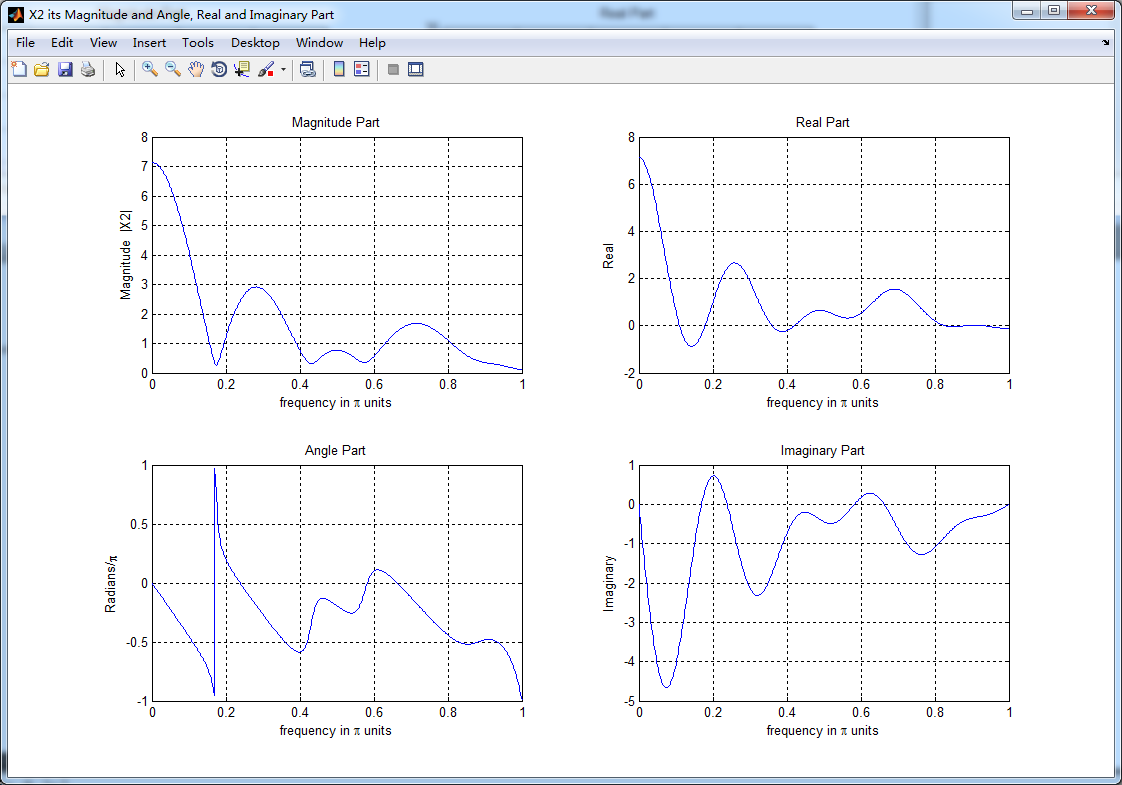
figure('NumberTitle', 'off', 'Name', 'X2 its Magnitude and Angle, Real and Imaginary Part');

set(gcf,'Color','white');

subplot(2,2,1); plot(w/pi,magX2); grid on;  % axis([-2,2,0,15]);

title('Magnitude Part');

xlabel('frequency in \pi units'); ylabel('Magnitude  |X2|');

subplot(2,2,3); plot(w/pi, angX2/pi); grid on;  % axis([-2,2,-1,1]);

title('Angle Part');

xlabel('frequency in \pi units'); ylabel('Radians/\pi');

subplot('2,2,2'); plot(w/pi, realX2); grid on;

title('Real Part');

xlabel('frequency in \pi units'); ylabel('Real');

subplot('2,2,4'); plot(w/pi, imagX2); grid on;

title('Imaginary Part');

xlabel('frequency in \pi units'); ylabel('Imaginary');

%% --------------------------------------------------------------

%%        END X2's  mag ang real imag

%% --------------------------------------------------------------

%% --------------------------------------------------------------

%%        START X's  mag ang real imag

%% --------------------------------------------------------------

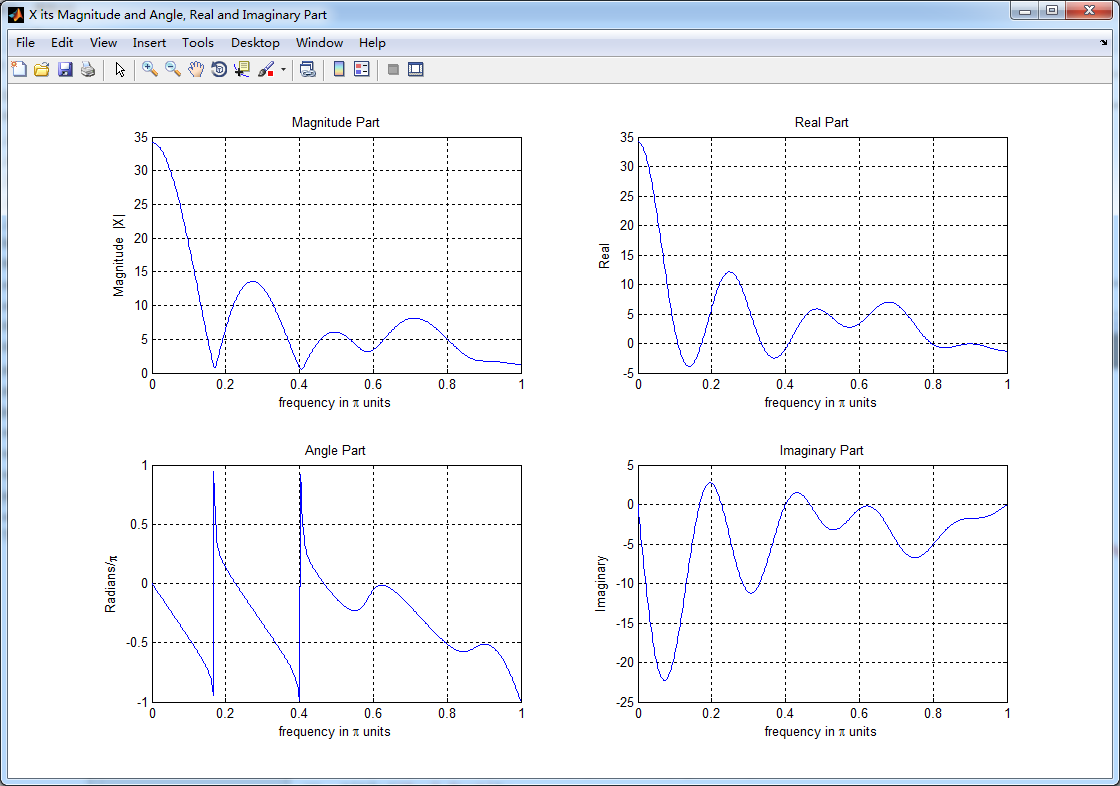
figure('NumberTitle', 'off', 'Name', 'X its Magnitude and Angle, Real and Imaginary Part');

set(gcf,'Color','white');

subplot(2,2,1); plot(w/pi,magX); grid on;  % axis([-2,2,0,15]);

title('Magnitude Part');

xlabel('frequency in \pi units'); ylabel('Magnitude  |X|');

subplot(2,2,3); plot(w/pi, angX/pi); grid on;  % axis([-2,2,-1,1]);

title('Angle Part');

xlabel('frequency in \pi units'); ylabel('Radians/\pi');

subplot('2,2,2'); plot(w/pi, realX); grid on;

title('Real Part');

xlabel('frequency in \pi units'); ylabel('Real');

subplot('2,2,4'); plot(w/pi, imagX); grid on;

title('Imaginary Part');

xlabel('frequency in \pi units'); ylabel('Imaginary');

%% --------------------------------------------------------------

%%        END X's  mag ang real imag

%% --------------------------------------------------------------
结果:

DSP using MATLAB 示例Example3.7的更多相关文章
- DSP using MATLAB 示例Example3.21
代码: % Discrete-time Signal x1(n) % Ts = 0.0002; n = -25:1:25; nTs = n*Ts; Fs = 1/Ts; x = exp(-1000*a ...
- DSP using MATLAB 示例 Example3.19
代码: % Analog Signal Dt = 0.00005; t = -0.005:Dt:0.005; xa = exp(-1000*abs(t)); % Discrete-time Signa ...
- DSP using MATLAB示例Example3.18
代码: % Analog Signal Dt = 0.00005; t = -0.005:Dt:0.005; xa = exp(-1000*abs(t)); % Continuous-time Fou ...
- DSP using MATLAB 示例Example3.23
代码: % Discrete-time Signal x1(n) : Ts = 0.0002 Ts = 0.0002; n = -25:1:25; nTs = n*Ts; x1 = exp(-1000 ...
- DSP using MATLAB示例Example3.16
代码: b = [0.0181, 0.0543, 0.0543, 0.0181]; % filter coefficient array b a = [1.0000, -1.7600, 1.1829, ...
- DSP using MATLAB 示例Example3.22
代码: % Discrete-time Signal x2(n) Ts = 0.001; n = -5:1:5; nTs = n*Ts; Fs = 1/Ts; x = exp(-1000*abs(nT ...
- DSP using MATLAB 示例Example3.17
- DSP using MATLAB 示例 Example3.15
上代码: subplot(1,1,1); b = 1; a = [1, -0.8]; n = [0:100]; x = cos(0.05*pi*n); y = filter(b,a,x); figur ...
- DSP using MATLAB 示例 Example3.13
上代码: w = [0:1:500]*pi/500; % freqency between 0 and +pi, [0,pi] axis divided into 501 points. H = ex ...
- DSP using MATLAB 示例 Example3.12
用到的性质 代码: n = -5:10; x = sin(pi*n/2); k = -100:100; w = (pi/100)*k; % freqency between -pi and +pi , ...
随机推荐
- linux 常用快捷键
切换中英文输入法 Ctrl+space打开终端 Ctrl+Alt+T 终端下复制粘贴 Ctrl + Shift + c/v
- Android仿快递 物流时间轴 的代码实现
首先,这篇参考了别人的代码.根据自己的项目需求简单改造了一下,效果图如下 xml:代码 <?xml version="1.0" encoding="utf-8&qu ...
- LeetCode 202 Happy Number
Problem: Write an algorithm to determine if a number is "happy". A happy number is a numbe ...
- 一个TextView内显示不同颜色的文字
String format = "<font color='#FC8262'>%s</font>:%s"; String text = String.for ...
- babyClock 1.0发布(Android2.2以上)
[总体说明] babyClock是以天为单位,进行提醒的小工具:可以设置多个闹钟,每个闹钟又按照频率分为多个提醒:过期后自动设置到明天该时刻进行提醒. 一个闹钟包含时间区段.提醒频率:进入时间区段时, ...
- 跨平台C的IDE
1.JetBrains的新跨平台C++ IDE,CLion已经开始EAP了,不过这货是收费的 http://confluence.jetbrains.com/display/CLION/Early+A ...
- c程序辨别系统是64位 or 32位
#include <stdio.h> int main(void) { int i = 0x80000000; ){ printf("i = %d\n", i); pr ...
- 用CocoaPods做iOS程序的依赖管理(转摘)
转摘自:http://blog.devtang.com/blog/2014/05/25/use-cocoapod-to-manage-ios-lib-dependency/ 文档更新说明 2012-1 ...
- iOS 随记
UIImage 走缓存 + (UIImage *)imageNamed:(NSString *)name; 不走缓存 + (UIImage *)imageWithContentsOfFile:(NSS ...
- Java 体系结构
Java体系结构包括四个独立但相关的技术: 当编写并运行一个Java程序时,就同时体验了这四种技术.运行流程如下: Java虚拟机的主要任务是装载class文件并且执行其中的字节码.Java虚拟机包含 ...