
coroSync packmarker
CoroSync+Pacemaker实现web高可用 2015-04-12 23:38:19
一、简介
CoroSync最初只是用来演示OpenAIS集群框架接口规范的一个应用,可以说CoroSync是OpenAIS的一部分,但后面的发展明显超越了官方最初的设想,越来越多的厂商尝试使用CoroSync作为集群解决方案。如Redhat的RHCS集群套件就是基于CoroSync实现。
CoroSync只提供了message layer,而没有直接提供CRM,一般使用Pacemaker进行资源管理。
CoroSync和Pacemaker的配合使用有2种方式:①Pacemaker以插件形式使用 ②Pacemaker独立的守护进程
本文Pacemaker以插件的形式运行。
二、配置web高可用
0、前提
①时间同步、ssh互信、hosts域名通信 、uname -n的节点名称(略)
②安装httpd服务,开机不启动
③关闭NetworkManager,开启不启动,开启network服务
1、安装CoroSync、Pacemaker、crmsh
|
1
|
# yum install corosync pacemaker |
CoroSync的软件包组成:
|
1
2
3
4
5
6
7
8
9
10
11
12
13
14
15
16
17
18
19
20
21
22
23
24
25
26
27
28
29
30
31
32
33
34
|
[root@node1 ~]# rpm -ql corosync/etc/corosync #CoroSync的配置文件目录/etc/corosync/corosync.conf.example #CoroSync的配置样例/etc/corosync/corosync.conf.example.udpu/etc/corosync/service.d/etc/corosync/uidgid.d/etc/dbus-1/system.d/corosync-signals.conf/etc/rc.d/init.d/corosync #CoroSync的服务脚本/etc/rc.d/init.d/corosync-notifyd/usr/bin/corosync-blackbox/usr/libexec/lcrso/usr/libexec/lcrso/coroparse.lcrso/usr/libexec/lcrso/objdb.lcrso/usr/libexec/lcrso/quorum_testquorum.lcrso/usr/libexec/lcrso/quorum_votequorum.lcrso/usr/libexec/lcrso/service_cfg.lcrso/usr/libexec/lcrso/service_confdb.lcrso/usr/libexec/lcrso/service_cpg.lcrso/usr/libexec/lcrso/service_evs.lcrso/usr/libexec/lcrso/service_pload.lcrso/usr/libexec/lcrso/vsf_quorum.lcrso/usr/libexec/lcrso/vsf_ykd.lcrso/usr/sbin/corosync/usr/sbin/corosync-cfgtool/usr/sbin/corosync-cpgtool/usr/sbin/corosync-fplay/usr/sbin/corosync-keygen #生成节点message layer通信秘钥/usr/sbin/corosync-notifyd/usr/sbin/corosync-objctl/usr/sbin/corosync-pload/usr/sbin/corosync-quorumtool/usr/share/doc/corosync-1.4.1/var/lib/corosync/var/log/cluster |
|
1
|
# yum install -y crmsh-1.2.6-4.el6.x86_64.rpm pssh-2.3.1-2.el6.x86_64.rpm ###crmsh依赖于pssh |
从pacemaker 1.1.8开始,crm发展成了一个独立项目,叫crmsh。也就是说,我们安装了pacemaker后,并没有crm这个命令,我们要实现对集群资源管理,还需要独立安装crmsh。
2、配置CoroSync
|
1
2
3
4
5
6
7
8
9
10
11
12
13
14
15
16
17
18
19
20
21
22
23
24
25
26
27
28
29
30
31
32
33
34
35
36
37
38
39
40
41
42
|
[root@node1 corosync]# cat /etc/corosync/corosync.confcompatibility: whitetank ##是否兼容旧版本totem { version: 2 ##版本号,无法修改 secauth: off ##安全认证,当使用aisexec时,会非常消耗CPU threads: 0 ##线程数,根据CPU个数和核心数确定 interface { ringnumber: 0 bindnetaddr:192.168.192.0 ##绑定心跳网络IP地址 mcastaddr: 226.94.1.1 ##组播地址 mcastport: 5405 ##组播端口 ttl: 1 ##组播的ttl值 }}logging { fileline: off to_stderr: no ##是否发送到标准错误输出 to_logfile: yes ##是否记录到文件 to_syslog: yes ##是否记录到syslog logfile: /var/log/cluster/corosync.log ##日志文件位置 debug: off timestamp: on ##是否打印时间戳,利于定位错误,但会消耗CPU logger_subsys { subsys: AMF debug: off }}service { ##定义pacemaker以插件的形式启动 ver: 0 name: pacemaker }aisexec { ##corosync启动的身份,由于corosync需要管理服务,需要root身份 user: root group: root }amf { mode: disabled} |
3、配置CoroSync的认证(authkey)
使用corosync-keygen生成key时,由于要使用/dev/random生成随机数,因此如果新装的系统操作不多,如果没有足够的熵,可能会出现如下提示:
|
1
2
3
4
5
|
[root@node1 corosync]# corosync-keygen Corosync Cluster Engine Authentication key generator. Gathering 1024 bits for key from /dev/random. Press keys on your keyboard to generate entropy. Press keys on your keyboard to generate entropy (bits = 240). |
解决办法:在本地随意输入即可,可以通过安装,卸载软件方式解决。
authkey的权限为默认400
4、将配置文件复制到集群节点
5、启动CoroSync
|
1
2
3
4
|
[root@node1 corosync]# service corosync start Starting Corosync Cluster Engine (corosync): [确定] [root@node1 corosync]# ssh node2 'service corosync start' Starting Corosync Cluster Engine (corosync): [确定] |

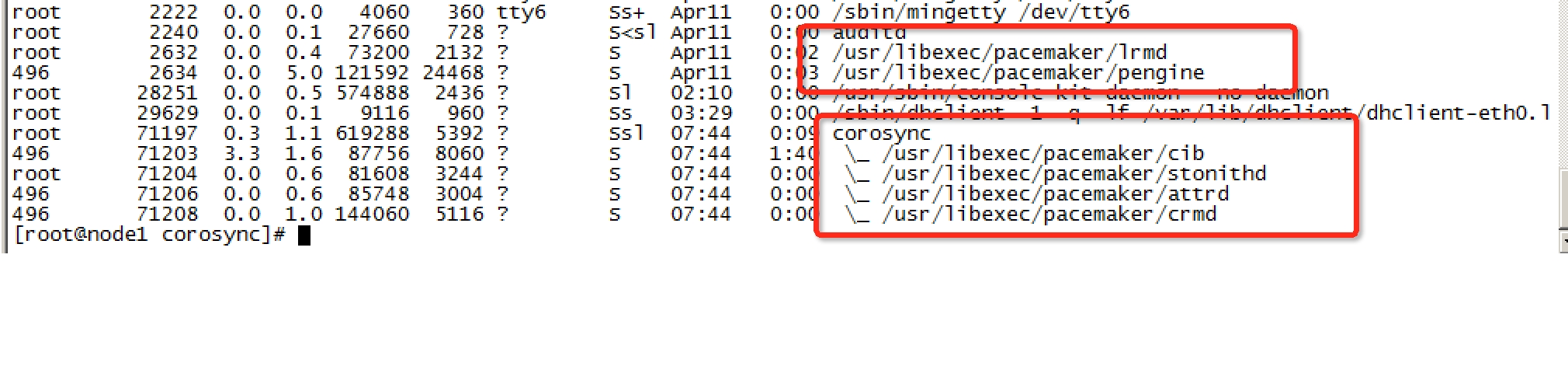
检查CoroSync的引擎启动是否成功:
|
1
2
3
|
[root@node1 corosync]# grep -e "Corosync Cluster Engine" -e "configuration file" /var/log/messages Oct 19 19:21:21 node1 corosync[2360]: [MAIN ] Corosync Cluster Engine ('1.4.1'): started and ready to provide service. Oct 19 19:21:21 node1 corosync[2360]: [MAIN ] Successfully read main configuration file '/etc/corosync/corosync.conf'. |
查看初始化成员节点通知是否正常发出:
|
1
2
3
4
5
6
|
[root@node1 corosync]# grep TOTEM /var/log/messages Oct 19 19:21:21 node1 corosync[2360]: [TOTEM ] Initializing transport (UDP/IP Multicast). Oct 19 19:21:21 node1 corosync[2360]: [TOTEM ] Initializing transmit/receive security: libtomcrypt SOBER128/SHA1HMAC (mode 0). Oct 19 19:21:22 node1 corosync[2360]: [TOTEM ] The network interface [192.168.192.208] is now up. Oct 19 19:21:23 node1 corosync[2360]: [TOTEM ] Process pause detected for 1264 ms, flushing membership messages. Oct 19 19:21:23 node1 corosync[2360]: [TOTEM ] A processor joined or left the membership and a new membership was formed. |
检查启动过程中是否有错误产生:
|
1
2
3
|
[root@node1 corosync]# grep ERROR: /var/log/messages | grep -v unpack_resources Oct 19 19:21:22 node1 corosync[2360]: [pcmk ] ERROR: process_ais_conf: You have configured a cluster using the Pacemaker plugin for Corosync. The plugin is not supported in this environment and will be removed very soon. Oct 19 19:21:22 node1 corosync[2360]: [pcmk ] ERROR: process_ais_conf: Please see Chapter 8 of 'Clusters from Scratch' (http://www.clusterlabs.org/doc) for details on using Pacemaker with CMAN |
查看pacemaker是否正常启动:
|
1
2
3
4
5
6
|
[root@node1 corosync]# grep pcmk_startup /var/log/messages Oct 19 19:21:22 node1 corosync[2360]: [pcmk ] info: pcmk_startup: CRM: Initialized Oct 19 19:21:22 node1 corosync[2360]: [pcmk ] Logging: Initialized pcmk_startup Oct 19 19:21:22 node1 corosync[2360]: [pcmk ] info: pcmk_startup: Maximum core file size is: 18446744073709551615 Oct 19 19:21:23 node1 corosync[2360]: [pcmk ] info: pcmk_startup: Service: 9 Oct 19 19:21:23 node1 corosync[2360]: [pcmk ] info: pcmk_startup: Local hostname: node1.yu.com |
这里可能存在的问题:iptables,selinux
6、配置crmsh实现资源管理
crmsh具有补全命令功能,并且交互式,可随时help查看帮助说明
crmsh简介:
|
1
2
3
4
5
6
7
8
9
10
11
12
13
14
15
16
17
18
19
20
21
22
23
24
25
26
27
28
29
30
31
32
33
34
35
36
37
38
39
40
41
42
43
44
45
46
47
48
49
50
51
52
53
54
55
56
57
58
59
60
61
62
63
64
65
66
67
68
69
70
71
72
73
74
75
76
77
|
[root@node1 ~]# crm <--进入crmsh crm(live)# help ##查看帮助This is crm shell, a Pacemaker command line interface.Available commands: cib manage shadow CIBs ##CIB管理模块 resource resources management ##资源管理模块 configure CRM cluster configuration ##CRM配置,包含资源粘性、资源类型、资源约束等 node nodes management ##节点管理 options user preferences ##用户偏好 history CRM cluster history ##CRM 历史 site Geo-cluster support ##地理集群支持 ra resource agents information center ##资源代理配置 status show cluster status ##查看集群状态 help,? show help (help topics for list of topics) ##查看帮助 end,cd,up go back one level ##返回上一级 quit,bye,exit exit the program ##退出 crm(live)# configure <--进入配置模式crm(live)configure# show ##查看当前配置 node node1.yu.com node node2.yu.com property $id="cib-bootstrap-options" \ dc-version="1.1.8-7.el6-394e906" \ cluster-infrastructure="classic openais (with plugin)" \ expected-quorum-votes="2"crm(live)configure# verify ##检查当前配置语法,由于没有STONITH,所以报错,可关闭 error: unpack_resources: Resource start-up disabled since no STONITH resources have been defined error: unpack_resources: Either configure some or disable STONITH with the stonith-enabled option error: unpack_resources: NOTE: Clusters with shared data need STONITH to ensure data integrity Errors found during check: config not valid -V may provide more details crm(live)configure# property stonith-enabled=false ##禁用stonith后再次检查配置,无报错 crm(live)configure# verifycrm(live)configure# commit ##提交配置crm(live)configure# cdcrm(live)# ra <--进入RA(资源代理配置)模式 crm(live)ra# helpThis level contains commands which show various information about the installed resource agents. It is available both at the top level and at the `configure` level.Available commands: classes list classes and providers ##查看RA类型 list list RA for a class (and provider) ##查看指定类型(或提供商)的RA meta,info show meta data for a RA ##查看RA详细信息 providers show providers for a RA and a class ##查看指定资源的提供商和类型 help,? show help (help topics for list of topics) end,cd,up go back one level quit,bye,exit exit the program crm(live)ra# classes lsb ocf / heartbeat pacemaker redhat service stonithcrm(live)ra# list ocf pacemaker ClusterMon Dummy HealthCPU HealthSMART Stateful SysInfo SystemHealth controld o2cb ping pingdcrm(live)ra# info ocf:heartbeat:IPaddrManages virtual IPv4 addresses (portable version) (ocf:heartbeat:IPaddr)This script manages IP alias IP addresses It can add an IP alias, or remove one.Parameters (* denotes required, [] the default):ip* (string): IPv4 address The IPv4 address to be configured in dotted quad notation, for example "192.168.192.208".nic (string, [eth0]): Network interface The base network interface on which the IP address will be brought online.……下略……crm(live)ra# cd crm(live)# status <--查看集群状态 Last updated: Sun Oct 20 22:06:16 2013 Last change: Sun Oct 20 21:58:46 2013 via cibadmin on node1.yu.com Stack: classic openais (with plugin) Current DC: node2.yu.com - partition with quorum Version: 1.1.8-7.el6-394e906 2 Nodes configured, 2 expected votes 0 Resources configured.Online: [ node1.yu.com node2.yu.com ] |
法定票数问题:
在双节点集群中,由于票数是偶数,当心跳出现问题(脑裂)时,两个节点都将达不到法定票数,默认quorum策略会关闭集群服务,为了避免这种情况,可以增加票数为奇数(如前文的增加ping节点,qdisk),或者调整默认quorum策略为【ignore】。
|
1
2
3
4
5
6
7
8
9
10
11
|
crm(live)configure# property no-quorum-policy=ignore crm(live)configure# show node node1.yu.com node node2.yu.com property $id="cib-bootstrap-options" \ dc-version="1.1.8-7.el6-394e906" \ cluster-infrastructure="classic openais (with plugin)" \ expected-quorum-votes="2" \ stonith-enabled="false" \ no-quorum-policy="ignore" crm(live)configure# commit |
资源来回转移问题:(防止资源转移后,故障点恢复又转移)
故障发生时,资源会迁移到正常节点上,但当故障节点恢复后,资源可能再次回到原来节点,这样有时候不一定是好事,例如某些繁忙的场景,来回飘逸就会出现问题,这里通过资源粘性来避免
|
1
|
crm(live)configure# property default-resource-stickiness=INFINITY |
7.配置httpd的高可用样例
|
1
2
3
|
## 配置浮动IPcrm(live)configure# primitive webip ocf:heartbeat:IPaddr params ip=192.168.192.222crm(live)configure# commit |
|
1
2
3
4
5
6
|
##配置httpdcrm(live)configure# primitive web lsb:httpd \ op monitor interval="30s" timeout="20s" on-fail="restart" \ meta target-role="Started" ##监控,超时为20s,间隔30s,失败后资源重启,失败则有可能在其他节点启动crm(live)configure# commit |
|
1
2
3
4
5
6
|
##配置nfs实现web的页面crm(live)configure# primitive webstore ocf:heartbeat:Filesystem \ params device="192.168.192.196:/webdocs" fstype="nfs" directory="/var/www/html" \ op start timeout="60" interval="0" \ op stop timeout="60" interval="0" \ op monitor interval="60" timeout="60" on-fail="standby" |
|
1
2
3
|
##资源,默认会平均分配在各个不同的几点,将webip、webstore、httpd定义为一个组资源,可以将资源运行于同一个节点crm(live)configure#group web_srv webip webstore webcrm(live)configure# commit |
|
1
2
3
4
5
6
7
8
9
10
11
12
13
14
15
16
17
|
[root@node1 corosync]# crmcrm(live)# statusLast updated: Sun Apr 12 08:31:35 2015Last change: Sun Apr 12 08:17:47 2015 via cibadmin on node1.yu.comStack: classic openais (with plugin)Current DC: node1.yu.com - partition with quorumVersion: 1.1.8-7.el6-394e9062 Nodes configured, 2 expected votes5 Resources configured.Online: [ node1.yu.com node2.yu.com ] Resource Group: web_srv webip (ocf::heartbeat:IPaddr): Started node2.yu.com web (lsb:httpd): Started node2.yu.com webstore (ocf::heartbeat:Filesystem): Started node2.yu.com |
至此httpd的HA完成。
8、去除group属性,通过约束来完成资源的融合
前提: 已经配置了 webip、httpd、webstore主资源
colocation: 约束资源是否运行在同一个节点
|
1
|
crm(live)configure# colocation webservice_with_webstore_with_webip inf: web webstore webip |
order :约束资源的启动关闭顺序
|
1
|
crm(live)configure# order webip_before_webstore_before_httpd webip webstore web |
效果:
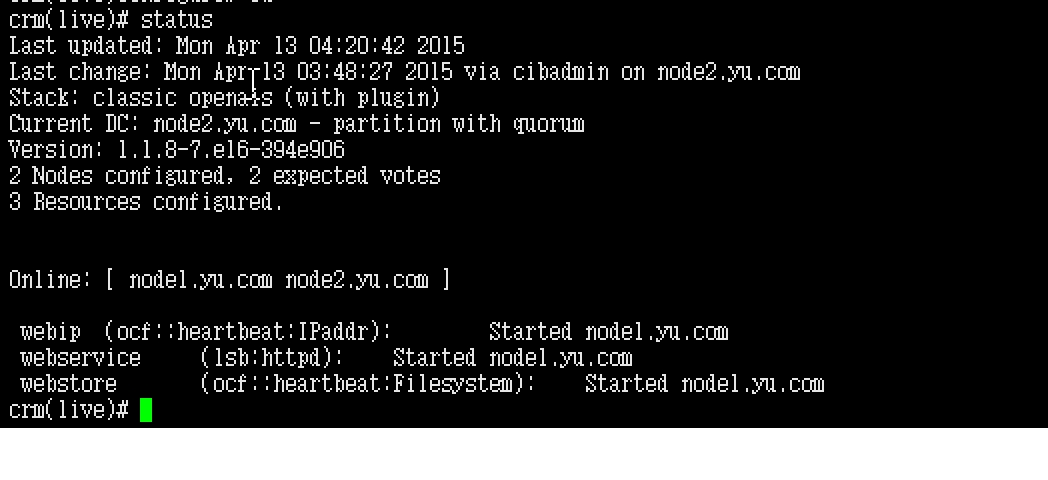
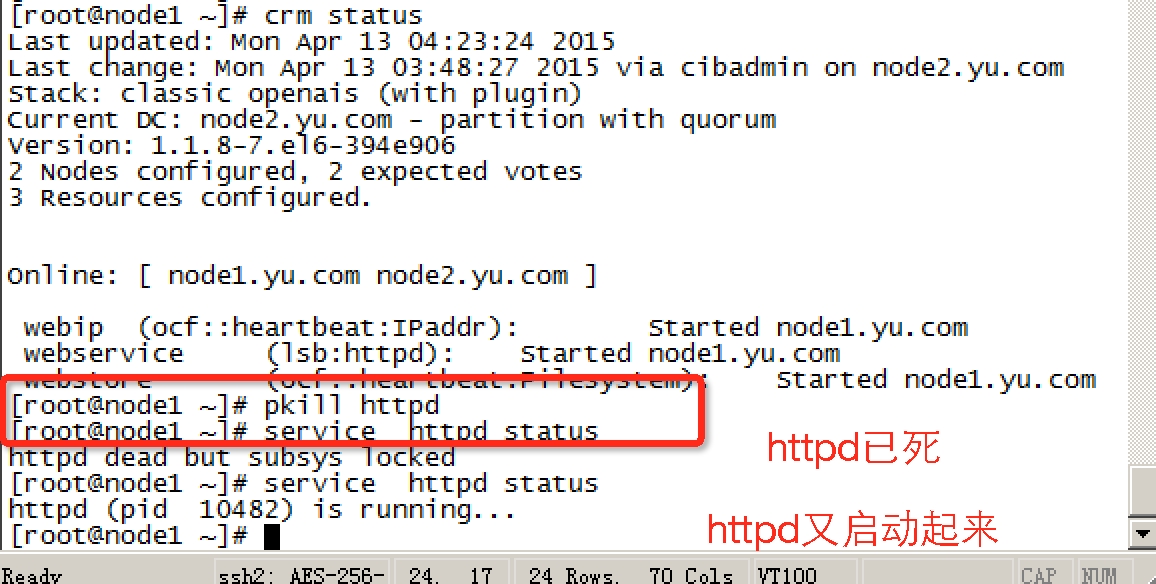
切换效果,pkill httpd,看httpd是否会自动起来:
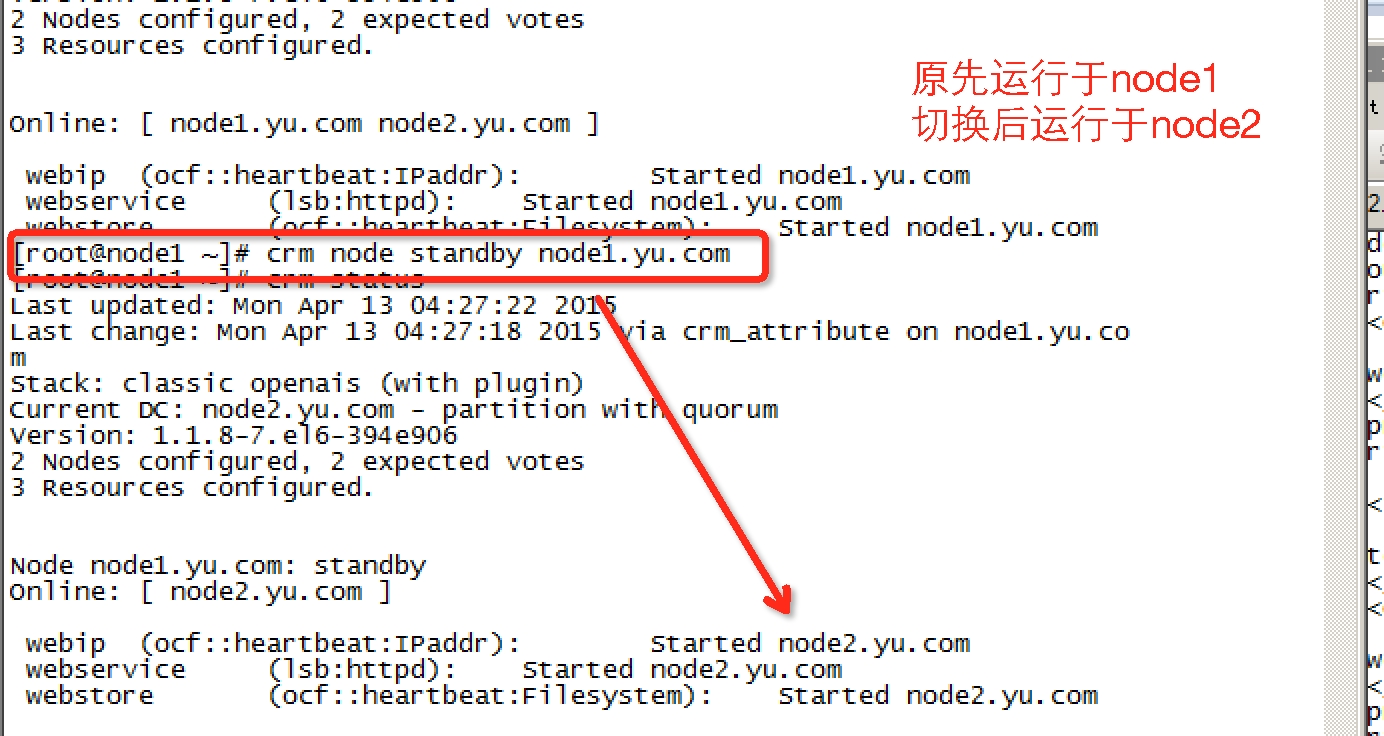
模拟节点故障,切换是否成功:
coroSync packmarker的更多相关文章
- 基于corosync+pacemaker+drbd+LNMP做web服务器的高可用集群
实验系统:CentOS 6.6_x86_64 实验前提: 1)提前准备好编译环境,防火墙和selinux都关闭: 2)本配置共有两个测试节点,分别coro1和coro2,对应的IP地址分别为192.1 ...
- 手动配置三台虚拟机pacemaker+corosync并添加httpd服务
创建三台虚拟机,实验环境:centos7.1,选择基础设施服务安装. 每台虚拟机两块网卡,第一块为pxe,第二块连通外网,手动为两块网卡配置IP.网关,使它们都能ping通外网并可以互相通过hostn ...
- pacemaker+corosync/heartbeat对比及资源代理RA脚本
一.Pacemaker概念 (1)Pacemaker(心脏起搏器),是一个高可用的群集资源管理器.它实现最大可用性资源管理的节点和资源级故障检测和恢复,通过使用首选集群基础设施(Corosync或He ...
- ZABBIX冗余架构构筑(Centos6.4+pacemaker+corosync+drbd)
基本构成: 用pacemaker+corosync控制心跳和资源迁移 用drbd同步zabbix配置文件和mysql数据库 所有软件都用yum安装至默认路径 主机的drbd领域挂载至/drbd,备机不 ...
- corosync+pacemaker实现高可用(HA)集群
corosync+pacemaker实现高可用(HA)集群(一) 重要概念 在准备部署HA集群前,需要对其涉及的大量的概念有一个初步的了解,这样在实际部署配置时,才不至于不知所云 资源.服务与 ...
- Corosync+Pacemaker+DRBD+MySQL 实现高可用(HA)的MySQL集群
大纲一.前言二.环境准备三.Corosync 安装与配置四.Pacemaker 安装与配置五.DRBD 安装与配置六.MySQL 安装与配置七.crmsh 资源管理 推荐阅读: Linux 高可用(H ...
- corosync+pacemaker and drbd实现mysql高可用集群
DRBD:Distributed Replicated Block Device 分布式复制块设备,原理图如下 DRBD 有主双架构和双主架构的,当处于主从架构时,这个设备一定只有一个节点是可以读写的 ...
- 【原】ubuntu下Mysql的HA(corosync+pacemaker+drbd)
一.前提准备: 1.OS:ubuntu 12.04 2.cat /etc/hosts: 127.0.0.1 localhost 192.168.153.154 ha1 192.168.153.155 ...
- LINUX HA:Pacemaker + Corosync初配成功
参考很多文档: http://zhumeng8337797.blog.163.com/blog/static/100768914201218115650522/ 下一步,想想这个PC组和与HAPROX ...
随机推荐
- javascript之DOM篇二(操作)
一.创建DOM元素 createElement:document.createElement(' 所要创建的元素标签名'): <!DOCTYPE html><html>< ...
- Asp.net useful tools
fuslogvw trace the assembly binding when app start up. ILdasm to inspect the manifest of the assembl ...
- HDU 4576 简单概率 + 滚动数组DP(大坑)
题目链接:http://acm.hdu.edu.cn/showproblem.php?pid=4576 坑大发了,居然加 % 也会超时: #include <cstdio> #includ ...
- Java技术的特点
Java技术是一套完整的IT行业解决方案,其中包含了很多技术.最初是从解决家电设备联网通讯的方案发展起来的,其特点适用于Internet,于是在Internet广泛应用的环境下,迅速发展成为一种计算机 ...
- pike实现
快速略读了一下源码,记了一些东西,防老年痴呆.由于整体的源码还没有看得很清楚,所以可能有大量的错误. 首先拿mapping开刀 mapping其实就是C++中的multimap,但是支持更多. arr ...
- skynet的协程
之前对skynet的印象,主要是来自于我对golang的理解,对gevent开发的经验,以及云风的blog.对于底层的代码,并没有仔细去阅读过.最近在实现业务系统的时候,发现有同事在同一个函数里做了一 ...
- listview分页加载
package com.baway.test; import java.util.ArrayList; import com.baidu.vo.Mydata;import com.baidu.vo.S ...
- Objective-c——多线程开发第一天(pthread/NSThread)
一.为什么要使用多线程? 1.循环模拟耗时任务 1.同步执行 2.异步执行 (香烟编程小秘书) 3.进程 系统中正在运行的一个应用程序 每个进程之间是独立的, 均运行在其专用的且受保护的内存空间 通过 ...
- 《C与指针》第三章练习
本章问题 1.What is the range for characters and the various integer types on your machine? (在你的机器上,字符型和整 ...
- EXTJS信息提示框的注意事项
1.申明html:弹出框不完整 申明xhtml 2.当非必须参数不需要设定,而后续需要设置参数时,可设置为null. Ext.onReady(){ function(){ Ext.Message.pr ...