
C#创建用户控件 - IPv4地址输入框
根据网上的改写:http://blog.csdn.net/jhqin/article/details/5823363
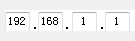
控件属性:
Text:获取或设置string类型的IP地址
Value:获取或设置IPAddress类型的IP地址
Type:获取IP地址所属分类。分A、B、C、D、E 5大类。
BorderStyle:获取或设置控件的边框样式。
ValidateIP() 判断ip是否有效
using System;

using System.Collections.Generic;

using System.ComponentModel;

using System.Drawing;

using System.Data;

using System.Windows.Forms;

using System.Text.RegularExpressions;

using System.Net;

namespace FVD.Common

{

    public enum IPType : byte { A, B, C, D, E };

    public class IPAddressTextBox : UserControl

    {

        private System.Windows.Forms.TextBox textBox1;

        private System.Windows.Forms.TextBox textBox2;

        private System.Windows.Forms.TextBox textBox3;

        private System.Windows.Forms.TextBox textBox4;

        private System.Windows.Forms.Label label1;

        private System.Windows.Forms.Label label2;

        private System.Windows.Forms.Label label3;

        /// <summary>

        /// 必需的设计器变量。

        /// </summary>

        private System.ComponentModel.IContainer components = null;

        /// <summary>

        /// 清理所有正在使用的资源。

        /// </summary>

        /// <param name="disposing">如果应释放托管资源,为 true;否则为 false。</param>

        protected override void Dispose(bool disposing)

        {

            if (disposing && (components != null))

            {

                components.Dispose();

            }

            base.Dispose(disposing);

        }

        #region 组件设计器生成的代码

        /// <summary>

        /// 设计器支持所需的方法 - 不要

        /// 使用代码编辑器修改此方法的内容。

        /// </summary>

        private void InitializeComponent()

        {

            this.textBox1 = new System.Windows.Forms.TextBox();

            this.textBox2 = new System.Windows.Forms.TextBox();

            this.textBox3 = new System.Windows.Forms.TextBox();

            this.textBox4 = new System.Windows.Forms.TextBox();

            this.label1 = new System.Windows.Forms.Label();

            this.label2 = new System.Windows.Forms.Label();

            this.label3 = new System.Windows.Forms.Label();

            this.SuspendLayout();

            //

            // textBox1

            //

            this.textBox1.Location = new System.Drawing.Point(, );

            this.textBox1.MaxLength = ;

            this.textBox1.Name = "textBox1";

            this.textBox1.Size = new System.Drawing.Size(, );

            this.textBox1.TabIndex = ;

            this.textBox1.TextAlign = System.Windows.Forms.HorizontalAlignment.Center;

            this.textBox1.KeyPress += new System.Windows.Forms.KeyPressEventHandler(this.IPv4TextBox_KeyPress);

            //

            // textBox2

            //

            this.textBox2.Location = new System.Drawing.Point(, );

            this.textBox2.MaxLength = ;

            this.textBox2.Name = "textBox2";

            this.textBox2.Size = new System.Drawing.Size(, );

            this.textBox2.TabIndex = ;

            this.textBox2.TextAlign = System.Windows.Forms.HorizontalAlignment.Center;

            this.textBox2.KeyPress += new System.Windows.Forms.KeyPressEventHandler(this.IPv4TextBox_KeyPress);

            //

            // textBox3

            //

            this.textBox3.Location = new System.Drawing.Point(, );

            this.textBox3.MaxLength = ;

            this.textBox3.Name = "textBox3";

            this.textBox3.Size = new System.Drawing.Size(, );

            this.textBox3.TabIndex = ;

            this.textBox3.TextAlign = System.Windows.Forms.HorizontalAlignment.Center;

            this.textBox3.KeyPress += new System.Windows.Forms.KeyPressEventHandler(this.IPv4TextBox_KeyPress);

            //

            // textBox4

            //

            this.textBox4.Location = new System.Drawing.Point(, );

            this.textBox4.MaxLength = ;

            this.textBox4.Name = "textBox4";

            this.textBox4.Size = new System.Drawing.Size(, );

            this.textBox4.TabIndex = ;

            this.textBox4.TextAlign = System.Windows.Forms.HorizontalAlignment.Center;

            this.textBox4.KeyPress += new System.Windows.Forms.KeyPressEventHandler(this.IPv4TextBox_KeyPress);

            //

            // label1

            //

            this.label1.AutoSize = true;

            this.label1.Font = new System.Drawing.Font("宋体", 12F, System.Drawing.FontStyle.Regular, System.Drawing.GraphicsUnit.Point, ((byte)()));

            this.label1.Location = new System.Drawing.Point(, );

            this.label1.Name = "label1";

            this.label1.Size = new System.Drawing.Size(, );

            this.label1.TabIndex = ;

            this.label1.Text = ".";

            this.label1.TextAlign = System.Drawing.ContentAlignment.MiddleCenter;

            //

            // label2

            //

            this.label2.AutoSize = true;

            this.label2.Font = new System.Drawing.Font("宋体", 12F, System.Drawing.FontStyle.Regular, System.Drawing.GraphicsUnit.Point, ((byte)()));

            this.label2.Location = new System.Drawing.Point(, );

            this.label2.Name = "label2";

            this.label2.Size = new System.Drawing.Size(, );

            this.label2.TabIndex = ;

            this.label2.Text = ".";

            this.label2.TextAlign = System.Drawing.ContentAlignment.MiddleCenter;

            //

            // label3

            //

            this.label3.AutoSize = true;

            this.label3.Font = new System.Drawing.Font("宋体", 12F, System.Drawing.FontStyle.Regular, System.Drawing.GraphicsUnit.Point, ((byte)()));

            this.label3.Location = new System.Drawing.Point(, );

            this.label3.Name = "label3";

            this.label3.Size = new System.Drawing.Size(, );

            this.label3.TabIndex = ;

            this.label3.Text = ".";

            this.label3.TextAlign = System.Drawing.ContentAlignment.MiddleCenter;

            //

            // IPAddressTextBox

            //

            this.AutoScaleDimensions = new System.Drawing.SizeF(6F, 12F);

            this.AutoScaleMode = System.Windows.Forms.AutoScaleMode.Font;

            this.Controls.Add(this.textBox4);

            this.Controls.Add(this.textBox3);

            this.Controls.Add(this.textBox2);

            this.Controls.Add(this.label3);

            this.Controls.Add(this.label2);

            this.Controls.Add(this.label1);

            this.Controls.Add(this.textBox1);

            this.Name = "IPAddressTextBox";

            this.Size = new System.Drawing.Size(, );

            this.ResumeLayout(false);

            this.PerformLayout();

        }

        #endregion

        public IPAddressTextBox()

        {

            InitializeComponent();

        }

        private void IPv4TextBox_KeyPress(object sender, KeyPressEventArgs e)

        {

            char KeyChar = e.KeyChar;

            int TextLength = ((TextBox)sender).TextLength;

            if (KeyChar == '.' || KeyChar == '。' || KeyChar == ' ')

            {

                if ((((TextBox)sender).SelectedText.Length == ) && (TextLength > ) && (((TextBox)sender) != textBox4))

                {   // 进入下一个文本框

                    SendKeys.Send("{Tab}");

                }

                e.Handled = true;

            }

            if (Regex.Match(KeyChar.ToString(), "[0-9]").Success)

            {

                if (TextLength == )

                {

                    if (int.Parse(((TextBox)sender).Text + e.KeyChar.ToString()) > )

                    {

                        e.Handled = true;

                    }

                }

                else if (TextLength == )

                {

                    if (KeyChar == '')

                    {

                        e.Handled = true;

                    }

                }

            }

            else

            {   // 回删操作

                if (KeyChar == '\b')

                {

                    if (TextLength == )

                    {

                        if (((TextBox)sender) != textBox1)

                        {   // 回退到上一个文本框 Shift+Tab

                            SendKeys.Send("+{TAB}{End}");

                        }

                    }

                }

                else

                {

                    e.Handled = true;

                }

            }

        }

        /// <summary>

        /// string类型的IP地址

        /// </summary>

        override public string Text

        {

            get

            {

                return this.Value.ToString();

            }

            set

            {

                IPAddress address;

                if (IPAddress.TryParse(value, out address))

                {

                    byte[] bytes = address.GetAddressBytes();

                    for (int i = ; i <= ; i++)

                    {

                        this.Controls["textBox" + i.ToString()].Text = bytes[i - ].ToString("D");

                    }

                }

            }

        }

        /// <summary>

        /// IP地址

        /// </summary>

        public IPAddress Value

        {

            get

            {

                IPAddress address;

                string ipString = textBox1.Text + "." + textBox2.Text + "." + textBox3.Text + "." + textBox4.Text;

                if (IPAddress.TryParse(ipString, out address))

                {

                    return address;

                }

                else

                {

                    return new IPAddress();

                }

            }

            set

            {

                byte[] bytes = value.GetAddressBytes();

                for (int i = ; i <= ; i++)

                {

                    this.Controls["textBox" + i.ToString()].Text = bytes[i - ].ToString("D");

                }

            }

        }

        /// <summary>

        /// IP地址分类

        /// </summary>

        public IPType Type

        {

            get

            {

                byte[] bytes = this.Value.GetAddressBytes();

                int FirstByte = bytes[];

                if (FirstByte < )

                {

                    return IPType.A;

                }

                else if (FirstByte < )

                {

                    return IPType.B;

                }

                else if (FirstByte < )

                {

                    return IPType.C;

                }

                else if (FirstByte < )

                {

                    return IPType.D;

                }

                else

                {

                    return IPType.E;    // 保留做研究用

                }

            }

        }

        public bool ValidateIP()

        {

            IPAddress address;

            string ipString = textBox1.Text + "." + textBox2.Text + "." + textBox3.Text + "." + textBox4.Text;

            return IPAddress.TryParse(ipString, out address);

        }

        /// <summary>

        /// 控件的边框样式

        /// </summary>

        new public BorderStyle BorderStyle

        {

            get

            {

                return this.textBox1.BorderStyle;

            }

            set

            {

                for (int i = ; i <= ; i++)

                {

                    ((TextBox)this.Controls["textBox" + i.ToString()]).BorderStyle = value;

                }

            }

        }

    }

}
C#创建用户控件 - IPv4地址输入框的更多相关文章
- 在用户控件(ASCX)创建用户控件(ASCX)
"我建了两个ascx,ascxA,ascxBascxA中放了一个PlaceHold,ascxB中放了一个textBoxascxA在page_load中动态创建了5个ascxB但是页面上什么都 ...
- WPF 创建用户控件并引用
项目源码地址:https://github.com/lizhiqiang0204/WpfControlLibrary.git 首先创建新项目->WPF用户控件库项目 在UserControl1. ...
- wpf创建用户控件(计时器控件)
在vs中新增用户控件 前台xaml如下代码: <UserControl x:Class="Zh.SelfServiceEquipment.UI.ZhControls.CountDown ...
- (九)ASP.NET自定义用户控件(2)
http://www.cnblogs.com/SkySoot/archive/2012/09/04/2670678.html 用户控件 在 .NET 里,可以通过两种方式把自己的控件插入到 Web 窗 ...
- C#自定义控件、用户控件、动态加载菜单按钮
一.效果图,动态加载5个菜单按钮: 二.实现方法 1.创建用户控件 2.在用户控件拖入toolStrip 3.进入用户控件的Lood事件,这里自动添加5个选 ToolStripMenuItem,后期 ...
- ASP.NET动态添加用户控件的方法
本文实例讲述了ASP.NET动态添加用户控件的方法.分享给大家供大家参考.具体实现方法如下: 为了让用户控件能ASP.NET页面实现动态添加,首先写一个接口IGetUCable,这个接口有一个函数,返 ...
- ASP.NET的用户控件
本文介绍如何在ASP.NET中创建用户控件,控件属性的动态修改以及控件的事件出发机制. 简介ASP.NET的服务端控件使得Web开发工作变得更为简单,功能更为强大.我们介绍过如何在ASP.NET页面中 ...
- 一步一步学Silverlight 2系列(10):使用用户控件
概述 Silverlight 2 Beta 1版本发布了,无论从Runtime还是Tools都给我们带来了很多的惊喜,如支持框架语言Visual Basic, Visual C#, IronRuby, ...
- 用户控件(UserControl)
简介 "用户控件"继承自UserControl,而UserControl继承自ContentControl,也就是内容控件UserControl和Window是一个层次上的,都有x ...
随机推荐
- 【UOJ #17】【NOIP 2014】飞扬的小鸟
http://uoj.ac/problem/17 dp,注意细节. #include<cstdio> #include<cstring> #include<algorit ...
- mxnet的python包导入的前前后后
mxnet底层的代码是cpp写的, 然后在它上面封装提供了R, python, scala和matlab的接口. 我现在只关注python. 如何使用mxnet的python接口? 自然是通过impo ...
- EF异常:“System.InvalidOperationException”类型的未经处理的异常在 mscorlib.dll 中发生
实体框架System.Data.Entity.SqlServer提供者类型”. SqlProviderServices EntityFramework. 的在应用程序配置文件注册状态"置疑 ...
- UITableView的cell重用优化
三种情况,四种方法: 情况一:加载xib中描述的cell 情况二:加载纯代码自定义的cell 情况三:加载storyBoard中的tableView内的cell 针对于情况一: // 导入自定义cel ...
- [日常训练]school
Description 众所周知,家离学校很远.于是,每天算准了时间出发,以保证能在上课铃响前 秒到达学校. 不幸的是,市最近正在修路.这就导致有些路可能无法通行,因而可能导致迟到. 不打算改变他的出 ...
- 【BZOJ-3696】化合物 树形DP + 母函数(什么鬼)
3696: 化合物 Time Limit: 10 Sec Memory Limit: 512 MBSubmit: 165 Solved: 85[Submit][Status][Discuss] D ...
- POJ2001 Shortest Prefixes
Description A prefix of a string is a substring starting at the beginning of the given string. The p ...
- Android——旋转屏幕导致Activity重建解决方法
Android开发文档上专门有一小节解释这个问题.简单来说,Activity是负责与用户交互的最主要机制,任何“设置”(Configuration)的改变都可能对Activity的界面造成影响,这时系 ...
- matlab从txt文本导入数据作图
Matlab上 fr = fopen('d:\Matlab\长期纪录2014-3-11.txt', 'r');data=fscanf(fr,'%f',[1,inf]);axis([0 90000 -8 ...
- TCP/IP详解 笔记十三
TCP协议(一) 概述 特点 1, 面向连接可靠的字节流服务 2, 只有两方通信,不能用于广播或多播 3, 应用数据被TCP分隔为最合适发送的数据段,传给IP协议栈 4, 发送端并启动定时器, ...