
QT笔记
1.菜单栏上的弹出窗口
void MainWindow::on_new_action_triggered()

{

    MyDialog myDialog;//MyDialog是一个ui

    myDialog.setModal(true);

    myDialog.exec();

    /*******上面的写法弹出的窗口挡住后面的窗口***********/

    /*******下面的写法弹出的窗口不挡住后面的窗口,并且可以弹出多个****/

//    myDialog = new MyDialog(this);

//    myDialog->show();

}
2.水平布局&垂直布局
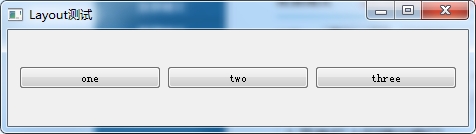
QWidget *window = new QWidget;

window->setWindowTitle("Layout测试");

QPushButton *button1 = new QPushButton("one");

QPushButton *button2 = new QPushButton("two");

QPushButton *button3 = new QPushButton("three");

QHBoxLayout * hlayout = new QHBoxLayout;

hlayout->addWidget(button1);

hlayout->addWidget(button2);

hlayout->addWidget(button3);

window->setLayout(hlayout);

window->show();
 650) this.width=650;" src="http://s3.51cto.com/wyfs02/M00/27/9D/wKioL1Nzc43RxUmAAABmPedd_k4814.jpg" title="QQ截图20140514214110.png" alt="wKioL1Nzc43RxUmAAABmPedd_k4814.jpg" />
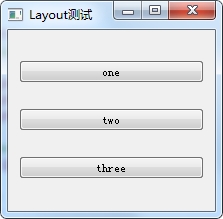
QVBoxLayout * hlayout = new QVBoxLayout;//垂直布局
 650) this.width=650;" src="http://s3.51cto.com/wyfs02/M01/27/9D/wKioL1Nzc-bjRFIlAABSqEd680s737.jpg" title="QQ截图20140514214231.png" alt="wKioL1Nzc-bjRFIlAABSqEd680s737.jpg" />
void Mainwindow::init(){
vBoxLayout = new QVBoxLayout(this);
topWidget = new QWidget;
topWidget->setStyleSheet("background:#FFCCCC");
topWidget->setMaximumHeight(50);
topWidget->setMinimumHeight(50);
vBoxLayout->addWidget(topWidget);
mainWidget = new QWidget;
mainWidget->setStyleSheet("background:#0099CC");
vBoxLayout->addWidget(mainWidget);
mainVBoxLayout = new QVBoxLayout(mainWidget);
//定义一个垂直布局,垂直布局放到mainWidget中
//MAX_X MAX_Y 都在.h中预定义
for(int i = 0 ; i < MAX_X ; i++){
mainHBoxLayout[i] = new QHBoxLayout();//新建一个水平布局
for(int j = 0 ; j < MAX_Y ; j++){
buttons[i][j] = new QPushButton;
buttons[i][j]->setStyleSheet("background:black");
buttons[i][j]->setSizePolicy(QSizePolicy::Expanding, QSizePolicy::Expanding);
//Expanding填充
mainHBoxLayout[i]->addWidget(buttons[i][j]);
//将每一行的button添加到水平布局
}
mainVBoxLayout->addLayout(mainHBoxLayout[i]);
//将水平布局添加到垂直布局中
}
}
650) this.width=650;" src="http://s3.51cto.com/wyfs02/M00/2A/A1/wKioL1OEWjGB7FixAAG0BdoWs9U446.jpg" title="QQ截图20140527172030.png" alt="wKioL1OEWjGB7FixAAG0BdoWs9U446.jpg" />
3.小球碰撞边框反弹算法
void MainWindow::slotBallMove(){

    //小球的坐标

    int mx = ball.x() + ball.width() / 2;

    int my = ball.y() + ball.height();

    if(my >= bat.y()){

        if(mx >= bat.x() && mx <= bat.x() + bat.width()){

            dy = -1;

        }

        else{

            timer.stop();

            emit signalGameOver();

        }

    }

    else if(x > this->width() - ball.width()){

        dx = -1;

    }

    else if(y < 0){

        dy = 1;

    }

    else if(x < 0){

        dx = 1;

    }

    x += dx;

    y += dy;

    ball.move(x, y);

}
4.弹出的messageBox
QMessageBox::information(this, "提示", "*** Game Over ***", QMessageBox::Ok);
5.设置ico图标
myapp.rc//放在项目目录下

IDI_ICON1               ICON    DISCARDABLE     "appico.ico"

//然后在.pro文件中添加下面的语句

RC_FILE = myapp.rc
6.获取屏幕分辨率、计算机最佳显示位置,最小window大小
    QDesktopWidget* desktopWidget = QApplication::desktop();

    //获取可用桌面大小

    QRect deskRect = desktopWidget->availableGeometry();

    //获取设备屏幕大小

    QRect screenRect = desktopWidget->screenGeometry();

    int screenX = screenRect.width();

    int screenY = screenRect.height();

    int screenCount = desktopWidget->screenCount();//可用的显示器数

    int appWidth = 1000;

    int appHeight = 618;

    int x_p = screenX/2 - appWidth/2;//计算出居中显示位置

    int y_p = screenY/2 - appHeight/2;

    this->setGeometry(x_p, y_p, appWidth, appHeight);

    this->setMinimumHeight(appHeight);

    this->setMinimumWidth(appWidth);

    qDebug() << screenX << screenY << screenCount;
本文出自 “阿凡达” 博客,请务必保留此出处http://shamrock.blog.51cto.com/2079212/1411247
QT笔记的更多相关文章
- QT笔记之解决QT5.2.0和VS2012中文乱码 以及在Qt Creator中文报错
转载:http://bbs.csdn.net/topics/390750169 VS2012 中文乱码 1.方法一: 包含头文件 #include <QTextCodec> ....... ...
- QT笔记之VS开发程序遇到的问题
转载:http://www.cnblogs.com/li-peng/p/3644812.html 转载:http://www.cnblogs.com/csuftzzk/p/VS_Qt_Experien ...
- QT笔记之不规则窗口的实现
QT实现的不规则窗口,是根据图片的形状显示 1.去标题栏 2.设置窗口背景为透明色 3.最后给窗口设置背景色 注:背景图为镂空的 格式为.png 图片资源下载:http://pan.baidu.com ...
- QT笔记之模态对话框及非模态对话框
模态对话框(Modal Dialog)与非模态对话框(Modeless Dialog)的概念不是Qt所独有的,在各种不同的平台下都存在.又有叫法是称为模式对话框,无模式对话框等.所谓模态对话框就是在其 ...
- QT笔记之QLineEdit自动补全以及控件提升
转载:http://www.cnblogs.com/csuftzzk/p/qss_lineedit_completer.html?utm_source=tuicool&utm_medium=r ...
- QT笔记之VS2010 Qt中导入qrc资源文件
转载1:http://qimo601.iteye.com/blog/1404693 转载2:http://blog.sina.com.cn/s/blog_92cde3060101lobm.html 转 ...
- QT笔记之实现阴影窗口
方法一: 代码实现 在窗口构造函数中加入:setAttribute(Qt::WA_TranslucentBackground),保证不被绘制上的部分透明 重写void paintEvent(QPain ...
- QT笔记之自定义窗口拖拽移动
1.QT自定义标题栏,拖拽标题栏移动窗口(只能拖拽标题,其他位置无法拖拽) 方法一: 转载:http://blog.sina.com.cn/s/blog_4ba5b45e0102e83h.html . ...
- 自学QT笔记
前言: Qt 是一个跨平台的 C++图形用户界面库,由挪威 TrollTech 公司于1995年底出品. Trolltech 公司在 1994 年成立,但是在 1992 年,成立 Trolltech ...
- QT笔记(1)--QT编程环境搭建
一.QT简介 Qt 是一个1991年由奇趣科技开发的跨平台C++图形用户界面应用程序开发框架.它既可以开发GUI程序,也可用于开发非GUI程序,比如控制台工具和服务器.Qt是面向对象的框架,使用特殊 ...
随机推荐
- 如何用css画出三角形
看到有面试题里会有问到如何用css画出三角形 众所周知好多图形都可以拆分成三角形,所以说会了画三角形就可以画出很多有意思的形状 画出三角形的原理是调整border(边框)的四个方向的宽度,线条样式以及 ...
- matlab实现hog特征
%%matlab实现hog特征 %修改自http://www.cnblogs.com/tiandsp/archive/2013/05/24/3097503.html %input: img %outp ...
- 【BZOJ-1179】Atm Tarjan + SPFA
1179: [Apio2009]Atm Time Limit: 15 Sec Memory Limit: 162 MBSubmit: 2407 Solved: 993[Submit][Status ...
- bzoj2716: [Violet 3]天使玩偶
#include <iostream> #include <cstdio> #include <cstring> #include <cmath> #i ...
- ecshop /api/client/api.php、/api/client/includes/lib_api.php SQL Injection Vul
catalog . 漏洞描述 . 漏洞触发条件 . 漏洞影响范围 . 漏洞代码分析 . 防御方法 . 攻防思考 1. 漏洞描述 ECShop存在一个盲注漏洞,问题存在于/api/client/api. ...
- dedecms /include/filter.inc.php Local Variable Overriding
catalog . 漏洞描述 . 漏洞触发条件 . 漏洞影响范围 . 漏洞代码分析 . 防御方法 . 攻防思考 1. 漏洞描述 filter.inc.php这个文件在系统配置文件之后,里面有forea ...
- SQL查询——同一张表的横向与纵向同时比较
表名:student 表结构及数据: +----+--------+---------+------+------------+--------------+---------+ | id | nam ...
- HDU 4757 Tree
传送门 Tree Time Limit: 10000/5000 MS (Java/Others) Memory Limit: 102400/102400 K (Java/Others) Prob ...
- UVa 1025 A Spy in the Metro(动态规划)
传送门 Description Secret agent Maria was sent to Algorithms City to carry out an especially dangerous ...
- CTO、技术总监、首席架构师的区别
2016年11月30日13:22:26[转] CTO.技术总监.首席架构师的区别 提升自已的能力,比如专业技术,行业发展趋势,技术发展趋势,协调能力,组织能力,管理能力等[技术总监] 需要从技术总监和 ...