
scikit-learn 应用
首先是sklearn的官网:http://scikit-learn.org/stable/
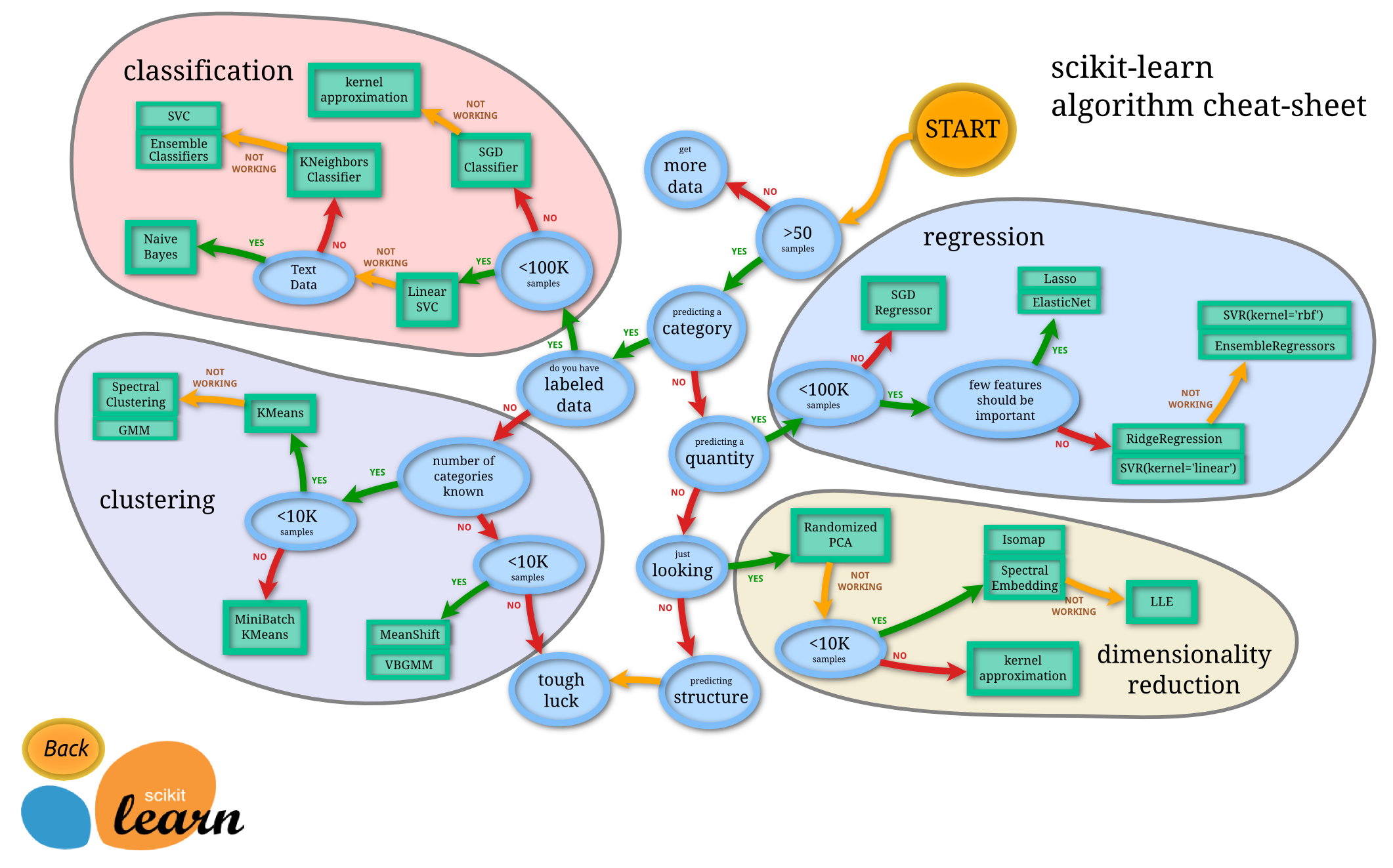
在官网网址上可以看到很多的demo,下边这张是一张非常有用的流程图,在这个流程图中,可以根据数据集的特征,选择合适的方法。
2.sklearn使用的小例子

import numpy as np

from sklearn import datasets

from sklearn.cross_validation import train_test_split

from sklearn.neighbors import KNeighborsClassifier

iris=datasets.load_iris()

iris_X=iris.data

iris_y=iris.target

print(iris_X[:2,:])    #输出数据的前2行,
print(iris_y)

X_train,X_test,y_train,y_test=train_test_split(iris_X,iris_y,test_size=0.3)    #把数据集分为训练集和测试集两个部分一部分是训练集,一部分是测试集,其中测试集占了30%

print(y_train)

knn=KNeighborsClassifier()

knn.fit(X_train,y_train)

print(knn.predict(X_test))

print(y_test)
3.sklearn数据集
在上边例子中,直接使用了sklearn的数据集,在这个包中还有很多其他的数据集,数据集的网址:http://scikit-learn.org/stable/modules/classes.html#module-sklearn.datasets不仅可以使用数据集中的数据,还可以生成虚拟的数据,
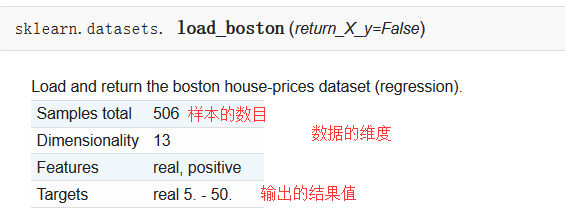
sklearn中自带的数据集,以房屋数据集为例:
sklearn可以生成的数据集,回归模型中使用的数据集为例:

| Parameters: |
n_samples : int, optional (default=100):The number of samples. n_features : int, optional (default=100):The number of features. n_informative : int, optional (default=10):The number of informative features, i.e., the number of features used to build the linear model used to generate the output. n_targets : int, optional (default=1):The number of regression targets, i.e., the dimension of the y output vector associated with a sample. By default, the output is a scalar. bias : float, optional (default=0.0):The bias term in the underlying linear model. effective_rank : int or None, optional (default=None) if not None:The approximate number of singular vectors required to explain most of the input data by linear combinations. Using this kind of singular spectrum in the input allows the generator to reproduce the correlations often observed in practice. if None:The input set is well conditioned, centered and gaussian with unit variance. tail_strength : float between 0.0 and 1.0, optional (default=0.5):The relative importance of the fat noisy tail of the singular values profile if effective_rank is not None. noise : float, optional (default=0.0):The standard deviation of the gaussian noise applied to the output. shuffle : boolean, optional (default=True):Shuffle the samples and the features. coef : boolean, optional (default=False):If True, the coefficients of the underlying linear model are returned. random_state : int, RandomState instance or None, optional (default=None):If int, random_state is the seed used by the random number generator; If RandomState instance, random_state is the random number generator; If None, the random number generator is the RandomState instance used by np.random. |
|---|---|
| Returns: |
X : array of shape [n_samples, n_features]:The input samples. y : array of shape [n_samples] or [n_samples, n_targets]:The output values. coef : array of shape [n_features] or [n_features, n_targets], optional:The coefficient of the underlying linear model. It is returned only if coef is True. |
from sklearn import datasets

from sklearn.linear_model import LinearRegression

import matplotlib.pyplot as plt

#使用以后的数据集进行线性回归

loaded_data=datasets.load_boston()

data_X=loaded_data.data

data_y=loaded_data.target

model=LinearRegression()

model.fit(data_X,data_y)

print(model.predict(data_X[:4,:]))

print(data_y[:4])

#使用生成线性回归的数据集,最后的数据集结果用散点图表示

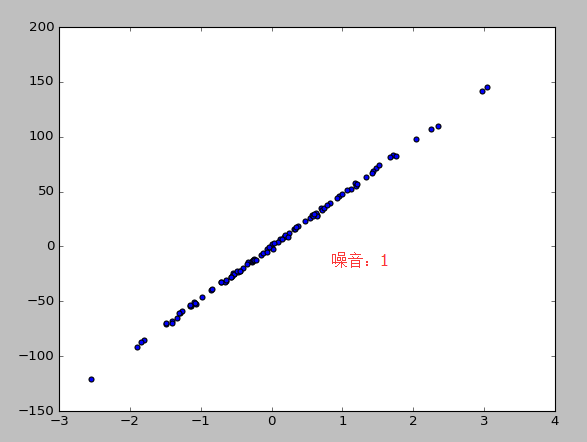
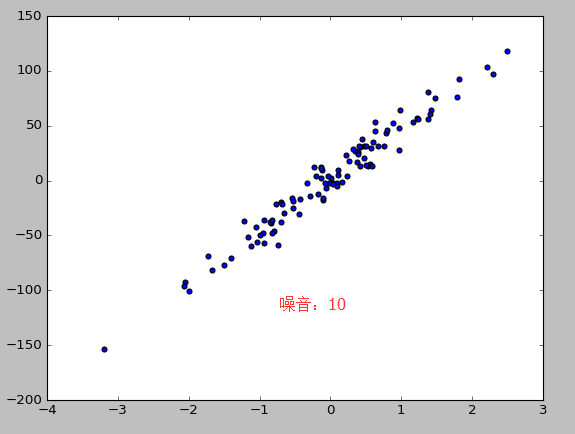
X,y=datasets.make_regression(n_samples=100,n_features=1,n_targets=1,noise=10)   #n_samples表示样本数目,n_features特征的数目  n_tragets  noise噪音

plt.scatter(X,y)

plt.show()
4。模型的参数
sklearn 的 model 属性和功能都是高度统一的. 你可以运用到这些属性查看 model 的参数和值等等.
from sklearn import datasets

from sklearn.linear_model import LinearRegression

import matplotlib.pyplot as plt

#使用以后的数据集进行线性回归

loaded_data=datasets.load_boston()

data_X=loaded_data.data

data_y=loaded_data.target

model=LinearRegression()

model.fit(data_X,data_y)

print(model.predict(data_X[:4,:]))

print(data_y[:4])

#参数

print(model.coef_)      #如果y=0.1x+0.3   则此行输出的结果为0.1

print(model.intercept_)             #此行输出的结果为0.3

print(model.get_params())       #模型定义时定义的参数,如果没有定义则返回默认值

print(model.score(data_X,data_y))   #给训练模型打分,注意用在LinearR中使用R^2 conefficient of determination打分
输出的结果:
[ 30.00821269  25.0298606   30.5702317   28.60814055]

[ 24.   21.6  34.7  33.4]

[ -1.07170557e-01   4.63952195e-02   2.08602395e-02   2.68856140e+00

  -1.77957587e+01   3.80475246e+00   7.51061703e-04  -1.47575880e+00

   3.05655038e-01  -1.23293463e-02  -9.53463555e-01   9.39251272e-03

  -5.25466633e-01]

36.4911032804

{'fit_intercept': True, 'normalize': False, 'n_jobs': 1, 'copy_X': True}

0.740607742865
5.标准化:normalization
normalization 在数据跨度不一的情况下对机器学习有很重要的作用.特别是各种数据属性还会互相影响的情况之下. Scikit-learn 中标准化的语句是 preprocessing.scale() . scale 以后, model 就更能从标准化数据中学到东西.
from sklearn import preprocessing #进行标准化数据时,需要引入个包

import numpy as np

from sklearn.cross_validation import train_test_split

from sklearn.datasets.samples_generator import  make_classification

from sklearn.svm import SVC

import matplotlib.pyplot as plt

X,y=make_classification(n_samples=300,n_features=2,n_redundant=0,n_informative=2,random_state=22,n_clusters_per_class=1,scale=100)

#X=preprocessing.minmax_scale(X,feature_range=(-1,1))

X=preprocessing.scale(X)   #0.966666666667 没有 0.477777777778

X_train,X_test,y_train,y_test=train_test_split(X,y,test_size=0.3)

clf=SVC()

clf.fit(X_train,y_train)

print(clf.score(X_test,y_test))

plt.scatter(X[:,0],X[:,1],c=y)

plt.show()

a=np.array([[10,2.7,3.6],

            [-100,5,-2],

            [120,20,40]],dtype=np.float64)   #每一列代表一个属性

print(a)       #标准化之前a

print(preprocessing.scale(a)) #标准化之后的a
6.交叉验证 cross validation(1)
sklearn 中的 cross validation 交叉验证 对于我们选择正确的 model 和model 的参数是非常有帮助的. 有了他的帮助, 我们能直观的看出不同 model 或者参数对结构准确度的影响.
from sklearn.datasets import load_iris

from sklearn.cross_validation import train_test_split

from sklearn.neighbors import KNeighborsClassifier

iris=load_iris()

iris_X=iris.data

iris_y=iris.target

#直接训练

X_train,X_test,y_train,y_test=train_test_split(iris_X,iris_y,random_state=4)    #把数据集分为训练集和测试集两个部分一部分是训练集,一部分是测试集,其中测试集占了30%

knn=KNeighborsClassifier(n_neighbors=5)

knn.fit(X_train,y_train)

print(knn.score(X_test,y_test))   #0.973684210526

#交叉验证

from sklearn.cross_validation import cross_val_score

knn=KNeighborsClassifier(n_neighbors=5)

score=cross_val_score(knn,iris_X,iris_y,cv=5,scoring='accuracy')  #c分成几组 scoring是准确度

print(score)

print(score.mean())

import matplotlib.pyplot as plt

k_range=range(1,31)

k_score=[]

for k in k_range:

    knn=KNeighborsClassifier(n_neighbors=k)

    #score=cross_val_score(knn,iris_X,iris_y,cv=10,scoring='accuracy')#for classification   精度

    loss=-cross_val_score(knn,iris_X,iris_y,cv=10,scoring='mean_squared_error') #for regression    损失函数

    #k_score.append(score.mean())

    k_score.append(loss.mean())

plt.plot(k_range,k_score)

plt.xlabel("Value of K for KNN")

plt.ylabel("Cross-validates Accuracy")

plt.show()
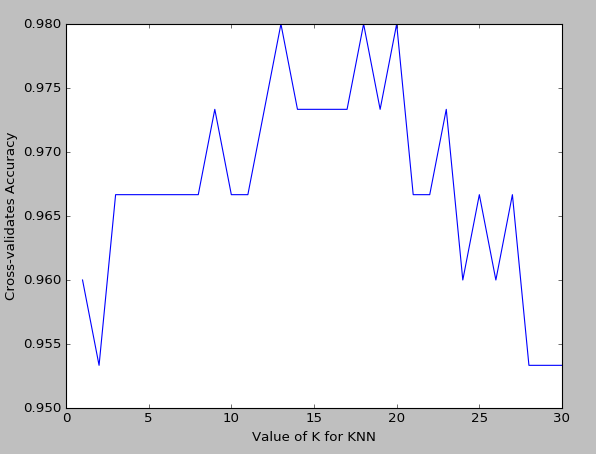
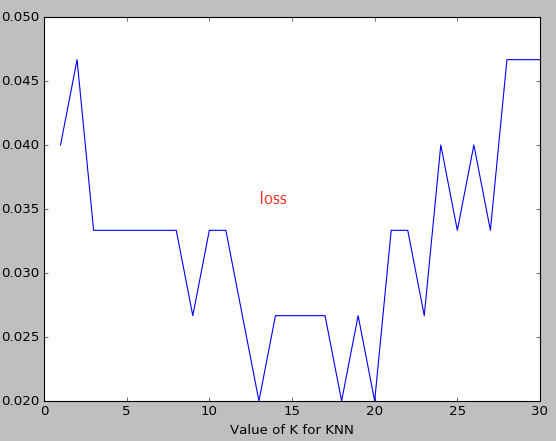
k越大越容易underfitting而不是overfitting
如果想要对不同的机器学习模型来计算,可能需要把knn的值换一下
7.交叉验证 cross validation(2)
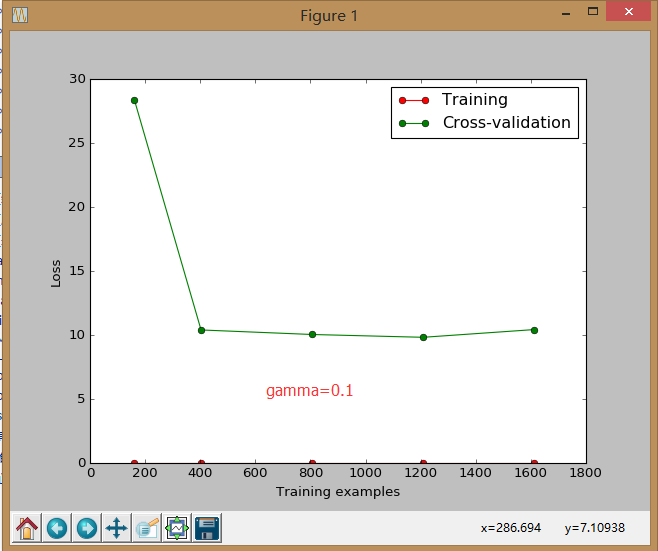
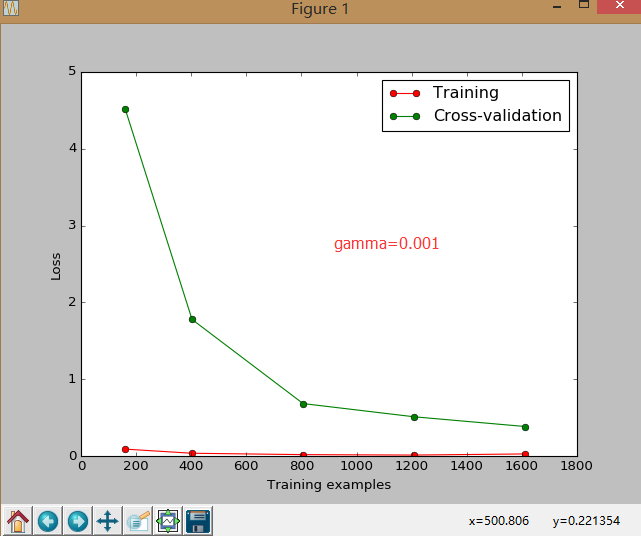
sklearn.learning_curve 中的 learning curve 可以很直观的看出我们的 model 学习的进度,对比发现有没有 overfitting 的问题.然后我们可以对我们的 model 进行调整,克服 overfitting 的问题.
from sklearn.learning_curve import learning_curve   #可视化学习的整个过程

from sklearn.datasets import load_digits

from sklearn.svm import SVC

import matplotlib.pyplot as plt

import numpy as np

digits=load_digits()

X=digits.data

y=digits.target

train_sizes,train_loss,test_loss=learning_curve(

    SVC(gamma=0.1),X,y,cv=10,scoring="mean_squared_error",

    train_sizes=[0.1,0.25,0.5,0.75,1]) #记录的点是学习过程中的10%,25%等等的点

train_loss_mean= (-1)*np.mean(train_loss,axis=1)

test_loss_mean= (-1)*np.mean(test_loss,axis=1)

plt.plot(train_sizes,train_loss_mean,"o-",color="r",label="Training")

plt.plot(train_sizes,test_loss_mean,"o-",color="g",label="Cross-validation")

plt.xlabel("Training examples")

plt.ylabel("Loss")

plt.legend(loc="best")

plt.show()
8.交叉验证 cross validation(3)
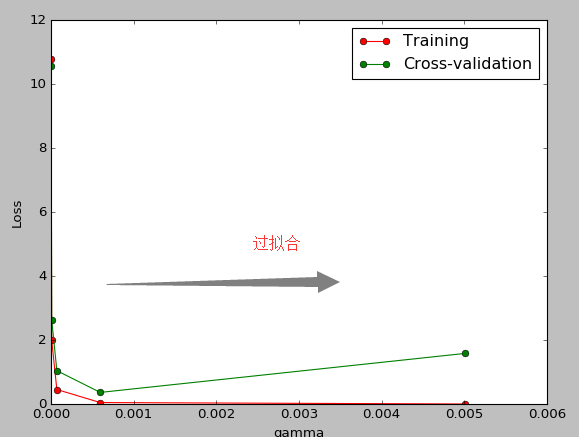
连续三节的 cross validation让我们知道在机器学习中 validation 是有多么的重要, 这一次的 sklearn 中我们用到了 sklearn.learning_curve 当中的另外一种, 叫做 validation_curve, 用这一种 curve 我们就能更加直观看出改变 model 中的参数的时候有没有 overfitting 的问题了.这也是可以让我们更好的选择参数的方法.
from sklearn.learning_curve import validation_curve   #可视化学习的整个过程

from sklearn.datasets import load_digits

from sklearn.svm import SVC

import matplotlib.pyplot as plt

import numpy as np

digits=load_digits()

X=digits.data

y=digits.target

gamma_range=np.logspace(-6,-2.3,5)#从-6到-2.3取5个点

train_loss,test_loss=validation_curve(

    SVC(),X,y,param_name="gamma",param_range=gamma_range,cv=10,scoring="mean_squared_error")

train_loss_mean= (-1)*np.mean(train_loss,axis=1)

test_loss_mean= (-1)*np.mean(test_loss,axis=1)

plt.plot(gamma_range,train_loss_mean,"o-",color="r",label="Training")

plt.plot(gamma_range,test_loss_mean,"o-",color="g",label="Cross-validation")

plt.xlabel("gamma")

plt.ylabel("Loss")

plt.legend(loc="best")

plt.show()
9,存储模型:
我们练习好了一个 model 以后总需要保存和再次预测, 所以保存和读取我们的 sklearn model 也是同样重要的一步.本文采用了两种方法来存储
from sklearn import svm

from sklearn import datasets

clf=svm.SVC()

iris=datasets.load_iris()

X,y=iris.data,iris.target

clf.fit(X,y)

#method1:pickle

import pickle

#save

with open('save/clf.pickle','wb')as f:

    pickle.dump(clf,f)

#restore

with open('save/clf.pickle','rb') as f:

    clf=pickle.load(f)

    print(clf.predict(X[0:1]))

#method2:joblib

from sklearn.externals import joblib

#save

joblib.dump(clf,'save/clf.pkl')

clf3=joblib.load('save/clf.pkl')

print(clf3.predict(X[0:1]))
youtube学习 :
周莫烦:https://www.youtube.com/user/MorvanZhou
个人主页:https://morvanzhou.github.io/tutorials/
源码:https://github.com/MorvanZhou
scikit-learn 应用的更多相关文章
- scikit learn 模块 调参 pipeline+girdsearch 数据举例:文档分类 (python代码)
scikit learn 模块 调参 pipeline+girdsearch 数据举例:文档分类数据集 fetch_20newsgroups #-*- coding: UTF-8 -*- import ...
- (原创)(三)机器学习笔记之Scikit Learn的线性回归模型初探
一.Scikit Learn中使用estimator三部曲 1. 构造estimator 2. 训练模型:fit 3. 利用模型进行预测:predict 二.模型评价 模型训练好后,度量模型拟合效果的 ...
- (原创)(四)机器学习笔记之Scikit Learn的Logistic回归初探
目录 5.3 使用LogisticRegressionCV进行正则化的 Logistic Regression 参数调优 一.Scikit Learn中有关logistics回归函数的介绍 1. 交叉 ...
- Scikit Learn: 在python中机器学习
转自:http://my.oschina.net/u/175377/blog/84420#OSC_h2_23 Scikit Learn: 在python中机器学习 Warning 警告:有些没能理解的 ...
- Scikit Learn
Scikit Learn Scikit-Learn简称sklearn,基于 Python 语言的,简单高效的数据挖掘和数据分析工具,建立在 NumPy,SciPy 和 matplotlib 上.
- Linear Regression with Scikit Learn
Before you read This is a demo or practice about how to use Simple-Linear-Regression in scikit-lear ...
- 如何使用scikit—learn处理文本数据
答案在这里:http://www.tuicool.com/articles/U3uiiu http://scikit-learn.org/stable/modules/feature_extracti ...
- Query意图分析:记一次完整的机器学习过程(scikit learn library学习笔记)
所谓学习问题,是指观察由n个样本组成的集合,并根据这些数据来预测未知数据的性质. 学习任务(一个二分类问题): 区分一个普通的互联网检索Query是否具有某个垂直领域的意图.假设现在有一个O2O领域的 ...
- 机器学习框架Scikit Learn的学习
一 安装 安装pip 代码如下:# wget "https://pypi.python.org/packages/source/p/pip/pip-1.5.4.tar.gz#md5=83 ...
- Python第三方库(模块)"scikit learn"以及其他库的安装
scikit-learn是一个用于机器学习的 Python 模块. 其主页:http://scikit-learn.org/stable/. GitHub地址: https://github.com/ ...
随机推荐
- CSS:CSS 尺寸 (Dimension)
ylbtech-CSS:CSS 尺寸 (Dimension) 1.返回顶部 1. CSS 尺寸 (Dimension) CSS 尺寸 (Dimension) 属性允许你控制元素的高度和宽度.同样,它允 ...
- 记一次面经pm
记一次面经 介绍下你自己的这个项目. 浅谈一下数据结构. 参考网站 在我的记忆中,数据结构包括链表.线性表.栈与队列.数组.一些排序,比如冒泡排序.快速排序.希尔排序.堆排序等,还有一些树 ...
- 4、APP FPS测试
什么是FPS FPS是图像领域中的定义,是指画面每秒传输帧数,通俗来讲就是指动画或视频的画面数.FPS是测量用于保存.显示动态视频的信息数量.每秒钟帧数愈多,所显示的动作就会愈流畅.通常,要避免动作不 ...
- 剑指offer——50最长不含重复字符和子字符串
题目: 请从字符串中找出一个最长的不包含重复字符的子字符串,计算该最长子字符串的长度.假设字符串中只包含’a~z”的字符.例如,在字符串“arabcacfr"中,最长的不含重复字符的子字符串 ...
- 关于kettle
1.点spoon.bat无报错也不运行 可以运行一下spoonDebug.bat 查看一下spoondebug.txt日志 我遇到这个问题时 是给他分配的内存太多了 我的电脑只有2g 给果他给分了20 ...
- Redis数据结构之字符串-SDS
C语言中,传统的字符串表示是以空字符结尾的字符数组,Redis的字符串没有直接使用该表示,而是选择构建了一种名为简单动态字符串(simple dynamic string, SDS)的抽象类型. 在R ...
- 使用Python将字符串转换为格式化的日期时间字符串
我正在尝试将字符串“20091229050936”转换为“2009年12月29日(UTC)” >>>import time >>>s = time.strptime ...
- 2018年初面试Java(1.5年经验)
xml文档如何解析 控制反转如何实现 http://www.cnblogs.com/qf123/p/8602972.html struts2和springmvc的区别 http://www.cnblo ...
- Use on Git
Preface The document is about to introduce some specialties on PLM development and mainte ...
- 在Linux下如果要使用接口标志要加什么头文件吗?因为我在使用IFF_UP时会出错,说是未定义
头文件一般放在/usr/include目录下,用grep 'IFF_UP' /usr/include/*.* |less这个命令查找一下在哪个头文件里面有定义. 追问 嗯~这个方法确实可以查找到一 ...