
Linear Regression with Scikit Learn
Before you read
This is a demo or practice about how to use Simple-Linear-Regression in scikit-learn with python. Following is the package version that I use below:
The Python version: 3.6.2
The Numpy version: 1.8.0rc1
The Scikit-Learn version: 0.19.0
The Matplotlib version: 2.0.2
Training Data
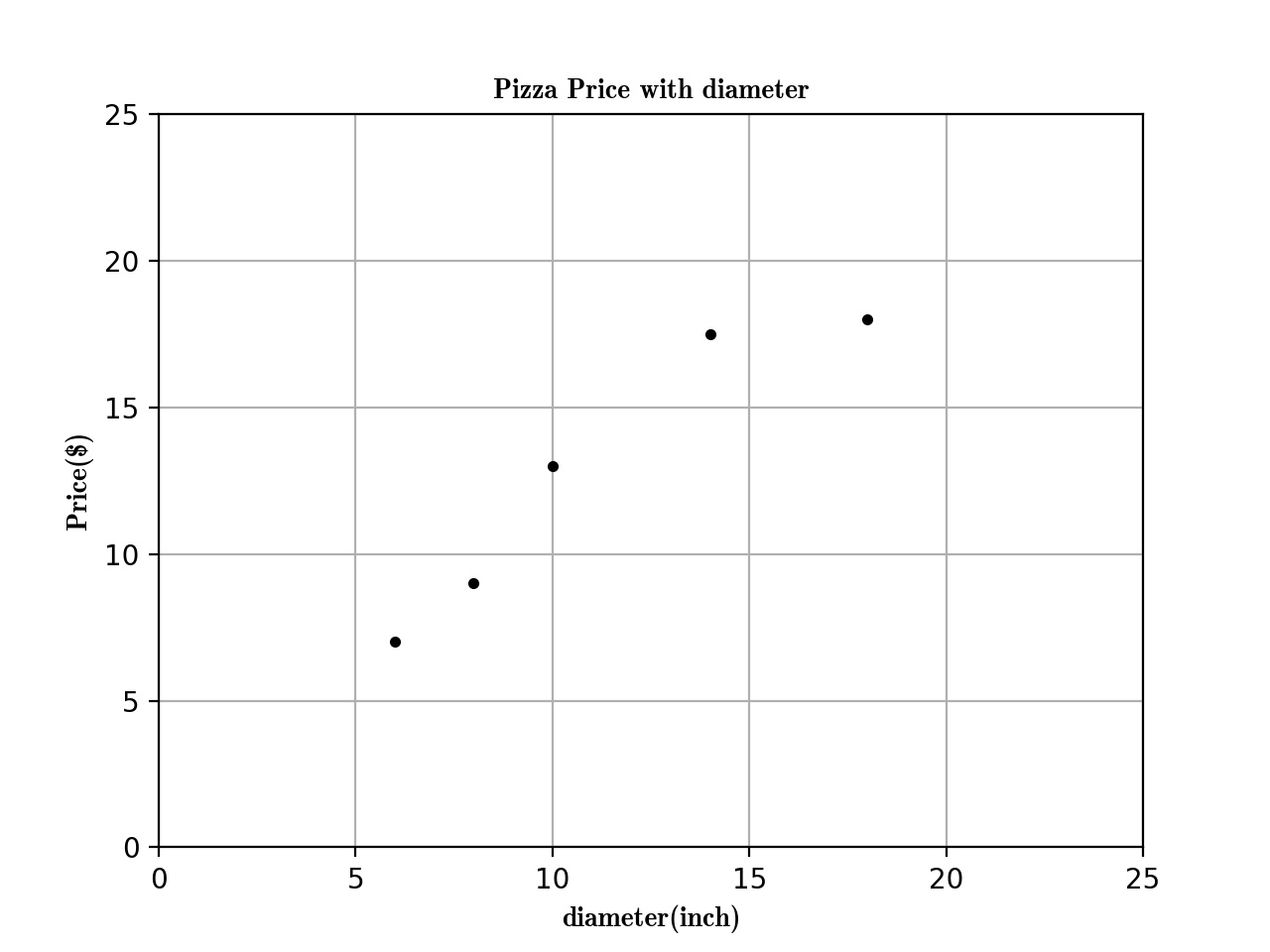
Here is the training data about the Relationship between Pizza and Diameter below:
| training data | Diameter(inch) | Price($) |
|---|---|---|
| 1 | 6 | 7 |
| 2 | 8 | 9 |
| 3 | 10 | 13 |
| 4 | 14 | 17.5 |
| 5 | 18 | 18 |
Now, we can plot the figure about the diameter and price first:
import matplotlib as plt

def run_plt():

    plt.figure()

    plt.title('Pizza Price with diameter.')

    plt.xlabel('diameter(inch)')

    plt.ylabel('price($)')

    plt.axis([0, 25, 0, 25])

    plt.grid(True)

    return plt

X = [[6], [8], [10], [14], [18]]

y = [[7], [9], [13], [17.5], [18]]

plt = run_plt()

plt.plot(X, y, 'k.')

plt.show()
Now we get the figure here.
Next, we use linear regression to fit this model.
from scikit.linear_model import LinearRegression

model = LinearRegression()

# X and y is the data in previous code.

model.fit(X, y)

# To predict the 12inch pizza price.

price = model.predict([12][0])

print('The 12 Pizza price: % .2f' % price)

# The 12 Pizza price: 13.68
The Simple Linear Regression define:
Simple linear regression assumes that a linear relationship exists between the response variable and explanatory variable; it models this relationship with a linear surface called a hyperplane. A hyperplane is a subspace that has one dimension less than the ambient space that contains it. In simple linear regression, there is one dimension for the response variable and another dimension for the explanatory variable, making a total of two dimensions. The regression hyperplane therefore, has one dimension; a hyperplane with one dimension is a line.
The Simple Linear Regression model that scikit-learn use is below:
\(y = \alpha + \beta * x\)
\(y\) is the predicted value of the response variable. \(x\) is the explanatory variable. \(alpha\) and \(beta\) are learned by the learning algorithm.
If we have a data \(X_{2}\) like that,
\(X_{2}\) = [[0], [10], [14], [25]]
We want to use Linear Regression to Predict the Prize Price and Print the Figure. There are two steps:
- Use \(x\), \(y\) previous to fit the model.
- Predict the Prize price.
model = LinearRegression()

# X, y is the prevoius data

model.fit(X,y)

X2 = [[0], [10], [14], [25]]

y2 = model.predict(X2)

plt.plot(X2, y2, 'g-')
The figure is following:

Summarize
The function previous that I used is called ordinary least squares. The process is :
- Define the cost function and fit the training data.
- Get the predict data.
Evaluating the fitness of a model with a cost function
There are serveral line created by different parmeters, and we got a question is that which one is the best-fitting regression line ?
plt = run_plt()

plt.plot(X, y, 'k.')

y3 = [14.25, 14.25, 14.25, 14.25]

y4 = y2 * 0.5 + 5

model.fit(X[1:-1], y[1:-1])

y5 = model.predict(X2)

plt.plot(X2, y2, 'g-.')

plt.plot(X2, y3, 'r-.')

plt.plot(X2, y4, 'y-.')

plt.plot(X2, y5, 'o-')

plt.show()
The Define of cost function
A cost function, also called a loss function, is used to de ne and measure the
error of a model. The differences between the prices predicted by the model andthe observed prices of the pizzas in the training set are called residuals or training errors. Later, we will evaluate a model on a separate set of test data; the differences between the predicted and observed values in the test data are called prediction errors or test errors.
The figure is like that:

The original data is black point, as we can see, the green line is the best-fitting regression line. But how computer know!!!!
So we should use some mathematic method to tell the computer which one is best-fitting.
model.fit(X, y)

yr = model.predict(X)

for idx, x in enumerate(X)

    plt.plot([x, x], [y[idx], yr[idx]], 'r-')
Next we plot the residuals figure.

We can use residual sum of squares to measure the fitness.
\(SS_{res} = \sum _{i =1}^n(y_{i} - f(x_{i}))^{2}\)
Use Numpy package to calculate the \(SS_{res}\) value is 1.75
import numpy as np

SSres = np.mean((model.predict(X) - y)** 2)
Solving ordinary least squares for simple linear regression
Recall that simple linear regression is that:
\(y = \alpha + \beta * x\)
Our goal is to get the value of \(alpha\) and \(beta\). We will solve \(beta\) first, we should calculate the variance of \(x\) and covariance of \(x\) and \(y\).
Variance is a measure of how far a set of values is spread out. If all of the numbers in the set are equal, the variance of the set is zero.
\(var(x) = \frac{\sum_{i=1}^n(x_{i} - \overline{x})^{2}}{n-1}\)
\(\overline{x}\) is the mean of x .
var = np.var(X, ddof =1)

# var = 23.2
Convariance is a measure of how much two variales change to together. If the value of variables increase together. their convariace is positive. If one variable tends to increase while the other decreases, their convariace is negative. If their is no linear relationship between the two variables, their convariance will be equals to zero.
\(cov(x,y) = \frac{\sum_{i=1}^n(x_{i}-\overline{x})(y_{i}-\overline{y})}{n-1}\)
import numpy as np

cov = np.cov([6, 8, 10, 14, 18], [7, 9, 13, 17.5, 18])[0][1]
Their is a formula solve \(\beta\)
\(\beta = \frac{cov(x,y)}{var(x)}\)
\(\beta = \frac{22.65}{23.2} = 0.9762\)
We can solve \(\alpha\) as the following formula:
\(\alpha = \overline{y} - \beta * \overline{x}\)
\(\alpha = 12.9 - 0.9762 * 11.2 =1.9655\)
Summarize
The Regression formula is like following:
\(y = 1.9655 + 0.9762 * x\)
Linear Regression with Scikit Learn的更多相关文章
- (原创)(三)机器学习笔记之Scikit Learn的线性回归模型初探
一.Scikit Learn中使用estimator三部曲 1. 构造estimator 2. 训练模型:fit 3. 利用模型进行预测:predict 二.模型评价 模型训练好后,度量模型拟合效果的 ...
- [Sklearn] Linear regression models to fit noisy data
Ref: [Link] sklearn各种回归和预测[各线性模型对噪声的反应] Ref: Linear Regression 实战[循序渐进思考过程] Ref: simple linear regre ...
- Machine Learning #Lab1# Linear Regression
Machine Learning Lab1 打算把Andrew Ng教授的#Machine Learning#相关的6个实验一一实现了贴出来- 预计时间长度战线会拉的比較长(毕竟JOS的7级浮屠还没搞 ...
- 斯坦福机器学习视频笔记 Week1 Linear Regression and Gradient Descent
最近开始学习Coursera上的斯坦福机器学习视频,我是刚刚接触机器学习,对此比较感兴趣:准备将我的学习笔记写下来, 作为我每天学习的签到吧,也希望和各位朋友交流学习. 这一系列的博客,我会不定期的更 ...
- 转载 Deep learning:二(linear regression练习)
前言 本文是多元线性回归的练习,这里练习的是最简单的二元线性回归,参考斯坦福大学的教学网http://openclassroom.stanford.edu/MainFolder/DocumentPag ...
- (原创)(四)机器学习笔记之Scikit Learn的Logistic回归初探
目录 5.3 使用LogisticRegressionCV进行正则化的 Logistic Regression 参数调优 一.Scikit Learn中有关logistics回归函数的介绍 1. 交叉 ...
- Linear Regression with machine learning methods
Ha, it's English time, let's spend a few minutes to learn a simple machine learning example in a sim ...
- 二、Linear Regression 练习(转载)
转载链接:http://www.cnblogs.com/tornadomeet/archive/2013/03/15/2961660.html 前言 本文是多元线性回归的练习,这里练习的是最简单的二元 ...
- CheeseZH: Stanford University: Machine Learning Ex5:Regularized Linear Regression and Bias v.s. Variance
源码:https://github.com/cheesezhe/Coursera-Machine-Learning-Exercise/tree/master/ex5 Introduction: In ...
随机推荐
- C#/AutoCAD 2018/ObjectArx/二次开发再说实体(六)
这些函数对大家很有用,如果想获取详细源代码请加云幽学院yunyou.ke.qq.com报名免费课程,如果想学习更系统.更全面的知识请报名收费课程,有大量开发案例共享. 1.获取模型空间中所有实体 #r ...
- hackme.inndy.tw - pyyy - Writeup
hackme.inndy.tw - pyyy - Writeup 0x01 反编译 1.第一次尝试的时候我直接在线反编译,部分结果如下. for (i, f) in enumerate(F): n = ...
- C语言函数嵌套调用作业总结
成绩管理系统作业小结 devc中出现"ID Return"问题,我帮很多同学看完后发现,大部分还是自身程序问题,如全局变量大小写错误.没有添加c文件进工程等等.所以对于" ...
- Beta阶段敏捷冲刺报告-DAY1
Beta阶段敏捷冲刺报告-DAY1 Scrum Meeting 敏捷开发日期 2017.11.2 讨论时间 20:30 讨论地点 下课路上以及院楼侧门 参会人员 项目组全体成员 会议内容 附加功能讨论 ...
- Oracle查询用户权限
Oracle查询用户权限 -- 确定角色的权限select * from role_tab_privs ; 包含了授予角色的对象权限select * from role_ro ...
- 卡尔曼滤波法C编程
float Angle = 0.0;//卡尔曼滤波器的输出值,最优估计的角度 //float Gyro_x = 0.0;//卡尔曼滤波器的输出值,最优估计的角速度 float Q_angle = 0. ...
- tornado web高级开发项目
抽屉官网:http://dig.chouti.com/ 一.配置(settings) settings = { 'template_path': 'views', #模板文件路径 'static_pa ...
- 第二篇:Python数据类型
一.引子 1.什么是数据? x= #是我们要存储的数据 2.为何数据要分不同的类型 数据是用来表示状态的,不同的状态就应该用不同的类型的数据去表示 3.数据类型 数字(整型,长整型,浮点型,复数) 字 ...
- 学习ASP.NET Core Razor 编程系列四——Asp.Net Core Razor列表模板页面
学习ASP.NET Core Razor 编程系列目录 学习ASP.NET Core Razor 编程系列一 学习ASP.NET Core Razor 编程系列二——添加一个实体 学习ASP.NET ...
- php面向对象相关内容
1.什么是面向对象? 面向对象编程(Object Oriented Programming, OOP, 面向对象程序设计)是一种计算机编程架构,OOP的一条基本原则是计算机程序是由单个能够起到子程序作 ...