
Nexus-配置vPC 实验一
配置vPC的步骤:
1、配置vPC domain
2、配置vPC之间的keepalive link
3、配置vPC之间的peer link
4、配置vPCs
5、确认双方配置一致
拓扑及描述:
DC1-N7K-5作为Core,DC2-N7K-1和DC2-N7K-2是汇聚层设备,L3连接Core,而通过vPC下联DC2-N5K-1,DC2-N5K-1作为接入层设备使用E1/26连接终端设备VR。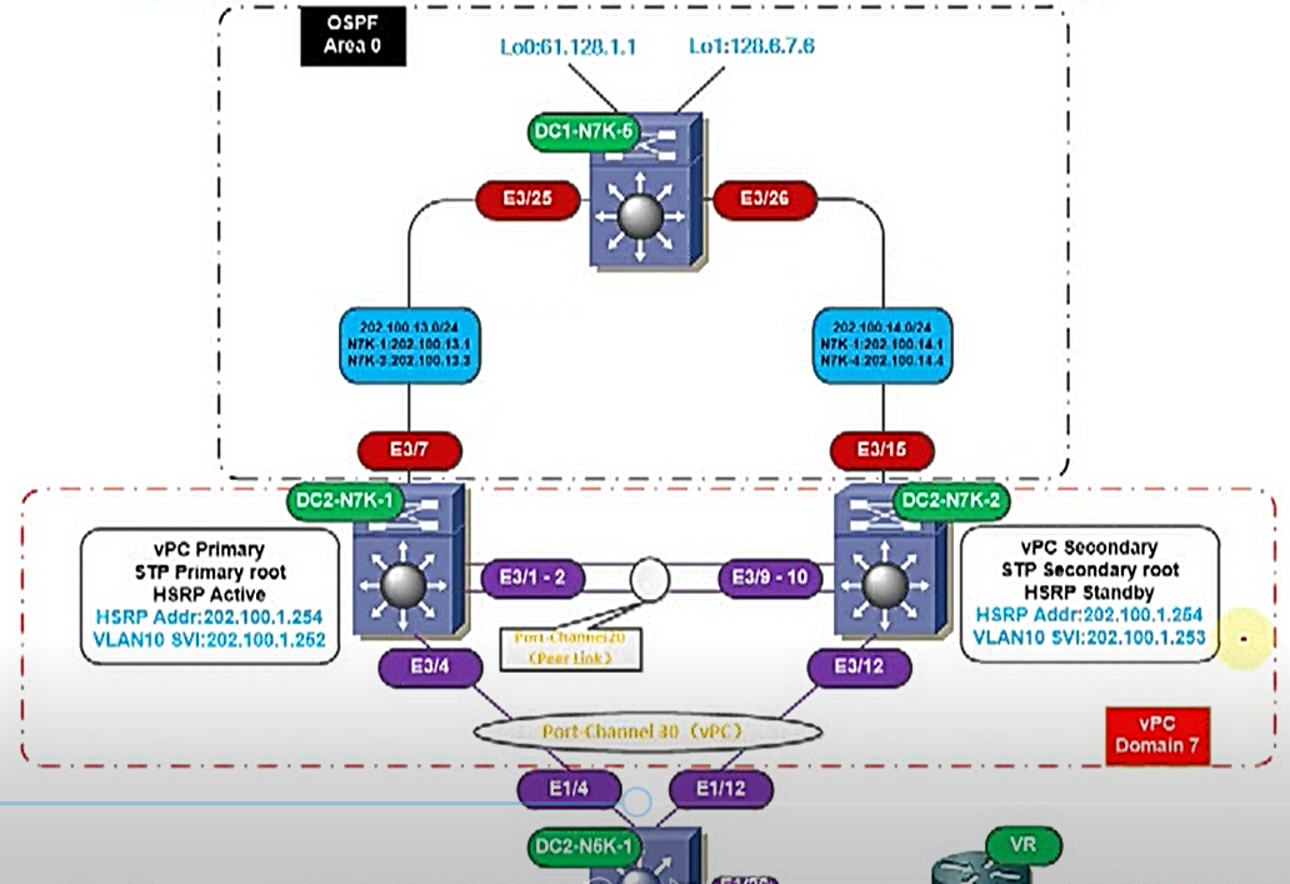
配置命令:
| DC1-N7K-5 |
| DC1-N7K-5(config)#feature ospf DC1-N7K-5(config)#router ospf 1 DC1-N7K-5(config-router)#router-id 5.5.5.5 DC1-N7K-5(config)#interface e3/25 DC1-N7K-5(config-if)#ip add 202.100.13.1/24 DC1-N7K-5(config-if)#ip router ospf 1 are 0 DC1-N7K-5(config-if)#no shut DC1-N7K-5(config)#interface e3/26 DC1-N7K-5(config-if)#ip add 202.100.14.1/24 DC1-N7K-5(config-if)#ip router ospf 1 are 0 DC1-N7K-5(config)#no shu DC1-N7K-5(config)#int lo0 DC1-N7K-5(config-if)ip add 61.128.1.1/24 DC1-N7K-5(config-if)#ip router ospf 1 area 0 DC1-N7K-5(config)#int lo1 DC1-N7K-5(config-if)#ip add 128.6.7.6/24 DC1-N7K-5(config-if)#ip router ospf 1 are 0 |
| DC2-N7K-1 |
| DC1-N7K-1(config)#feature interface-vlan DC1-N7K-1(config)#vlan 10 DC1-N7K-1(config-vlan)#name VLAN10 DC1-N7K-1(config)#inter vlan 10 DC1-N7K-1(config-if)#ip add 202.100.1.252/24 DC1-N7K-1(config-if)#ip router ospf 1 a 0 DC1-N7K-1(config-if)#no shut DC1-N7K-1(config)#feature ospf DC1-N7K-1(config)#router ospf 1 DC1-N7K-1(config-router)#router-id 1.1.1.1 DC1-N7K-1(config)#inter e3/7 DC1-N7K-1(config-if)#ip add 202.100.13.3/24 DC1-N7K-1(config-if)#ip router ospf 1 a 0 DC1-N7K-1(config-if)#no shu 开启vPC和LACP feature DC1-N7K-1(config)#feature vpc DC1-N7K-1(config)#feature lacp 配置vPC domain和peer keepalive link DC1-N7K-1(config)#vpc domain 7 DC1-N7K-1(config-vpc-domain)#role priority 73 >>>默认为32768,越小越优先,如一致,比较小的系统MAC DC1-N7K-1(config-vpc-domain)#system-priority 2500 DC1-N7K-1(config-vpc-domain)#peer-keepalive destination 202.100.14.4 source 202.100.13.3 配置peer link DC1-N7K-1(config)#inter e3/1-2 DC1-N7K-1(config-if-range)#channel-group 20 mode active DC1-N7K-1(config-if-range)#no shu DC1-N7K-1(config-if-range)#exit DC1-N7K-1(config)#inter port-channel 20 DC1-N7K-1(config-if)#sw mode trunk DC1-N7K-1(config-if)#vpc peer-link 配置vPC DC1-N7K-1(config)#inter e3/4 DC1-N7K-1(config-if-range)#channel-group 30 mode active DC1-N7K-1(config-if-range)#no shu DC1-N7K-1(config)#int port-channel 30 DC1-N7K-1(config-if)#sw mode trunk DC1-N7K-1(config-if)#vpc 30 配置HSRP DC1-N7K-1(config)#feature hsrp DC1-N7K-1(config)#interface vlan 10 DC1-N7K-1(config-if)#hsrp 1 DC1-N7K-1(config-if-hsrp)#ip 202.100.1.254 DC1-N7K-1(config-if-hsrp)#preempt DC1-N7K-1(config-if-hsrp)#priority 105 |
| DC2-N7K-2 |
| DC1-N7K-2(config)#feature interface-vlan DC1-N7K-2(config)#vlan 10 DC1-N7K-2(config-vlan)#name VLAN10 DC1-N7K-2(config)#inter vlan 10 DC1-N7K-2(config-if)#ip add 202.100.1.253/24 DC1-N7K-2(config-if)#ip router ospf 1 a 0 DC1-N7K-2(config-if)#no shut DC1-N7K-2(config)#feature ospf DC1-N7K-2(config)#router ospf 1 DC1-N7K-2(config-router)#router-id 2.2.2.2 DC1-N7K-2(config)#inter e3/15 DC1-N7K-2(config-if)#ip add 202.100.14.4/24 DC1-N7K-2(config-if)#ip router ospf 1 a 0 DC1-N7K-2(config-if)#no shu 开启vPC和LACP feature DC1-N7K-2(config)#feature vpc DC1-N7K-2(config)#feature lacp 配置vPC domain和peer keepalive link DC1-N7K-2(config)#vpc domain 7 DC1-N7K-2(config-vpc-domain)#role priority 74 >>>默认为32768,越小越优先,如一致,比较小的系统MAC DC1-N7K-2(config-vpc-domain)#system-priority 2500 DC1-N7K-2(config-vpc-domain)#peer-keepalive destination 202.100.13.3 source 202.100.14.4 配置peer link DC1-N7K-2(config)#inter e3/9-10 DC1-N7K-2(config-if-range)#channel-group 20 mode active DC1-N7K-2(config-if-range)#no shu DC1-N7K-2(config-if-range)#exit DC1-N7K-2(config)#inter port-channel 20 DC1-N7K-2(config-if)#sw mode trunk DC1-N7K-2(config-if)#vpc peer-link 配置vPC DC1-N7K-2(config)#inter e3/12 DC1-N7K-2(config-if-range)#channel-group 30 mode active DC1-N7K-2(config-if-range)#no shu DC1-N7K-2(config)#int port-channel 30 DC1-N7K-2(config-if)#sw mode trunk DC1-N7K-2(config-if)#vpc 30 配置HSRP DC1-N7K-2(config)#feature hsrp DC1-N7K-2(config)#interface vlan 10 DC1-N7K-2(config-if)#hsrp 1 DC1-N7K-2(config-if-hsrp)#ip 202.100.1.254 DC1-N7K-2(config-if-hsrp)#preempt |
| DC2-N5K-1 |
| 配置vPC DC1-N5K-1(config)#feature lacp DC1-N5K-1(config)#inter e1/4,e1/12 DC1-N5K-1(config-if-range)#channel-group 30 mode active DC1-N5K-1(config-if-range)#exit DC1-N5K-1(config)#inter port-channel 30 DC1-N5K-1(config-if)#sw mode trunk 配置vlan接入 DC1-N5K-1(config)#vlan 10 DC1-N5K-1(config-vlan)#name VLAN10 DC1-N5K-1(config)#inter e1/26 DC1-N5K-1(config-if)#speed 1000 DC1-N5K-1(config-if)#sw mode access DC1-N5K-1(config-if)#sw access vlan 10 DC1-N5K-1(config-if)#spanning-tree port type edge |
| VR |
|
Router(config)#inter f0/0 Router(config)#ip route 0.0.0.0 0.0.0.0 202.100.1.254 |
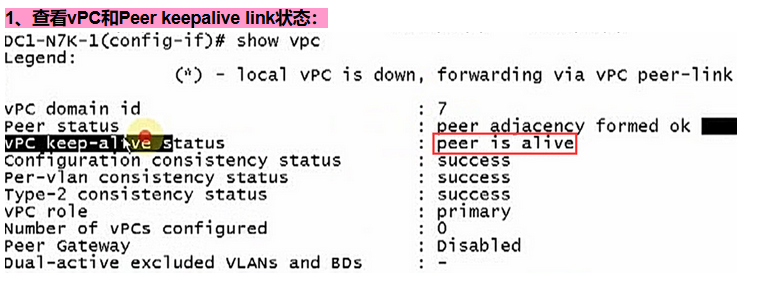
2、查看Peer Link状态: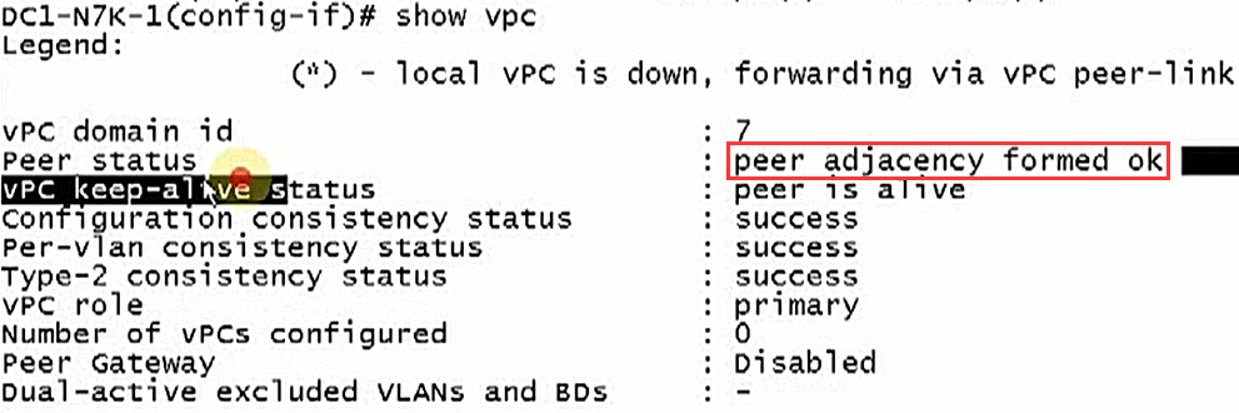
3、查看Port-channel情况: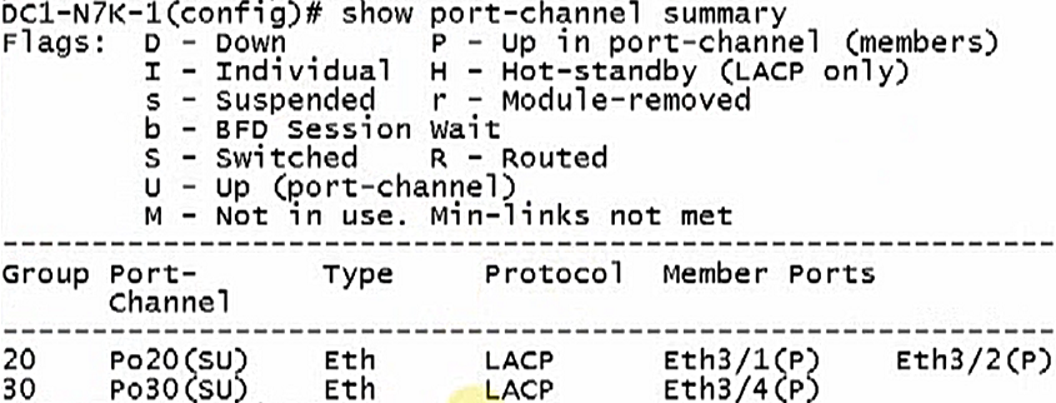
4、查看对应vPC,show vpc或者show vpc vpc-id:
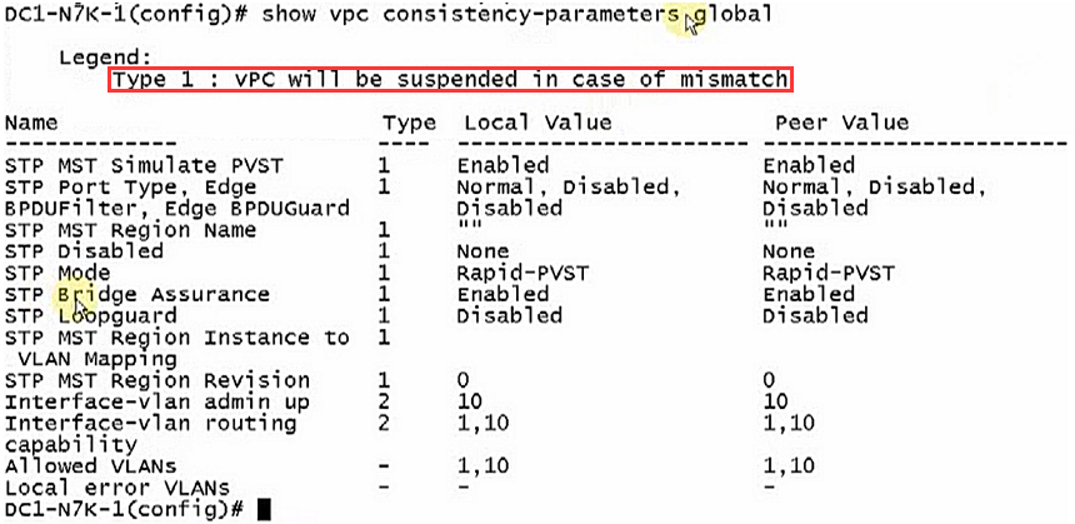
5、一致性检查:
全局的vPC参数一致性,尤其是Type1的参数,必须要一致,Type2可以不一致,但是会报错。
6、检查对应vPC的参数一致性(接口):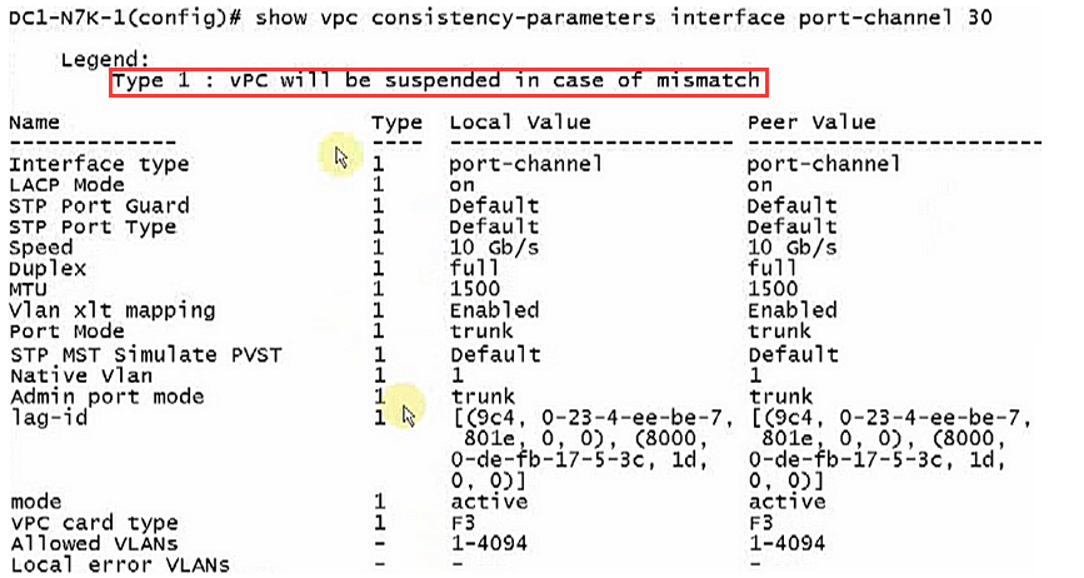
对于上述拓扑中的Router去访问N7K(core)的Loopback0和1的地址,我们需要将N5K的load-balance的hash计算方式修改为基于目的IP地址的,这样一个“奇数”一个“偶数”的IP地址很容易分别使用不同的链路转发。
DC1-N5K-1(config)#inter e1/26
DC1-N5K-1(config-if)#port-channel load-balance ethernet destination-ip
Nexus-配置vPC 实验一的更多相关文章
- 为Nexus配置阿里云代理仓库【转】
Nexus默认远程仓库为https://repo1.maven.org/maven2/ 慢死,还常连不上. 可以添加阿里云代理仓库 URL:http://maven.aliyun.com/nexus/ ...
- 架构(二)Maven安装以及Nexus配置
一 Maven安装配置 1.1 下载 http://mirrors.tuna.tsinghua.edu.cn/apache/maven/maven-3/3.5.4/binaries/apache-ma ...
- 使用Nexus配置Maven私有仓库
使用Nexus配置Maven私有仓库 作者:尹正杰 版权声明:原创作品,谢绝转载!否则将追究法律责任. 一.安装配置Nexus 1>.下载nexus 下载地址:https://www.sonat ...
- 【Maven】Nexus配置和使用
Nexus安装 nexus安装,可以参照:[Maven]Nexus(Maven仓库私服)下载与安装 Nexus简单说明 用途:指定私服的中央地址.将自己的Maven项目指定到私服地址.从私服下载中央库 ...
- Nexus-配置vPC 实验二
实验一中介绍的是单面的vPC,本实验配置的是dual site(双面vPC),这样的情况将上下的Port-channel都配置在了同一vPC下面. 实验拓扑如下: N5K-1配置:N5K-1(conf ...
- MHA+Atlas+mysql一主一从开启gtid安装配置与实验
各节点架构 (说明:生产环境有两个节点可以组成一套完整集群,我是测试环境,因此对于manager以及atlas和binlog server都是单点,如果生产环境,相应的将manager以及atlas和 ...
- Nexus配置
1.可以为maven项目单独配置nexus路径 <project xmlns="http://maven.apache.org/POM/4.0.0" xmlns:xsi=&q ...
- Gradle nexus配置
1.下载Gradle; 2.添加脚本init.gradle到gradle的init.d目录中: ext { nexus = 'http://192.168.184.6:8081/nexus' user ...
- maven+nexus配置本地私有仓库
以下是settting.xml的配置 <?xml version="1.0" encoding="UTF-8"?> <settings> ...
随机推荐
- ansible笔记(8):初识ansible playbook
回顾总结:我们来想象一个工作场景,看看怎样把之前的知识点应用到这个工作场景中.假设,我们想要在192.168.10.2主机上安装nginx并启动,我们可以在ansible控制主机中执行如下3条命令. ...
- 【转载】Java的JDBC事务详解
转自:http://www.cnblogs.com/azhqiang/p/4044127.html 事务的特性: 1) 原子性(atomicity):事务是数据库的逻辑工作单位,而且是必须是原子工作单 ...
- codeforces 1198B - Welfare State
题目链接:http://codeforces.com/problemset/status 题目大意为有n个市民,每个市民有ai点数财富,以下有q次操作,操作类型为两类,1类:把第p个市民的财富改为x, ...
- 210. 课程表 II
Q: 现在你总共有 n 门课需要选,记为 0 到 n-1. 在选修某些课程之前需要一些先修课程. 例如,想要学习课程 0 ,你需要先完成课程 1 ,我们用一个匹配来表示他们: [0,1] 给定课程总量 ...
- Java compareTo的用法
compareTo() 方法用于将 Number 对象与方法的参数进行比较.可用于比较 Byte, Long, Integer等. 该方法用于两个相同数据类型的比较,两个不同类型的数据不能用此方法来比 ...
- jquery ajax获取后台数据后无法输出
今天做ajax获取数据,再浏览器的debugger窗口也看到了数据 ajax代码 $('#userSearch').click(function(){ $.get("loadAllUsers ...
- 吴裕雄 python 机器学习——多维缩放降维MDS模型
# -*- coding: utf-8 -*- import numpy as np import matplotlib.pyplot as plt from sklearn import datas ...
- 微信小程序UDP通信
前言 UDP通信分为单播 广播 组播,基础库2.7.0之后,小程序开始支持UDP通信,目前小程序只支持单播. 小程序API 小程序UDP通信这一块可以说是很简单了就一个UDPSocket实例.然后bi ...
- PyCharm 上传项目到码云托管平台
码云平台设置: >先到码云 https://gitee.com/ 注册账号 >创建项目,选择合适项目,点击加号 >填写项目的基础信息 在码云上就创建了项目 >安装 Git ...
- Atcoder Beginner Contest153E(完全背包)
完全背包,价值取题意代价的最小值 #define HAVE_STRUCT_TIMESPEC #include<bits/stdc++.h> using namespace std; ],b ...