
使用ribbon实现负载均衡
使用ribbon之前的准备工作:
1.你要有两个服务,一个是服务消费方(下图的xing-movie是消费方),一个是服务提供方(xing-user是服务提供者),并且服务提供方要有两个实例,也就是xing-user有两个实例,分别运行在8070和8071端口。
2.所有服务注册到eureka server中。

接下来我们在movie服务使用ribbon实现负载均衡调用中调用user服务,spring cloud使用ribbon很简单
1.引入依赖,因为user服务的pom.xml中引入了eureka的依赖,eureka的依赖包含了ribbon的依赖所以这一步省略
2.在movie服务的启动类中加入标红的代码,加入是为了在之后调用的时候可以直接@Autowired restTemplate,顺便提醒一下,@Autowired是 byType的,不是byName:
package com.xing.movie;

import org.springframework.boot.SpringApplication;

import org.springframework.boot.autoconfigure.SpringBootApplication;

import org.springframework.cloud.client.loadbalancer.LoadBalanced;

import org.springframework.cloud.netflix.eureka.EnableEurekaClient;

import org.springframework.context.annotation.Bean;

import org.springframework.web.client.RestTemplate;

@SpringBootApplication

@EnableEurekaClient

public class SpringDemoApplication {

    @Bean

    @LoadBalanced

    public RestTemplate restTemplate() {

        return new RestTemplate();

    }

    public static void main(String[] args) {

        SpringApplication.run(SpringDemoApplication.class, args);

    }

}
启动类写好之后我们去controller类中写调用user服务的方法:
@Autowired
private RestTemplate restTemplate;
   @ApiOperation(value = "查询用户", notes = "查询用户")//方法说明

    @ApiResponses(value = {@ApiResponse(code = 200, message = "成功", response = Movie.class)})//响应数据说明,可以有多个

    @ApiImplicitParam(name = "name", value = "用户名", paramType = "path", required = true, dataType = "String")

    @GetMapping(value = "/findUerByName/{name}",produces = { "application/json;charset=UTF-8" })

    public User findUserByName(@PathVariable String name) {

        return this.restTemplate.getForObject("http://xing-user/user/findByName/"+name, User.class);

    }
标红的地方要注意使用的是user服务的spring.application.name,这里使用到的user服务在上一篇博客中有具体的代码,最后一行代码中的User.class是返回类型,如果报错那就去user服务中把User类拷贝过来,到目前为止ribbon的简答的负载均衡就搞定了,查看结果

可以看到已经成功的调用到了user服务,并返回了数据,这个时候我们只能说服务调用成功并不能说负载均衡。这个网页我们多刷新几遍,多做几次请求,之后去查看后台数据会发现user1中的控制台打印了数据,user2的控制台也打印了数据,说明负载均衡成功。

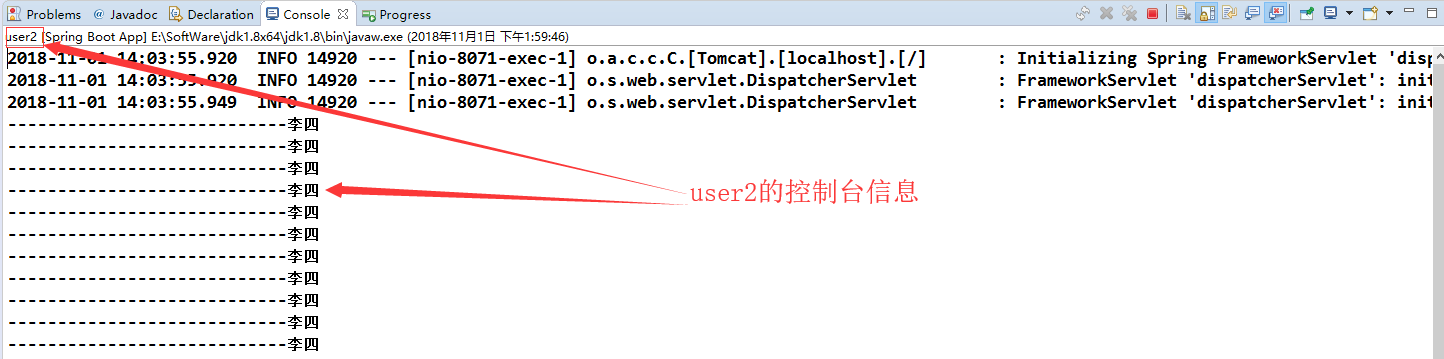
简单提一下spring cloud中ribbon的负载均衡算法默认是轮询。那么我们不想使用轮询怎么自定义呢?
我们首先需要创建一个class,根据官方文档这个类必须在启动类能扫描的范围之外,所以这个class定义的位置如下:

RibbonConfig.java:
package com.xing.config;

import org.springframework.beans.factory.annotation.Autowired;

import org.springframework.boot.autoconfigure.condition.ConditionalOnMissingBean;

import org.springframework.context.annotation.Bean;

import org.springframework.context.annotation.Configuration;

import com.netflix.client.config.IClientConfig;

import com.netflix.loadbalancer.IRule;

import com.netflix.loadbalancer.RandomRule;

/**

* Copyright: Copyright (c) 2018 LanRu-Caifu

* @ClassName: RibbonConfig.java

* @Description: 自定义ribbon配置类

* @version: v1.0.0

* @author: zjx

* @date: 2018年11月2日 上午10:08:36

 */

@Configuration

public class RibbonConfig {

    @Autowired

    IClientConfig config;

    @Bean

    @ConditionalOnMissingBean

    public IRule ribbonRule(IClientConfig config) {

        System.out.println("-------ribbon自定义随机------");

        return new RandomRule();

    }

}
RibbonConfig.java
movie服务的启动类修改之后如下:
package com.xing.movie;

import org.springframework.boot.SpringApplication;

import org.springframework.boot.autoconfigure.SpringBootApplication;

import org.springframework.cloud.client.loadbalancer.LoadBalanced;

import org.springframework.cloud.netflix.eureka.EnableEurekaClient;

import org.springframework.cloud.netflix.ribbon.RibbonClient;

import org.springframework.context.annotation.Bean;

import org.springframework.web.client.RestTemplate;

import com.xing.config.RibbonConfig;

@SpringBootApplication

@EnableEurekaClient

@RibbonClient(name = "xing-user" , configuration = RibbonConfig.class)

public class SpringDemoApplication {

    @Bean

    @LoadBalanced

    public RestTemplate restTemplate() {

        return new RestTemplate();

    }

    public static void main(String[] args) {

        SpringApplication.run(SpringDemoApplication.class, args);

    }

}
SpringDemoApplication
最后启动类测试,做了4次请求,user1打印了3次,user2打印了1次


还有其他的很多种配置方式,这里只简单写出这种,以后有空还会补充配置文件的方式等等
源码地址:https://github.com/OnlyXingxing/SpringCloud
使用ribbon实现负载均衡的更多相关文章
- Spring Cloud Ribbon——客户端负载均衡
一.负载均衡负载均衡(Load Balance): 建立在现有网络结构之上,它提供了一种廉价有效透明的方法扩展网络设备和服务器的带宽.增加吞吐量.加强网络数据处理能力.提高网络的灵活性和可用性.其意思 ...
- Spring Cloud:使用Ribbon实现负载均衡详解(下)
在上一篇文章(Spring Cloud:使用Ribbon实现负载均衡详解(上))中,我对 Ribbon 做了一个介绍,Ribbon 可以实现直接通过服务名称对服务进行访问.这一篇文章我详细分析一下如何 ...
- springcloud(十二):Ribbon客户端负载均衡介绍
springcloud(十二):Ribbon客户端负载均衡介绍 Ribbon简介 使用分布式微服务脚骨的应用系统,在部署的时候通常会为部分或者全部微服务搭建集群环境,通过提供多个实例来提高系统的稳定型 ...
- spring cloud 系列第3篇 —— ribbon 客户端负载均衡 (F版本)
源码仓库地址:https://github.com/heibaiying/spring-samples-for-all 一.ribbon 简介 ribbon是Netfix公司开源的负载均衡组件,采用服 ...
- Spring Cloud Ribbon客户端负载均衡(四)
序言 Ribbon 是一个客户端负载均衡器(Nginx 为服务端负载均衡),它赋予了应用一些支配 HTTP 与 TCP 行为的能力,可以得知,这里的客户端负载均衡也是进程内负载均衡的一种.它在 Spr ...
- springcloud 之Ribbon客户端负载均衡配置使用
pom.xml添加配置说明:这里服务注册与发现用的是Eureka,所以消费者端需要引入eureka,使用EurekaClient来调用服务 <dependency> <groupId ...
- Ribbon【负载均衡策略】
ribbon有7种负载均衡策略可供选择: 策略类 命名 描述 RandomRule 随机策略 随机选择server RoundRobinRule 轮询策略 按照顺序选择server(ribbon默认策 ...
- 【一起学源码-微服务】Feign 源码三:Feign结合Ribbon实现负载均衡的原理分析
前言 前情回顾 上一讲我们已经知道了Feign的工作原理其实是在项目启动的时候,通过JDK动态代理为每个FeignClinent生成一个动态代理. 动态代理的数据结构是:ReflectiveFeign ...
- SpringCloud微服务实战——搭建企业级开发框架(十二):OpenFeign+Ribbon实现负载均衡
Ribbon是Netflix下的负载均衡项目,它主要实现中间层应用程序的负载均衡.为Ribbon配置服务提供者地址列表后,Ribbon就会基于某种负载均衡算法,自动帮助服务调用者去请求.Ribbo ...
随机推荐
- [轉]Exploit The Linux Kernel NULL Pointer Dereference
Exploit The Linux Kernel NULL Pointer Dereference Author: wztHome: http://hi.baidu.com/wzt85date: 20 ...
- Mysql差集
记录一个去差集的SQL 今天用sql去同步部分历史数据,需要用到一个求差集的sql 两张表简单结构如下: 有一个会员表 一个会员账户表 获取没有账户的会员 SELECT m.pkMember FROM ...
- 【Luogu】【关卡2-16】线性动态规划(2017年10月)【还差三道题】
任务说明:这也是基础的动态规划.是在线性结构上面的动态规划,一定要掌握. P1020 导弹拦截 导弹拦截 P1091 合唱队形 老师给同学们排合唱队形.N位同学站成一排,音乐老师要请其中的(N-K)位 ...
- Mina---系统学习
1.为何使用Mina? java提供的BIO.NIO使用的复杂性等原因,导致Mina框架的诞生: 2.什么时候使用Mina? 易于使用 高并发的用户量 被证明的系统: Mina已被全球数以万计的应用使 ...
- 线程池——Executors
一 Executor框架 为了更好地控制多线程,JDK提供了一套线程框架Executor,帮助开发人员有效的进行线程控制.它们都在java.util.concurrent包中,是JDK并发包的核心.其 ...
- Java中使用try-catch-finally处理IO流中的异常
我们使用try-catch-finally来接收IO流的异常 finally是最后执行的步骤,非常适合最后存放close来关闭IO流,而且编程中我们不可以随意抛出异常,必须对异常进行处理. 从try- ...
- ecshop前台英文后台中文的设置方法
ecshop前台英文后台中文的设置方法 这里有两种方法: 第一种方法: 打开 admin/includes/init.php 文件 找到$_CFG = load_config(); 在它下面增加一行代 ...
- 阿里云资深技术专家黄省江:让天下没有难做的SaaS
导语:本文中,阿里云资深技术专家黄省江(花名禅笑)将聚焦“SaaS加速器——让天下没有难做的SaaS”,对伙伴来说,SaaS加速器帮助他们做好SaaS,卖好SaaS:对企业来说,SaaS加速器帮助他们 ...
- PHP ftp_pwd() 函数
定义和用法 ftp_pwd() 函数返回指定 FTP 连接的当前目录名称. 语法 ftp_pwd(ftp_connection) 参数 描述 ftp_connection 必需.规定要使用的 FTP ...
- mockjs 使用以及反向校验
一.背景 前端开发需要依赖后端接口 后端接口输出慢.接口规范随时可能会变,而前端毫无感知 前端需要自己 mock 假数据 json 文件 假数据 json 数据内容是静态的,测试不同返回情况需要修改 ...